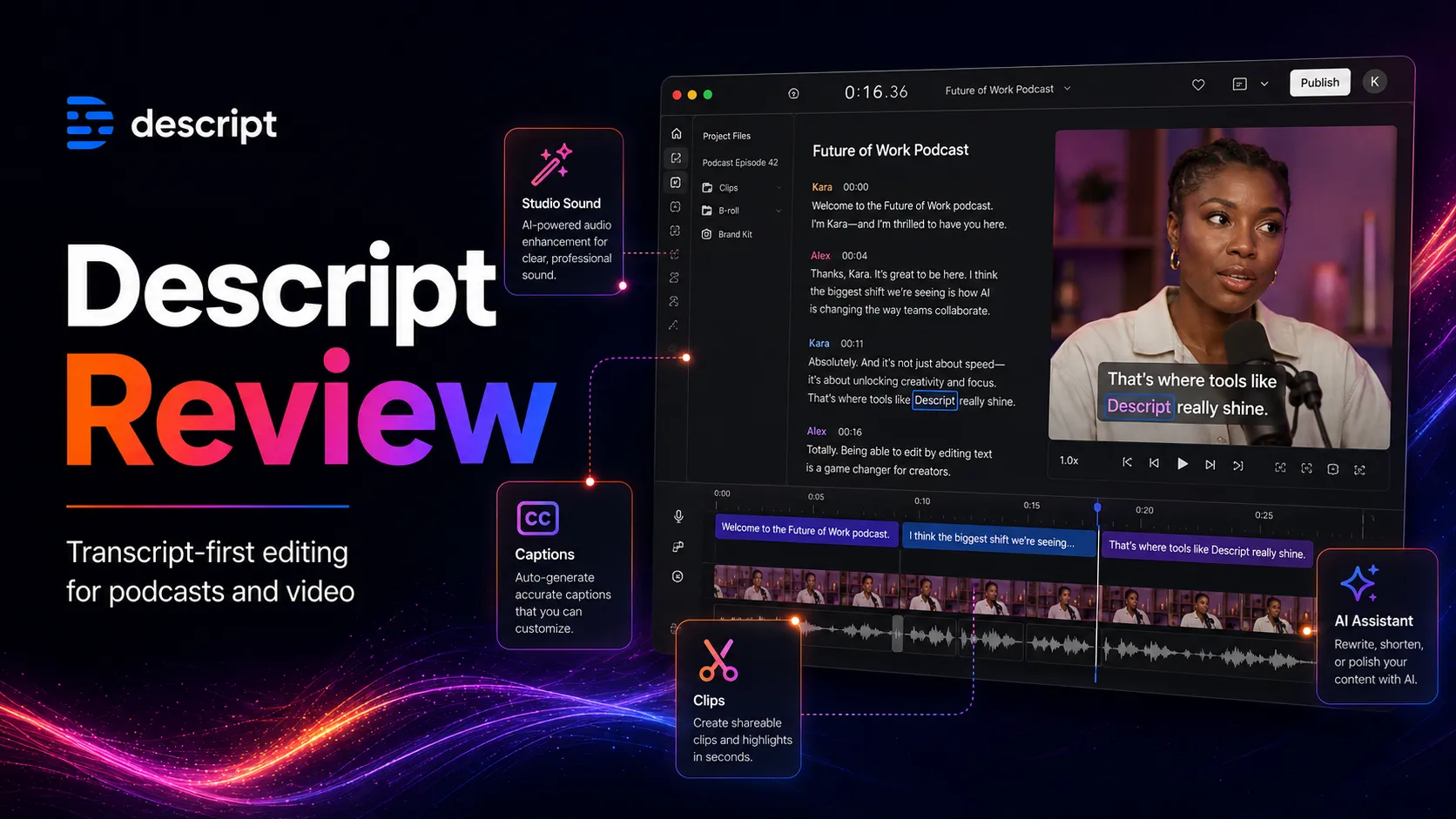
Descript Review
A practical Descript review for podcasters, YouTube creators, and teams. See workflow fit, pricing, AI credits, limits, and alternatives.
Descript is one of the best transcript-first editors for spoken-word audio and video, but credits, performance, and advanced editing limits matter.
Use it if…
- ✓ Your main bottleneck is editing spoken audio or video, not creating cinematic visuals.
- ✓ You regularly produce podcasts, interviews, tutorials, demos, courses, or talking-head clips.
- ✓ You value transcript editing, filler-word cleanup, captions, clips, and audio repair in one workflow.
- ✓ You can review AI edits before publishing and treat voice features with permission discipline.
Skip it if…
- – You need a full professional video editor with heavy timeline, color, motion, and grading controls.
- – Your content has frequent overlapping speakers, poor audio, complex music beds, or transcript accuracy requirements that leave no room for manual correction.
- – AI credits and media-hour caps make your monthly costs hard to predict.
- – Your team cannot approve how recorded media, transcripts, voice clones, and AI features are handled.
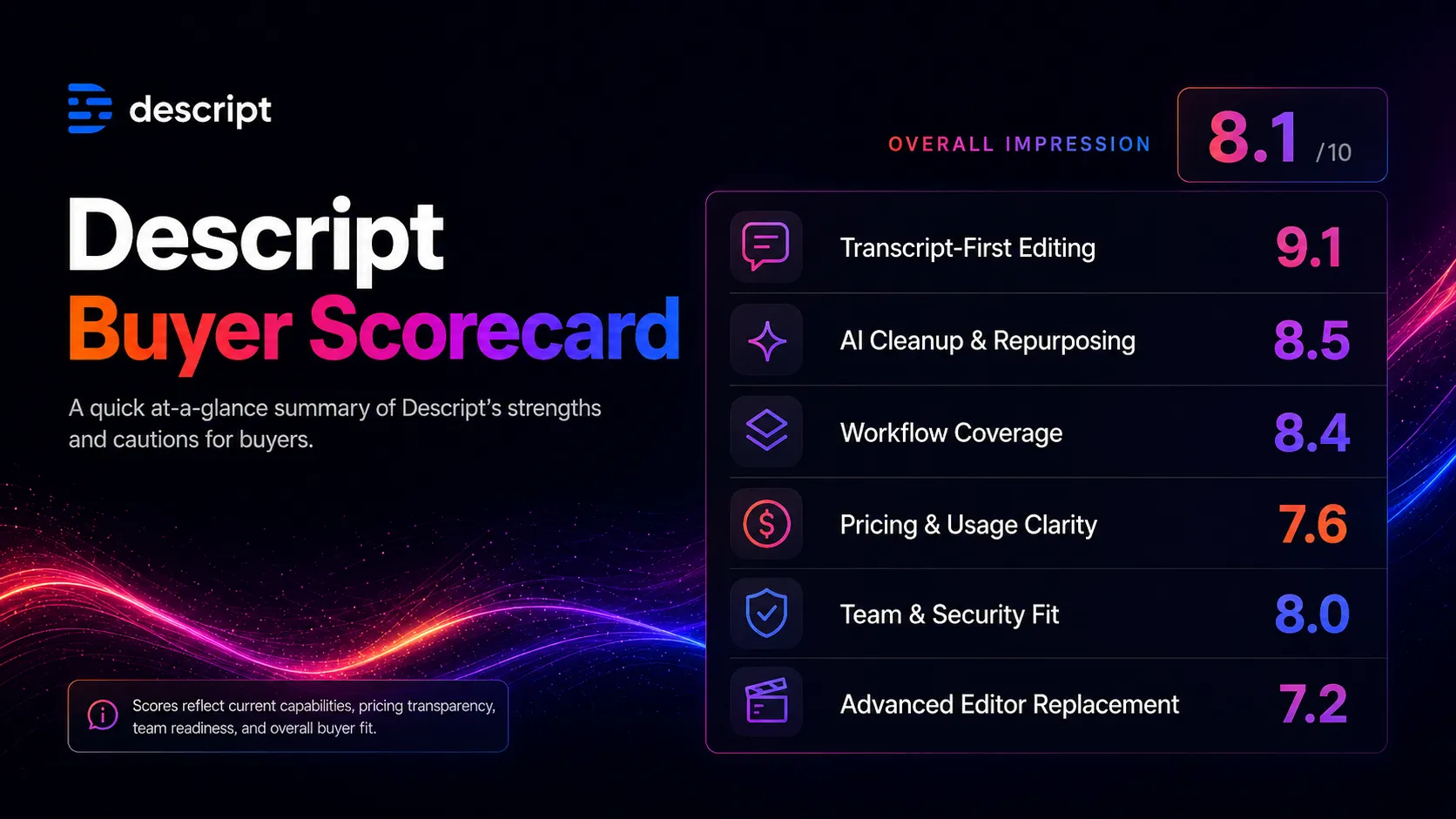
Review scorecard
Scored by workflow fit, ease of use, value, and stack compatibility. Weights reflect importance for typical buyers.
| Criteria | Score | ||
|---|---|---|---|
| Transcript-first editing | 9.1 | ||
| AI cleanup and repurposing | 8.5 | ||
| Workflow coverage | 8.4 | ||
| Pricing and usage clarity | 7.6 | ||
| Team and security fit | 8.0 | ||
| Advanced editor replacement | 7.2 | ||
| Weighted overall | 8.3 / 10 | ||
On this page
Quick verdict
Descript is worth considering if your editing bottleneck is spoken-word audio or video. It earns an 8.2 out of 10 because the transcript-first workflow can remove a lot of repetitive cutting from podcasts, interviews, tutorials, training videos, and clip repurposing.
The caution is not small. Descript is easy to misunderstand as a magic editor. It is better viewed as a fast spoken-content production layer that still needs transcript review, export checks, voice-permission discipline, and a realistic read on media hours and AI credits.
This review is based on public product information, official Descript pricing and help pages, security documentation, changelog updates, and user-review patterns. No private paid-plan benchmark was conducted, so treat the recommendation as editorial stack judgment rather than a controlled lab test.
Who should use Descript
A creator records a 55-minute interview, notices three tangents, five filler-heavy answers, one noisy section, and several short clips that could become Shorts or LinkedIn posts. In a traditional editor, that can become a slow timeline hunt. In Descript, the practical appeal is that the first edit starts in the transcript.
Descript fits you if:
- You publish podcasts, interviews, tutorials, demos, training videos, webinars, or talking-head clips on a regular schedule.
- You want to remove filler words, tighten spoken sections, clean audio, add captions, and create clips without starting every edit inside a heavy timeline.
- You prefer a document-like workflow where finding a phrase in the transcript helps you find the exact audio or video moment.
- Your team needs good-enough production speed more than cinematic finishing.
- You are willing to review AI edits before publishing, especially around voice changes, captions, and clipped context.
Who should skip Descript
Descript becomes less attractive when the project is less about words and more about detailed visual control. A short internal training video is one thing. A cinematic brand film, a music-heavy documentary cut, or a complex commercial with heavy motion work is a different job.
Skip or compare first if:
- You need advanced color grading, motion graphics, detailed audio mixing, frame-level timeline control, or complex finishing.
- Your recordings often include overlapping speakers, poor microphones, heavy background noise, or accents that require near-perfect transcript accuracy.
- You dislike usage caps and do not want to manage media hours, AI credits, bonus credits, and top-ups.
- Your organization has not approved how recorded media, transcripts, voice clones, AI Speech, and generated video are handled.
- You mainly need one specialist job, such as synthetic voice generation, remote recording, or mobile social video editing.
The friction moment for me is the credit model. The product promise is speed, but the buyer still has to think like an operator: how many hours do we upload, how many AI actions do we run, and who reviews the final cut?
Descript pros and cons
Pros
- Transcript-first editing is unusually practical for spoken-word content.
- Studio Sound and filler-word tools can reduce repetitive cleanup work.
- Captions, clips, recording, and publishing handoff sit close together.
- The free plan gives enough access to test the workflow shape.
- Creator and Business tiers add stronger export and team paths.
Cons
- AI credits and media-hour limits can complicate cost planning.
- Transcript accuracy still needs review on messy recordings.
- Long or complex projects may expose performance and stability friction.
- It is not a true replacement for pro video finishing tools.
- Voice features require consent, policy, and brand controls.
The strength is not that Descript does every media job. The strength is that it gives spoken-word creators a faster way to move from raw recording to edited story.
Real workflow fit
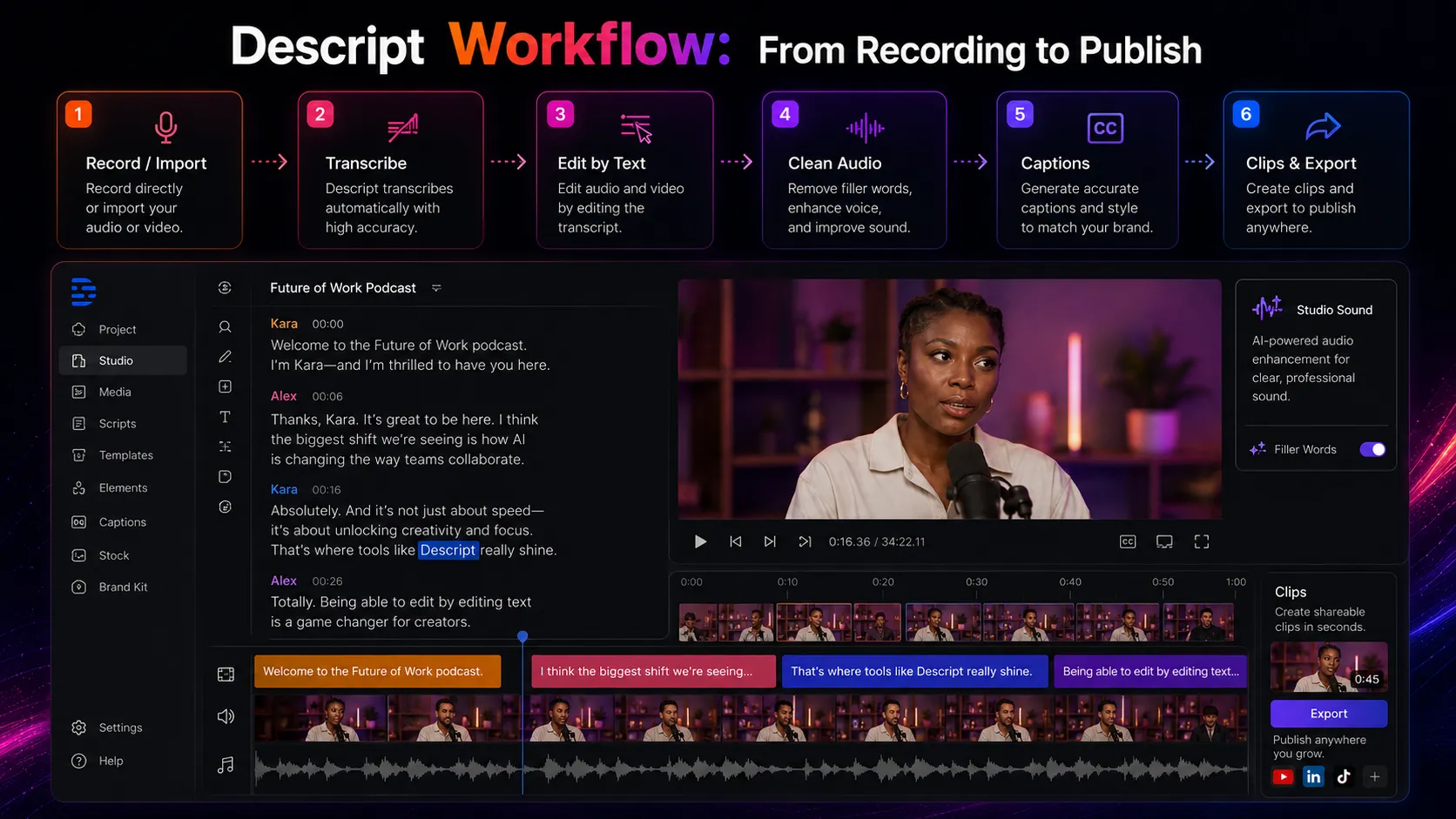
The cleanest Descript workflow looks like this: record or import the conversation, let the transcript become the main editing surface, cut sections by removing text, clean obvious filler moments, improve sound where it helps, add captions, then create clips or export the main episode.
That workflow is especially useful for people who publish repeatedly. One podcast episode is helpful. Ten episodes, each with clips and captions, is where the system starts to matter.
The main practical question is whether Descript removes the part of editing that slows you down every week. If your friction is finding moments, cleaning speech, building captions, and making clips, Descript belongs on the shortlist. If your friction is color, motion design, visual rhythm, or complex sound design, it may sit earlier in the workflow and hand off to another editor later.
A realistic workflow may look like this:
- Draft the outline in ChatGPT or Claude.
- Record in Descript, Riverside, Zoom, or a dedicated recorder.
- Edit spoken sections in Descript using the transcript.
- Clean sound and filler words carefully, not blindly.
- Create captions and clips for short-form distribution.
- Finish brand visuals in Canva, CapCut, Premiere Pro, or another visual editor.
- Publish to YouTube, podcast hosting, an LMS, or internal training tools.
This is why I would treat Descript as a production accelerator, not as the whole studio.
Where Descript fits in an AI stack
The right way to think about Descript is as the audio and spoken-video editing layer. It can replace some transcript cleanup, rough cutting, caption preparation, filler-word removal, and clip production. It does not replace scripting strategy, guest recording quality, brand design, legal review, publishing analytics, or a human editor’s final judgment.
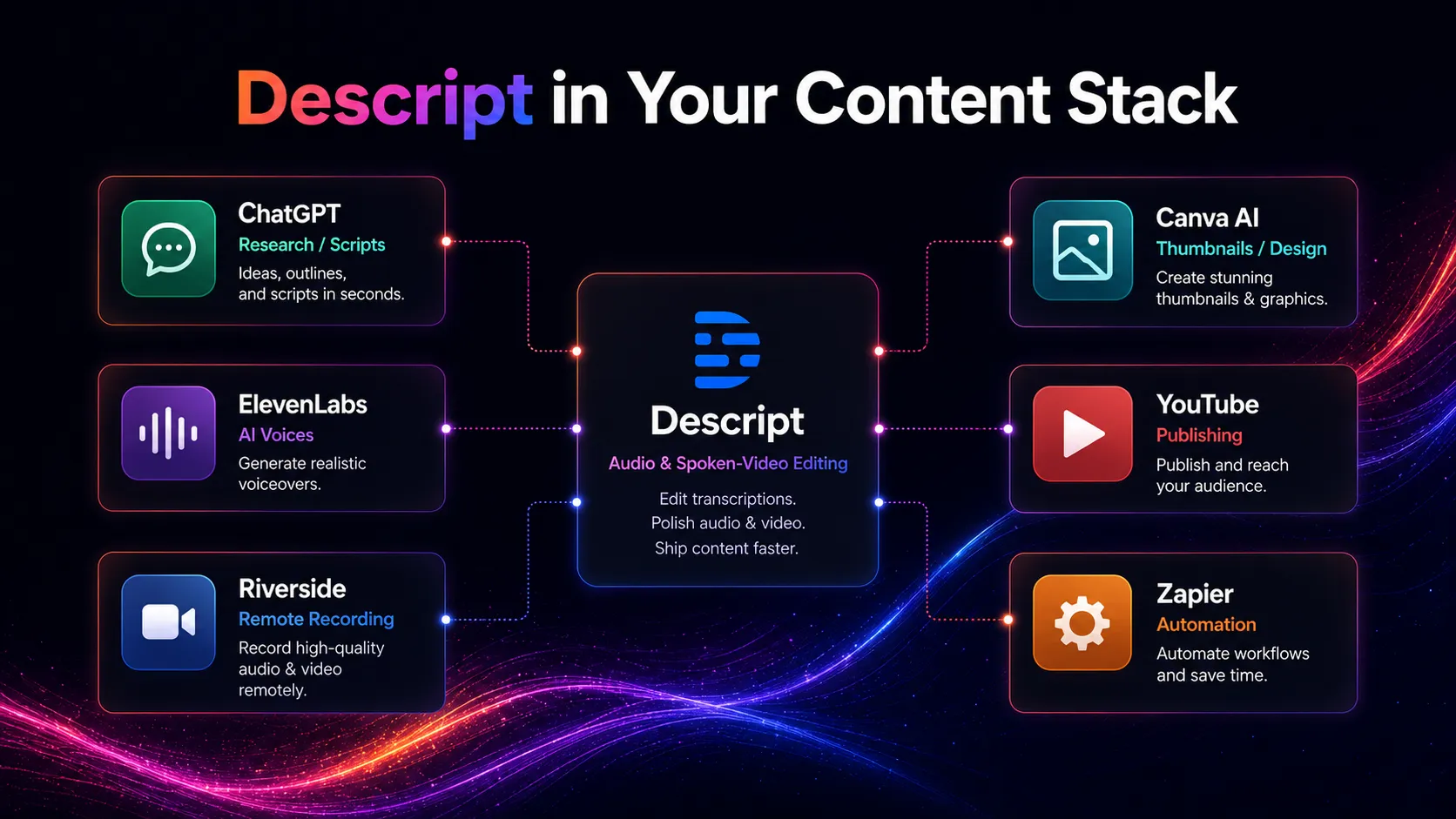
This matters because many creators buy tools by feature list instead of stack role. Descript looks attractive because it has editing, transcription, clips, audio cleanup, AI Speech, and generated media. The buyer-safe move is to ask a narrower question: which part of our weekly workflow gets meaningfully shorter?
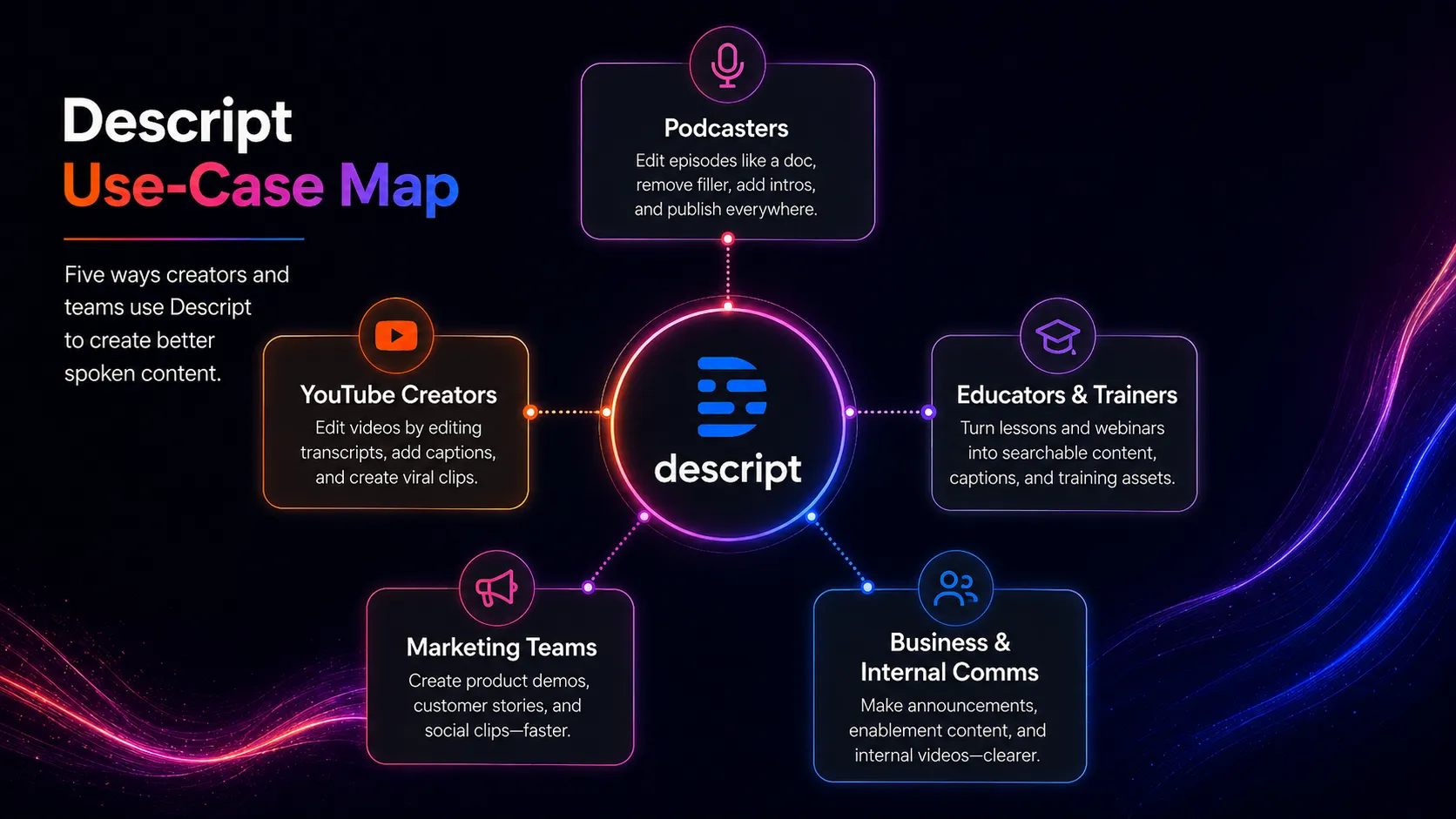
For a podcast team, Descript can sit after recording and before publishing. For a YouTube educator, it can sit between script and final edit. For a marketing team, it can turn customer calls, demos, or webinars into cleaner internal or public videos. For a team already deep in Premiere Pro, it may become a rough-cut and transcript tool rather than the final editor.
What Descript does well
Descript is strongest when the recording is mostly speech and the editor needs to make decisions based on what was said. Cutting a sentence, finding a phrase, removing repeated filler words, or turning a good answer into a clip all become more approachable when the transcript is the navigation system.
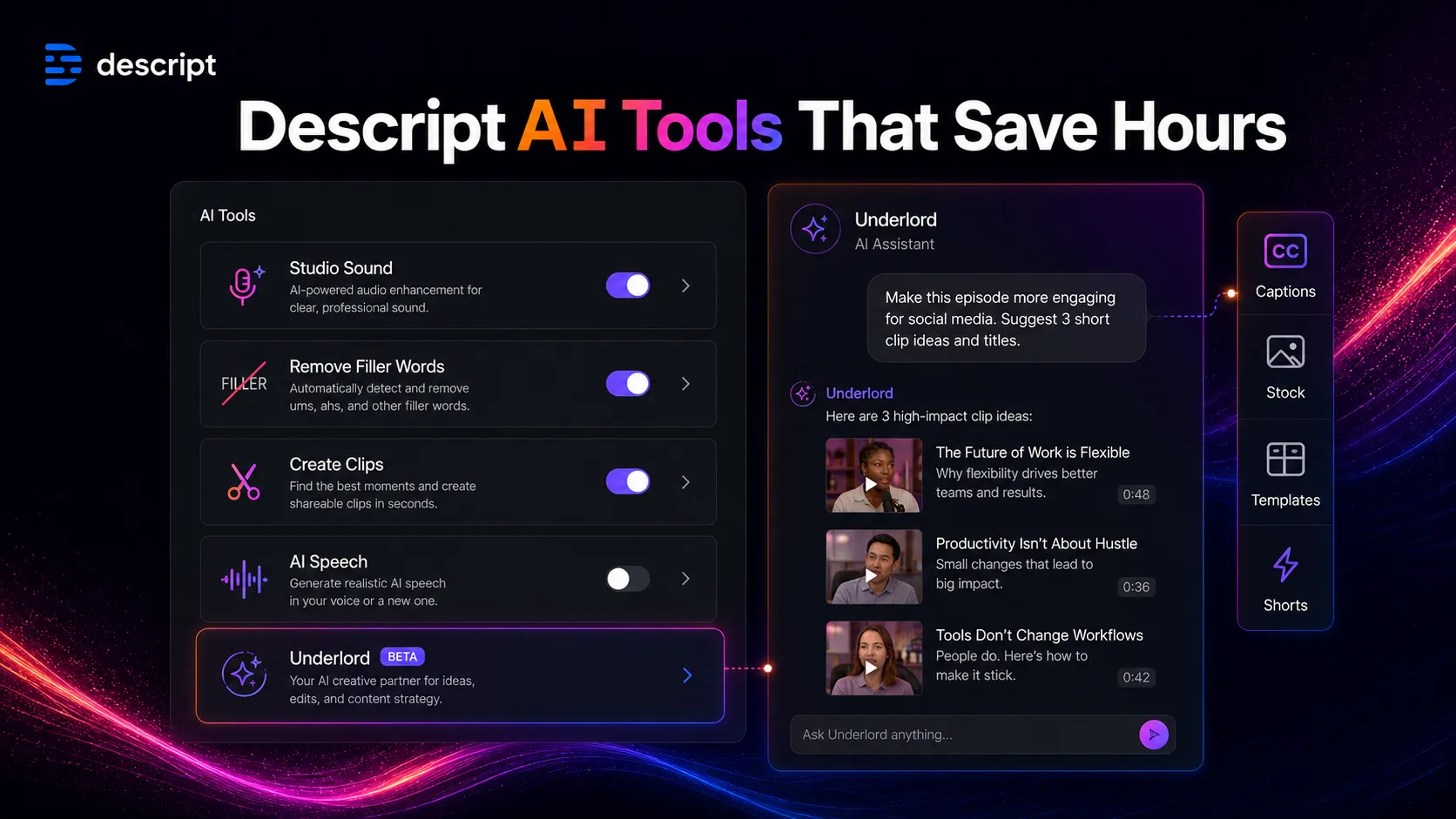
The features that matter most for buyers are the practical ones:
- Transcript editing for spoken audio and video.
- Studio Sound for improving rough recordings.
- Filler-word detection and removal.
- Captioning and clip creation for repurposing.
- AI Speech and Regenerate for limited correction workflows.
- Underlord for AI-assisted editing actions and project guidance.
- Team paths for brand and collaboration needs on higher plans.
What is actually interesting here is not one single AI feature. It is the compression of many small production chores into a workflow that non-specialist editors can understand. That is valuable for creators and small teams, as long as they do not mistake speed for final quality.
Where Descript falls short
The first limitation is transcript trust. If the transcript is wrong, your edit can be wrong. If the speakers overlap, the recording is messy, or the content uses names, acronyms, technical terms, or multiple languages, you should expect correction time.
The second limitation is production depth. Descript can make spoken content easier to edit, but it does not give the same deep control as a dedicated professional editor for complex timelines, grading, motion, and heavy sound work.
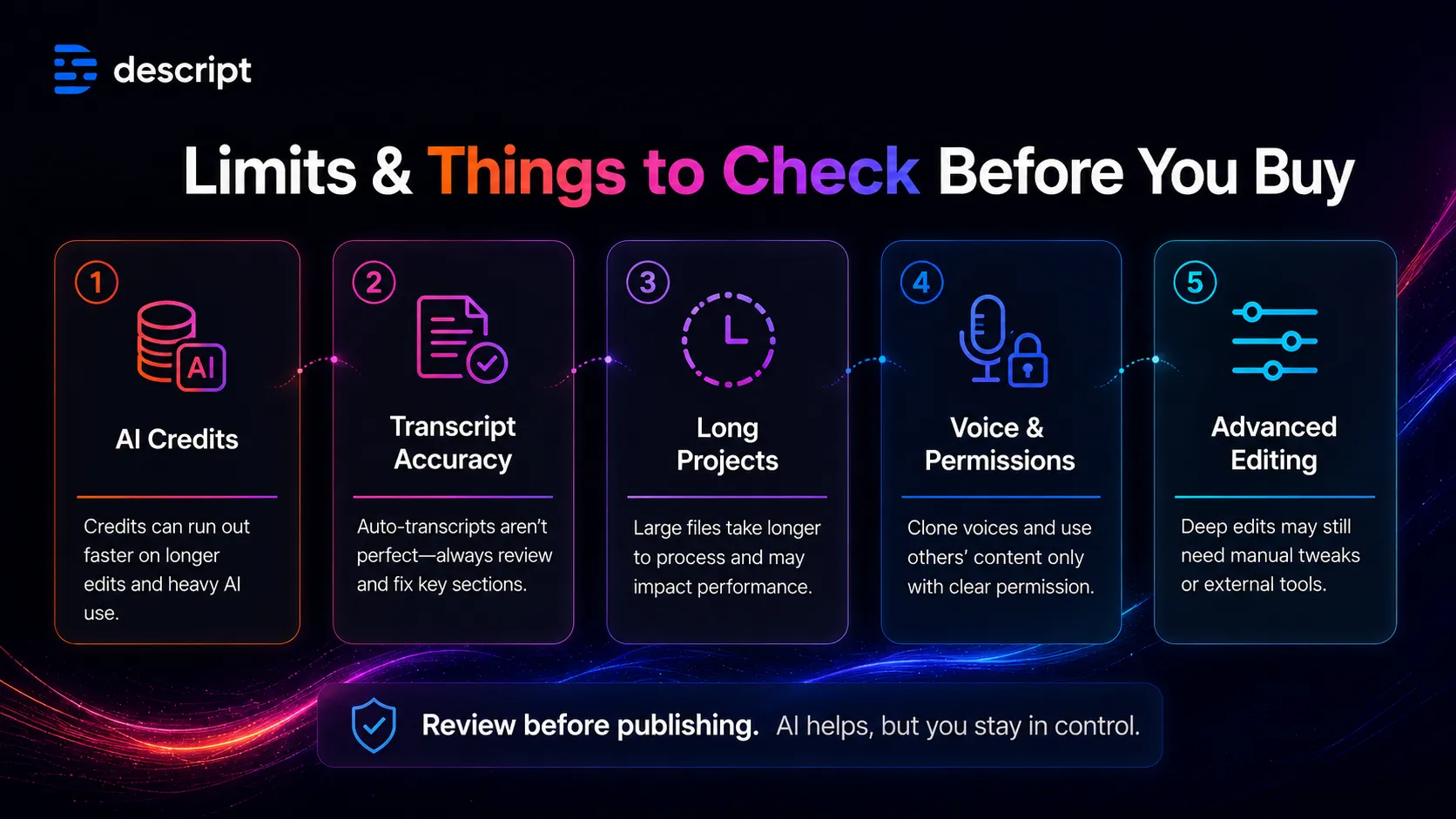
The third limitation is operational. AI credits, media hours, export quality, team seats, bonus credits, and top-ups all matter once the workflow becomes real. A team publishing weekly should not judge Descript by the demo alone. It should estimate monthly recording hours, AI actions, clip volume, review time, and who owns final approval.
The final caution is voice. AI Speech, voice cloning, Regenerate, dubbing, and generated media can be useful, but they create policy questions. For client work, employee training, education, or branded media, consent and disclosure are not optional details.
Pricing judgment
As of this review date, Descript lists a Free plan, Hobbyist, Creator, Business, and Enterprise. The important change from older summaries is that the current paid pricing is not just a single starting number. Buyers need to look at annual versus monthly billing, media hours, AI credits, export quality, seats, and team controls.
The Free plan is best for workflow testing. It includes limited media hours and AI credits, and it lets you decide whether transcript editing fits your brain. I would not treat it as a regular publishing plan unless your work is very light.
Hobbyist is the first serious individual upgrade if you need watermark-free 1080p exports, more media hours, and access to the core AI editing workflow. Creator becomes more compelling if you need more media hours, more credits, 4K export, stock media access, and heavier creative use. Business and Enterprise are team decisions, not impulse upgrades.
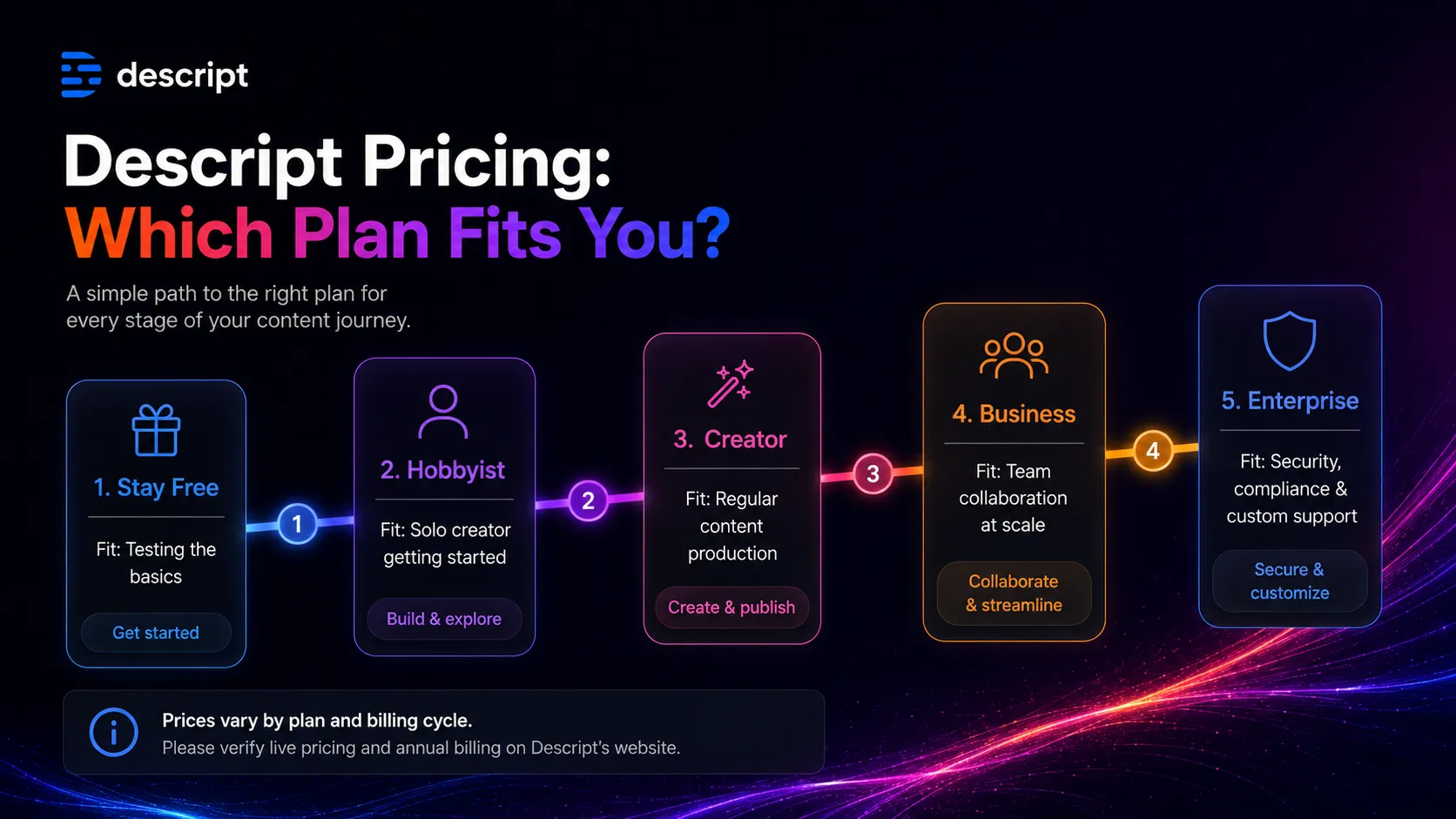
My practical pricing take: pay when Descript becomes part of a weekly production system. Stay free or compare first if you only edit a few short clips a month, if your recording workflow is still unsettled, or if you cannot estimate credit use yet.
Best alternatives to compare
The better comparison depends on the job you are trying to fix.
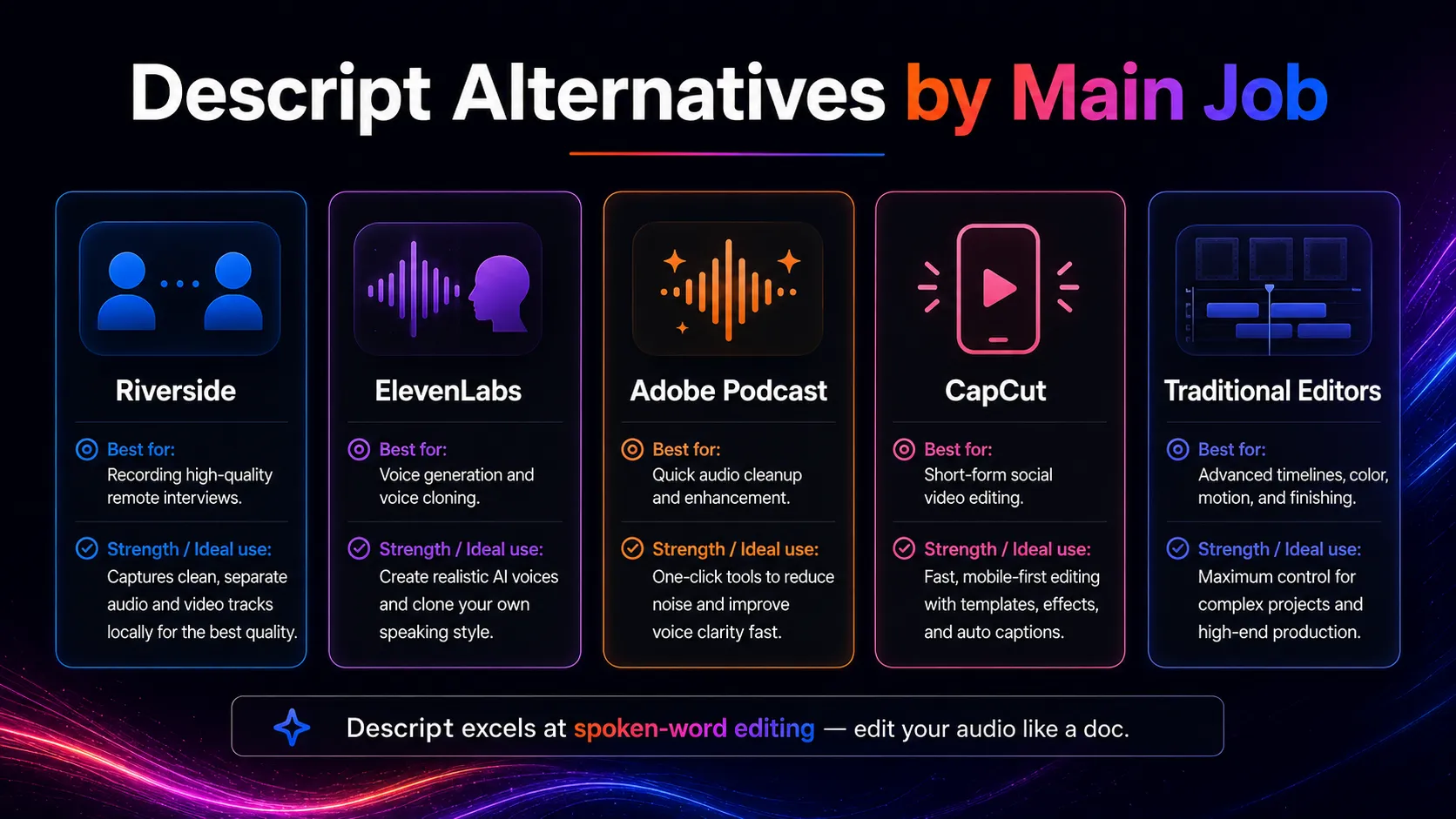
Riverside is the strongest comparison if your biggest issue is recording remote guests in high quality. Descript is stronger after the recording, especially for transcript-led editing and clip repurposing. Many podcast teams could justify using both.
ElevenLabs is not a full Descript replacement. It is a voice-first tool for narration, synthetic speech, and dubbing workflows. Compare it if the core need is voice output rather than editing recorded media.
Adobe Podcast is a narrower route for audio cleanup and podcast-style utility. It can be easier if you only need sound improvement, but it does not cover the same editing and repurposing surface.
CapCut, Premiere Pro, Final Cut Pro, and DaVinci Resolve are better comparisons when the project is visual-first. Descript wins on spoken-word speed. Traditional editors win when visual control, timeline complexity, and finishing are the main job.
Final decision
Add Descript to your stack if you repeatedly edit podcasts, interviews, talking-head videos, tutorials, webinars, courses, or internal training videos. It is especially useful when the transcript is the fastest way to find and shape the story.
Compare it first if your problem starts before editing. Riverside may be better for remote recording. ElevenLabs may be better for voice generation. CapCut or Premiere Pro may be better for visual-first editing. Adobe Podcast may be enough if you only need audio cleanup.
Skip it for now if your production work is complex, visual-heavy, credit-sensitive, or policy-sensitive around voice and transcripts. Descript is strong, but it is strongest for a specific job: turning spoken media into cleaner, shorter, more publishable content with less timeline friction.
Frequently asked questions
Is Descript worth it for podcast editing?
Does Descript have a free plan?
What is the main weakness of Descript?
Is Descript better than Riverside?
Can Descript replace Adobe Premiere Pro or Final Cut Pro?
Should teams worry about Descript AI voice features?
Where Descript fits in a stack
AI audio and voice production layer
Does not replace
- – Professional sound design and audio mastering
- – Advanced nonlinear video editing
- – Dedicated recording studios for high-end production
- – Voice-permission policy and legal review
- – Human review of transcripts, AI edits, and exported clips
Pairs well with
Head-to-head comparisons
Top alternatives to consider
If Descript is not the right fit, these are the most common alternatives.
Riverside is the stronger comparison when recording quality, remote guests, and podcast capture matter more than transcript-first editing. Compare it first if your problem begins before the edit.

ElevenLabs is better treated as a voice-generation companion than a full Descript replacement. It becomes relevant when synthetic narration and multilingual voice output matter more than editing recorded media.
Adobe Podcast is a narrower alternative for audio cleanup and podcast-style workflows. It can be simpler for sound improvement, but it does not replace Descript's broader editor and clip workflow.
Review methodology
This review is based on current public product information, Descript official pricing and feature pages, help documentation, security documentation, changelog updates, user-review patterns, and editorial stack-fit analysis.
No private editing benchmark, paid plan stress test, or controlled export test was conducted for this review. Recommendations reflect public product information and stack-fit judgment.
Not covered: Private export-speed testing · Professional audio mastering benchmark · Enterprise procurement review · Hands-on comparison against every podcast editor