 C
C Canva AI
Canva AI is an AI-assisted design platform best for marketers, content creators, and small teams who need to produce social media visuals, presentations, and brand assets without professional design skills. It is less suited for teams that need pixel-level editing control or high-volume AI image generation beyond its monthly credit limits.
Quick answer
Canva AI is an AI-assisted design platform best for marketers, content creators, and small teams who need to produce social media visuals, presentations, and brand assets without professional design skills. It is less suited for teams that need pixel-level editing control or high-volume AI image generation beyond its monthly credit limits.
Canva's AI credit system can be limiting for high-volume image generation — there is no a-la-carte top-up option, so running out means waiting for reset or upgrading. Teams pricing jumped significantly in 2024; verify current per-seat costs before rolling out to larger groups. Enterprise requires a 100-seat minimum.
What is Canva AI?
Canva combines a template-based design editor with a suite of AI tools under the Magic Studio umbrella — including Dream Lab for text-to-image generation, Magic Write for copy drafting, Magic Resize for multi-format resizing, Magic Eraser, and Background Remover. Unlike Photoshop or Figma, Canva is built for speed over precision, letting non-designers create on-brand visuals from templates. The Brand Kit feature stores logos, colors, and fonts for consistent output across a team. AI credits are shared across Magic Studio features and reset monthly; heavy Dream Lab users may exhaust Pro credits before month-end. Verify current credit limits and plan terms on the official pricing page.
Who Canva AI fits best
Canva AI fits best for social media managers, small marketing teams, and solopreneurs who need fast, on-brand visual content where speed and ease of use matter more than fine-grained design control or unlimited AI generation.
- ✓Social media managers and content creators who produce high volumes of visual assets weekly
- ✓Small marketing teams that need consistent brand visuals without a dedicated designer
- ✓Solopreneurs and freelancers who want an all-in-one design, scheduling, and AI content tool
- ✓Non-designers in startups or agencies who need polished templates and brand kit management
Not ideal for
- •Professional designers who need pixel-level control, advanced layer management, or print production workflows
- •Teams that need high-volume AI image generation beyond monthly credit limits
- •Developers or technical teams looking for a programmatic design or image generation API
- •Enterprise organizations with 100+ seats who need SSO and brand governance at scale (verify Enterprise terms)
Main use cases
Social Media Visual Production
Marketing teams and content creators use Canva to produce social posts, stories, and carousels from branded templates at volume. Magic Resize automatically reformats a design across platforms, reducing repetitive resizing work.
Brand Asset Management and Consistency
Teams store logos, brand colors, and fonts in Brand Kit so any team member can create on-brand assets without starting from scratch. This reduces off-brand output and design review cycles for small marketing teams without a dedicated designer.
AI Image Generation with Dream Lab
Users generate custom visuals from text prompts via Dream Lab inside the Canva editor. AI credits are shared across all Magic Studio features and reset monthly; high-volume generation may exhaust Pro credits before the reset date.
Presentation and Document Design
Non-designers use Canva to build pitch decks, reports, and proposals from templates, then share or present directly from the browser. It replaces basic PowerPoint workflows for teams that prioritize visual appeal over deep slide logic.
Where Canva AI fits in the AI stack
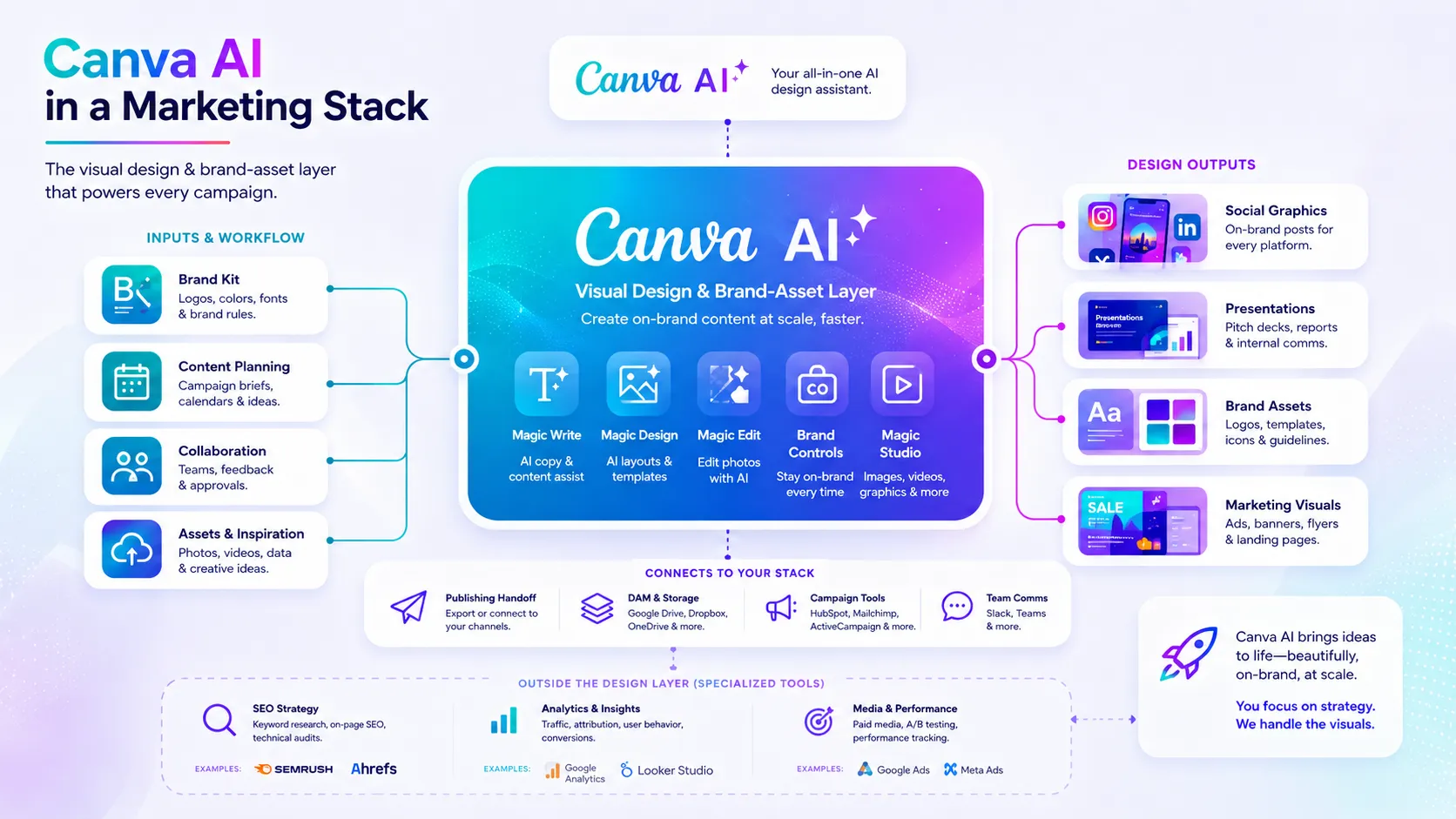
Canva AI sits at the design and visual content layer of a marketing or creator stack. It handles template-based design, social scheduling, AI image generation, and brand asset management in one tool. It does not replace dedicated image editors for precision work or SEO and analytics tools for strategy. Content briefs from ChatGPT or Claude feed into Canva's design and copy workflow.
Stack role
AI Design and Visual Content Layer
Best paired with
ChatGPT, Claude, Ahrefs
Strongest layer
Visual Asset Creation + Brand Consistency
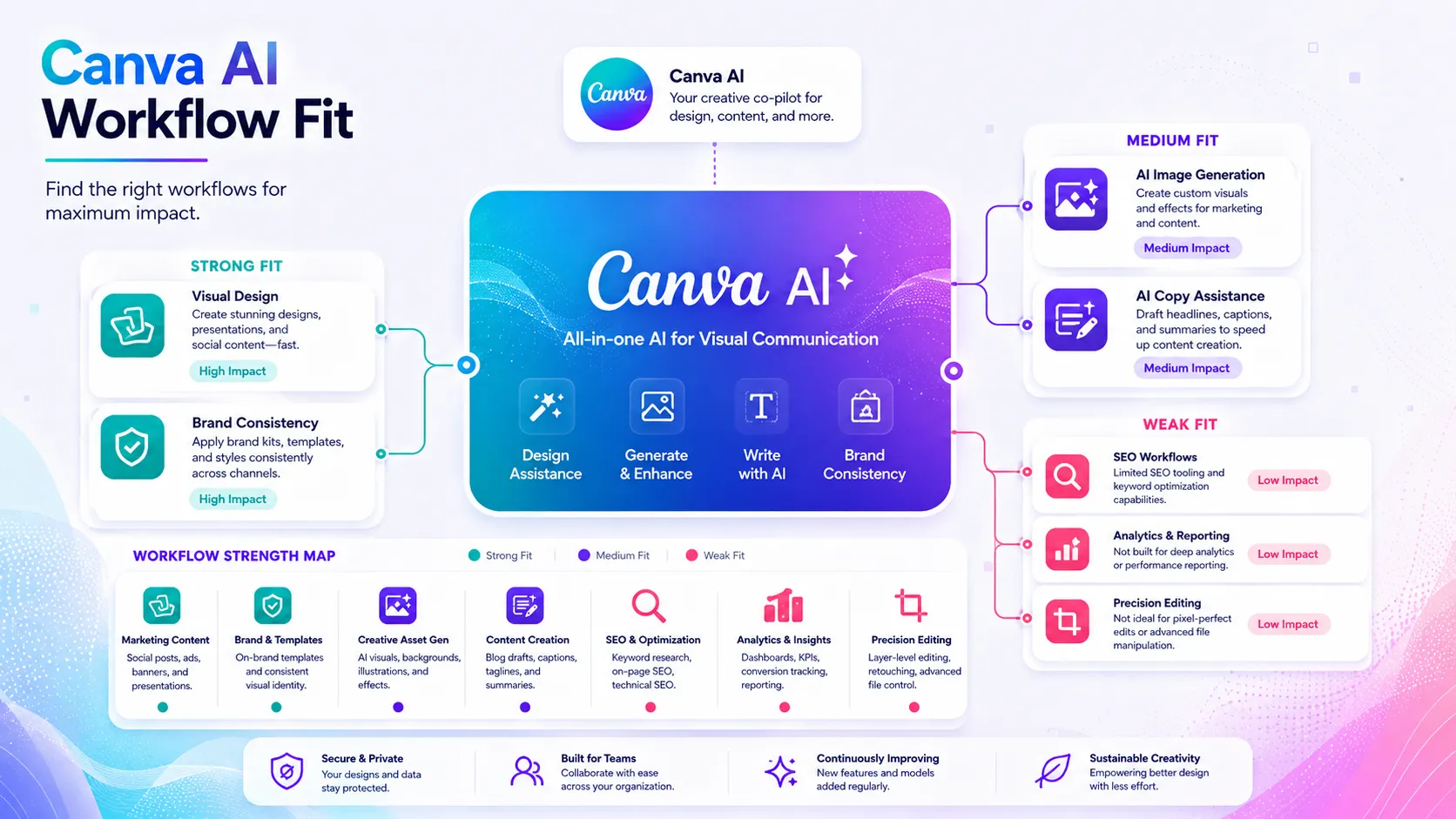
| Stack layer | Fit | What to know |
|---|---|---|
| Visual Asset Creation | strong | Template-based design with AI resize, background remover, and Dream Lab covers most social and marketing asset needs |
| Brand Consistency | strong | Brand Kit stores and enforces logos, colors, and fonts across team output |
| AI Image Generation | medium | Dream Lab covers moderate use; monthly credit limits constrain high-volume generation workflows |
| Content Copy and Strategy | medium | Magic Write handles short-form copy; deeper content strategy and long-form writing need ChatGPT or Claude |
| SEO and Analytics | weak | Canva has no SEO research, keyword, or traffic analytics capability |
| Precision Editing and Print Production | weak | Template-based editor lacks layer-level control needed for professional print or complex illustration work |
Best stack combinations
Solo content creators and solopreneurs
Canva AI + ChatGPT
ChatGPT writes captions and content briefs; Canva AI designs and schedules the visuals.
Small marketing teams
Canva AI + Claude + Ahrefs
Ahrefs identifies content topics; Claude writes campaign copy; Canva AI designs and publishes assets.
Freelance designers and social media managers
Canva AI + Adobe Firefly
Canva AI handles template-based production and scheduling; Adobe Firefly generates higher-fidelity custom images when needed.
What Canva AI can replace
- · Basic PowerPoint or Google Slides for visually polished presentations
- · Manual per-platform resizing workflows for social media content
- · Scattered stock photo + text editor combinations for quick social visuals
- · Simple social media scheduling tools when combined with Canva's content publisher
What it still needs
- · ChatGPT or Claude: Content strategy, caption writing, and campaign copy beyond Magic Write's scope
- · Ahrefs or SEO platform: Keyword research and content planning that Canva cannot provide
- · CMS or social media scheduler: Advanced publishing workflows, analytics, and audience management
- · Photoshop or Figma: Precision editing, advanced layer work, and professional print production
Add it to your stack if
- · Your team produces social media visuals, presentations, or marketing assets regularly and lacks a dedicated designer
- · You need brand consistency across multiple team members without enforcing it manually
- · You want AI image generation, copy drafting, and social scheduling in one tool
Skip it if
- · Your primary need is precision image editing, advanced compositing, or professional print production
- · You need high-volume AI image generation that will consistently exceed monthly credit limits
- · Your organization requires SSO, advanced brand governance, and has fewer than 100 seats (Enterprise minimum)
Choose your next step
Pricing
→Compare Canva Free, Pro, Teams, and Enterprise plans with current AI credit limits.
Alternatives
→Compare Canva to Adobe Firefly, Visme, and other AI design tools for your workflow.
Compare options
→See how Canva's template-based design compares to Adobe Firefly's CC-integrated generation.
Stack fit
→See how Canva AI fits inside a full social media content and publishing workflow.
Review
→See whether Canva AI is worth it for your workflow.
Pricing summary
This is a profile-level summary. Use the pricing page for deeper plan checks.
Starting path
Freemium — Pro from $15/mo or $120/yr
Free plan
Yes
Free trial
30 days
Canva offers a permanently free plan with real utility. Pro is $15/mo or $120/yr per person, unlocking Magic Studio AI credits, Brand Kit, Background Remover, and premium assets. Teams is $10/seat/mo (annual, 3-user minimum). Enterprise pricing is custom with a 100-seat minimum. A 30-day free trial is available for Pro. Verify current regional pricing, credit limits, and team seat minimums on the official pricing page.
Best starting path: Individual creators and freelancers doing regular professional content should evaluate Pro at $120/yr. Teams of three or more doing collaborative brand work should compare Teams vs multiple Pro seats on the official pricing page.
Related stack page
Top alternatives
See all →
Adjacent tools in the same stack

Used for content briefs and caption writing that feed into Canva designs; not a replacement for visual creation.

Long-form copy and campaign strategy complement to Canva's design layer; not a design replacement.

AI-generated UI components for web; adjacent for teams building web products alongside Canva-designed marketing assets.
Related comparisons
FAQ
What is Canva AI best for?
Canva AI is best for marketers, content creators, and small teams who need to produce social media visuals, presentations, and branded assets quickly without design expertise. Its template library, Brand Kit, and Magic Studio AI tools cover most everyday visual content needs in one platform.
Is Canva AI enough as a full AI creative stack?
No. Canva handles design and visual production but needs ChatGPT or Claude for content strategy and copy, Ahrefs for SEO-informed content planning, and a CMS or analytics tool for publishing and performance tracking. It is one layer, not a complete stack.
What tools should I use with Canva AI?
ChatGPT or Claude for caption and copy drafting, Ahrefs for content topic research, and Adobe Firefly when you need higher-fidelity AI image generation beyond Dream Lab's monthly credits. A social media scheduler or CMS handles advanced publishing and analytics.
What is the best alternative to Canva AI?
Adobe Firefly is the strongest alternative for teams inside the Adobe ecosystem who need licensed-content generation. Visme competes directly for presentation and marketing design. Midjourney or DALL-E 3 are alternatives if AI image generation volume and quality is the primary need.
Who should not use Canva AI?
Professional designers who need precision editing and advanced layer control, teams that need high-volume AI image generation beyond monthly credit limits, and organizations that require SSO and brand governance at enterprise scale should evaluate alternatives or pair Canva with more specialized tools.
Does Canva AI have a free plan or free trial?
Yes to both. The free plan is permanent and genuinely usable for light design work. Canva Pro includes a 30-day free trial. Verify current trial terms, credit limits, and whether a credit card is required on the official Canva pricing page.
How TopAIStacks evaluates Canva AI
Pricing sourced from official Canva pricing page and cross-checked against multiple independent 2026 pricing guides. Plan names, AI credit model, free trial status, and Teams per-seat pricing are consistent across sources. Stack role, workflow fit, and alternative classification based on official product positioning and market context. No hands-on testing, coupons, screenshots, or unsupported claims included.
Last checked: May 2026 · Source confidence: high