 A
A Adobe Firefly
Adobe Firefly is an AI image and creative generation platform best for designers and marketers inside the Adobe ecosystem who want generation trained on licensed content for client or brand work. It is less suited for teams outside Adobe's toolchain who want maximum generation volume at the lowest cost.
Quick answer
Adobe Firefly is an AI image and creative generation platform best for designers and marketers inside the Adobe ecosystem who want generation trained on licensed content for client or brand work. It is less suited for teams outside Adobe's toolchain who want maximum generation volume at the lowest cost.
Firefly's value scales with Adobe ecosystem investment. Buyers outside Creative Cloud will find it more expensive per generation than standalone alternatives. Credit limits on lower tiers can run out quickly for video workflows. Always verify current plan names, credit amounts, trial eligibility, and CC bundle terms on the official pricing page before committing.
What is Adobe Firefly?
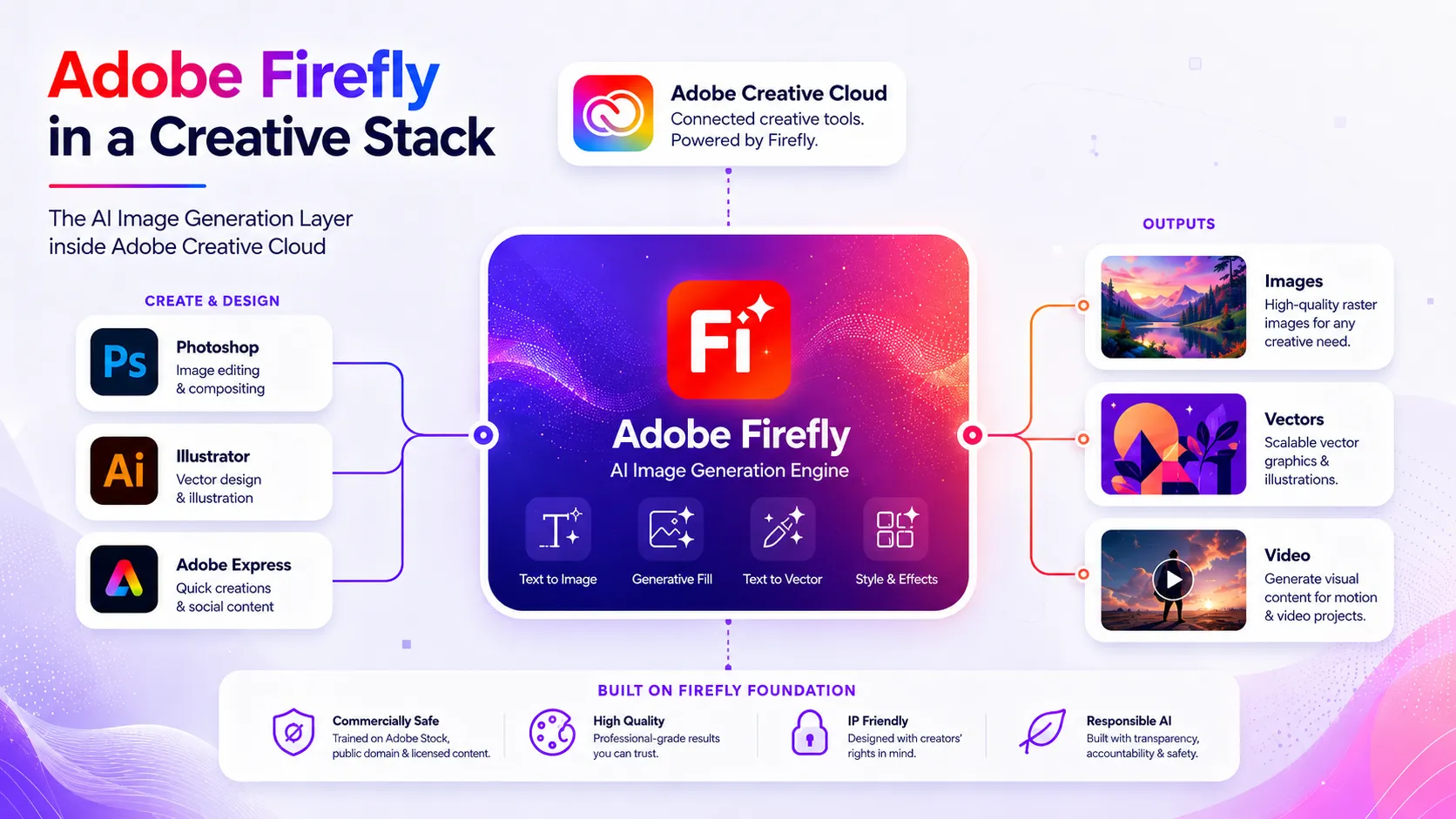
Firefly is Adobe's generative AI platform trained on licensed and public-domain content, designed to reduce licensing uncertainty compared with open-ended image generators — though buyers should still review Adobe's current terms before using outputs in sensitive client or brand work. It covers text-to-image, generative fill, text-to-vector, and AI video and audio generation. Unlike Midjourney or DALL-E, Firefly is embedded directly into Photoshop, Illustrator, and Adobe Express, so generations happen inside existing creative workflows. Standalone Firefly plans add premium generative credits; Creative Cloud subscribers should verify whether their existing plan already includes credits before buying separately.
Who Adobe Firefly fits best
Adobe Firefly fits best for graphic designers, brand marketers, and creative teams already in the Adobe ecosystem who want AI-generated images trained on licensed content that flow directly into Photoshop or Illustrator workflows.
- ✓Adobe Creative Cloud users who want AI generation without leaving their existing tools
- ✓Designers and marketers who need AI outputs trained on licensed content for client or brand deliverables
- ✓Teams using Photoshop or Illustrator who want generative fill and text-to-image in-app
- ✓Content creators producing social media visuals who need assets with clearer licensing posture
Not ideal for
- •Teams outside the Adobe ecosystem who want lower-cost standalone generation
- •High-volume video generation workflows where credit costs escalate quickly
- •Users who prioritize maximum artistic style control
- •Developers looking for a raw API-first image generation service
Main use cases
AI Image Generation with Licensed-Content Training
Designers seeking AI-generated images for client deliverables often prefer models trained on licensed rather than scraped content. Firefly's training approach may reduce licensing uncertainty — verify Adobe's current content terms before using outputs in commercial client or brand work.
Generative Fill and In-App Editing in Photoshop
Photoshop users can extend backgrounds, remove objects, and generate new image elements directly in-canvas using Firefly-powered generative fill. This keeps the generation step inside the existing editing workflow rather than requiring a separate tool.
Text-to-Vector and Graphic Element Creation
Illustrator users can generate vector graphics and design elements from text prompts via Firefly integration. Verify current Illustrator integration depth and credit consumption on the official product page.
Social Media and Marketing Asset Production
Marketing teams use Firefly to generate on-brand visuals for campaigns and social posts, then refine them in Adobe Express or Photoshop. Credit limits on lower plans may constrain high-frequency content calendars.
Where Adobe Firefly fits in the AI stack
Firefly sits at the AI image generation layer of a creative or marketing stack, providing text-to-image, generative fill, and AI video generation trained on licensed content. Its deepest value is inside Adobe workflows — it feeds outputs directly into Photoshop, Illustrator, and Express rather than operating as a standalone tool. Brand direction, editing, publishing, and rights review still require surrounding tools and human judgment.
Stack role
AI Image Generation Layer (Licensed-Content Training)
Best paired with
Canva AI, ChatGPT, Adobe Express
Strongest layer
AI Image Generation + In-App Generative Editing
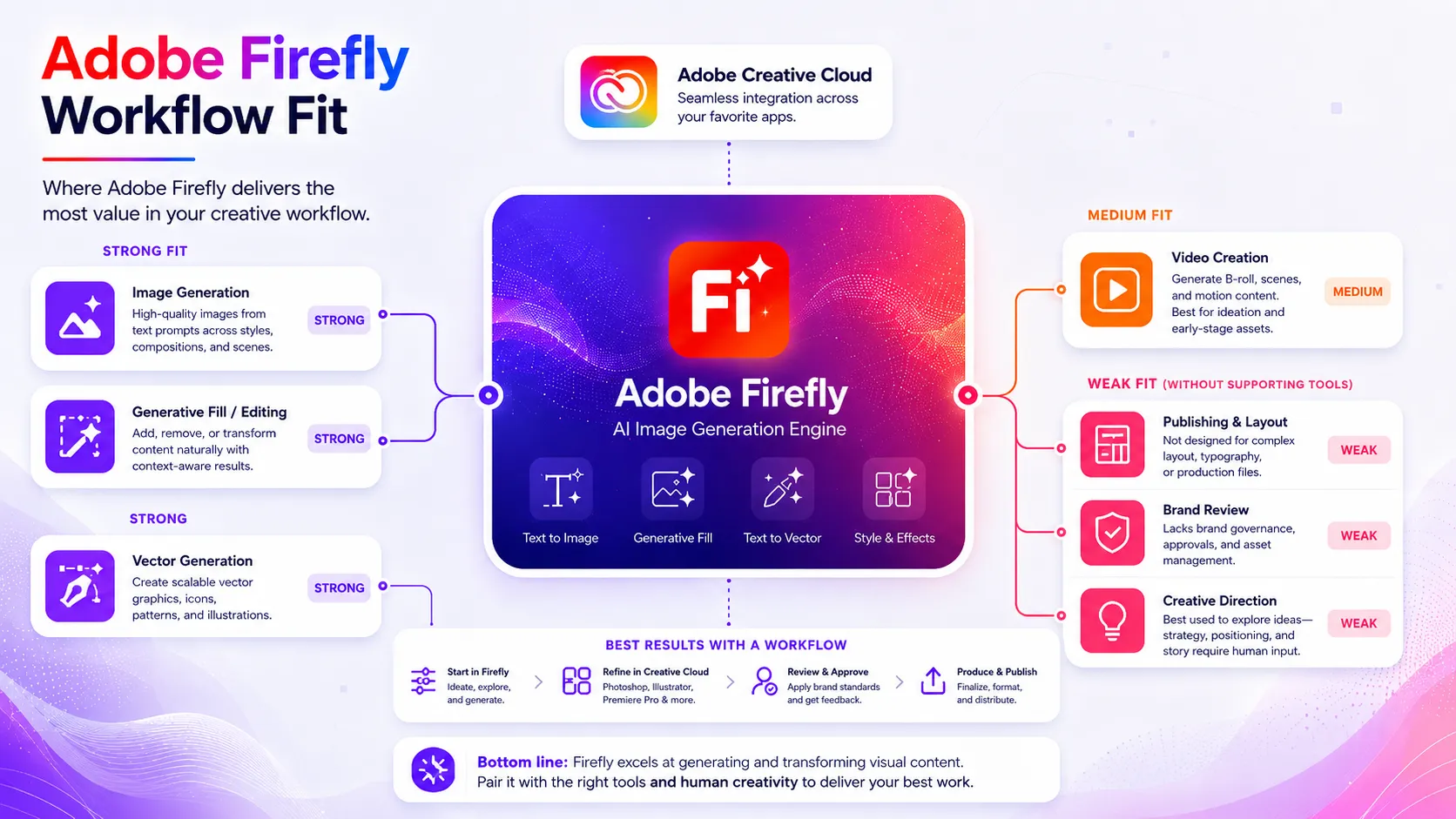
| Stack layer | Fit | What to know |
|---|---|---|
| AI Image Generation | strong | Core capability with direct CC integration and licensed-content training approach |
| In-App Generative Editing | strong | Generative fill and expand work natively inside Photoshop and Illustrator |
| AI Video Generation | medium | Available on paid plans but credit-constrained at lower tiers; verify current limits |
| Brand and Design Review | weak | Firefly generates assets but does not enforce brand guidelines or review outputs |
| Publishing and Distribution | weak | Requires Adobe Express, CMS, or social scheduler to publish generated assets |
| Prompt Strategy and Creative Direction | weak | Human brief and prompt crafting still needed; ChatGPT or Claude can assist |
Best stack combinations
Adobe Creative Cloud designers
Adobe Firefly + Photoshop + Adobe Express
Firefly generates base images; Photoshop refines and composites; Express publishes to social or web.
Marketing teams producing campaign visuals
Adobe Firefly + ChatGPT + Canva AI
ChatGPT builds prompts; Firefly generates licensed-content assets; Canva AI handles quick-turn social layouts.
Solo creators in the Adobe ecosystem
Adobe Firefly + Adobe Express
Firefly generates visuals; Express formats and publishes without requiring full Photoshop skills.
What Adobe Firefly can replace
- · Some stock image search for concept and mood board visuals
- · Manual prompt-based visual ideation across separate generation tools
- · Basic AI image generation outside the Adobe ecosystem for CC users
What it still needs
- · Human creative direction: Prompt strategy, brand alignment, and quality review
- · Photoshop or Illustrator: Professional editing, compositing, and refinement of generated outputs
- · Publishing platform or CMS: Distribution of final assets to web, social, or print channels
- · Legal or brand review: Verification of output terms before use in sensitive client or paid campaign work
Add it to your stack if
- · You are already a Creative Cloud subscriber and want AI image generation without leaving Adobe tools
- · Your work involves client or brand deliverables and you prefer models trained on licensed content
- · You use Photoshop or Illustrator regularly and want generative fill and in-canvas generation
Skip it if
- · You are not in the Adobe ecosystem and want the lowest cost per image generated
- · Your primary need is high-volume video generation where credit costs will escalate quickly
- · You prioritize maximum artistic style control and do not need Adobe's training approach
Choose your next step
Pricing
→Compare Firefly Free, Standard, Pro, Pro Plus, and Premium plans with current credit limits.
Alternatives
→Compare Firefly to Midjourney, DALL-E 3, and Canva AI for your image generation workflow.
Compare options
→See how Firefly's training approach and CC integration compares to Midjourney's artistic output.
Stack fit
→See how Firefly fits inside a full social and creative asset production workflow.
Review
→See whether Adobe Firefly is worth it for your workflow.
Pricing summary
This is a profile-level summary. Use the pricing page for deeper plan checks.
Starting path
Freemium — paid plans from ~$9.99/mo
Free plan
Yes
Free trial
Yes
Firefly offers a free plan with limited monthly generative credits. Paid standalone plans include Standard (~$9.99/mo), Pro (~$19.99/mo), Pro Plus, and Premium (~$199.99/mo), each with higher credit pools. Selected plans show a free trial path on Adobe's checkout flow. Firefly credits are also included in Creative Cloud plans. Verify current plan names, credit limits, trial eligibility, and CC bundle terms on the official pricing page before buying.
Best starting path: Creative Cloud subscribers should check whether their current CC plan already includes Firefly credits before purchasing separately. Verify trial eligibility and current plan terms on the official pricing page.
Related stack page
Top alternatives
See all →Direct alternatives

Leading alternative for high-quality artistic image generation; stronger style control but no CC integration and different training and licensing approach.

OpenAI's image model available via ChatGPT; strong prompt adherence but not embedded in Adobe tools.

Covers AI image generation within a design-and-publish workflow; better fit for non-Adobe users who need an all-in-one tool.

Related comparisons
FAQ
What is Adobe Firefly best for?
Firefly is best for designers and marketers inside the Adobe ecosystem who want AI image generation trained on licensed content, directly inside Photoshop and Illustrator. It may reduce licensing uncertainty compared with open-ended generators — verify Adobe's current terms before using outputs in client or paid campaign work.
Is Adobe Firefly enough as a full AI creative stack?
No. Firefly handles generation but still needs Photoshop or Illustrator for editing, a CMS or social scheduler for publishing, and human creative direction for brand alignment. It is one layer of a broader creative workflow, not a complete production stack.
What tools should I use with Adobe Firefly?
Photoshop and Illustrator for in-app generation and editing, Adobe Express for quick social publishing, and ChatGPT or Claude for prompt strategy. Creative Cloud subscribers should verify whether their CC plan already includes Firefly credits before buying a separate plan.
What is the best alternative to Adobe Firefly?
Midjourney is the strongest alternative for artistic quality and style control. DALL-E 3 via ChatGPT suits users in the OpenAI ecosystem. Canva AI suits teams that want image generation and design publishing in one non-Adobe tool. Compare training data approach and credit models before choosing.
Who should not use Adobe Firefly?
Teams outside the Adobe ecosystem who want lower-cost standalone generation, users who need high-volume video generation without steep credit costs, and buyers who prioritize maximum artistic style control over Adobe's licensed-content approach.
Does Adobe Firefly have a free plan or free trial?
Yes to both. Firefly has a free plan with limited monthly credits. Selected paid plans show a free trial path on Adobe's checkout flow. Verify current free credit limits, trial eligibility, plan terms, and renewal pricing on the official Adobe Firefly pricing page before starting.
How TopAIStacks evaluates Adobe Firefly
Official Firefly homepage and pricing page were primary sources. Plan names, credit model, and pricing figures cross-checked against third-party sources due to Adobe pricing restructuring in 2025. Cautious language used throughout given ongoing plan changes. Stack role, workflow fit, and alternatives based on official product scope. No hands-on testing, coupons, screenshots, or unsupported claims included.
Last checked: May 2026 · Source confidence: medium