
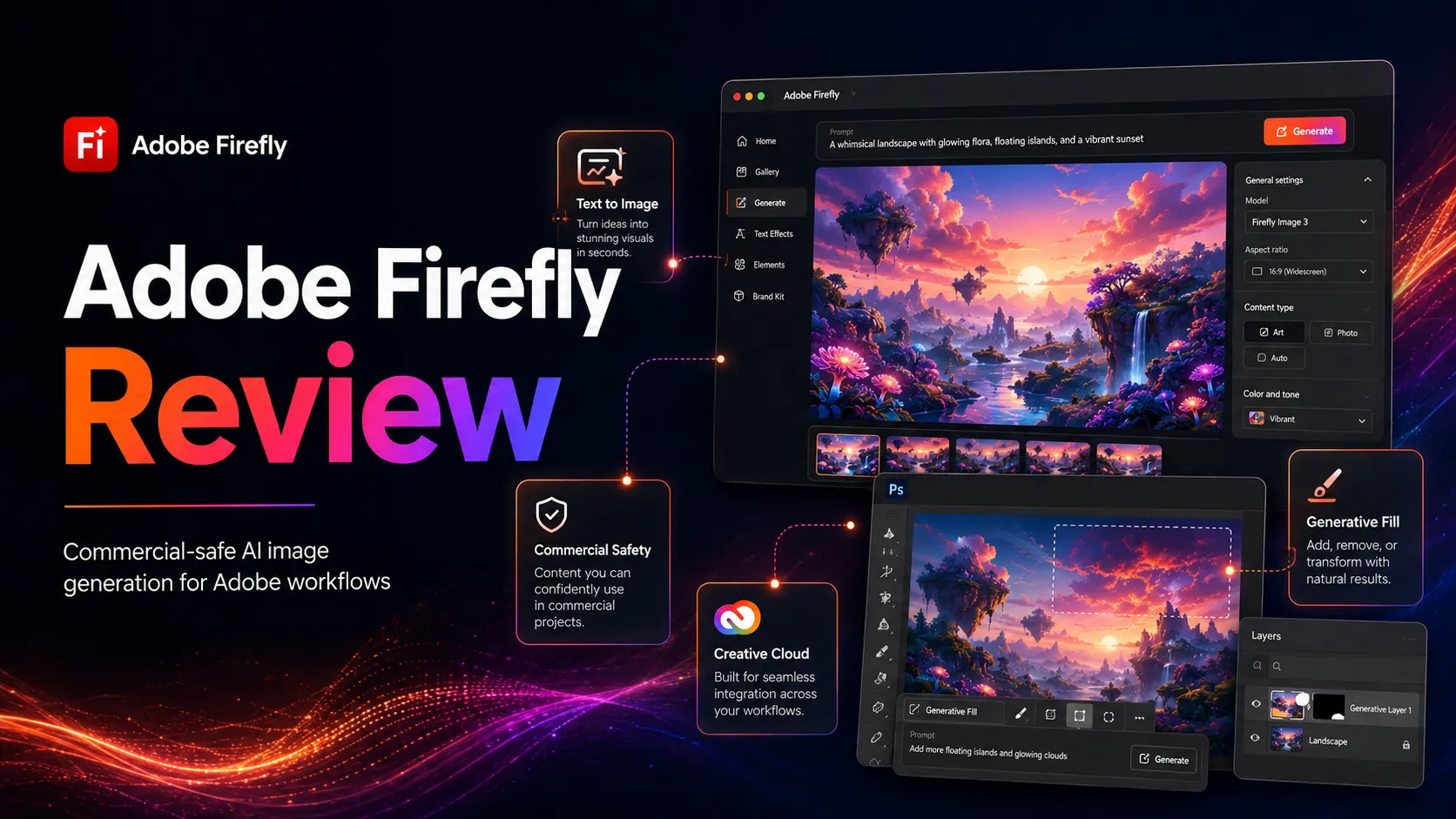
Adobe Firefly Review
Is Adobe Firefly worth paying for? Editorial review covering commercial safety, credit system, stack fit, and who should add it to their creative workflow.
Strong fit for Adobe Creative Cloud users; situational value for everyone else.
Use it if…
- ✓ Your production workflow already runs inside Photoshop, Illustrator, or Express
- ✓ Commercial IP safety of AI outputs is a non-negotiable requirement for your team or clients
- ✓ You are a Creative Cloud Pro or All Apps subscriber and want AI image generation without adding another paid tool
- ✓ You produce commercial assets that will go through a legal or compliance review
- ✓ You need AI-powered editing features like Generative Fill as part of a retouching workflow
Skip it if…
- – You have no Adobe CC subscription and are comparing Firefly Standard against Midjourney or DALL-E 3 on output quality alone
- – You need consistent photorealistic human figures in generated outputs
- – Your monthly image generation volume will exhaust credits frequently, triggering upsell pressure
- – You find the generative credit system unpredictable and want simpler flat-rate access
- – Your team is outside North America or Europe and pricing in your region has not been verified
Review scorecard
Scored by workflow fit, ease of use, value, and stack compatibility. Weights reflect importance for typical buyers.
| Criteria | Score | ||
|---|---|---|---|
| Commercial safety | 9.5 | ||
| Output quality | 6.5 | ||
| Ecosystem integration | 9.0 | ||
| Pricing clarity | 5.5 | ||
| Standalone value | 6.0 | ||
| Weighted overall | 7.5 / 10 | ||
On this page
Quick verdict
Adobe Firefly is easy to misread as a direct Midjourney competitor. It is not. The more useful frame is this: Firefly is Adobe’s commercial safety layer for AI-generated creative assets — tightly embedded in Photoshop and Illustrator, trained on licensed content, and designed for workflows where IP clearance is not optional.
That distinction matters a great deal if you work inside the Adobe ecosystem. It matters much less if you do not. A solo creator or small team comparing Firefly Standard at $9.99/mo against Midjourney or DALL-E 3 on output quality alone is unlikely to prefer Firefly. But an agency producing advertising assets that must pass legal review has a very different calculus — and Firefly serves that calculus well.
The credit system has been a persistent point of friction. Adobe has restructured it multiple times since 2023, and the current plan lineup (Standard, Pro, Pro Plus, Premium) adds complexity that not all users find navigable. That complexity is worth knowing before you commit.
Who should use Adobe Firefly
Firefly fits best when two conditions are true at once: you work inside Adobe’s suite of apps regularly, and the commercial clearance of AI-generated content is an active concern in your workflow.
Consider a design team at a mid-sized agency. They are in Photoshop daily, producing assets for client campaigns that go through brand review and legal sign-off. They have been cautious about AI image tools precisely because of licensing uncertainty. Firefly removes most of that concern. The Generative Fill feature handles background replacement, object removal, and content expansion without leaving the app they already work in — and the outputs carry Adobe’s commercial-safe licensing position.
Similarly, marketing teams at companies with brand compliance requirements benefit from Firefly’s stock-trained outputs. The tool will not generate images of unlicensed public figures or branded items not available in Adobe Stock, which is a limitation for some and an explicit feature for compliance-minded buyers.
Creative Cloud Pro and All Apps subscribers who have not yet used Firefly should know: unlimited standard image and vector generation is already included. If you are already paying for the full Adobe suite, the practical question is not whether to add Firefly — it is whether you have adopted the features that are already there.
Who should skip Adobe Firefly
Skip Firefly if you have no existing Adobe subscription and you are choosing an AI image generator primarily on output quality. Midjourney and DALL-E 3 both produce stronger results for a wide range of use cases at comparable or lower price points, without requiring familiarity with the Adobe credit system.
Skip it if photorealistic human figures are central to your work. Community feedback on this has been consistent: Firefly’s people generation is one of its weaker areas, producing outputs that experienced users describe as unpolished for client-facing or editorial use.
Skip it for now if you find the pricing structure confusing. The system involves standard credits, premium credits, credit resets, promotional pricing that expires, and plan names that have changed multiple times. If you cannot easily answer what your monthly credit entitlement is on your target plan, that friction compounds over time.
Real workflow fit
From a workflow perspective, Firefly operates across two distinct modes, and the value case differs significantly between them.
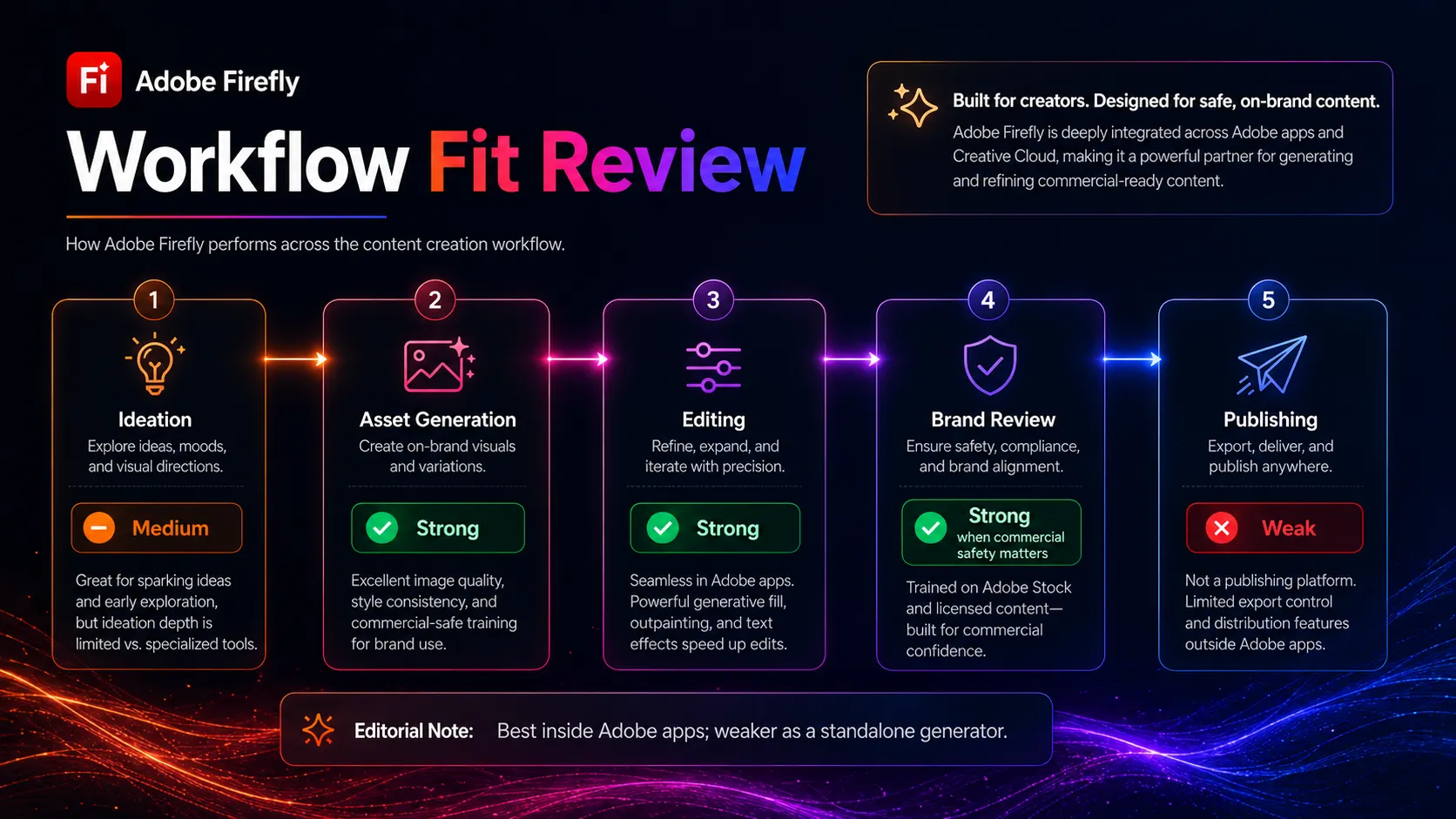
In the first mode — embedded inside Creative Cloud apps — Firefly is genuinely useful in a way competitors cannot replicate. Generative Fill in Photoshop is the clearest example: you select a region, describe what you want, and the AI extends or replaces the content in context with the surrounding image. This is not a separate step that requires exporting, uploading, and re-importing. It is in the tool, in the workflow, with a commercially licensed output. For production retouchers and brand designers, this is a real time-saver on a task that recurs constantly.
In the second mode — the standalone Firefly web app or mobile app — the tool competes on output quality with tools where it does not hold a consistent edge. The Firefly web app supports text-to-image, vector generation, and the newer video generation features (Firefly Video Model). Video generation is still early-stage: users in beta reported inconsistent prompt adherence and credit consumption for unusable results. This is a feature to watch, not a feature to plan a production workflow around yet.
The right way to think about Firefly is as the commercial-safe image layer inside your existing Adobe tools, not as a standalone competitor to the best-in-class image generators. If you treat it as the former, it delivers. If you treat it as the latter, it often disappoints.
Where Adobe Firefly fits in an AI stack
Firefly belongs in the AI image generation layer of any stack built around Adobe Creative Cloud. It does not replace creative direction, brand strategy, or design review — those remain human steps that Firefly feeds into, not replaces.
It pairs naturally with Canva AI and Adobe Express for marketing asset production, and with ChatGPT or Claude for prompt refinement and brief development upstream. The outputs slot directly into Photoshop, Illustrator, and Premiere Pro workflows without format conversion or re-uploading friction.
What Firefly does not replace is important to state clearly: it is not a substitute for Midjourney if high-quality artistic image generation is the primary goal. It is not a substitute for stock photography in cases where photographic authenticity matters. And it is not a publishing tool — the asset still needs to go through your existing design review and publishing pipeline.
What Adobe Firefly does well
Commercial IP safety at the generation layer. Firefly’s training on licensed Adobe Stock and public domain content is not a marketing claim — it is a structural product decision that affects every output the tool generates. For buyers in advertising, brand design, and enterprise marketing, this is the feature that justifies the tool’s place in the stack regardless of how its output quality compares to alternatives.
Generative Fill and in-app AI editing inside Photoshop. The ability to perform context-aware content generation directly inside a Photoshop workflow, with commercially licensed outputs, is Firefly’s strongest practical differentiator. This feature alone — not the web app, not the video model — is the reason professional retouchers and design teams stay on Firefly rather than switching to standalone generators.
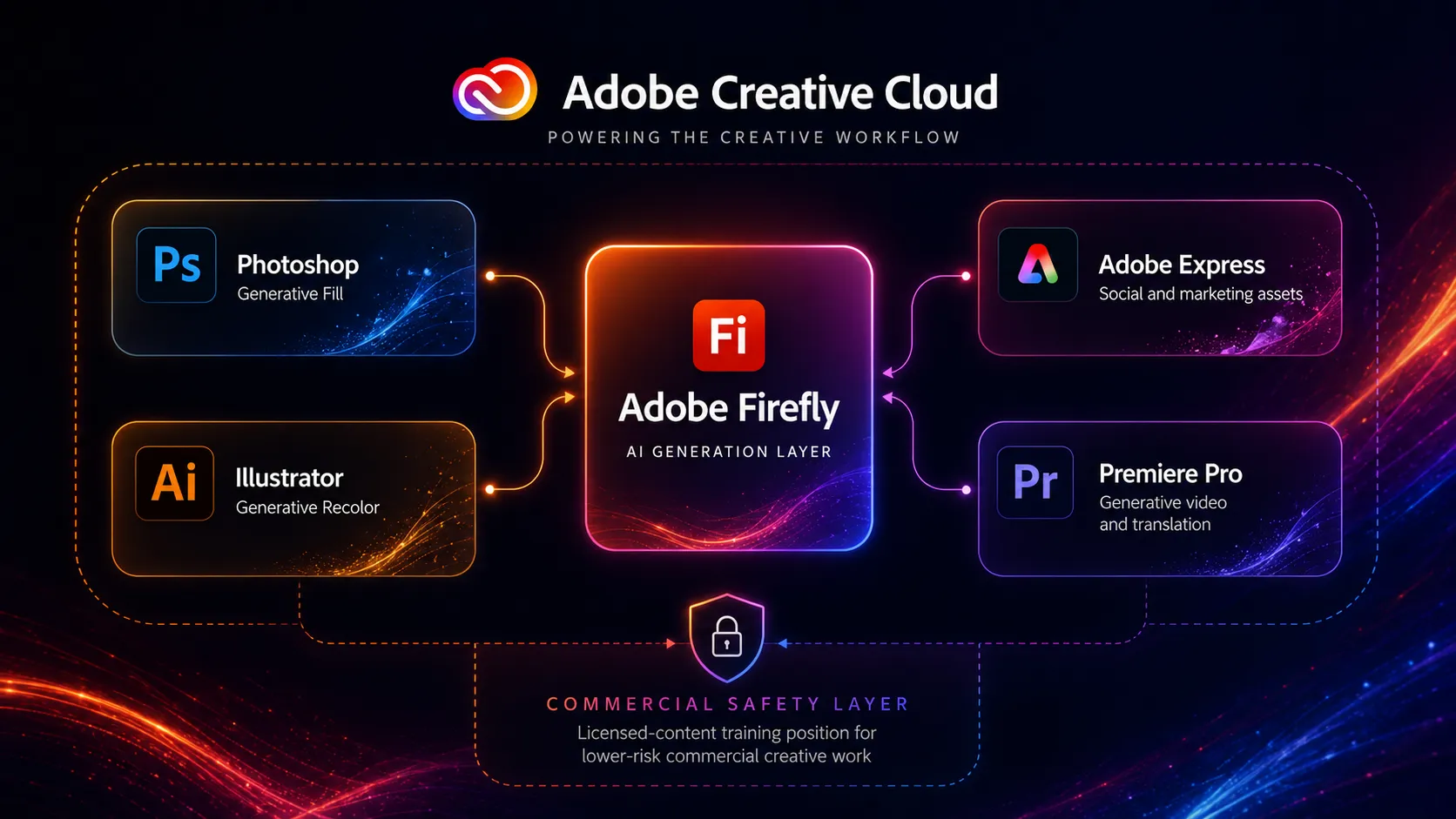
Breadth of Creative Cloud integration. Beyond Photoshop, Firefly powers Generative Recolor in Illustrator, AI text effects in Express, Generative Extend in Premiere Pro, and Scene to Image in the web app. For teams that have invested in the Adobe suite, this breadth means the learning and credit investment works across multiple production contexts.
Where Adobe Firefly falls short
Image quality outside controlled use cases. For standard product shots, abstract backgrounds, and text effects, Firefly is competitive. For photorealistic human figures, complex compositional scenes, and high-detail artistic styles, community feedback and third-party reviews consistently place Firefly below Midjourney and sometimes below DALL-E 3. This is a real limitation for use cases that depend on human imagery.
The credit system is genuinely confusing. Adobe has restructured credit allocations, plan names, and premium feature gating multiple times in under two years. Users on paid Creative Cloud plans have been surprised to find that video generation requires a separate Firefly subscription. Users on Firefly plans have found they cannot purchase top-up credits when they run out mid-project. This is not a minor UX issue — it is a recurring trust problem that appears in community forums with significant frequency.
Standalone value is limited for non-Adobe users. If you are not in the Adobe ecosystem, Firefly Standard at $9.99/mo competes directly with Midjourney Basic at a similar price point. The output quality comparison does not favor Firefly. The commercial safety advantage is real but only valuable to buyers for whom that risk is already an identified concern.
Video generation is early-stage. The Firefly Video Model is a new capability and should be evaluated accordingly. Current reports indicate inconsistent prompt adherence, limited editing capabilities during generation, and credit consumption that frustrates users when results are unusable. It belongs in a test-and-evaluate phase, not a production workflow.
Pricing judgment
Based on the current public pricing page as of May 2026, Firefly’s standalone plans are: Standard at $9.99/mo (2,000 monthly credits), Pro at $19.99/mo (4,000 credits plus Adobe Express Premium and web Photoshop access), Pro Plus at $49.99/mo regular (10,000 credits), and Premium at $199.99/mo regular (50,000 credits). Promotional pricing is active on Pro Plus and Premium but is explicitly time-limited and subject to change.
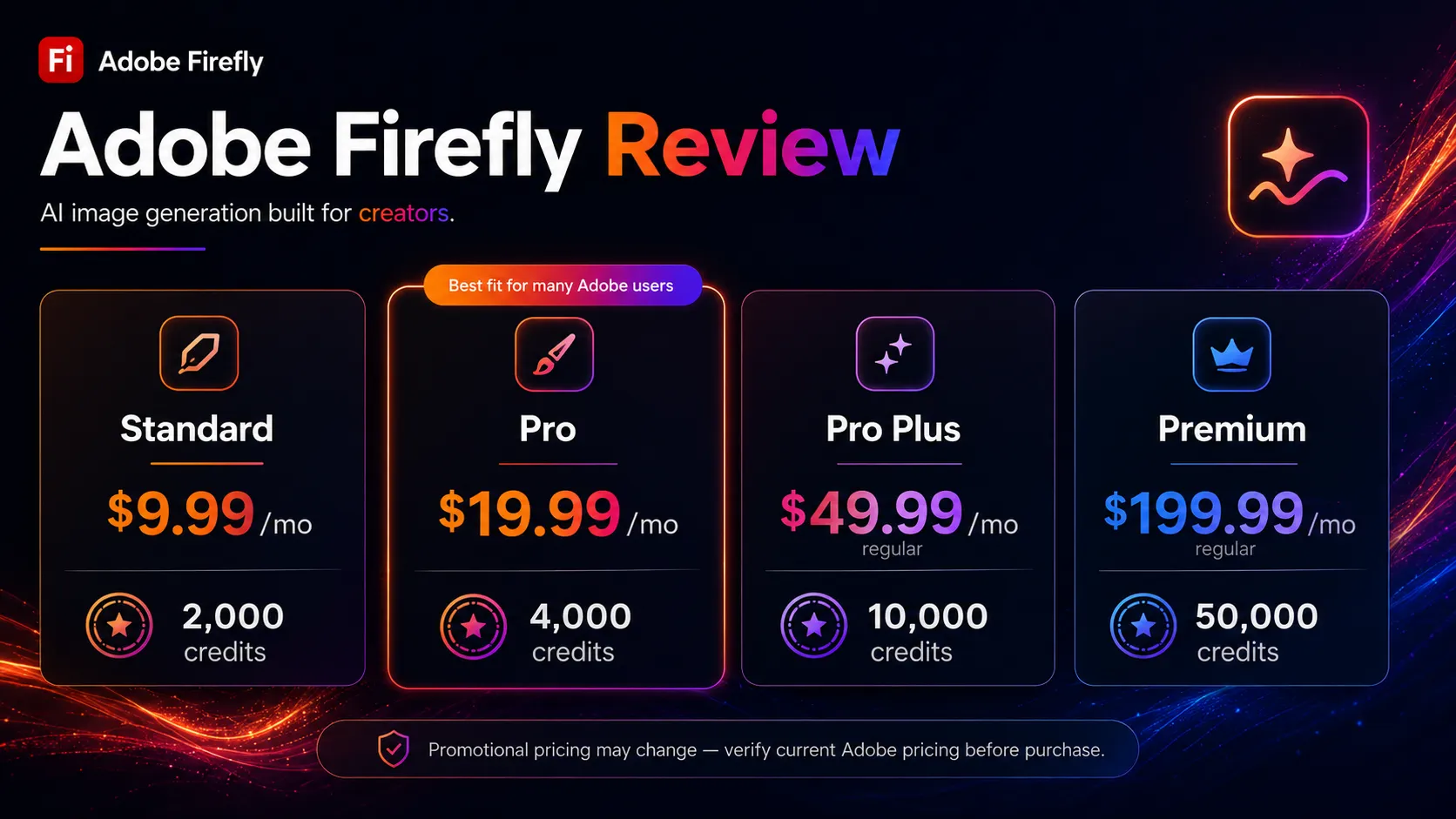
The question I would ask before paying for a standalone Firefly plan is: am I paying for output quality or for commercial safety? If the answer is output quality, the budget is likely better spent on Midjourney. If the answer is commercial safety and you do not have a Creative Cloud subscription, Firefly Standard or Pro becomes defensible.
For Creative Cloud Pro subscribers, the math is simpler. Unlimited standard image and vector generation is already included. The practical decision is whether your video and audio generation volume justifies additional premium credits.
Stay free or hold off if you are not yet sure whether Firefly fits your workflow. The free tier’s 25 monthly credits are enough to test core features but not to evaluate the tool for regular production use. Verify current pricing on the official Adobe Firefly plans page before purchasing.
Best alternatives to compare
Midjourney is the direct quality alternative. It consistently produces stronger artistic and photorealistic outputs for most use cases and is well-suited to creative exploration and concept art. The tradeoff is that Midjourney provides no commercial licensing guarantees — its terms require users to review usage rights themselves, and enterprise legal teams often apply more scrutiny to its outputs than to Firefly’s.
DALL-E 3 via ChatGPT Plus is the better option if prompt adherence and simple flat-rate pricing matter more than ecosystem integration or commercial safety guarantees. At $20/mo for ChatGPT Plus, DALL-E 3 access is bundled with a general AI assistant — which is a strong value proposition for users who would use both anyway.
Canva AI is the relevant comparison for marketing and social media teams that do not need full Adobe app integration. Canva’s AI image generation covers similar commercial use cases at a lower effective price point and within a publishing-ready environment. Teams not invested in Photoshop or Illustrator often find Canva AI a more practical daily driver.
Final decision
Add Adobe Firefly to your stack if you are an Adobe Creative Cloud Pro or All Apps subscriber who has not yet adopted its AI features — Generative Fill in particular — or if you are producing commercial creative assets at an agency or studio where IP clearance is an active workflow requirement.
Compare Midjourney or DALL-E 3 first if you are primarily evaluating AI image generators on output quality, you have no existing Adobe subscription, or video generation is a central use case (where Firefly’s current capabilities are still maturing).
Skip Adobe Firefly for now if you work outside the Adobe ecosystem entirely, your primary need is photorealistic human imagery, or you find the generative credit system too complex to budget reliably for your current workload.
Frequently asked questions
Is Adobe Firefly free to use?
Is Adobe Firefly commercially safe to use?
How does the Adobe Firefly credit system work?
Do I need a Creative Cloud subscription to use Adobe Firefly?
How does Adobe Firefly compare to Midjourney?
What happens when I run out of Firefly generative credits?
Where Adobe Firefly fits in a stack
Commercial-safe AI image generation layer, embedded inside the Adobe Creative Cloud suite
Does not replace
- – Full creative direction and brand strategy
- – Design review and approval workflows
- – Publishing and asset management pipelines
- – High-fidelity human portrait photography
- – Midjourney or DALL-E 3 for pure output quality comparisons outside the Adobe ecosystem
Head-to-head comparisons
Top alternatives to consider
If Adobe Firefly is not the right fit, these are the most common alternatives.

Midjourney consistently outperforms Firefly on visual quality and creative output variety, particularly for photorealistic and artistic image styles. The tradeoff is that Midjourney provides no commercial licensing guarantees and requires separate legal review.
DALL-E 3 via ChatGPT Plus gives strong prompt adherence and image quality for a flat monthly fee without a credit system. Better standalone value if you are not in the Adobe ecosystem.

Canva AI covers image generation, design, and publishing in one tool at a lower effective price point for marketing teams not invested in professional Adobe apps.
Review methodology
Editorial review based on public product documentation, official Adobe help pages, pricing page research, community forum analysis, and third-party coverage. No hands-on testing was conducted.
This review is based entirely on public product information, official Adobe documentation, community feedback patterns, and current pricing page data as of May 2026. We did not test Firefly directly or generate any outputs.
Not covered: Hands-on output quality testing · Enterprise or Teams plan terms · API access capabilities · Firefly Video Model detailed evaluation · Non-US regional pricing verification