 v
v v0 by Vercel
AI app builder for React, Next.js, and Vercel-based prototypes
Quick answer
Choose v0 when you want to move from idea to working React or Next.js prototype quickly, especially if your team already uses Vercel. Treat it as a fast app-building and UI generation layer, not as a replacement for code review, architecture, testing, or production security checks.
v0 can accelerate prototyping, but generated code still needs review before production. Pricing is credit-based, plan limits can affect heavy usage, and Vercel deployment or hosting costs may be separate from v0 usage. Verify the current pricing page before relying on it for a team workflow.
What is v0 by Vercel?
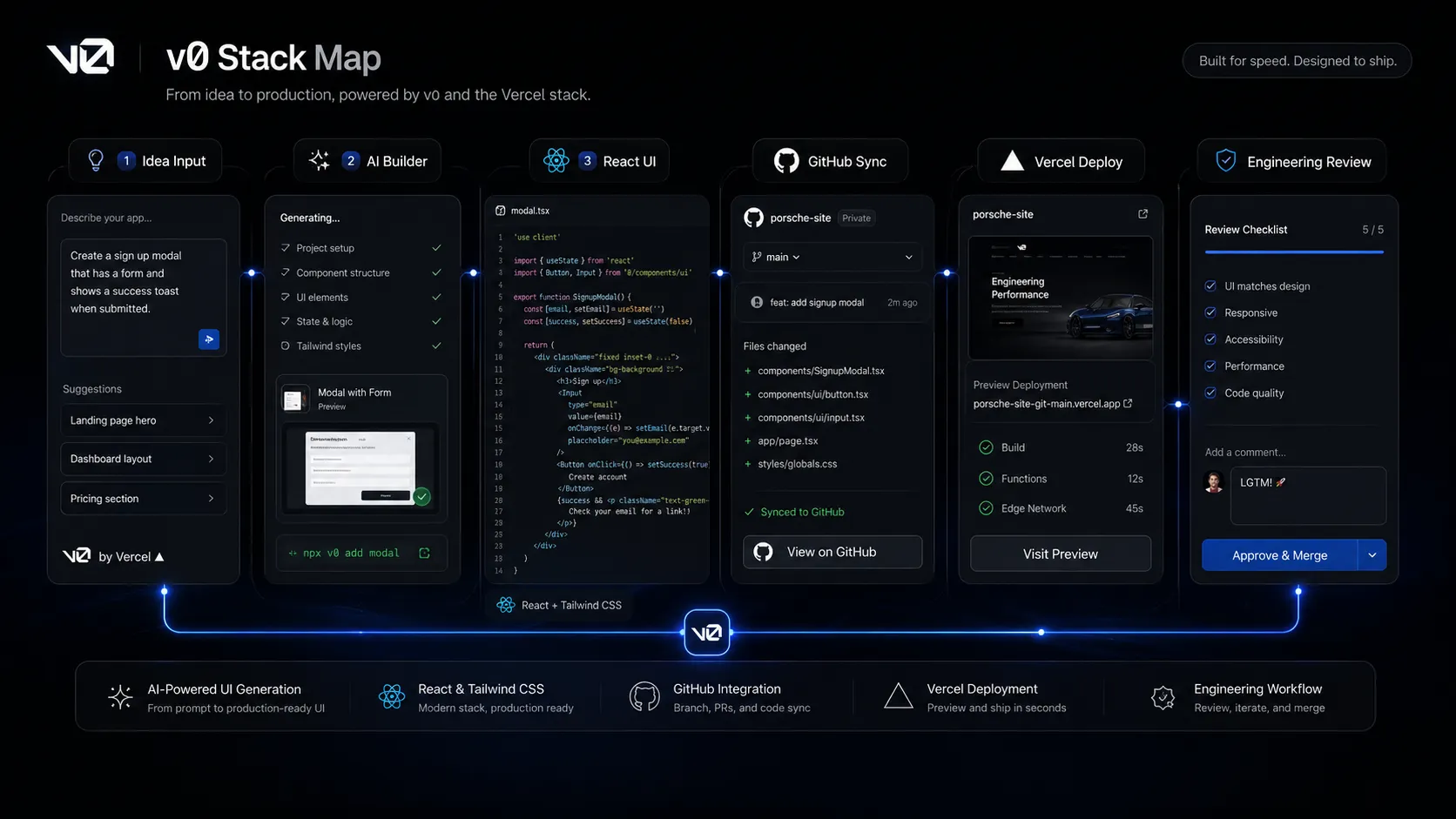
v0 is Vercel's AI agent for creating real code, full-stack apps, interfaces, prototypes, and agents from prompts. Current official docs describe workflows for generating high-fidelity UIs, connecting backend services, deploying with Vercel, syncing with GitHub, editing visually, and fixing errors with diagnostics. In a practical developer stack, v0 sits between product idea, frontend scaffold, GitHub review, and deployment.
Who v0 by Vercel fits best
Best for developers, founders, designers, and product teams who want fast React-based prototypes with a realistic path to Vercel deployment.
- ✓Frontend developers building React components, dashboards, landing pages, and app scaffolds
- ✓Product managers validating ideas with live prototypes before sending work to engineering
- ✓Designers turning screenshots, mockups, or Figma-style direction into interactive interfaces
- ✓Founders who want to test MVP screens and simple workflows quickly
Not ideal for
- •Teams that need non-React output as the primary deliverable
- •Buyers who want a no-review path from AI-generated code to production
- •Backend-heavy products where data modeling, security, and infrastructure decisions dominate
- •Enterprises that need SSO, training opt-out, and support SLAs but have not reviewed the Business or Enterprise terms
Main use cases
React UI prototyping
v0 is useful for turning prompts, screenshots, or rough product ideas into React-based interfaces that a team can preview, adjust, and hand off for review.
Landing pages and dashboards
Teams can generate marketing pages, dashboards, forms, and admin-style layouts quickly, then refine copy, structure, and styling before moving the code into a real project.
Founder MVP exploration
Founders can use v0 to create early product screens and simple app flows before investing more engineering time. It is best used for validation, not as an unchecked production shortcut.
Vercel deployment workflow
v0 connects naturally with Vercel deployment, GitHub sync, and modern frontend tooling, making it useful when the team already wants a Vercel-centered development workflow.
Where v0 by Vercel fits in the AI stack
v0 belongs in the prototyping and frontend generation layer of a developer productivity stack. It can replace some blank-page UI scaffolding, quick prototype wiring, landing page assembly, and early app experiments. It does not replace GitHub review, tests, product architecture, secure backend design, monitoring, or deployment governance.
Stack role
AI app prototyping and React UI generation layer
Best paired with
GitHub, Vercel, Cursor
Strongest layer
React and Next.js UI prototyping + Product validation
| Stack layer | Fit | What to know |
|---|---|---|
| React and Next.js UI prototyping | strong | v0 is strongest when the output target is a modern web UI with React, Next.js, Tailwind, shadcn/ui, and Vercel deployment nearby. |
| Product validation | strong | It helps product teams and founders create working prototypes quickly enough to clarify user flows and stakeholder feedback. |
| IDE-level codebase editing | medium | v0 can generate and revise code, but tools like Cursor are stronger once the project has a larger existing codebase and complex refactoring needs. |
| Backend-heavy production engineering | medium | Official docs mention backend connections and full-stack apps, but serious production systems still need architecture, security, and review outside the AI agent. |
Best stack combinations
Founder building an MVP prototype
v0 + vercel + github + chatgpt
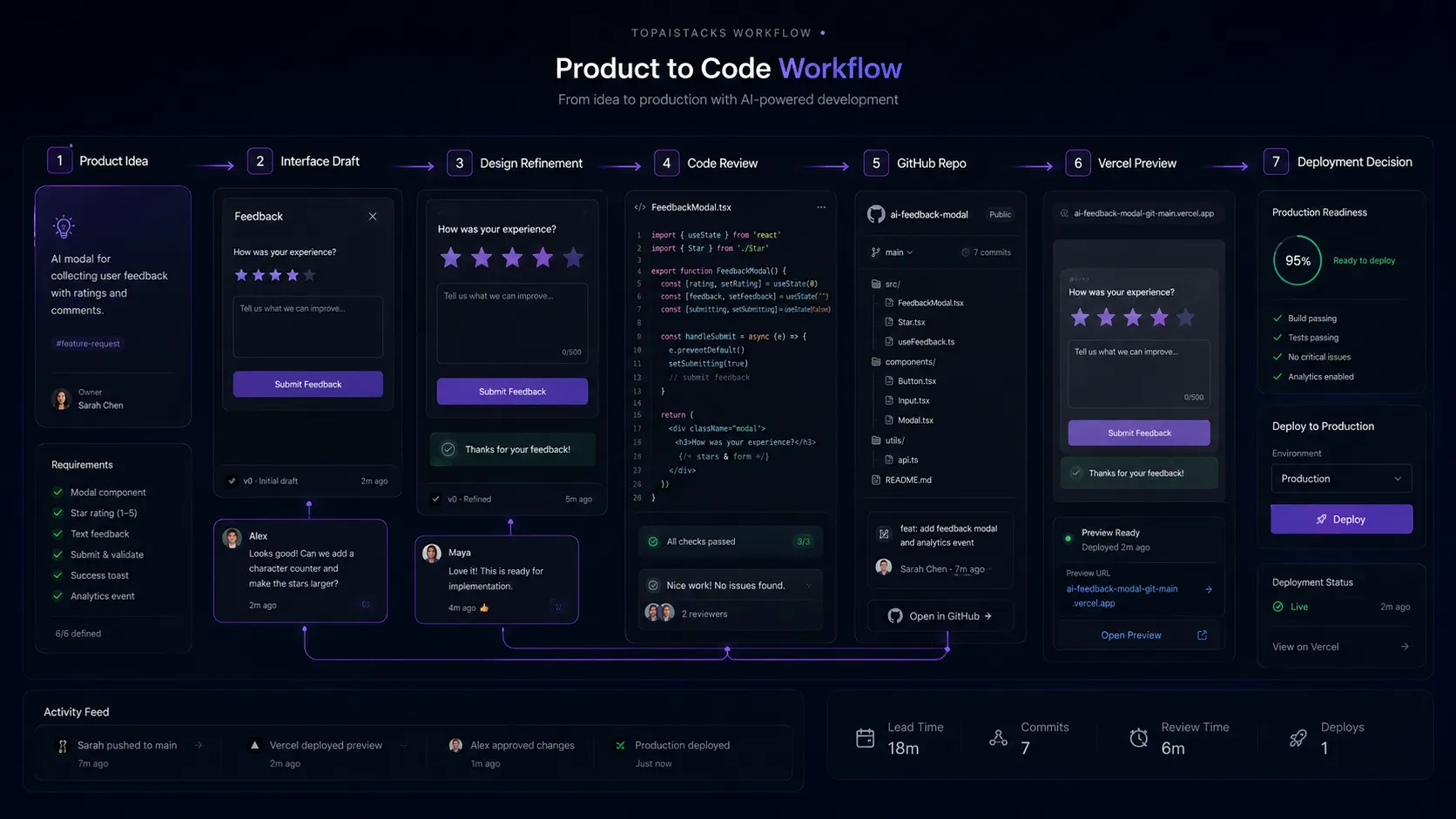
Use ChatGPT to refine the idea, v0 to generate the first app screens, Vercel for preview deployment, and GitHub for version control before the prototype becomes a real product.
Frontend developer testing UI directions
v0 + cursor + github + vercel
Use v0 for initial components and layouts, Cursor for deeper editing in the codebase, GitHub for review, and Vercel for previews and production deployment.
Product team validating a feature
v0 + linear + figma + slack
Use Linear to define the problem, v0 to create a working prototype, Figma for design feedback, and Slack for quick stakeholder review.
What v0 by Vercel can replace
- · Some blank-page React component scaffolding
- · Some early landing page and dashboard layout work
- · Some clickable prototype building
- · Some simple app experimentation before a formal engineering ticket
What it still needs
- · github: Version control, review, branching, and production approval
- · testing: Unit, integration, accessibility, and security validation
- · backend-architecture: Database design, API design, auth, permissions, and data protection
- · monitoring: Production observability, error tracking, and performance review
Add it to your stack if
- · You build React, Next.js, or Vercel-based products and need faster UI scaffolding.
- · Your team wants working prototypes instead of static mockups.
- · You have a developer review path before generated code reaches production.
Skip it if
- · Your primary stack is not compatible with the type of code v0 generates.
- · You need backend architecture, security, and compliance solved without engineering input.
- · Your budget cannot handle credit-based usage or possible Vercel platform costs.
Choose your next step
Pricing
→Check current credit rules, Team and Business pricing, model token pricing, and possible Vercel platform costs.
Alternatives
→Compare v0 with Cursor, GitHub Copilot, Bolt, Replit, and other AI coding workflows.
Compare with Cursor
→Prompt-to-prototype app generation compared with IDE-based AI coding and refactoring.
Stack fit
→See how v0 fits with GitHub, Vercel, AI coding editors, issue tracking, and deployment workflows.
Review
→Read the full editorial review before making v0 part of a production development workflow.
Pricing summary
This is a profile-level summary. Use the pricing page for deeper plan checks.
Starting path
Free plan, paid plans from $30 per user per month
Free plan
Yes
Free trial
No
v0 currently lists a Free plan at $0 per month with included monthly credits, Vercel deployment, Design Mode, GitHub sync, and a daily message limit. The Team plan is listed at $30 per user per month, Business at $100 per user per month, and Enterprise as custom pricing. The pricing page also lists model token pricing for v0 Mini, v0 Pro, v0 Max, and v0 Max Fast. Buyers should confirm credit usage, on-demand credits, Vercel account billing, and deployment costs before using v0 as a team standard.
Best starting path: The Free plan is the safest way to test UI generation and small prototypes. Team makes more sense when collaboration, shared billing, and higher included usage matter. Business or Enterprise should be considered when training opt-out, SSO, role-based access control, support SLAs, and organization-level governance are required.
Related stack page
Developer Productivity Stack
→Role: Prompt-to-prototype and frontend generation layer
v0 fits the developer productivity stack when a team wants to accelerate early frontend work, generate prototypes, and move quickly into GitHub and Vercel workflows. It is most valuable when the team can review and refine generated code.
Developer Productivity Stack
→Role: MVP screen and prototype builder
v0 can help startups test product concepts quickly by turning prompts into live interfaces. It should still be paired with validation, code review, and careful production planning.
Top alternatives
See all →Direct alternatives

Cursor is stronger as an AI code editor for working inside an existing codebase, while v0 is stronger for prompt-to-prototype and UI generation.

GitHub Copilot is better for inline coding assistance inside IDEs and GitHub workflows, while v0 focuses more on generating app screens and prototypes.
Adjacent tools in the same stack

Claude can help with requirements, code explanation, and reasoning, but it does not provide the same built-in app preview and Vercel-centered build flow.

ChatGPT is useful for product thinking, code snippets, and debugging help, but v0 is more purpose-built for generating and previewing app interfaces.
Related comparisons
FAQ
What is v0 by Vercel best for?
v0 is best for quickly generating React and Next.js interfaces, live prototypes, dashboards, landing pages, and early app scaffolds from prompts, screenshots, and product ideas. It works best when a developer reviews the output before production.
Does v0 have a free plan?
Yes. The current v0 pricing page lists a Free plan at $0 per month with included monthly credits, Vercel deployment, Design Mode, GitHub sync, and a daily message limit.
Is v0 the same as Vercel hosting?
No. v0 is the AI app-building agent and interface. Vercel is the broader deployment and cloud platform. v0 can deploy apps to Vercel, but buyers should check whether hosting, domains, bandwidth, or other platform usage creates separate costs.
Is v0 better than Cursor?
v0 is usually better for prompt-to-prototype UI generation and quick app previews. Cursor is usually better once you are working inside a larger existing codebase and need deep editing, navigation, and refactoring.
Can non-developers use v0 safely?
Non-developers can use v0 to create prototypes and understand product ideas, but production deployment should still involve technical review. Generated code can contain logic, security, accessibility, or data-handling issues that need human inspection.
How TopAIStacks evaluates v0 by Vercel
Verified v0 positioning, capabilities, docs, and pricing against the official v0 homepage, pricing page, and docs. Public review ratings from G2, Capterra, Trustpilot, Product Hunt, App Store, or Chrome Web Store were not found clearly enough to use as a top-level public rating, so the public rating fields are set to zero while the directory card uses an editorial score.
Last checked: May 2026 · Source confidence: high