Zapier vs Make vs n8n: Automation Tool Decision Guide
A three-way decision guide for choosing Zapier, Make, or n8n based on ease of use, automation complexity, pricing at scale, integrations, and self-hosting needs.
On this page
Three tools dominate workflow automation. They serve different use cases and have genuinely different cost profiles. Choosing the wrong one costs time and money. This guide is a three-way decision framework for Zapier, Make, and n8n.
For a stricter two-tool head-to-head, see the dedicated Zapier vs Make comparison.
The one-paragraph summary
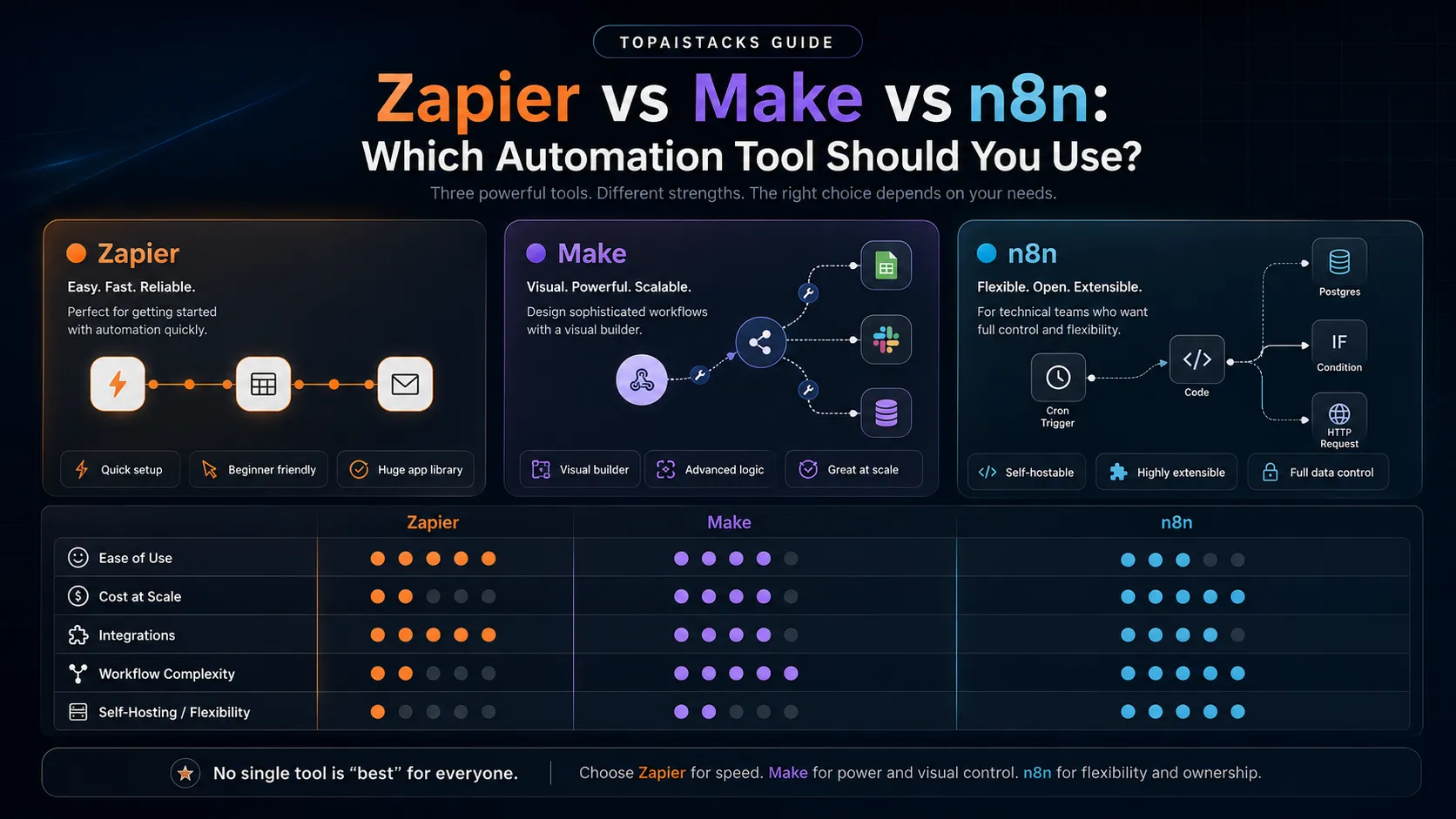
Zapier is the easiest to use and has the most app integrations — use it for simple automations when you don’t want to think about infrastructure. Make (formerly Integromat) handles complex logic and is significantly cheaper at volume — use it when Zapier’s pricing or simplicity becomes a ceiling. n8n is open-source and self-hostable — use it if you’re technical, have data privacy needs, or run very high-volume automations you don’t want to pay per-operation.
Pricing reality
This is where the differences matter most:
| Zapier | Make | n8n | |
|---|---|---|---|
| Free | 100 tasks/mo | 1,000 ops/mo | Unlimited (self-hosted) |
| Paid entry | $29/mo (750 tasks) | $9/mo (10,000 ops) | $24/mo (cloud) |
| Mid-tier | $73/mo (2,000 tasks) | $16/mo (10,000 ops) | $24/mo |
| Volume cost | High — per task | Low — per operation | Free (self-hosted) |
The math at scale: An automation that runs 10,000 times per month with 3 steps = 30,000 Zapier tasks ($73–299/mo) vs 30,000 Make operations ($9/mo). Make is 8–30x cheaper at volume.
n8n self-hosted is free. The only cost is your server (typically $5–20/mo on a VPS).
Integrations
| Zapier | Make | n8n | |
|---|---|---|---|
| App integrations | 6,000+ | ~1,500 | 400+ native |
| Custom HTTP requests | Yes | Yes | Yes — very flexible |
| Long-tail apps | Strong | Weaker | Community nodes |
If you need to connect to a niche app only Zapier supports, Zapier wins by default. For most common apps (Slack, Google, Airtable, Notion, Stripe, etc.), all three have you covered.
Complexity ceiling
This is the real differentiator for non-trivial automations:
Zapier:
- Linear trigger → action chains
- Branching with Paths (paid)
- Simple data formatting
- Best for: “When X happens, do Y (and maybe Z)”
Make:
- Visual canvas with branching, loops, and iterators
- Advanced data mapping and transformation
- Error handling built into the interface
- Best for: “Process each item in this list differently based on these conditions”
n8n:
- Code nodes (JavaScript/Python) for any custom logic
- Self-hosted = full data control
- Complex branching and sub-workflows
- Best for: developers who want full control
Who should use each
Use Zapier if:
- You’re non-technical and want the simplest setup
- You need a niche app that only Zapier supports
- Your automations are simple (2–4 steps, linear flow)
- You run fewer than 1,000 tasks/month and simplicity is worth the cost premium
- You need enterprise compliance (SSO, audit logs, advanced security)
Use Make if:
- You have complex logic needs (loops, iterators, conditional branching)
- You run high-volume automations and Zapier’s task-based pricing is painful
- You’re comfortable with a visual node editor (it has a learning curve)
- You process and transform data as part of your workflow
- You’re migrating from Zapier due to cost
Use n8n if:
- You’re a developer comfortable with self-hosting
- You have data privacy or compliance requirements (everything stays on your server)
- You run very high-volume workflows where even Make’s cost is significant
- You want code-level control (JavaScript/Python nodes)
- You’re building internal tooling for a company rather than quick personal automations
The migration path
Most people follow this progression:
- Start with Zapier — lowest friction, get automations running
- Hit Zapier’s pricing ceiling — move specific high-volume workflows to Make
- Hit Make’s complexity ceiling or want data control — move core infrastructure to n8n
You don’t need to choose one forever. Many teams run Zapier for quick integrations, Make for complex data workflows, and n8n for internal tooling.
Common automations and which tool to use
| Automation | Best tool | Why |
|---|---|---|
| New Gmail → Slack notification | Zapier | Simple, 2-step |
| Process each Airtable row differently | Make | Loop + conditional logic |
| Sync CRM data across 3 platforms | Make or n8n | Data transformation |
| AI-triggered content publishing | n8n or Make | Complex, multi-step |
| Meeting notes → CRM update | Zapier | Simple, Fireflies has Zapier native |
| Self-hosted webhook handler | n8n | Code control, privacy |
| Social media auto-posting | Zapier or Make | Both support main platforms |
Starting recommendation
If you’re new to automation: start with Zapier’s free tier. Build 2–3 automations. If you hit the 100-task/month limit or want more complex logic, evaluate Make. If you’re technical and cost-sensitive, evaluate n8n from the start.
See our Zapier vs Make comparison for a more detailed head-to-head.


