 M
M Make
Visual AI automation platform for building workflows, agents, and app connections
Quick answer
Choose Make when your automation workflow needs visual control, routers, filters, data mapping, API work, AI agents, and more flexible scenario design than a simple trigger-action tool. Choose Zapier first if ease of setup matters more than logic depth, and consider n8n if self-hosting or developer ownership is the main requirement.
Make can become powerful quickly, but buyers should plan credit usage, scenario complexity, execution intervals, error handling, app permissions, and ownership rules before relying on it for important workflows. The platform is more flexible than many beginner automation tools, but that also means it requires more process thinking.
What is Make?
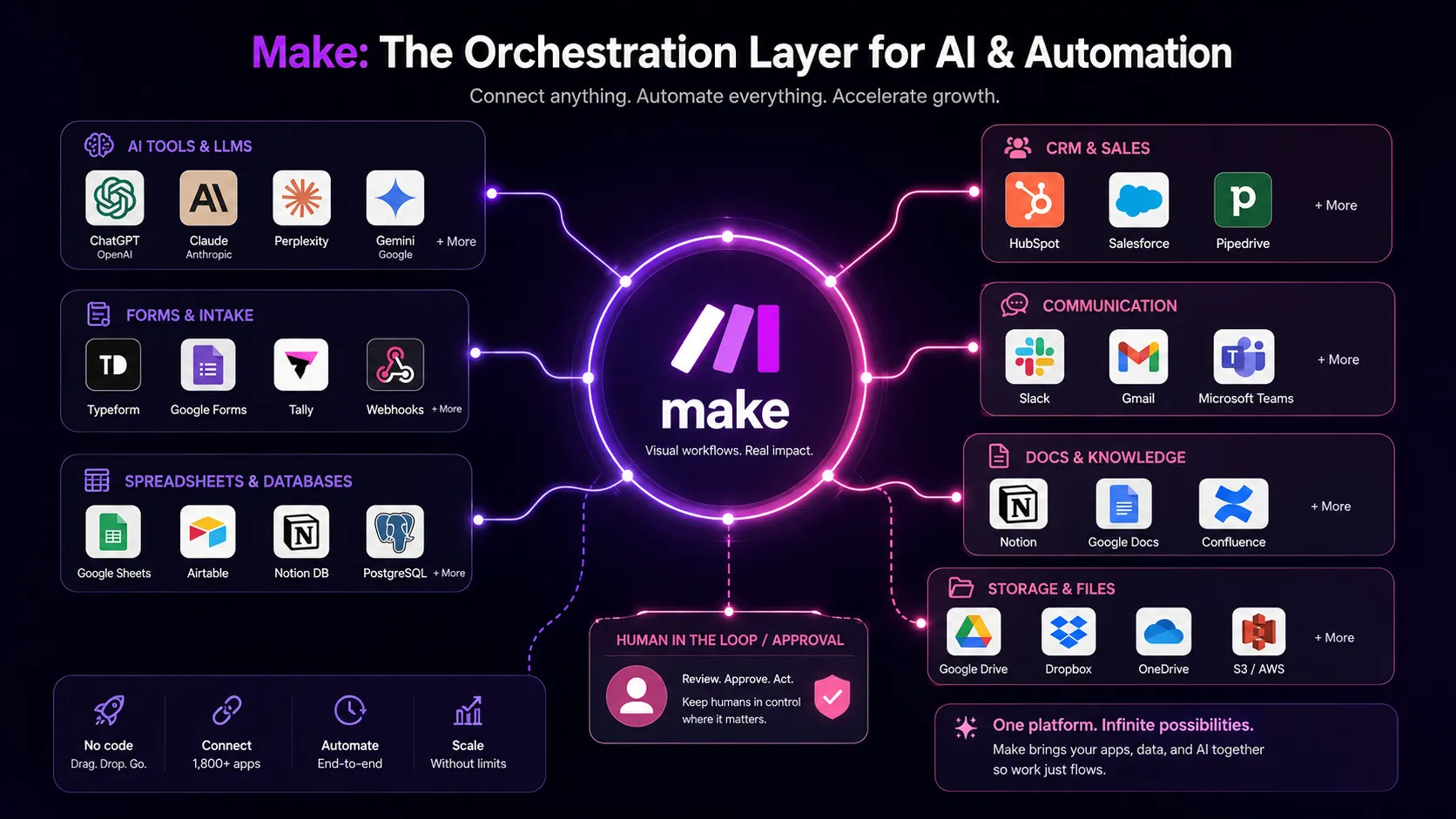
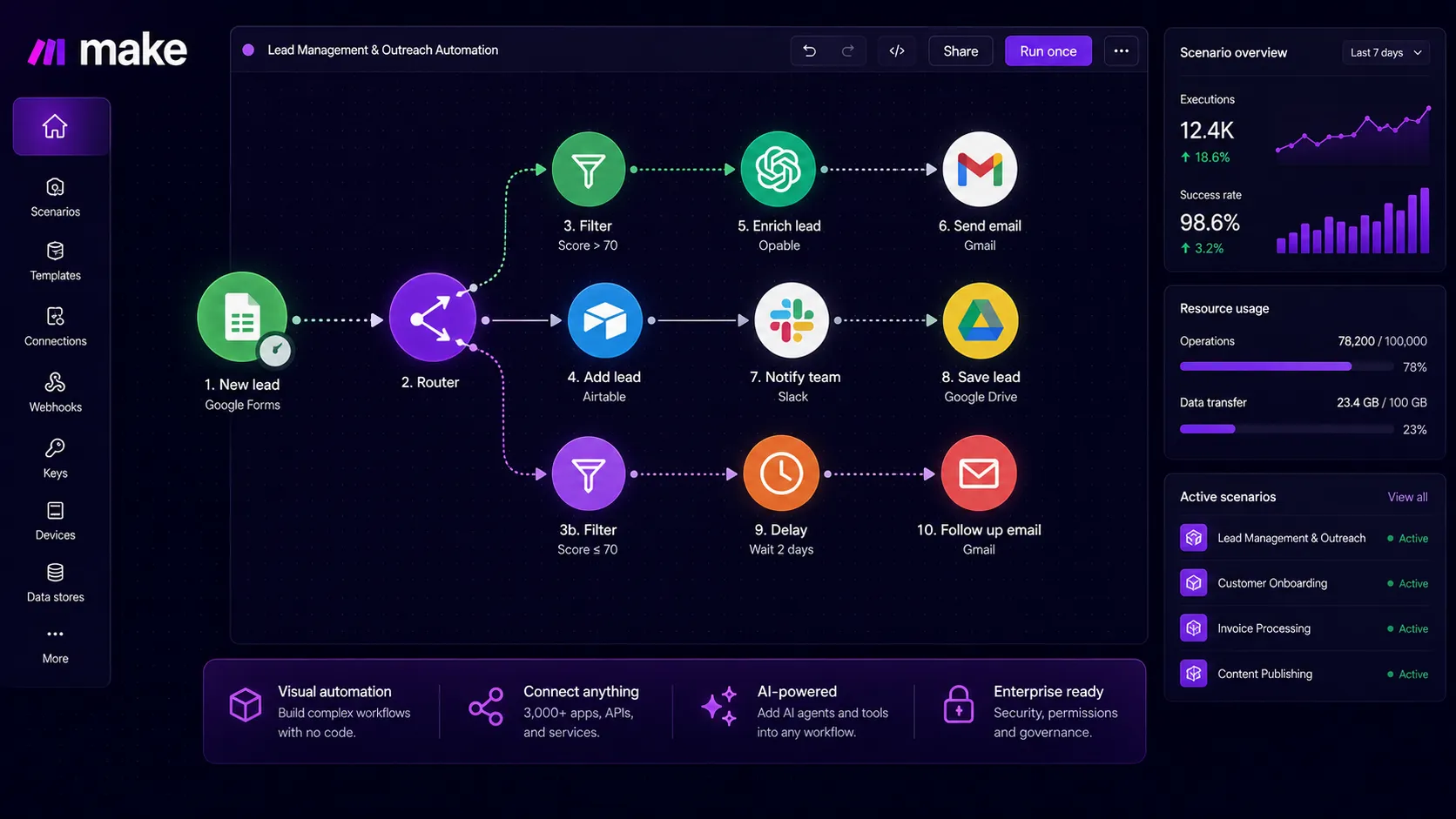
Make is a visual AI automation platform for building workflows across apps, data sources, APIs, and AI systems. Automations are built as scenarios, where each module action counts as a credit. The current product positioning includes app automation, Make AI Agents, Make MCP Server, AI Toolkit, AI Content Extractor, AI Web Search beta, Make Code App, and governance features for larger automation landscapes.
Who Make fits best
Best for operators who want visual automation depth without moving straight into a developer-only workflow tool.
- ✓Operations teams that need visual workflow logic, filters, routers, and data mapping
- ✓Agencies building automation scenarios for clients across many SaaS apps
- ✓Solopreneurs connecting AI tools, spreadsheets, CRMs, forms, and notification systems
- ✓Technical operators who want API access, custom variables, and more flexible automation structure
Not ideal for
- •Users who want the simplest automation setup and do not want to think through scenario logic
- •Teams with unclear ownership for app permissions, errors, and workflow maintenance
- •Organizations that need self-hosted automation by default
- •Very basic workflows where a simpler app connector would be faster to manage
Main use cases
Multi-step AI automation workflows
Make fits workflows where AI outputs need to be routed through spreadsheets, CRMs, Slack, Notion, email, databases, and APIs. It is useful when the process needs logic, branching, data mapping, or AI agents rather than a simple one-step automation.
Operations and data transformation
Make is strong for operations teams that need to clean, map, transform, enrich, and route data between systems. It still needs clear source fields, permissions, and exception handling before workflows become reliable.
Agency client automation
Agencies can use Make to build repeatable client automations for lead routing, reporting, onboarding, content operations, and notifications. The buyer decision is usually whether Make's control is worth the extra setup effort compared with Zapier.
AI agents and app actions
Make now positions AI Agents, MCP, AI Toolkit, and AI Web Search as parts of its automation platform. Buyers should test these features with real business workflows and verify credit usage before making them central to the stack.
Where Make fits in the AI stack
Make sits between AI tools, business apps, databases, spreadsheets, CRMs, APIs, and internal operations. It replaces some repetitive handoffs and gives teams visual control over scenario logic. It does not replace clean data, process design, security review, human approval points, or monitoring.
Stack role
Visual workflow automation connector layer
Best paired with
ChatGPT, Google Sheets, Airtable
Strongest layer
Visual workflow automation + AI orchestration
| Stack layer | Fit | What to know |
|---|---|---|
| Visual workflow automation | strong | Make is a strong fit when teams need visual scenario logic, routers, filters, API steps, and data mapping across apps. |
| AI orchestration | strong | Make now includes AI Agents, MCP, AI Toolkit, AI Content Extractor, and AI Web Search beta as part of its automation platform. |
| Beginner one-step automation | medium | Make can handle simple workflows, but Zapier may be easier for users who want the fastest beginner setup. |
| Self-hosted automation ownership | weak | Make is a SaaS platform, so teams that need self-hosted automation should compare n8n or other open-source options. |
Best stack combinations
Solopreneur automation
make + chatgpt + google-sheets + notion
Use ChatGPT for structured outputs, Make for routing and logic, Google Sheets for lightweight records, and Notion for content or task tracking.
Agency operations
make + airtable + slack + google-drive
Use Airtable as the operations database, Make for scenario logic, Slack for approvals and alerts, and Google Drive for client files.
AI operations workflow
make + openai + hubspot + slack
Use Make to connect AI outputs with CRM updates, lead routing, alerting, and business process steps that need controlled logic.
What Make can replace
- · Some repetitive app-to-app handoffs
- · Some spreadsheet updates and record routing
- · Some workflow notification chains
- · Some API connection and data transformation work
What it still needs
- · process-map: Clear trigger, action, owner, approval, and exception rules before automation is built
- · clean-data: Reliable input fields, app permissions, naming conventions, and deduplication rules
- · error-monitoring: A plan for failed runs, broken connections, retries, and data cleanup
- · human-approval: Manual review points before automating sensitive customer, finance, or publishing actions
Add it to your stack if
- · You need visual logic, branching, filters, routers, and data mapping across multiple apps.
- · You want to connect AI tools to real business actions without writing full custom integrations.
- · Your team can plan credit usage, app permissions, and workflow monitoring.
Skip it if
- · You want the simplest possible automation builder for one-step workflows.
- · You need self-hosted infrastructure and developer-first workflow ownership.
- · Your process is too unclear to automate safely.
Choose your next step
Pricing
→Check Free, Make Plan, Company, monthly credits, annual billing, scenario limits, API access, AI features, and enterprise controls.
Alternatives
→Compare Make with Zapier, n8n, Activepieces, and other workflow automation platforms.
Compare options
→Use this comparison if you are choosing between Zapier's easier setup and Make's deeper visual workflow control.
Stack fit
→See how Make fits with ChatGPT, Google Sheets, Airtable, Slack, Notion, Zapier, and small-business automation workflows.
Review
→Read the full editorial review before using Make as your main workflow automation layer.
Pricing summary
This is a profile-level summary. Use the pricing page for deeper plan checks.
Starting path
Free plan with up to 1,000 credits per month, paid from $9 per month for 5,000 credits
Free plan
Yes
Free trial
No
Make's current pricing page lists Free at $0 with up to 1,000 credits per month, Make Plan at $9 per month for 5,000 credits per month, and Company as custom pricing. The page explains that each module action in a scenario counts as one credit and shows annual billing savings of 15 percent or more. Buyers should verify the selected credit tier, billing interval, execution interval, active scenario limits, API endpoint access, team features, and enterprise controls before checkout.
Best starting path: Start with Free if you are testing the visual builder and a small first scenario. The paid Make Plan is the first realistic option for people running multiple workflows because it unlocks unlimited active scenarios, credit usage flexibility, API endpoint access, custom variables, priority execution, execution log search, teams, roles, and enterprise apps. Company is the safer route for critical business processes, advanced security, overage protection, and enterprise support.
Related stack page
Solopreneur Stack
→Role: Visual automation layer for connecting AI, sheets, forms, email, and task tools
Make fits a solopreneur stack when the user needs more control than a basic connector but still wants to avoid full custom development. It is especially useful for content systems, lead intake, reporting, and AI-assisted operations.
AI Automation Stack
→Role: AI orchestration, app actions, and scenario logic layer
Make belongs in an AI automation stack when AI prompts, tools, databases, and business apps need to coordinate through visual scenarios with filters, routers, and action steps.
Top alternatives
See all →Direct alternatives

Zapier is the closest alternative for users who want a simpler, beginner-friendly automation platform with broad app coverage.

n8n is a stronger alternative for teams that want self-hosting, developer control, and deeper ownership of automation infrastructure.

Related comparisons
Zapier vs Make
Beginner-friendly app automation compared with visual scenario control, credits, and advanced logic.
Make vs n8n
SaaS visual automation compared with self-hosted and developer-friendly workflow control.
Zapier vs n8n
Simple SaaS automation compared with open-source automation ownership.
FAQ
What is Make best for?
Make is best for visual workflow automation where teams need routers, filters, data mapping, API calls, AI agents, and multi-step scenarios across apps. It is useful when Zapier feels too simple but custom development feels too heavy.
Does Make have a free plan?
Yes. The current pricing page lists a Free $0 plan with up to 1,000 credits per month, the visual workflow builder, 3,000+ apps, routers, filters, customer support, and a 15-minute minimum interval between scheduled runs.
How much does Make cost?
The current pricing page lists a paid Make Plan from $9 per month for 5,000 credits per month, with Company available on custom pricing. The final cost can change by credit tier and billing interval.
Is Make easier than Zapier?
Make can be more powerful for visual logic, routing, and data transformation, but Zapier is often easier for beginners. Choose Make when workflow control matters more than the fastest basic setup.
Is Make good for AI automation?
Yes, Make is now positioned as a visual AI automation platform with AI Agents, MCP, AI Toolkit, AI Content Extractor, AI Web Search beta, and support for many AI apps. Buyers should test credit usage and real workflow reliability before scaling.
How TopAIStacks evaluates Make
Verified Make against the current official homepage and pricing page, then checked a public G2 result for ratings. The G2 result available during this pass appeared to describe a branding agency named Make rather than the Make.com automation platform, so the top-level public rating is set to 0 instead of importing an unreliable score. The editorial score in directoryCard is separate from public user rating.
Last checked: May 2026 · Source confidence: high