 G
G Grammarly
AI writing assistant for grammar, clarity, and tone
Quick answer
Grammarly is strongest as the final polish layer in a writing stack. It is not the tool that plans strategy, researches facts, or writes a full content system for you, but it is very useful for catching mistakes, tightening tone, and making everyday writing easier to send with confidence.
Grammarly can improve writing polish, but it should not replace human judgment, source checking, brand voice control, or subject expertise. Buyers should verify plan limits, AI prompt allowances, plagiarism and AI detection access, team controls, and education or workplace policy before relying on it for sensitive work.

What is Grammarly?
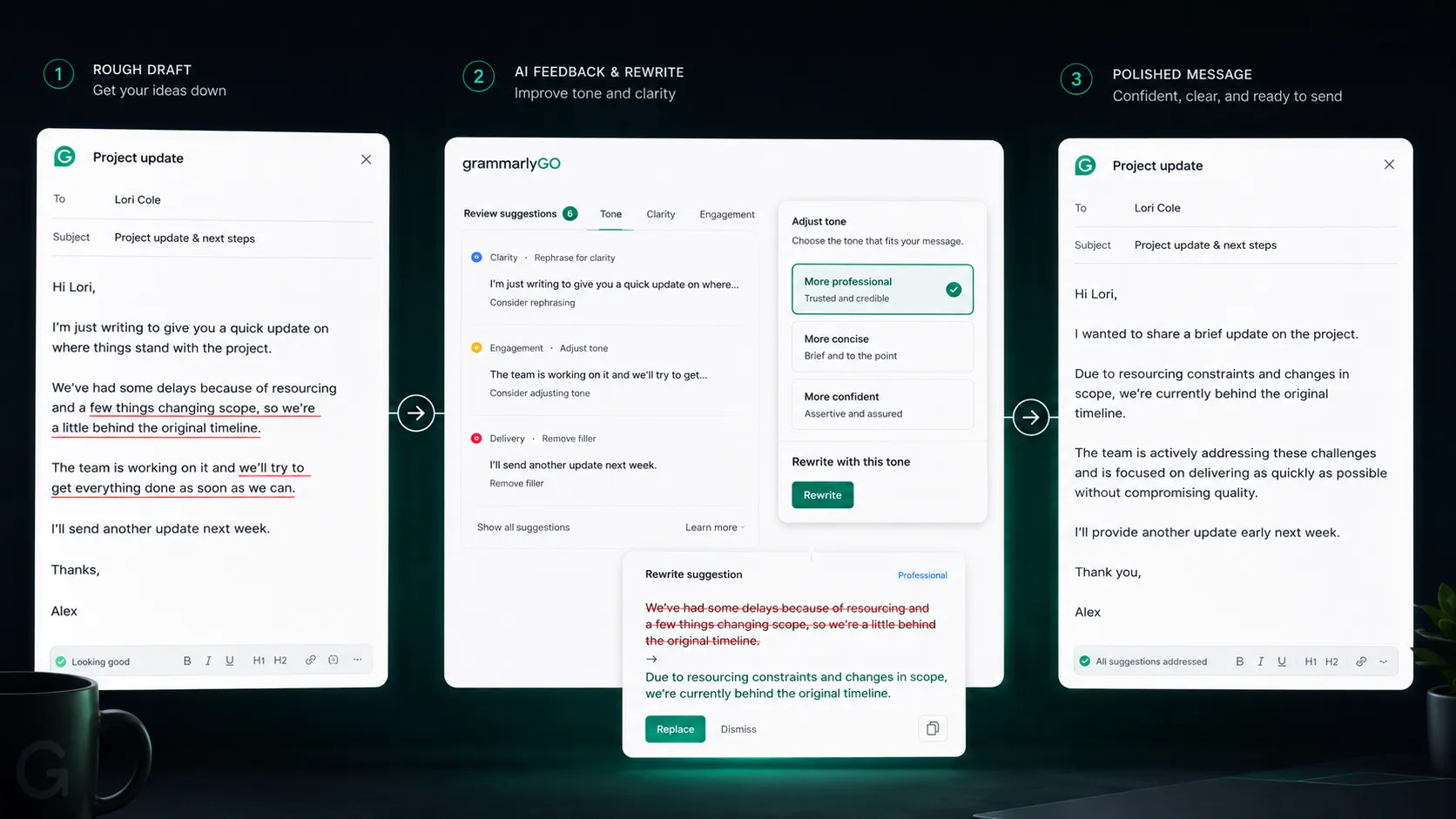
Grammarly is an AI writing assistant focused on grammar, spelling, clarity, tone, rewrites, and communication quality. It works across common writing surfaces such as browsers, documents, email, desktop apps, and mobile workflows. In a stack, it is best understood as the editing and quality-control layer that catches obvious mistakes, improves phrasing, and helps writers make final text clearer before it reaches readers, clients, teachers, or colleagues.
Who Grammarly fits best
Best for writers, students, freelancers, and teams that already have a writing process and want a dependable final editing layer.
- ✓A professional writes emails, proposals, reports, or docs and wants fewer grammar, clarity, and tone mistakes.
- ✓A non-native English writer wants sentence-level support without handing the whole draft to a general AI assistant.
- ✓A student or academic writer needs proofreading support while still following school policy and citation rules.
- ✓A content team needs a consistent final polish layer before publishing or sending client-facing copy.
Not ideal for
- •A marketer needs full SEO briefs, keyword scoring, SERP analysis, and content optimization in one place.
- •A long-form writer wants a tool to build entire articles, content strategy, and editorial calendars.
- •A team cannot allow cloud-based writing assistance for sensitive or regulated text without security review.
- •A writer prefers manual editing and does not want automated tone or rewrite suggestions in the workflow.
Main use cases
Everyday writing polish
Use Grammarly to catch grammar, spelling, punctuation, clarity, and tone issues in emails, messages, documents, and drafts before sending.
Non-native English editing support
Use Grammarly as a fluency and phrasing assistant when the draft is already written but needs cleaner English and more natural sentence-level polish.
Professional communication
Use Grammarly to keep workplace messages, proposals, reports, and client-facing documents clearer and less error-prone.
Final editorial quality check
Use Grammarly after a draft has been researched, outlined, written, and fact-checked. It works best as a final editing layer, not as the only content system.
Where Grammarly fits in the AI stack
Grammarly belongs near the end of the writing workflow. It can reduce grammar mistakes, improve readability, suggest tone changes, and help writers tighten finished drafts. It does not replace research, strategy, SEO tooling, brand governance, or human editing for important claims.
Stack role
Writing polish and communication quality layer
Best paired with
ChatGPT, Claude, Notion
Strongest layer
Grammar and spelling checks + Clarity and tone polish + Workplace communication
| Stack layer | Fit | What to know |
|---|---|---|
| Grammar and spelling checks | strong | Grammarly is built for catching common language mistakes across everyday writing surfaces. |
| Clarity and tone polish | strong | It is especially useful for tightening phrasing and making messages sound more appropriate for the audience. |
| Workplace communication | strong | The product fits email, documents, browser writing, and team communication where small errors can hurt trust. |
| Long-form content generation | medium | Grammarly can assist rewriting and AI prompts, but full content planning and research usually need other tools. |
| SEO research and optimization | weak | It does not replace SERP analysis, keyword data, topical mapping, or dedicated SEO optimization tools. |
Best stack combinations
Freelance writers and editors
grammarly + chatgpt + notion + surfer-seo
Use ChatGPT for draft support, Notion for project organization, Surfer SEO for search-driven content, and Grammarly for the final clarity and grammar pass.
Students and academic writers
grammarly + notion + perplexity + google-docs
Use Perplexity for source discovery, Notion or Google Docs for drafting and notes, and Grammarly for proofreading while following school rules on AI assistance.
Business communication teams
grammarly + google-workspace + slack + notion
Use Grammarly as the polish layer across everyday documents, messages, emails, internal notes, and client-facing communication.
What Grammarly can replace
- · Basic grammar checking
- · Light proofreading passes
- · Some tone and clarity edits
- · Manual typo checks before sending
What it still needs
- · Research source: Verifies facts, data, quotes, and claims before editing starts
- · Human editor: Checks judgment, nuance, voice, sensitive claims, and final approval
- · SEO tool: Handles keyword targeting and search intent when the draft is meant to rank
- · Document or CMS workflow: Stores, reviews, publishes, and tracks final content after editing
Add it to your stack if
- · Your team sends a lot of client-facing emails, docs, reports, posts, or proposals.
- · You already write drafts but need better grammar, tone, and clarity before publishing or sending.
- · Non-native English writing quality is a recurring bottleneck in your workflow.
Skip it if
- · Your main problem is keyword research, content strategy, or SEO scoring.
- · You need a tool to generate full content systems rather than polish finished drafts.
- · Your organization cannot use cloud-based writing assistants without legal, privacy, or security review.
Choose your next step
Pricing
→Compare Free, Pro, and Enterprise paths before choosing a writing polish workflow.
Alternatives
→Compare Grammarly with grammar checkers, style editors, and broader AI writing tools.
Stack fit
→See where Grammarly belongs beside drafting, research, SEO, and publishing tools.
Review
→Read the full editorial review when you need a deeper buyer verdict.
Pricing summary
This is a profile-level summary. Use the pricing page for deeper plan checks.
Starting path
Free plan, Pro from $12/mo
Free plan
Yes
Free trial
7 days
Based on the current public pricing page, Grammarly offers a Free plan at $0 per month and a Pro plan currently listed at $12 per month with a 7-day free trial path. Enterprise pricing is handled through sales and includes additional security, administrative, and organization-level controls.
Best starting path: Start with Free for basic grammar and tone checks. Move to Pro if you need full-sentence rewrites, fluency help, plagiarism and AI detection, more AI prompts, and stronger editing support. Larger organizations should verify Enterprise controls with sales.
Related stack page
AI Writing Stack
→Role: Final editing and writing polish layer
Grammarly fits the AI writing stack as the final quality layer after drafting, research, and content planning are done. It improves everyday readability, catches obvious issues, and helps writers send cleaner work.
AI Writing Stack
→Role: Communication quality layer
Grammarly also fits productivity stacks because much of the value appears in email, docs, browser writing, and workplace messaging where small errors can slow trust and communication.
Top alternatives
See all →Adjacent tools in the same stack

ChatGPT helps draft, rewrite, brainstorm, and explain, while Grammarly is stronger as a sentence-level polish layer.

Claude is better for long-form reasoning and document work, while Grammarly focuses on writing quality checks.

Surfer SEO solves SEO optimization and SERP alignment, which Grammarly does not cover deeply.
FAQ
What is Grammarly best used for?
Grammarly is best used for grammar checking, spelling correction, tone adjustment, clarity edits, full-sentence rewrites, and final proofreading across everyday writing surfaces.
Does Grammarly have a free plan?
Yes. Grammarly currently lists a Free plan at $0 per month with basic writing checks, tone visibility, and limited AI prompt access. Check the official plans page for current limits.
How much does Grammarly Pro cost?
Grammarly currently lists Pro at $12 per month on the public pricing page, with a 7-day free trial path. Buyers should verify billing cadence, renewal terms, and regional pricing at checkout.
Is Grammarly a full AI writing tool?
Grammarly includes AI writing and rewrite features, but it is strongest as a polish and editing layer. For full ideation, research, long-form drafting, or SEO planning, it usually works better alongside other tools.
Is Grammarly good for SEO content?
Grammarly can improve readability, clarity, and grammar, but it does not replace SEO tools that handle keyword research, SERP analysis, topical coverage, and content scoring.
What should I pair with Grammarly?
Pair Grammarly with a drafting tool, a source or research workflow, a document workspace, and a human review step. For SEO content, add a dedicated SEO optimization tool as well.
How TopAIStacks evaluates Grammarly
Reviewed the official Grammarly plans page and G2 review page. Pricing is based on the current public pricing table, while rating and review count use G2 as a public third-party signal. Plan limits, billing cadence, and policy-sensitive use cases should be verified again before checkout or publication updates.
Last checked: May 2026 · Source confidence: high