
Grammarly Review
Grammarly review for writers, teams, students, and professionals comparing Pro, AI prompts, privacy, style guides, and alternatives.
Strong writing polish layer for everyday communication, but less necessary if your stack already has a strong AI assistant and disciplined editing workflow.
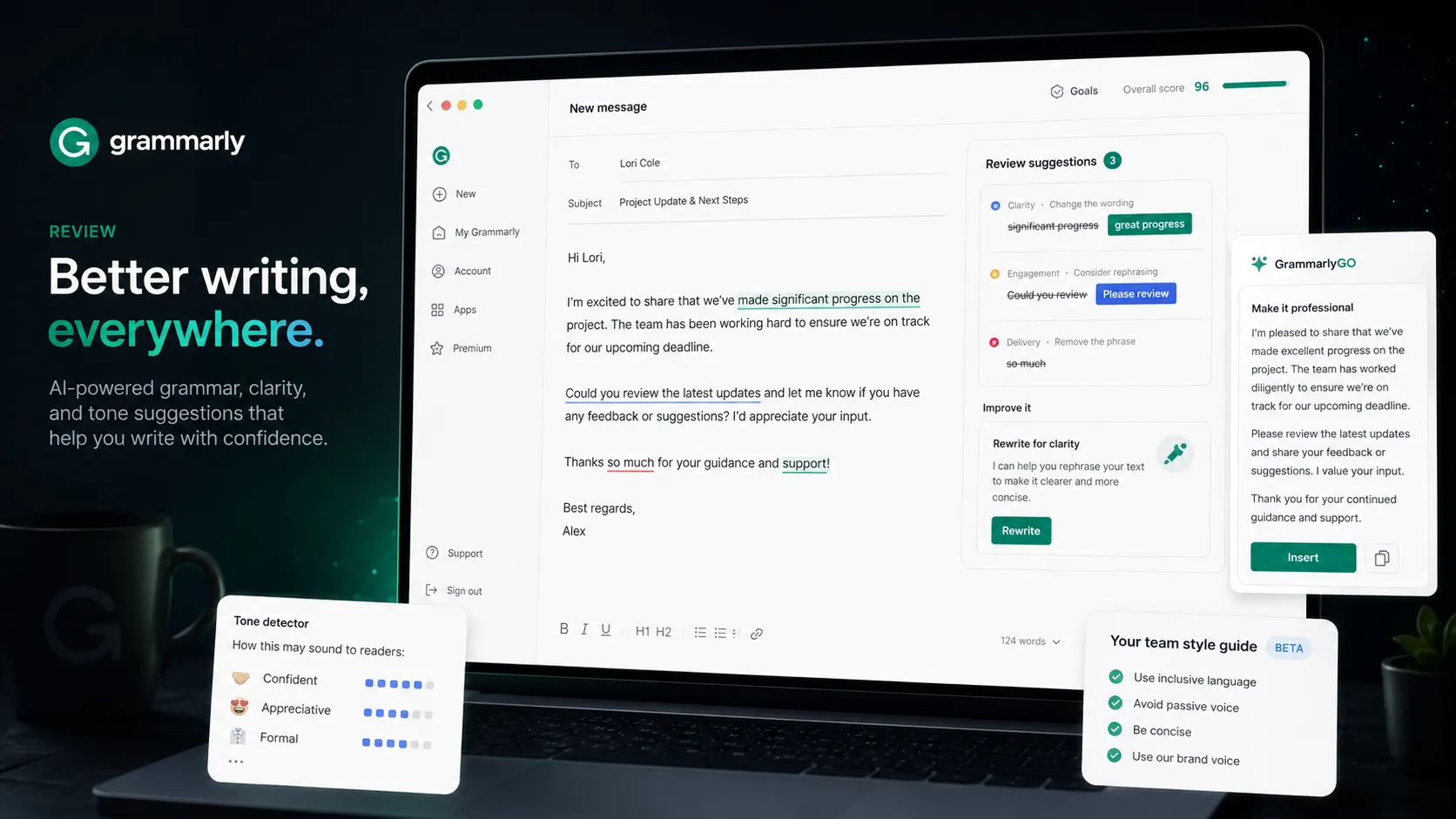
Use it if…
- ✓ You write in many browser and document surfaces and want grammar, clarity, and tone feedback to follow you.
- ✓ Your team needs shared writing rules, brand tones, snippets, analytics, or Enterprise controls.
- ✓ You want a practical polish layer after drafting in ChatGPT, Claude, Notion, Google Docs, or email.
- ✓ You care more about reducing everyday communication mistakes than generating long-form content from scratch.
Skip it if…
- – You only need occasional spell-checking and the free plan covers your actual usage.
- – Your main job is SEO writing, content briefs, competitor research, or long-form blog production.
- – Your organization cannot send sensitive drafts into external writing-assistant workflows.
- – You expect AI rewriting to replace your own editing judgment, source checking, or subject expertise.
Review scorecard
Scored by workflow fit, ease of use, value, and stack compatibility. Weights reflect importance for typical buyers.
| Criteria | Score | ||
|---|---|---|---|
| Writing polish quality | 9.0 | ||
| Workflow coverage | 8.7 | ||
| AI feature usefulness | 7.8 | ||
| Team and brand controls | 8.5 | ||
| Pricing clarity | 8.0 | ||
| Buyer trust and boundaries | 7.6 | ||
| Weighted overall | 8.4 / 10 | ||
On this page
Quick verdict
You probably do not need Grammarly because you want another AI writer. You need it if small writing problems keep showing up in places where work actually happens: Gmail, Google Docs, LinkedIn, support replies, proposals, Slack updates, and team documents.
That is the honest frame. Grammarly is not the deepest writing tool, and it is not the smartest general AI assistant. Its advantage is more ordinary and more useful: it catches writing issues in the flow of work before they become embarrassing, unclear, or inconsistent.
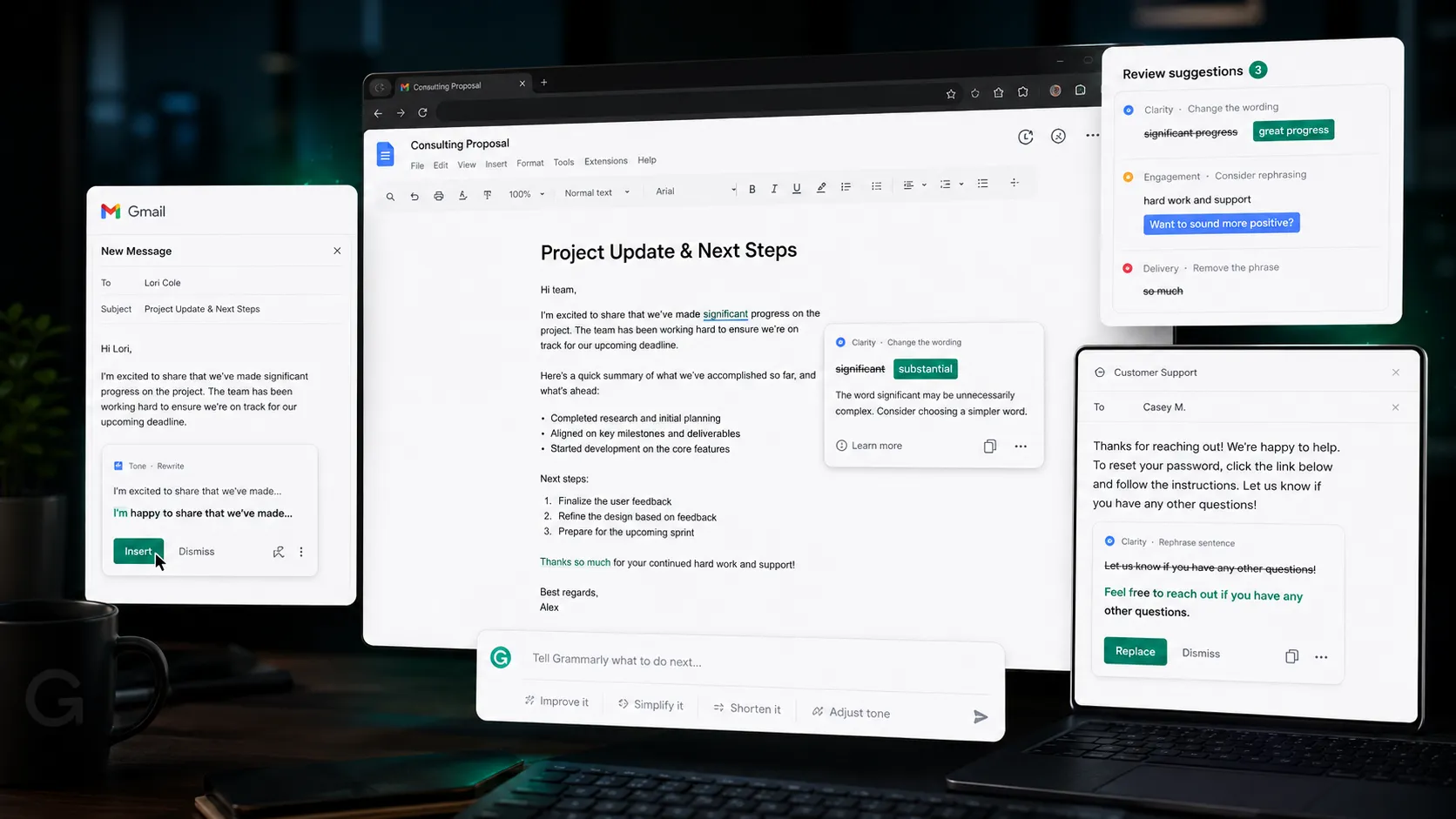
The Free plan is enough for light use. Pro starts to make sense when writing is part of your job, your tone matters, or you want full-sentence rewrites, plagiarism checks, AI detection, and more AI prompts. Enterprise is a different decision entirely, because then you are buying control, policy, brand consistency, and admin features, not just grammar help.
My main caution is simple: do not treat Grammarly as a substitute for judgment. It can make a message cleaner. It cannot decide whether the message is true, strategically smart, properly cited, or appropriate for a sensitive situation.
Who should use Grammarly
Imagine a manager writing five performance notes, a marketer rewriting a campaign brief, and a founder replying to an investor email at 11 p.m. None of them needs a blank-page AI novelist. They need a second set of eyes that catches awkward tone, unclear phrasing, and small errors before the message leaves the building.
That is the Grammarly buyer.

Grammarly is a strong fit for people who write in public or semi-public contexts every day. That includes professionals writing client emails, teams handling support replies, non-native English writers polishing business communication, students checking clarity before submission, and content operators trying to keep brand terms consistent.
The tool becomes more valuable when writing happens across many surfaces. If you only write inside one editor, you have many options. If your text moves through browser forms, documents, email, help desks, social posts, and collaboration tools, Grammarly’s always-nearby style is the point.
For teams, the fit is clearer. Shared snippets, style guides, brand tones, analytics, and admin controls can reduce repeated review work. A solo user may ask whether Pro is worth the subscription. A team should ask whether inconsistent writing creates support costs, brand drift, or review bottlenecks.
Who should skip Grammarly
You should skip Grammarly if your real problem is not writing polish. This sounds obvious, but it is where many buyers waste money.
If you need SEO content briefs, SERP analysis, keyword gaps, article scoring, and competitor outlines, Grammarly is not Frase or Surfer SEO. If you need deep reasoning, research synthesis, or full creative exploration, Grammarly is not Claude or ChatGPT. If you need a private offline editor, Grammarly’s cloud and browser-first nature may not fit your risk model.
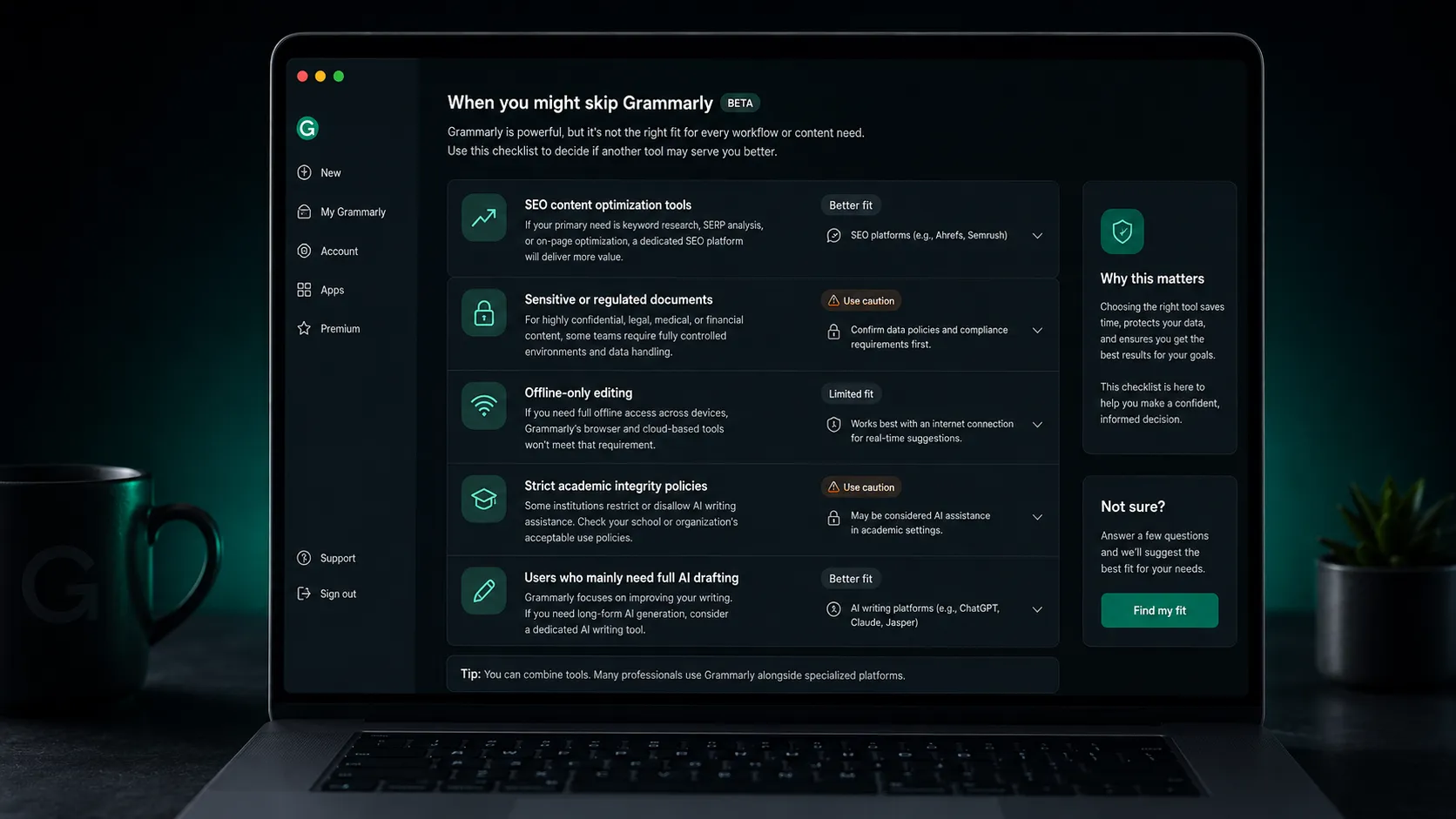
There is also a voice risk. Grammarly can make text cleaner, but if you accept suggestions too quickly, it can sand down personality. That may be fine for a support email. It is less fine for an opinion essay, founder note, sales page, or any writing where the edge matters.
Students should be extra careful. Some schools treat grammar checking differently from AI rewriting. Others blur the line. If a class policy is strict, do not assume Grammarly Pro rewrites are automatically allowed just because the tool is common.
Sensitive teams should pause as well. Grammarly publishes security and data ownership materials, but legal, medical, HR, finance, and enterprise teams still need a policy decision before letting confidential text flow through any external writing assistant.
Real workflow fit
The most practical Grammarly workflow starts after you already have a draft. You write the message, then use Grammarly to tighten the sentence, check the tone, remove accidental ambiguity, and catch mistakes your tired eyes missed.
That is different from using AI to create the whole thing. Grammarly can generate text and rewrite full sentences, but its strongest job is still editing in context.
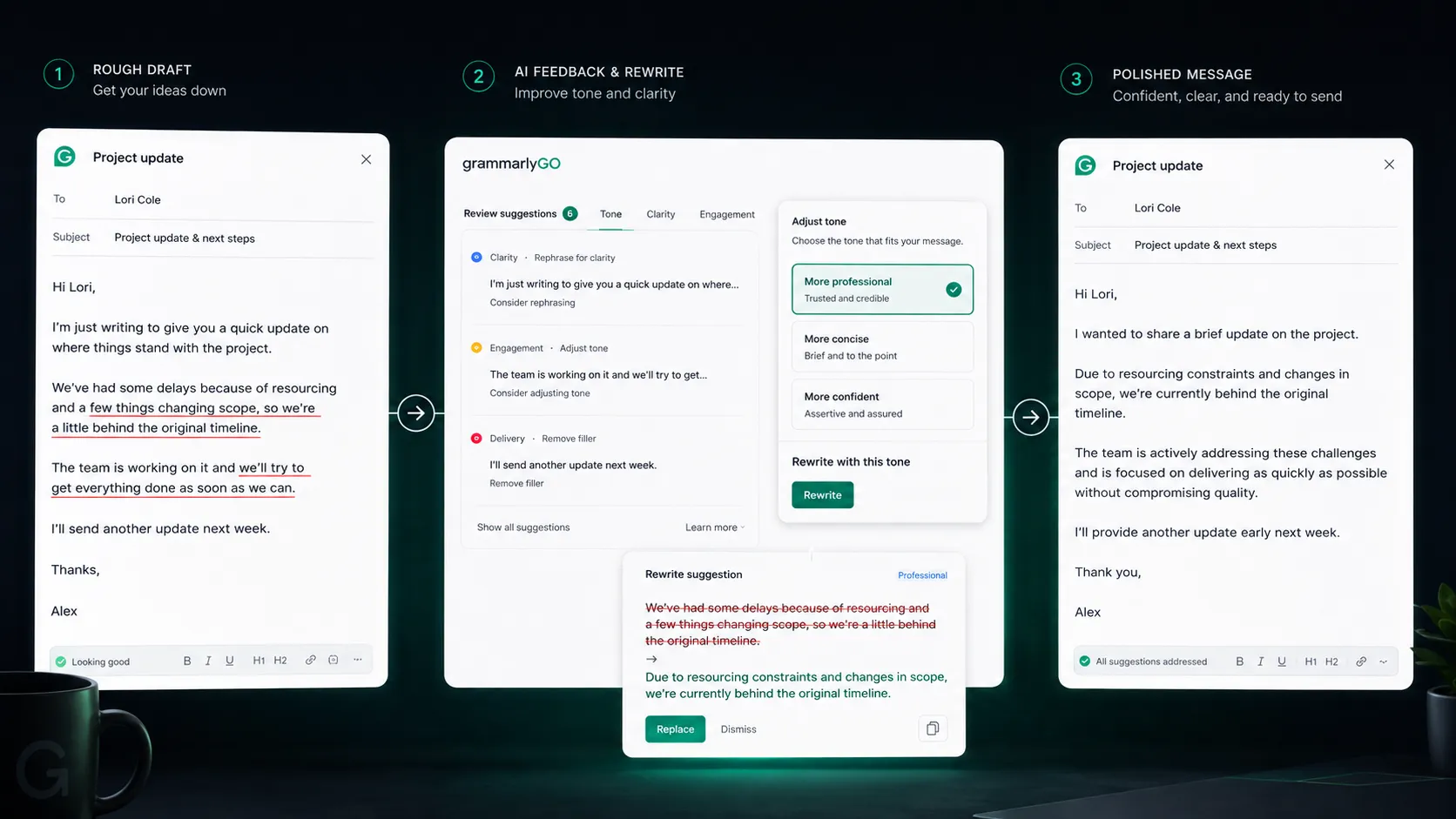
A good workflow looks like this:
- Draft in your normal tool.
- Use Grammarly to catch grammar, clarity, and tone issues.
- Accept only the suggestions that preserve meaning.
- Use AI rewrite when the sentence is clumsy, not when the idea is weak.
- Do a final human read for accuracy, audience, and intent.
The friction moment is that Grammarly can feel too confident. A suggestion may be grammatically cleaner while slightly changing emphasis. That is not a bug unique to Grammarly. It is the cost of automated editing. You still need to read the changed sentence like the owner of the message.
For day-to-day writing, though, the workflow is hard to beat. It is fast, familiar, and close to the point of writing. That matters more than a long list of AI features.
Where Grammarly fits in an AI stack
In a practical AI stack, Grammarly is not the brain. It is the polish layer.
Use ChatGPT or Claude for ideation, rough drafting, summarizing, and reasoning. Use Notion, Google Docs, or Coda for writing and collaboration. Use Surfer SEO or Frase if search intent and SERP coverage matter. Then use Grammarly near the end of the chain to make the text cleaner, clearer, and more consistent.
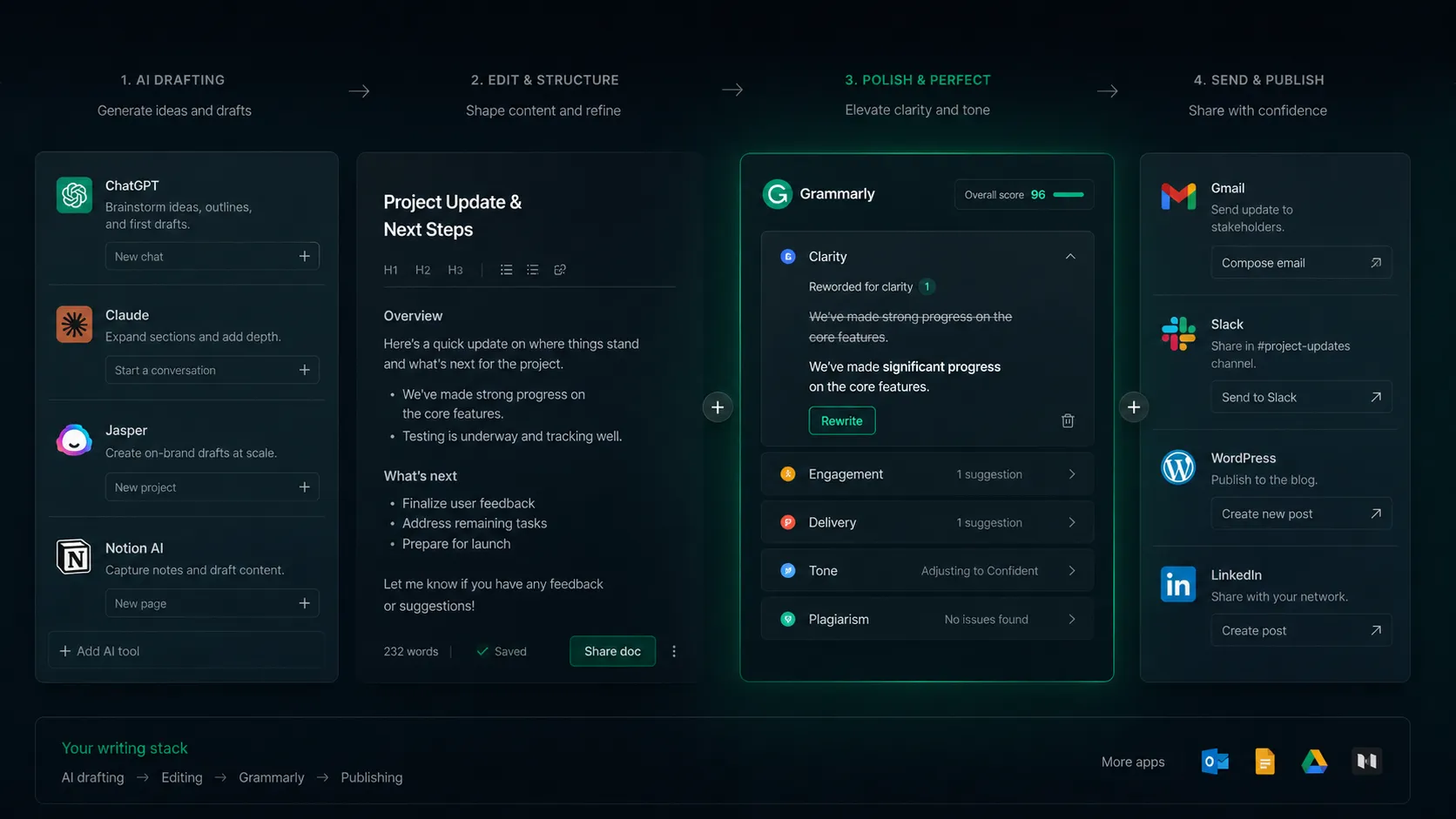
This is why the buyer decision is not “Grammarly versus AI.” It is “Do I need Grammarly after AI?”
For many professionals, yes. AI-generated drafts often still need tone control, sentence cleanup, and a final check inside the place where the text will be sent. Grammarly fills that gap better than most general AI assistants because it lives closer to the actual writing surface.
For users who already have disciplined editing habits, the overlap is more noticeable. If you can ask Claude to revise tone, then manually proofread well, then run a free spell-checker, Pro may feel less essential.
The stack decision comes down to frequency. If writing polish is a daily workflow, Grammarly deserves a place. If it is a monthly annoyance, keep the free plan and spend elsewhere.
What Grammarly does well
The obvious strength is grammar. The more valuable strength is reducing communication friction.
A typo is small until it appears in a client proposal. A vague sentence is small until a teammate misreads it. A tone mismatch is small until a support reply sounds colder than intended. Grammarly is good at catching those ordinary problems before they create unnecessary cleanup work.
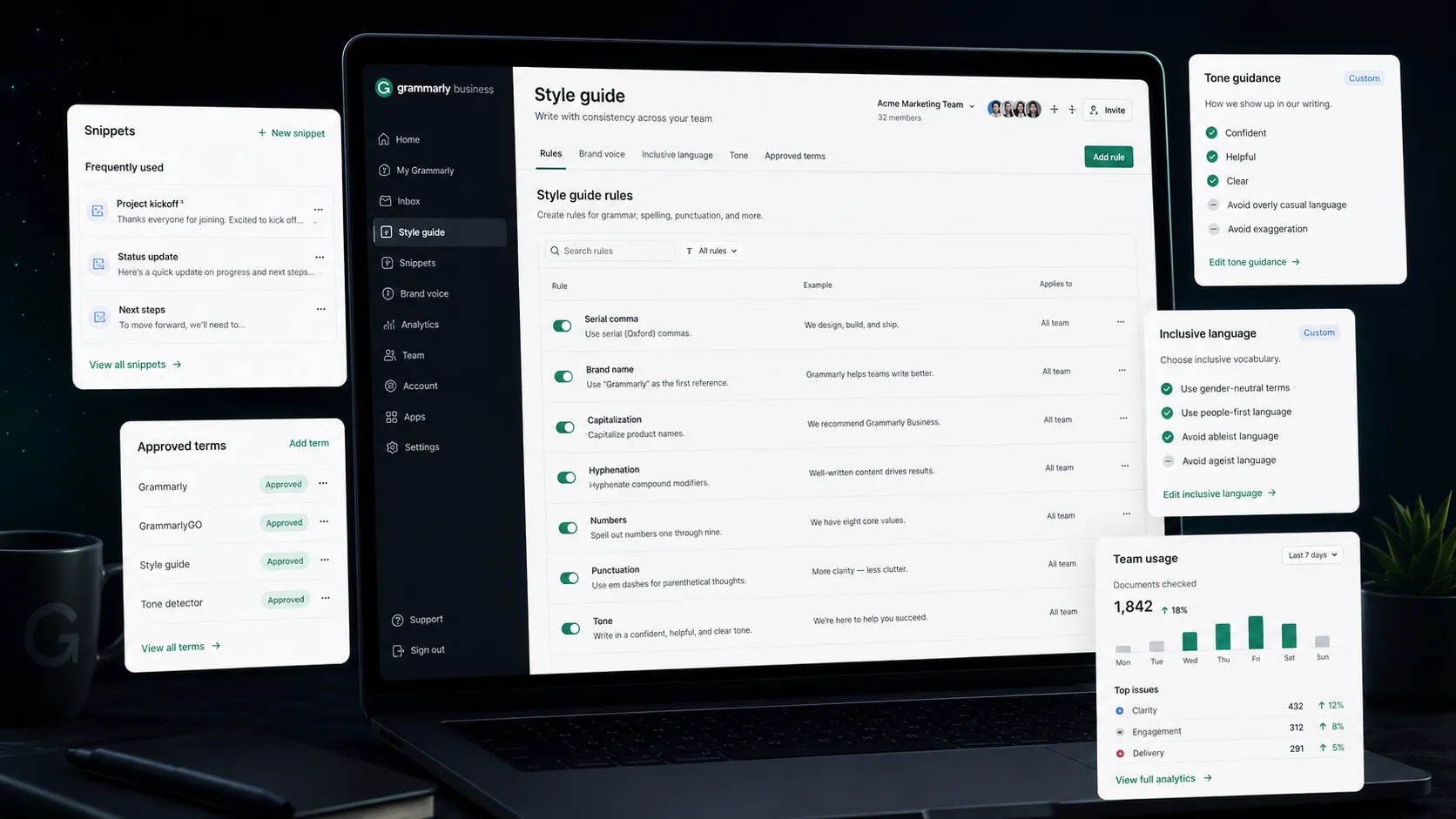
For individuals, the best parts are grammar correction, tone adjustment, fluency help, and full-sentence rewrites. For non-native English writers, the fluency layer is especially useful because it improves professional confidence without requiring a separate editor for every message.
For teams, the better story is consistency. Style guides, brand tones, snippets, Knowledge Share, and analytics can help a team write with fewer repeated corrections. This matters in customer support, marketing, sales, HR, internal comms, and any department where writing reflects the brand.
The security page also gives Grammarly a stronger enterprise story than many lightweight writing tools. SOC 2 Type 2, ISO references, encryption, data ownership language, SAML, SCIM, DLP, and Enterprise key management are not exciting features for a casual user. For an IT or security buyer, they are part of the reason Grammarly remains in the conversation.
Where Grammarly falls short
The first weak spot is over-editing. Grammarly can make text clean but generic if the user accepts every suggestion. Clean writing is not always better writing. Sometimes a sentence needs tension, rhythm, or a slightly imperfect human edge.
The second weak spot is category overlap. Grammarly now has AI prompts, AI detection, plagiarism checking, and broader Superhuman platform context. That makes the product more useful, but it also makes the buying decision less simple. Some buyers want a grammar checker. Others are being nudged toward a larger AI productivity suite.
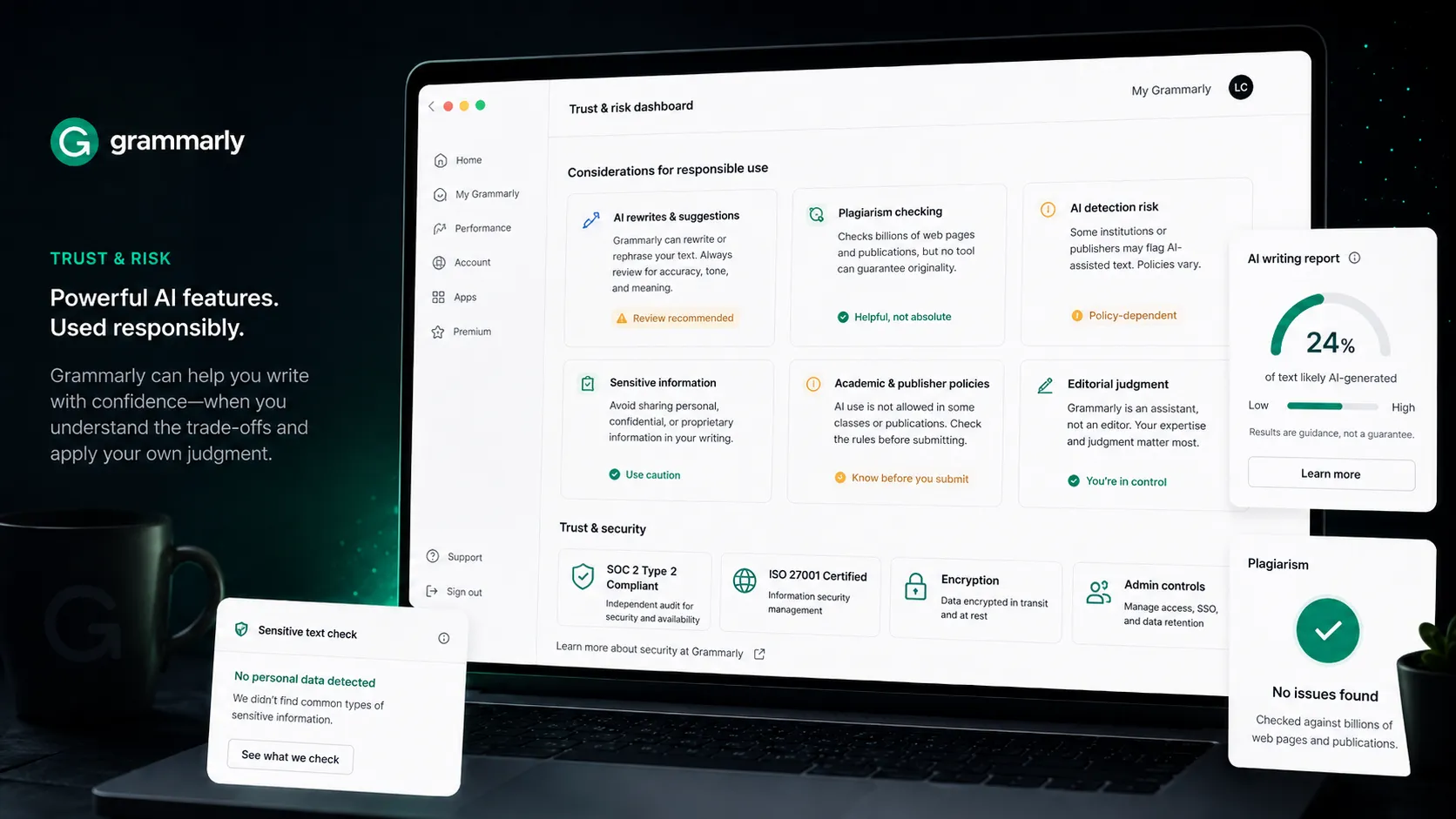
The recent Expert Review controversy also belongs in the buyer context. The removed feature raised concerns about AI suggestions tied to simulated expert identities. Even though that is not the core grammar product, it is a useful reminder that buyers should review current AI feature behavior, data settings, and institutional policy before rolling the tool out broadly.
Another limitation is academic ambiguity. Grammarly can help a student write more clearly. Grammarly AI rewrites may also cross a line depending on class policy. The tool cannot solve that policy problem for the user.
Finally, Grammarly is not a deep editorial brain. It can flag, rewrite, and suggest. It does not know your full strategy, source quality, factual accuracy, reader psychology, or business goal unless you bring that judgment yourself.
Pricing judgment
Grammarly’s pricing is easier to understand than many AI tools. The official pricing page shows Free at $0, Pro at $12 per member per month when billed annually, $30 when billed monthly, a 7-day free trial, and Enterprise on a contact-sales path.
The Free plan is a real starting point. It gives mistake checking, tone visibility, and 100 AI prompts per month. For occasional users, that is enough.
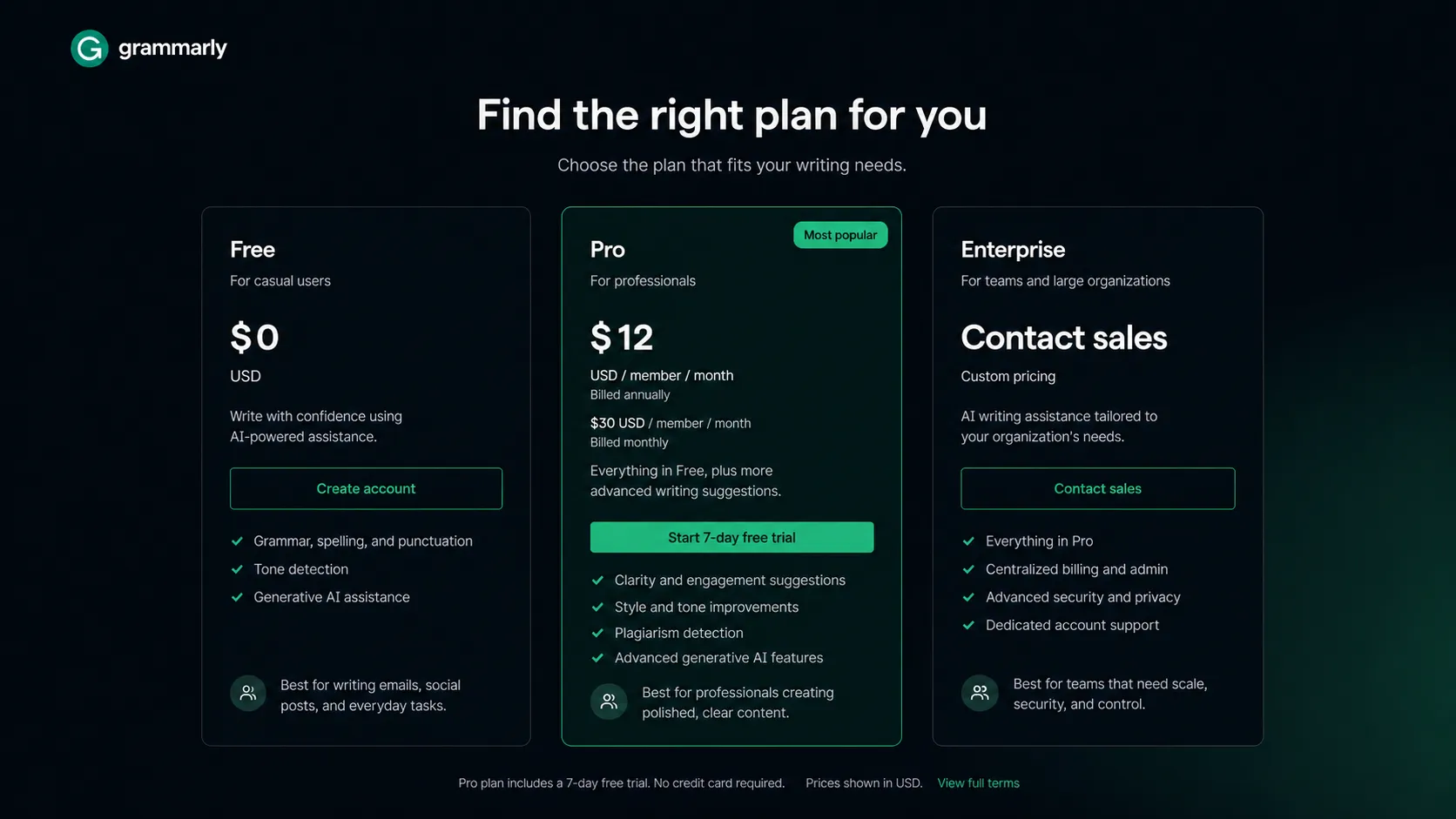
Pro is justified when one of three things is true. First, you write professionally every day. Second, your team benefits from shared style and writing controls. Third, the extra features save enough review time to matter, including full-sentence rewrites, tone adjustment, fluency, plagiarism checks, AI detection, and higher AI prompt limits.
Enterprise is not mainly about better grammar. It is about governance. If your organization needs SSO, SCIM, DLP, custom roles, confidential mode, audit logs, Enterprise key management, dedicated support, and unlimited prompt access, then Enterprise is the plan conversation.
My pricing advice is conservative: start Free, upgrade to Pro only after you feel the pain repeatedly, and treat Enterprise as an IT and policy decision. Do not pay for Pro because the feature list looks long. Pay because writing mistakes or slow review loops are costing you time, confidence, or trust.
Best alternatives to compare
The right alternative depends on the job you are hiring the tool to do.
Compare ProWritingAid if you care more about writing improvement, detailed reports, fiction, long-form style, or manuscript-oriented editing. Grammarly is easier for workplace communication. ProWritingAid can feel more writer-focused.
Compare LanguageTool if you want a grammar checker with stronger multilingual and privacy-sensitive appeal. It may fit buyers who do not need Grammarly’s broader team layer.
Compare Hemingway Editor if readability is the main goal. It is simpler, more focused, and less like a browser-wide assistant.
Compare ChatGPT or Claude if you want drafting, ideation, rewriting, reasoning, or a deeper writing partner. They overlap with Grammarly’s AI rewrites, but they do not replace the convenience of live, surface-level writing polish across work apps.
For TopAIStacks, I would classify Grammarly as a direct alternative to ProWritingAid and LanguageTool for grammar and editing. I would classify ChatGPT, Claude, Notion AI, and SEO tools as adjacent stack tools, not direct replacements.
Final decision
Add Grammarly to your stack if writing is part of your daily work and you want a reliable polish layer that follows you across apps. It is especially easy to justify for professionals, non-native English writers, managers, support teams, sales teams, and organizations with shared writing standards.
Compare it first if your main need is deeper style coaching, multilingual grammar checking, SEO content optimization, or full AI drafting. Grammarly is very good at cleanup, but it is not the only writing tool worth considering.
Skip it for now if the Free plan already catches the mistakes you care about, your documents are too sensitive for external writing assistance, or your school or company has strict rules around AI rewriting.
The cleanest verdict is this: Grammarly is still worth using, but it is worth paying for only when writing quality affects your work often enough that better polish saves real time, reduces review friction, or protects your professional credibility.
Frequently asked questions
Is Grammarly worth paying for in 2026?
Does Grammarly have a free plan?
How much does Grammarly Pro cost?
Is Grammarly a replacement for ChatGPT or Claude?
Is Grammarly safe for sensitive writing?
Where Grammarly fits in a stack
Writing polish and communication consistency layer after drafting, research, and content planning
Does not replace
- – A full AI assistant for deep reasoning or complex drafting
- – SEO research and content optimization tools
- – Human editorial judgment and subject-matter review
- – Academic integrity policy or legal review
- – A private document governance process for sensitive text
Pairs well with
Top alternatives to consider
If Grammarly is not the right fit, these are the most common alternatives.
ProWritingAid is the closest comparison for writers who want deeper style reports, manuscript-style feedback, and writing improvement guidance rather than lightweight everyday polish.
LanguageTool is worth comparing when buyers want a more privacy-conscious, multilingual grammar checker and do not need Grammarly's broader team and AI workflow layer.
Hemingway Editor is simpler and cheaper for readability-focused editing, but it is not a full browser-wide writing assistant or team communication platform.
Review methodology
Editorial review based on Grammarly's official homepage, pricing page, AI feature pages, security materials, public product positioning, current third-party reporting, and buyer-fit analysis. No hands-on testing was conducted.
This review is based on public product information and current research, not direct hands-on testing with private writing workflows.
Not covered: Hands-on benchmark testing across private documents · Enterprise contract review · Legal or academic integrity advice · Private security audit