 N
N Notion AI
AI writing, search, agents, and meeting notes inside Notion
Quick answer
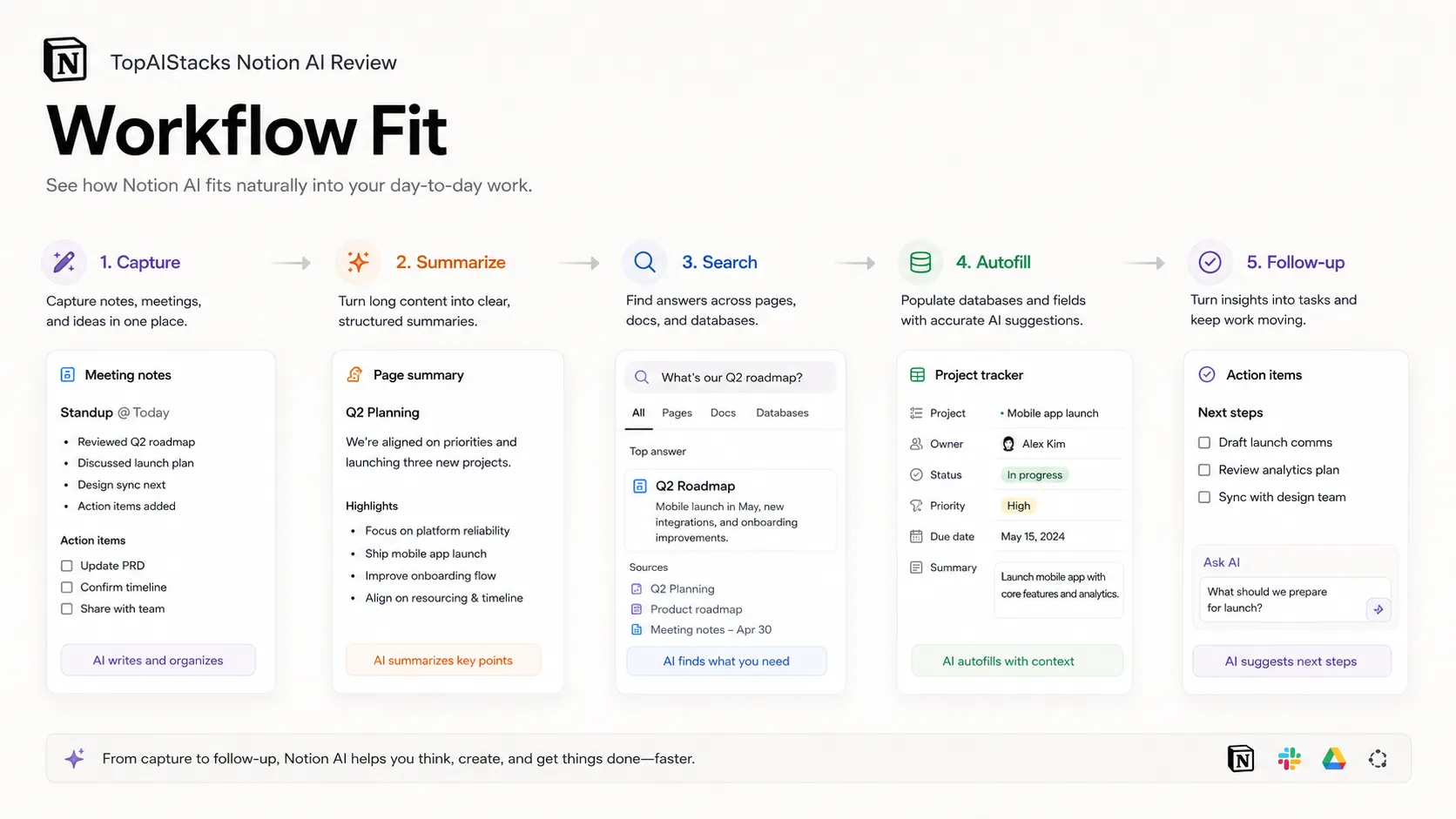
Notion AI is best when your team already keeps work inside Notion. It helps write, summarize, search, autofill databases, capture meeting notes, and run agent workflows using workspace context.
Notion AI is much less compelling if your team does not already work in Notion. Pricing and access have also shifted toward Business and Enterprise plans, with limited trial usage on lower plans. Buyers should verify current plan access, credit rules, privacy settings, and admin controls before relying on it for team workflows.
What is Notion AI?
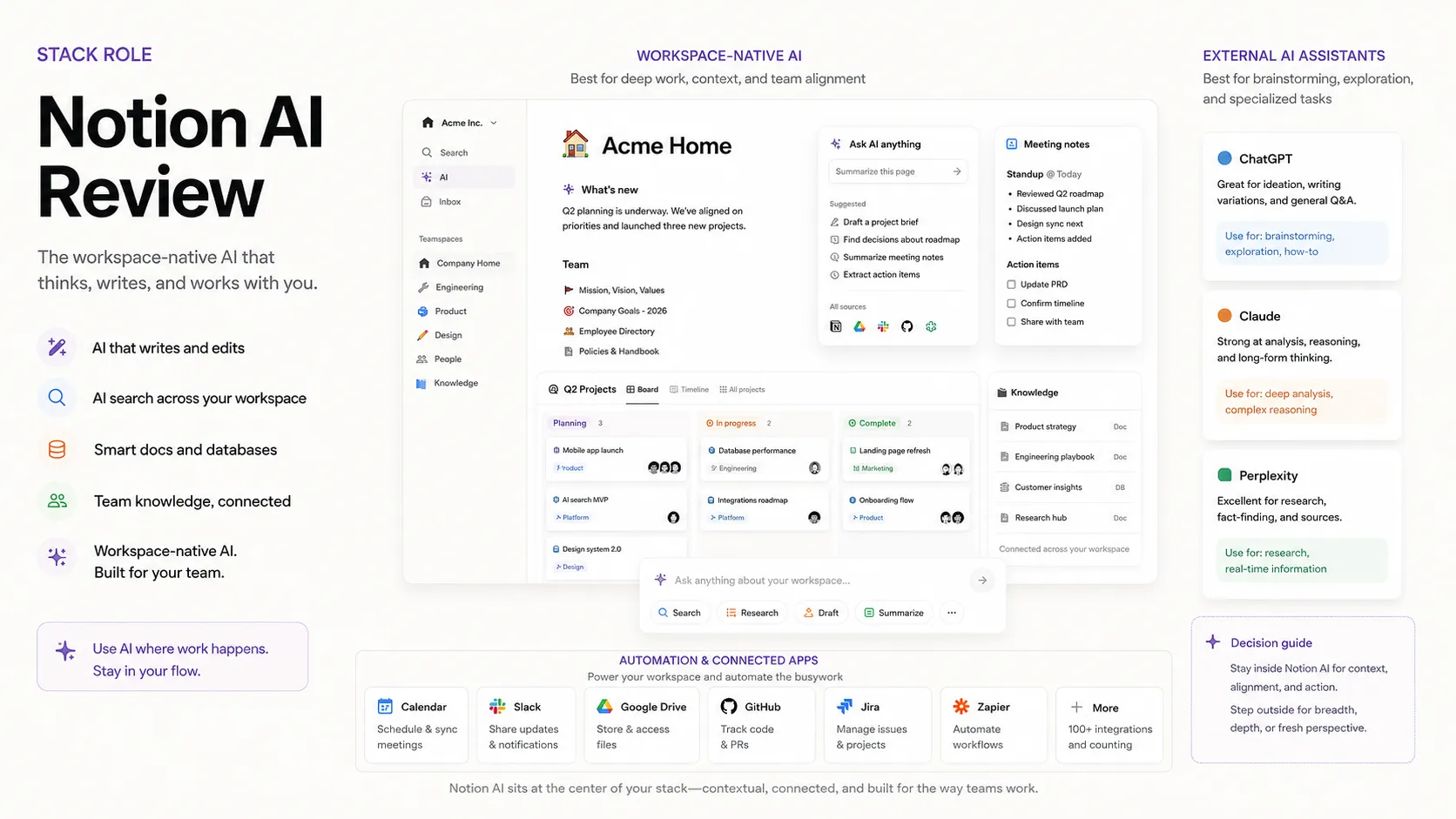
Notion AI is the AI layer inside Notion for people who already use Notion as a workspace. It can help draft and edit pages, summarize notes, answer questions from workspace content, autofill database properties, capture meeting notes, and support agent-based work on higher plans. It belongs in the productivity and knowledge layer of a stack, where the real value comes from using AI on existing docs, tasks, databases, and team knowledge.
Who Notion AI fits best
Best for Notion users who want AI inside their existing docs, wikis, projects, meeting notes, and internal knowledge base.
- ✓Teams that already run documentation, projects, and internal knowledge in Notion.
- ✓Managers who need meeting summaries, follow-ups, and workspace search in one place.
- ✓Operators who want AI-assisted database autofill, task updates, and recurring internal workflows.
- ✓Startups that want a shared workspace before adding separate AI search or automation tools.
Not ideal for
- •Teams that store knowledge mainly in Google Docs, Confluence, Slack, or local files.
- •Writers who need dedicated SEO scoring, content briefs, or brand campaign workflows.
- •Buyers who only want a general AI assistant and do not need Notion workspace context.
- •Regulated teams that have not reviewed Notion AI privacy, retention, and Enterprise controls.
Main use cases
Workspace question answering
Notion AI can answer questions using workspace pages and connected apps when enabled. It is most useful when team knowledge is already organized in Notion.
Meeting notes and follow-ups
Teams can use AI Meeting Notes to capture transcripts, summaries, and action items. It fits managers who want follow-up work connected to docs and projects.
Drafting and editing docs
Notion AI can help generate, rewrite, summarize, translate, and improve pages inside the workspace. Human review should remain part of publishing or client-facing workflows.
Database autofill and agent workflows
Notion AI can autofill database properties and support agent workflows on eligible plans. Buyers should test usage rules before relying on agents for recurring operations.
Where Notion AI fits in the AI stack
Notion AI sits inside the workspace layer of an AI stack. It helps turn existing pages, databases, meeting notes, and connected context into summaries, answers, drafts, and follow-up actions. It can replace some manual note cleanup and internal search, but it still needs organized workspace content, clear permissions, human review, and a process for deciding which AI outputs become official team knowledge.
Stack role
Productivity and knowledge workflow layer
Best paired with
Notion, ChatGPT, Claude
Strongest layer
Workspace knowledge search + Meeting notes and summaries
| Stack layer | Fit | What to know |
|---|---|---|
| Workspace knowledge search | strong | Notion AI is strongest when team docs, projects, and decisions already live inside Notion. |
| Meeting notes and summaries | strong | AI Meeting Notes can reduce cleanup work when meetings need summaries and action items linked to the workspace. |
| General writing assistant | medium | It can draft and edit pages, but dedicated writing tools may fit marketing or SEO workflows better. |
| Standalone AI chat | weak | Teams that do not use Notion will usually get more value from a general assistant before paying for Notion AI. |
Best stack combinations
Startup operators and team leads
notion-ai + notion + slack
Use Notion as the team workspace, Notion AI for answers and summaries, and Slack for alerts and daily discussion.
Solo founders and creators
notion-ai + chatgpt + google-workspace
Use ChatGPT for broad ideation, Notion AI for workspace-based drafting, and Google Workspace for email and calendar context.
Knowledge management teams
notion-ai + notion + zapier
Use Notion AI for workspace search and summaries, then use automation to move approved outputs into repeatable systems.
What Notion AI can replace
- · Some manual meeting note cleanup
- · Some internal workspace search
- · Some first-pass writing and rewriting inside Notion
- · Some database property filling and recurring task support
What it still needs
- · organized-workspace: Clean pages, databases, teamspaces, and ownership rules before AI can use context well
- · human-review: Review for factual accuracy, tone, and publishing decisions
- · permission-governance: Access controls for private pages, teamspaces, connected apps, and AI-visible content
- · workflow-policy: Clear rules for which AI-generated notes, reports, or actions become team records
Add it to your stack if
- · Your team already uses Notion as the main workspace.
- · You want AI to work with pages, databases, projects, and meeting notes in one place.
- · You need internal answers and summaries more than standalone AI chat.
- · Business or Enterprise pricing fits the team budget and governance needs.
Skip it if
- · Your knowledge base lives outside Notion.
- · You mainly need SEO writing, coding help, image generation, or customer support automation.
- · The team has not reviewed Notion AI access, credits, privacy, and permission controls.
- · A general AI assistant already covers the workflow without extra workspace migration.
Choose your next step
Pricing
→Compare Notion AI access across Free, Plus, Business, Enterprise, and credit-based agent usage.
Alternatives
→Compare Notion AI with general assistants, workspace tools, and knowledge management options.
Compare options
→See whether Notion AI or ChatGPT fits your workspace and writing workflow better.
Stack fit
→See where Notion AI belongs in a productivity or solopreneur AI stack.
Review
→Read the full Notion AI review before adding it to your workspace stack.
Pricing summary
This is a profile-level summary. Use the pricing page for deeper plan checks.
Starting path
Included with Business, limited trial on lower plans
Free plan
No
Free trial
Yes
Notion currently shows Notion AI as included with Business and Enterprise plans, while Free and Plus workspaces receive limited trial usage. Business is listed at $20 per member per month on the public pricing page, with yearly billing savings shown separately. Custom Agents use Notion credits, which are an extra usage path for Business and Enterprise teams.
Best starting path: Free or Plus is enough to test limited AI usage. Business is the practical entry point for teams that want Notion Agent, AI Meeting Notes, Enterprise Search, and fuller workspace AI access.
Related stack page
Solopreneur Stack
→Role: Workspace AI assistant for notes, docs, and lightweight project knowledge
Notion AI helps solopreneurs keep ideas, projects, notes, and action items inside one workspace. It is most useful when Notion is already the operating base, not just a spare notes app.
AI Productivity Stack
→Role: Knowledge search, meeting notes, and internal drafting layer
In a productivity stack, Notion AI belongs near documents, meetings, and project records. It helps users turn workspace context into answers, summaries, and next actions.
Top alternatives
See all →Direct alternatives

ChatGPT is a better fit when the buyer wants standalone AI chat, broad reasoning, or work outside Notion.

Claude is a strong alternative when document analysis and nuanced writing matter more than Notion workspace context.


Related comparisons
FAQ
Is Notion AI free?
Notion AI is not a separate full free plan. Notion currently gives Free and Plus workspaces limited trial usage, while fuller AI access is included with Business and Enterprise plans. Buyers should confirm the current limits before building a workflow around it.
How much does Notion AI cost?
Notion currently lists Business at $20 per member per month and says Notion AI is included with Business and Enterprise plans. Custom Agents use Notion credits, which are priced separately for teams that need recurring agent runs.
Who should use Notion AI?
Notion AI fits teams already using Notion for docs, wikis, projects, meeting notes, and databases. It is less useful if your knowledge lives mainly in other tools and you only need a general AI chat assistant.
Is Notion AI better than ChatGPT?
Notion AI is better when the task depends on Notion workspace context. ChatGPT is usually better for broad brainstorming, standalone writing, code help, and tasks that do not need access to your Notion pages or databases.
Does Notion AI use my workspace data to train models?
Notion says it will not use your data to train models unless you opt in to a request to share data. Buyers should still review current privacy, subprocessors, data retention, and Enterprise controls before using it for sensitive work.
How TopAIStacks evaluates Notion AI
Pricing and feature claims were checked against Notion's public AI and pricing pages. Public rating uses the G2 Notion product profile because Notion AI is bundled into Notion's workspace experience rather than maintained as a separate high-volume review profile. Product Hunt was checked but had too little relevant review volume for the directory rating.
Last checked: May 2026 · Source confidence: high