 N
N Notion
Flexible workspace for notes, docs, wikis, databases, and projects
Quick answer
Notion is best when you want one flexible place for notes, docs, wikis, databases, and lightweight project tracking. It is easy to start, but the real value comes when you design a simple structure instead of letting pages and databases grow randomly.
Notion can become messy if every team member builds their own structure without rules. Before moving important operations into Notion, decide page ownership, database naming, permission rules, review cycles, and what should stay in dedicated tools like Jira, Google Docs, Slack, or a CRM.
What is Notion?
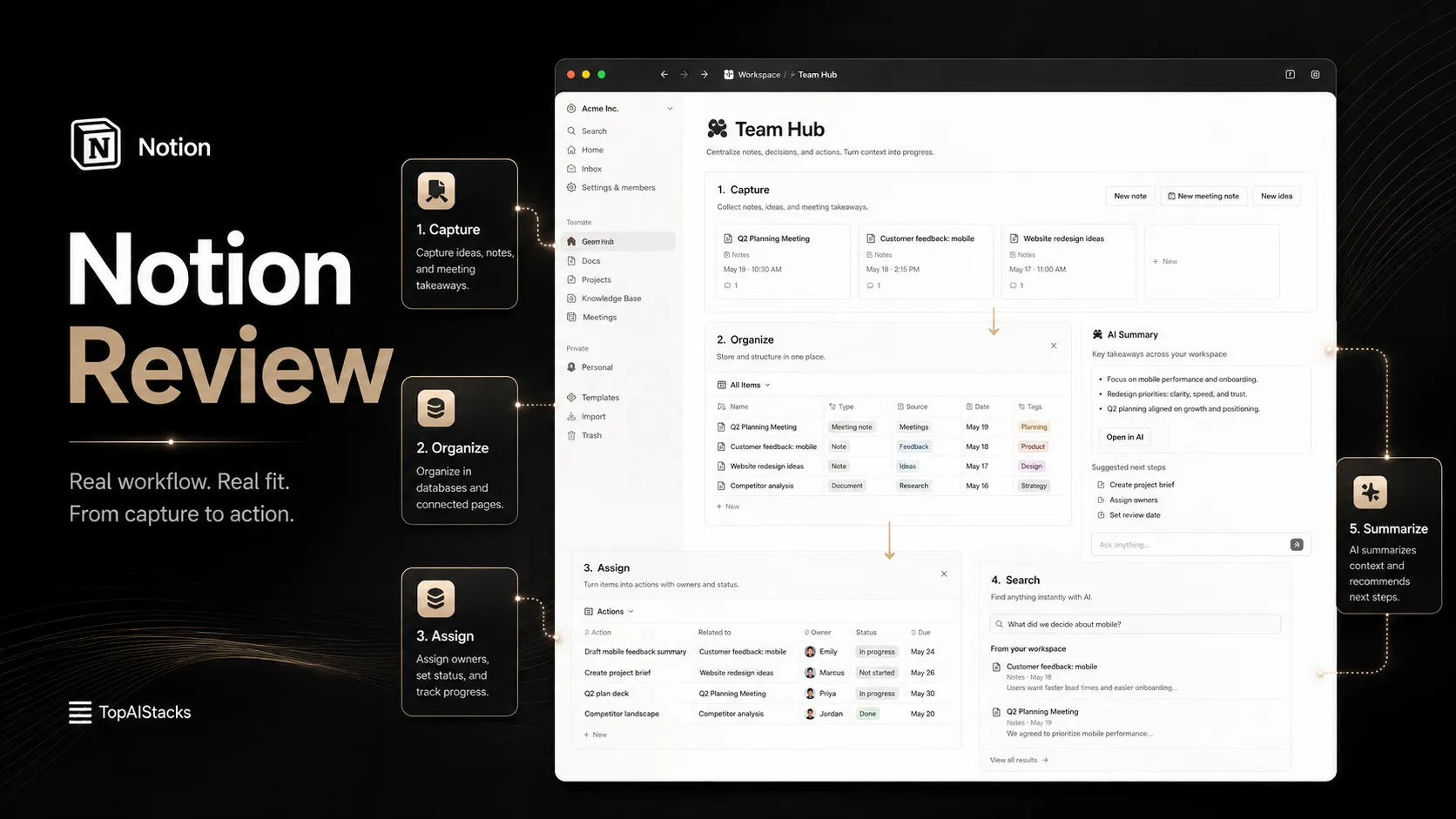
Notion is a workspace app that combines pages, blocks, databases, calendars, forms, sites, project views, and team knowledge into one flexible system. Users can start with a simple note page, then turn the same workspace into a content calendar, CRM, project tracker, internal wiki, operating manual, or personal knowledge base. Its AI layer is now part of the wider Notion product strategy, but the base Notion workspace is still useful even before a buyer depends on AI features.
Who Notion fits best
Best for builders, creators, startups, and teams that want one adaptable workspace for knowledge, projects, and documentation before choosing heavier specialized software.
- ✓Solopreneurs using one workspace for ideas, tasks, writing plans, and business operations.
- ✓Startups building internal wikis, onboarding pages, roadmaps, and team documentation.
- ✓Content teams managing briefs, calendars, research notes, checklists, and publishing workflows.
- ✓Operations teams creating lightweight databases for projects, assets, processes, and requests.
Not ideal for
- •Enterprise teams that need strict project governance before setting up permissions and admin controls.
- •Users who prefer a minimal notes app with folders and plain files instead of databases.
- •Teams that already have a strong Confluence, Jira, Google Workspace, or Asana setup and do not want migration work.
- •Buyers assuming Notion AI, agents, or enterprise search behave the same on every plan.
Main use cases
Personal second brain
Notion can organize notes, ideas, tasks, research, reading lists, goals, and project plans in one searchable workspace. It works best when the user keeps the structure simple at first.
Team wiki and internal documentation
Startups and small teams can use Notion for onboarding pages, SOPs, team policies, meeting notes, product notes, and internal knowledge. Ownership and review cycles keep the wiki useful.
Lightweight project and content management
Notion databases can power content calendars, project trackers, kanban boards, editorial pipelines, roadmaps, and request queues. It is flexible, but not a full replacement for every dedicated project management system.
Creator and operator workspace
Creators, marketers, and operators can build dashboards for content, campaigns, affiliates, assets, ideas, and recurring workflows. The value comes from a clear operating system, not from adding more pages.
Where Notion fits in the AI stack
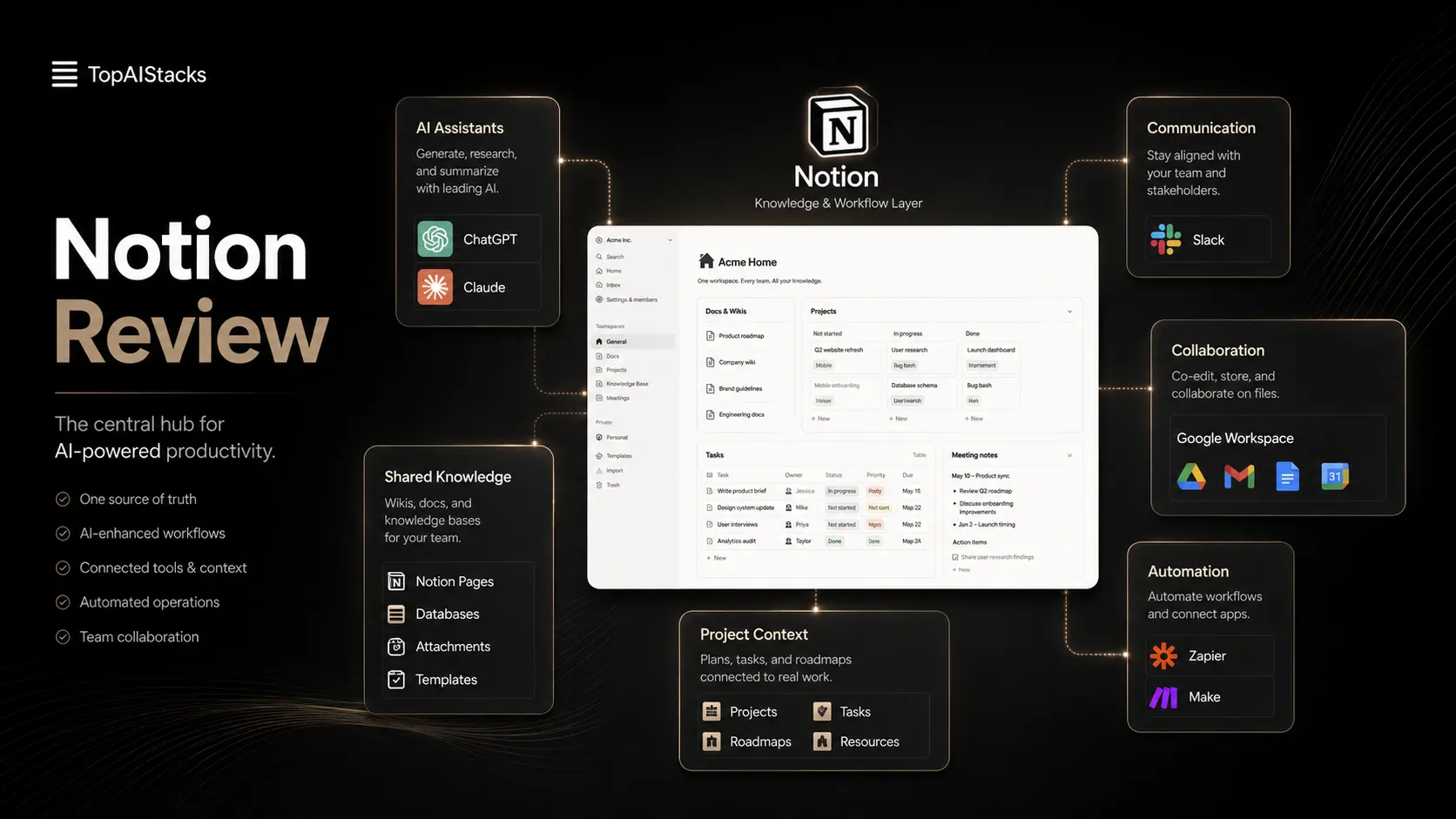
Notion sits in the workspace and knowledge layer of an AI productivity stack. It can replace scattered notes, simple team wikis, lightweight project trackers, content calendars, and internal dashboards. It still needs clear structure, permission rules, communication tools, automation connectors, file storage decisions, and human ownership.
Stack role
Productivity and knowledge workflow layer
Best paired with
ChatGPT, Claude, Notion AI
Strongest layer
Knowledge capture + Lightweight project tracking
| Stack layer | Fit | What to know |
|---|---|---|
| Knowledge capture | strong | Works well for notes, research, docs, ideas, and internal knowledge when users keep structure simple. |
| Lightweight project tracking | strong | Good for flexible boards, calendars, tables, and linked databases, especially for small teams. |
| Enterprise workflow control | medium | Business and Enterprise controls help, but specialized project or compliance systems may still be required. |
| Real-time communication | weak | Notion stores decisions and context, but chat and live collaboration usually belong in Slack, Teams, or Google Docs. |
Best stack combinations
Solopreneurs and creators
notion + chatgpt + canva-ai + zapier
Use Notion for the operating system, ChatGPT for ideation, Canva AI for visuals, and Zapier for routing forms or publishing handoffs.
Startup teams
notion + notion-ai + slack + google-workspace
Use Notion for docs and projects, Notion AI for workspace answers, Slack for daily discussion, and Google Workspace for email and calendar.
Content teams
notion + grammarly + surfer-seo + wordpress
Use Notion for briefs and calendars, Grammarly for polish, Surfer SEO for search optimization, and WordPress for publishing.
What Notion can replace
- · Some scattered notes and personal task lists
- · Some lightweight team wiki tools
- · Some basic project trackers and content calendars
- · Some spreadsheet-based operating dashboards
What it still needs
- · communication-tool: Real-time discussion and quick team updates outside long-term documentation
- · source-of-truth-rules: Decisions about which pages, databases, and documents are official
- · automation-connector: Routing data between Notion and forms, CRMs, calendars, email, or publishing systems
- · human-owner: Workspace cleanup, permissions, naming standards, and documentation review
Add it to your stack if
- · You want one flexible workspace for notes, docs, tasks, databases, and internal knowledge.
- · Your team needs a wiki or operating hub before adding heavier project management systems.
- · You are willing to maintain structure, templates, database rules, and ownership.
- · You want a workspace that can later connect with AI, automations, forms, and publishing workflows.
Skip it if
- · You need a very simple notes app with no database or workspace design decisions.
- · Your main need is strict enterprise project management, issue tracking, or sprint planning.
- · Your team already has a mature Confluence, Jira, Asana, or Google Workspace process and does not want migration work.
- · Nobody will own cleanup, permissions, templates, or source-of-truth rules.
Choose your next step
Pricing
→Compare Notion Free, Plus, Business, Enterprise, AI access, and yearly billing notes.
Alternatives
→Compare Notion with workspace, wiki, notes, and project management alternatives.
Stack fit
→See where Notion belongs in a solopreneur or productivity stack.
Review
→Read the full Notion review before moving your workspace, wiki, or projects into it.
Pricing summary
This is a profile-level summary. Use the pricing page for deeper plan checks.
Starting path
Free plan, paid plans from $10/member/mo
Free plan
Yes
Free trial
No
Notion currently lists a Free plan at $0 per member per month, Plus at $10 per member per month, Business at $20 per member per month, and Enterprise as custom pricing. The pricing page also shows yearly billing savings up to 20 percent. AI capabilities differ by plan, with Free and Plus showing trial AI capabilities and Business including more of Notion's current AI workspace features.
Best starting path: Free is enough for personal organization and early testing. Plus is the practical upgrade for small teams that need better collaboration and uploads. Business is the better route when team knowledge, permissions, AI workspace features, and admin controls matter.
Related stack page
Solopreneur Stack
→Role: Personal operating system for ideas, tasks, content, and lightweight business workflows
Notion fits a solopreneur stack as the central workspace where ideas, tasks, offers, notes, research, and content plans live together. It can reduce tool sprawl, but only if the user keeps the system clear and maintainable.
AI Productivity Stack
→Role: Workspace and knowledge base for AI-assisted productivity
In an AI productivity stack, Notion acts as the durable memory layer. AI assistants can help create drafts and summaries, while Notion stores the reviewed pages, project notes, and reusable knowledge.
Top alternatives
See all →Adjacent tools in the same stack

Notion AI extends the workspace but does not replace the base Notion product for pages, databases, and team structure.

Zapier helps connect Notion databases with forms, CRMs, email, sheets, and other app workflows.
FAQ
Is Notion free?
Yes. Notion currently lists a Free plan at $0 per member per month. It is useful for personal organization and early testing, but teams should check collaboration, upload, guest, history, and AI limitations before relying on it for shared work.
How much does Notion cost?
Notion currently lists Free at $0, Plus at $10 per member per month, Business at $20 per member per month, and Enterprise as custom pricing. Yearly billing savings are shown separately on the official pricing page.
Is Notion good for project management?
Notion is good for lightweight and flexible project management, especially boards, calendars, tables, roadmaps, and content pipelines. For strict agile development, ticketing, dependencies, and enterprise reporting, teams may still prefer Jira, Asana, Linear, or ClickUp.
Is Notion the same as Notion AI?
No. Notion is the core workspace for pages, databases, docs, wikis, and projects. Notion AI is the AI layer inside that workspace, with access and feature depth depending on the current plan.
Who should use Notion?
Notion fits individuals, creators, startups, operators, and small teams that want a flexible workspace for notes, docs, projects, and knowledge. It is less ideal when the team needs a rigid project management system or does not want to maintain workspace structure.
How TopAIStacks evaluates Notion
Pricing and feature claims were checked against Notion's public product and pricing pages. Public rating uses the G2 Notion product profile because it has a large visible review count. The profile separates base Notion workspace value from Notion AI plan access to avoid treating AI features as identical across every plan.
Last checked: May 2026 · Source confidence: high