 O
O Otter.ai
AI meeting notes, transcription, and summaries for busy teams
Quick answer
Otter.ai is best for people who spend a lot of time in meetings and want automatic transcripts, summaries, and action items without building a complex workflow. It is practical for meeting memory, but users should still review accuracy and consent settings before relying on transcripts operationally.
The main buyer risk is not setup difficulty. It is meeting policy, transcript accuracy, and consent. Teams should confirm how the notetaker joins calls, who receives notes, which meetings should be excluded, how sensitive recordings are handled, and whether the available minutes and import limits match real usage.
What is Otter.ai?
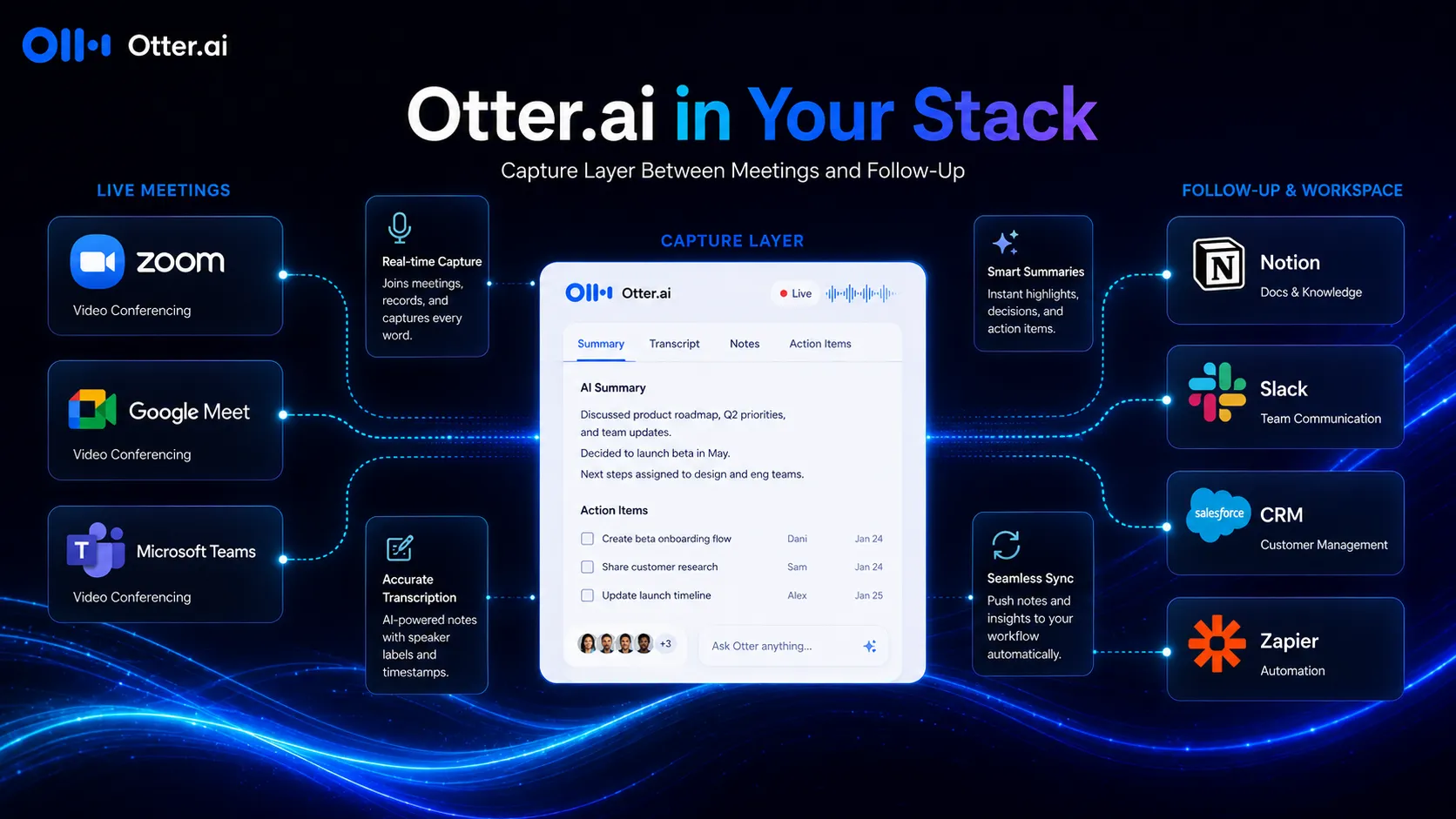
Otter.ai is an AI notetaker and transcription platform for live meetings, uploaded audio and video files, and in-person conversations. It can join Zoom, Microsoft Teams, and Google Meet meetings, create transcripts, generate summaries, identify speakers, capture action items, and let users ask AI questions across meeting content.
Who Otter.ai fits best
Best for teams that want meeting notes handled automatically but still expect humans to check sensitive summaries and action items before sharing them widely.
- ✓Remote teams that want fewer manual notes and easier meeting follow-up.
- ✓Sales and customer success teams that want call summaries, follow-up context, and CRM-connected notes.
- ✓Consultants, researchers, and interviewers who need searchable transcripts from calls or recordings.
- ✓Students, educators, and media users who need lightweight transcription with a free entry plan.
Not ideal for
- •Teams with strict no-bot policies or sensitive meetings where recording consent is hard to manage.
- •Video creators who need editing, screen recording polish, or production tools rather than transcription.
- •Buyers expecting perfect transcript accuracy without review in noisy, multilingual, or overlapping conversations.
- •Enterprise teams that need custom data controls but do not want to evaluate the Enterprise plan.
Main use cases
Remote team meeting notes
Otter can join meetings, transcribe conversations, summarize key points, and help teams search what was discussed later.
Sales and customer-call follow-up
Sales teams can use Otter to capture call context, extract follow-up items, and keep customer conversations easier to review.
Interviews and research sessions
Consultants, researchers, journalists, and educators can use transcripts to review spoken conversations without manually typing every exchange.
Personal meeting memory
Individuals can use the Basic or Pro plan to remember meeting details, pull action items, and ask questions about past discussions.
Where Otter.ai fits in the AI stack
Otter.ai sits in the meeting and knowledge workflow layer of an AI stack. It does not replace calendars, project management, CRM, or team decision-making. Its job is to capture spoken information, turn it into searchable text, summarize the discussion, and make follow-up easier.
Stack role
AI meeting transcription and summary layer
Best paired with
Zoom, Google Meet, Notion
Strongest layer
Meeting capture + Sales and customer notes
| Stack layer | Fit | What to know |
|---|---|---|
| Meeting capture | strong | Otter is strong when teams want automatic live transcription, summaries, and searchable records from recurring calls. |
| Sales and customer notes | strong | It can help sales and customer-facing teams preserve call context and prepare follow-up notes without manual note-taking. |
| Knowledge management | medium | Otter creates useful meeting memory, but teams still need a system like Notion, CRM, or project management to organize decisions. |
| Video production | weak | Otter is not a video editing or polished recording tool. It is better treated as transcription and meeting intelligence software. |
Best stack combinations
Remote teams
otter-ai + notion + google-meet + slack
Use Otter for meeting notes, Notion for the long-term record, Google Meet for calls, and Slack for follow-up communication.
Sales teams
otter-ai + hubspot + zapier + google-calendar
Use Otter to capture call notes and send follow-up context into a CRM or automation workflow.
Consultants and researchers
otter-ai + google-docs + notion + grammarly
Use Otter to capture interviews, then refine notes and findings in a document or research workspace.
What Otter.ai can replace
- · Some manual note-taking during meetings
- · Some transcript cleanup and meeting recap work
- · Some follow-up summary drafting
- · Some searching through old recordings for key context
What it still needs
- · calendar-policy: Rules for which meetings the assistant may join and record
- · human-review: Final check for sensitive summaries, speaker labels, and action items
- · project-management: A place to assign tasks and track decisions after the transcript is created
- · security-review: Internal review for recording consent, retention, admin controls, and compliance needs
Choose your next step
Pricing
→Compare free paths, paid plans, and checkout notes.
Alternatives
→Compare direct and adjacent options before you decide.
Compare with Fireflies.ai
→Open the closest side-by-side comparison.
Stack fit
→See where this tool fits in a broader AI workflow.
Review
→Read the full editorial review when available.
Pricing summary
This is a profile-level summary. Use the pricing page for deeper plan checks.
Starting path
Free plan, Pro from $8.33/user/mo billed annually
Free plan
Yes
Free trial
No
Otter.ai currently lists Basic as free with 300 monthly transcription minutes, Pro from $8.33 per user per month when billed annually, Business from $19.99 per user per month when billed annually, and Enterprise through a demo request. Monthly billing is higher. Buyers should verify minutes, import limits, meeting duration, concurrent meeting limits, CRM integrations, admin controls, and regional promo terms before checkout.
Best starting path: Basic is enough for occasional transcription and testing. Pro is the practical individual plan for longer meetings, more imports, and better exports. Business is better when a team needs unlimited meetings, higher import limits, admin features, and prioritized support.
Related stack page
Top alternatives
See all →Direct alternatives
Related comparisons
FAQ
Is Otter.ai free?
Yes. Otter.ai lists a Basic free plan with 300 monthly transcription minutes, 30 minutes per conversation, live transcription, speaker identification, and limited file imports. The free plan is useful for testing but may be too limited for regular team use.
How much does Otter.ai Pro cost?
The pricing page currently lists Pro from $8.33 per user per month when billed annually and $16.99 per user per month on monthly billing. Buyers should verify the latest billing period and regional offers before purchase.
Is Otter.ai better than Fireflies.ai?
Otter.ai is often simpler for meeting notes and personal transcription, while Fireflies.ai can be a stronger fit for teams that prioritize searchable archives, sales calls, and CRM workflows. The better choice depends on integrations, admin needs, and how the team handles follow-up.
Can Otter.ai replace manual meeting notes?
It can replace much of the first-pass note-taking work, but not final judgment. Important action items, sensitive summaries, client follow-ups, and speaker labels should still be reviewed by a human.
How TopAIStacks evaluates Otter.ai
Pricing and plan notes were checked against the official Otter.ai pricing page on 2026-05-29. Public user rating uses G2's Otter.ai profile rating of 4.4 out of 5 from 484 reviews. Editorial score reflects workflow usefulness, ease of setup, plan accessibility, and known limitations around accuracy and meeting policy.
Last checked: May 2026 · Source confidence: medium