 F
F Fireflies.ai
AI meeting notetaker for searchable transcripts, summaries, and CRM handoffs
Quick answer
Fireflies.ai is an AI meeting assistant for teams that want transcripts, summaries, search, and follow-up context from calls. It is strongest when meetings need to become searchable team knowledge rather than private notes.
The main buying question is not whether Fireflies can transcribe meetings. It is whether your team is allowed to record those meetings, where recordings will be stored, and which plan unlocks the storage, video, analytics, integrations, and security controls you need. Verify consent rules and plan limits before making it part of a recurring workflow.
What is Fireflies.ai?
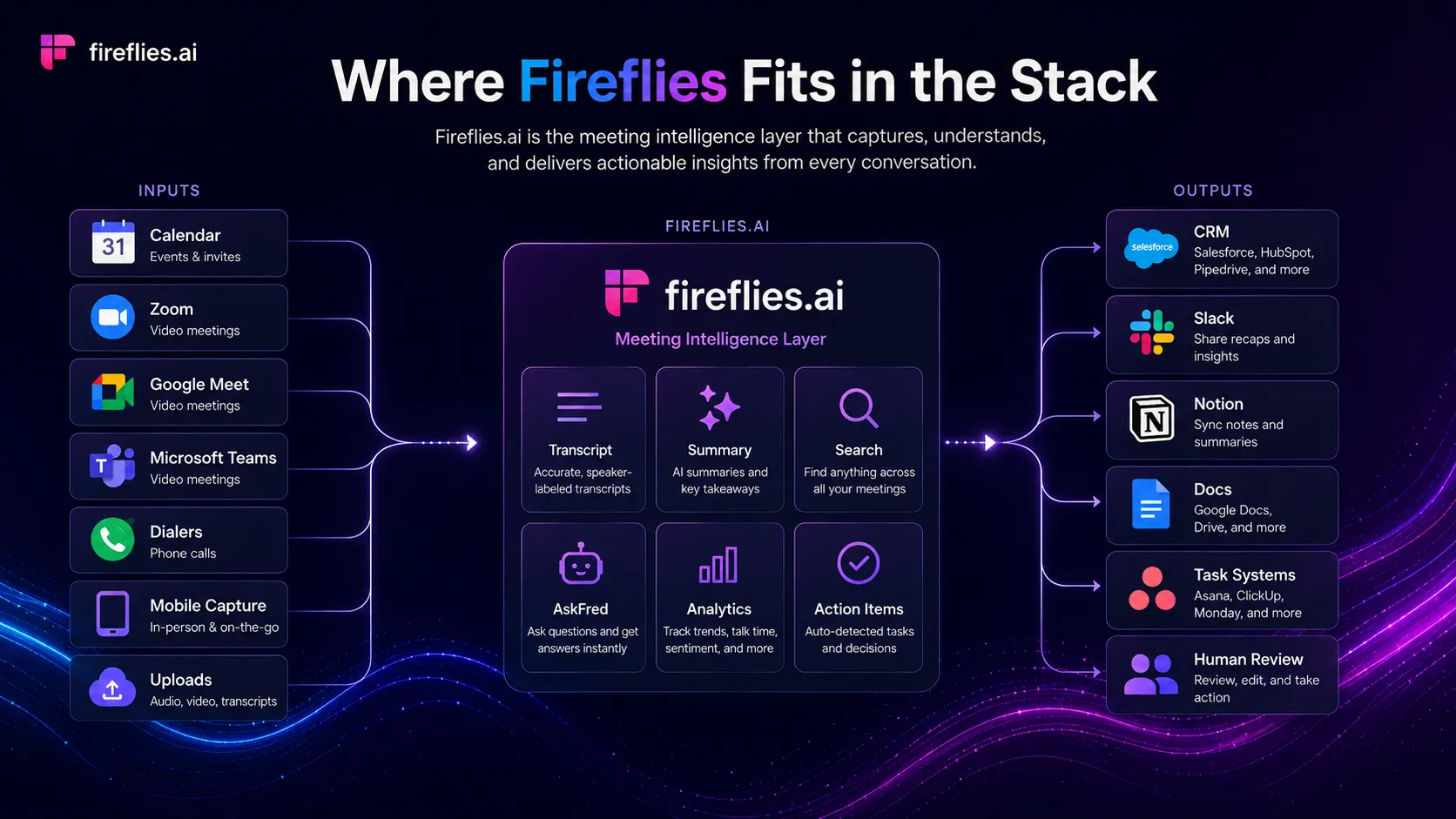
Fireflies.ai joins or captures meetings, transcribes conversations, produces AI summaries, and makes past calls searchable. It is commonly used around Zoom, Google Meet, Microsoft Teams, Slack, CRM systems, and collaboration tools. In a stack, Fireflies sits after the meeting happens and before follow-up work begins. It helps sales, customer success, recruiting, product research, and remote teams turn spoken conversations into notes, action items, and reusable context.
Who Fireflies.ai fits best
Best for teams that run frequent calls and need meeting history searchable across people, projects, customers, and follow-up tasks.
- ✓A sales team wants call summaries, action items, talk-time analytics, and CRM sync after customer conversations.
- ✓A remote team needs searchable meeting history so absent teammates can catch up without asking for repeated context.
- ✓A product, research, or customer success team wants transcripts and clips from user conversations.
- ✓A manager wants action items and meeting summaries without manually writing every note during calls.
Not ideal for
- •A team cannot record meetings because of legal, client, healthcare, education, or internal privacy restrictions.
- •A solo user only needs quick personal notes and does not need shared transcripts, integrations, or meeting archive search.
- •A company needs perfect transcripts in noisy calls without human review before sharing notes externally.
- •A buyer wants video editing, publishing, or polished async video rather than meeting capture and analysis.
Main use cases
Sales call logging and follow-up
Record sales calls, generate summaries, identify action items, and push context into CRM or collaboration workflows. It is useful when reps need to focus on the conversation instead of manual notes, but the output still needs review before sending to customers.
Remote team meeting memory
Capture team calls and make decisions searchable later. This is helpful for distributed teams, managers, and async teammates who need to understand what happened without asking for another recap.
Customer research and interview analysis
Use transcripts, search, clips, and topic tracking to review user interviews, customer success calls, or product research sessions. Human review is still needed before turning raw meeting notes into product decisions.
Recruiting and internal operations
Summarize interview calls, internal check-ins, project meetings, or recurring operations meetings. Teams should set clear rules for candidate, employee, and confidential information before recording.
Where Fireflies.ai fits in the AI stack
Fireflies.ai sits in the productivity layer of an AI stack. It captures meeting content, turns spoken conversations into searchable transcripts and summaries, and connects that context to CRM, Slack, Notion, Zapier, and other work systems. It does not replace team process, legal consent rules, CRM discipline, or human review of sensitive notes.
Stack role
AI meeting memory and follow-up layer
Best paired with
ChatGPT, Notion, Zapier
Strongest layer
Meeting transcription + AI summaries and action items + CRM and collaboration handoffs
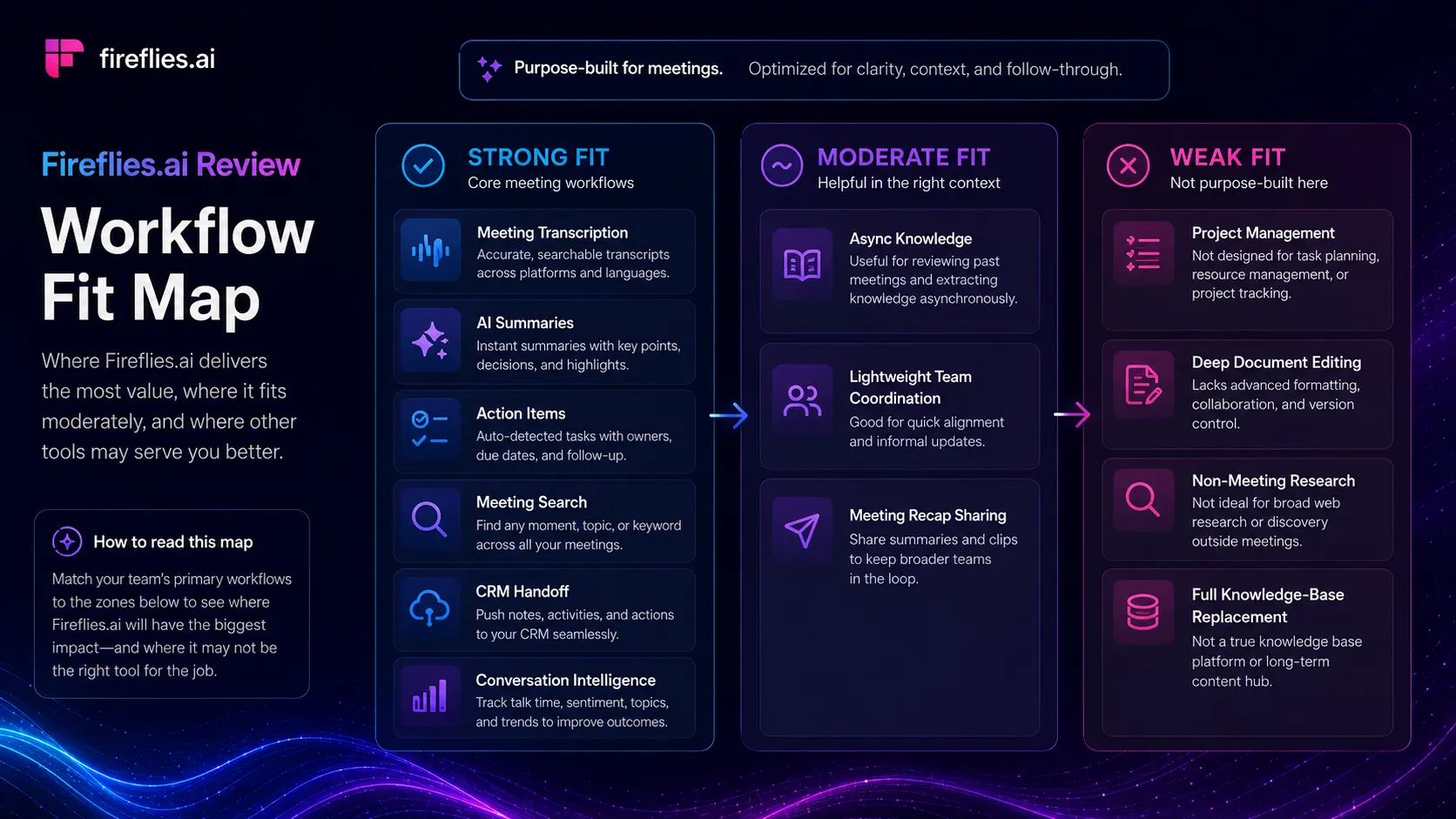
| Stack layer | Fit | What to know |
|---|---|---|
| Meeting transcription | strong | Fireflies is built around capturing and transcribing meetings across common conferencing tools and uploaded audio or video files. |
| AI summaries and action items | strong | It fits teams that need summaries, action items, tasks, and searchable meeting history after calls. |
| CRM and collaboration handoffs | strong | The tool is useful when notes need to connect with CRM, Slack, Zapier, Notion, and other team systems. |
| Conversation intelligence | medium | Business and higher plans add more analytics and team insight features, but buyers should confirm whether those insights match their coaching workflow. |
| Private personal note taking | weak | It can be overkill when the user only needs short private notes and does not need recording, sharing, integrations, or searchable archives. |
Best stack combinations
Sales and customer success teams
fireflies-ai + hubspot + slack + zapier
Use Fireflies to capture calls, HubSpot for customer context, Slack for team visibility, and Zapier for lightweight routing when native integrations do not cover every handoff.
Remote operators and team leads
fireflies-ai + notion + chatgpt + google-workspace
Use Fireflies for meeting memory, Notion for decisions and project notes, ChatGPT for drafted follow-ups, and Google Workspace for calendars and docs.
Product and research teams
fireflies-ai + notion + claude-ai + airtable
Use Fireflies to capture user calls, Notion or Airtable to organize insights, and Claude to help synthesize reviewed notes into patterns.
What Fireflies.ai can replace
- · Manual meeting notes
- · Basic call transcription tools
- · Some meeting summary workflows
- · Scattered post-call action item tracking
What it still needs
- · Calendar and meeting platform: Provides the meeting source that Fireflies captures or joins
- · CRM or project system: Turns meeting notes into customer records, tasks, or follow-up workflows
- · Human reviewer: Checks transcript accuracy, sensitive information, and customer-facing claims before reuse
- · Privacy and consent policy: Defines when recording is allowed and how meeting data should be stored or shared
Add it to your stack if
- · Your team has many calls and needs transcripts, summaries, and action items without manual note taking.
- · Meeting context should be searchable and reusable across sales, success, recruiting, research, or operations workflows.
- · You want meeting notes to connect with CRM, Slack, Notion, Zapier, or other team systems.
Skip it if
- · Your team cannot record meetings or has not defined consent and privacy rules.
- · You only need occasional short notes and do not need a searchable meeting archive.
- · Your core need is polished video editing, async video messaging, or public-facing content production.
Choose your next step
Check Fireflies.ai pricing
→Compare Free, Pro, Business, and Enterprise plans before deciding whether the storage, analytics, and security limits fit your meeting volume.
Compare Fireflies alternatives
→Review Otter.ai, Fathom, tl;dv, and adjacent meeting tools if Fireflies feels too team-heavy or does not fit your recording policy.
Compare Otter.ai vs Fireflies.ai
→Use the direct comparison when the main decision is between two meeting transcription and note-taking workflows.
See the AI productivity stack
→Place Fireflies beside calendars, video meeting tools, knowledge bases, CRM systems, and automation tools.
Read the Fireflies.ai review
→Use the review when you need a deeper buyer breakdown of workflow fit, pricing tradeoffs, and limitations.
Pricing summary
This is a profile-level summary. Use the pricing page for deeper plan checks.
Starting path
Free plan, paid plans from $10/seat/mo annually
Free plan
Yes
Free trial
No
Based on the current public pricing page, Fireflies.ai has a Free plan with 800 minutes of storage per seat and limited AI summaries. Paid plans start with Pro at $10 per seat per month when billed annually, while Business is listed at $19 per seat per month annually and Enterprise at $39 per seat per month annually. The page currently says annual billing can save up to 44%.
Best starting path: Start with Free only to confirm meeting capture, transcript quality, and team consent workflow. Choose Pro when downloads, unlimited summaries, and more storage matter. Consider Business for video recording, conversation intelligence, team analytics, and stronger admin workflow needs.
Related stack page
AI Productivity Stack
→Role: Meeting memory and follow-up layer
Fireflies fits a productivity stack when meetings generate decisions, tasks, customer context, and follow-up work. It should sit beside a calendar, video meeting platform, knowledge base, CRM, and automation layer rather than act as a standalone productivity system.
Sales Productivity Stack
→Role: Call notes and conversation context layer
Fireflies is useful for sales teams that want call notes, summaries, talk-time context, and CRM handoffs. It works best when managers define how notes should be reviewed and used after each call.
Top alternatives
See all →Direct alternatives
Adjacent tools in the same stack


Related comparisons
FAQ
What is Fireflies.ai best used for?
Fireflies.ai is best used for recording meetings, creating transcripts, generating AI summaries, searching past calls, and sending follow-up context into team tools. It fits recurring team, sales, research, and operations meetings better than occasional personal notes.
Does Fireflies.ai have a free plan?
Yes. The current public pricing page lists a Free plan with unlimited transcription, limited AI summaries, and 800 minutes of storage per seat. Buyers should verify current limits before relying on it for a full team workflow.
How much does Fireflies.ai cost?
The current pricing page lists Pro at $10 per seat per month when billed annually, Business at $19 per seat per month annually, and Enterprise at $39 per seat per month annually. Monthly prices and plan details should be confirmed at checkout.
Is Fireflies.ai better than Otter.ai?
It depends on the workflow. Fireflies.ai is usually stronger when CRM, team analytics, integrations, and shared meeting memory matter. Otter.ai may be simpler for users who mostly want straightforward transcription and meeting notes.
Can Fireflies.ai connect to CRM and team tools?
Yes. Fireflies positions integrations as a major part of the product and lists CRM, collaboration, meeting, storage, and automation connections. Buyers should test the exact apps they use before building a recurring workflow around it.
What should buyers check before using Fireflies.ai?
Check meeting recording consent, privacy rules, storage requirements, transcript accuracy, plan limits, security controls, and whether the team will actually review and act on the summaries after each meeting.
How TopAIStacks evaluates Fireflies.ai
This profile uses the official Fireflies.ai homepage and pricing page as the source of truth for product positioning, plan structure, free plan details, annual saving, storage limits, integrations, and security-related claims. G2 was used only for public rating, review count, and general buyer sentiment. Claims about legal consent, privacy, and sensitive meetings are framed as buyer checks rather than product guarantees.
Last checked: May 2026 · Source confidence: high