Fireflies.ai Review
Fireflies.ai review for teams: meeting notes, summaries, CRM fit, pricing, privacy, limits, and best alternatives.
Strong meeting intelligence layer for teams that actually use transcripts, summaries, search, and CRM handoffs.
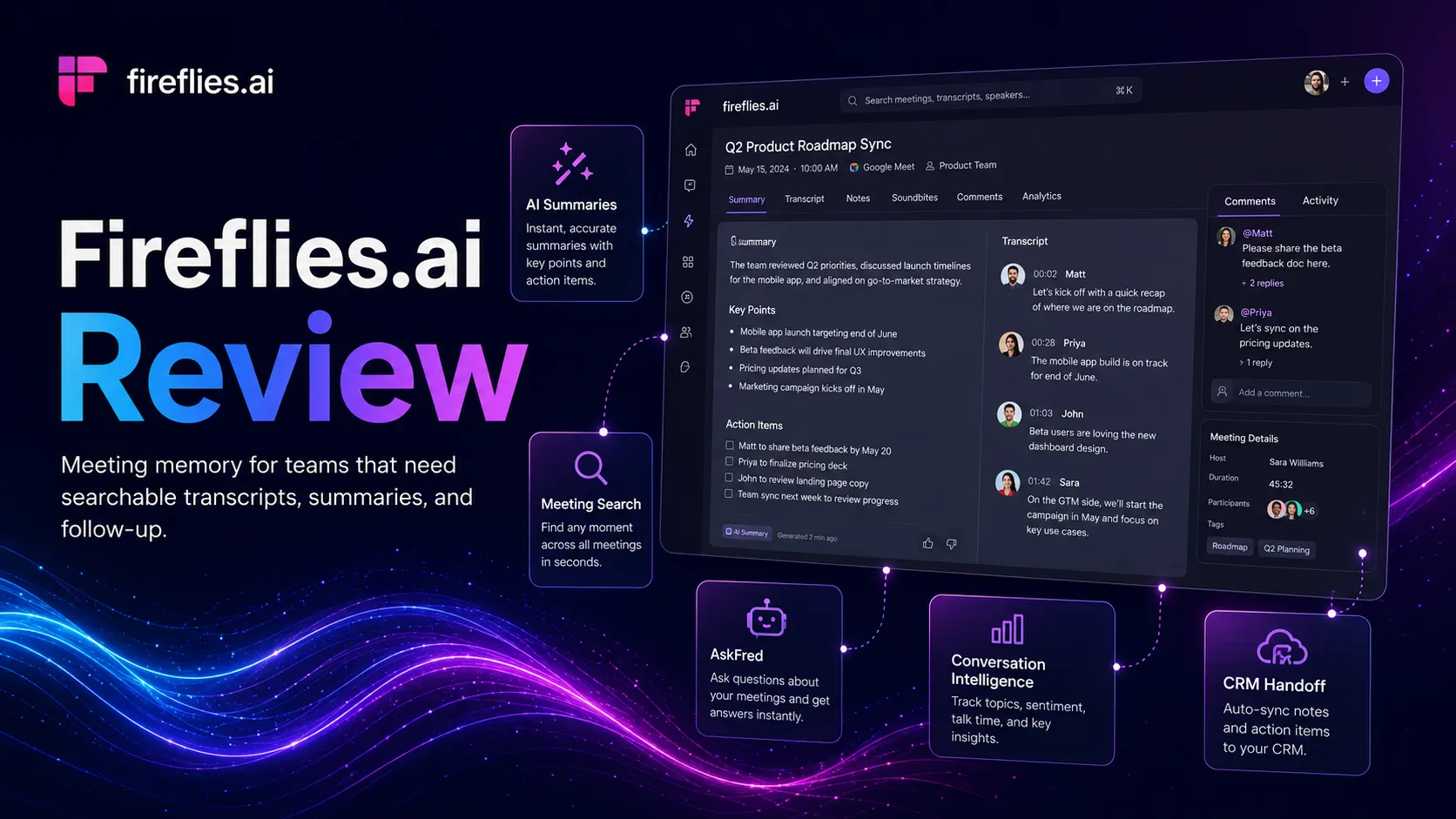
Use it if…
- ✓ Your team has enough meetings that decisions and follow-ups are regularly lost.
- ✓ You want transcripts, summaries, action items, meeting search, and CRM-friendly notes in one workflow.
- ✓ You can set clear rules for recording consent, sharing, retention, and sensitive meetings.
- ✓ You have someone responsible for reviewing AI notes and turning them into real follow-up work.
Skip it if…
- – Your team does not act on meeting notes after calls.
- – You cannot safely record meetings in your market, client context, or internal policy.
- – You only need occasional personal transcription and do not need integrations or analytics.
- – You need a project management system, CRM, or documentation workspace more than a meeting assistant.
Review scorecard
Scored by workflow fit, ease of use, value, and stack compatibility. Weights reflect importance for typical buyers.
| Criteria | Score | ||
|---|---|---|---|
| Meeting capture and transcription coverage | 8.5 | ||
| Summary, search, and follow-up usefulness | 8.5 | ||
| Team and CRM workflow fit | 9.0 | ||
| Pricing and plan clarity | 8.0 | ||
| Privacy, consent, and governance readiness | 8.0 | ||
| Weighted overall | 8.5 / 10 | ||
On this page
Quick verdict
Fireflies.ai earns an 8.5/10 because it solves a real problem that keeps showing up after meetings: the team remembers the feeling of the call, but not the exact decision, objection, owner, or follow-up. It is strongest as a meeting intelligence and searchable conversation memory layer for sales, customer success, recruiting, consulting, product research, and remote teams.
I would add Fireflies if your team already has enough meetings to justify a shared record of what happened. I would compare it first if you only need personal notes, or if recording consent and privacy rules are still unclear.
The danger is subtle. Fireflies can make your team feel organized before anyone has actually followed up.
Who should use Fireflies.ai
Picture a sales manager reviewing five calls on a Friday afternoon. One rep promised a follow-up deck, another heard a pricing objection, and a third call has a hidden buying signal that nobody copied into the CRM. This is the kind of messy workflow where Fireflies starts to make sense.
Use Fireflies when meeting memory has business value. Sales calls, customer onboarding, recruiting screens, agency client calls, research interviews, partner meetings, and recurring team reviews all create information that disappears fast unless someone captures it.
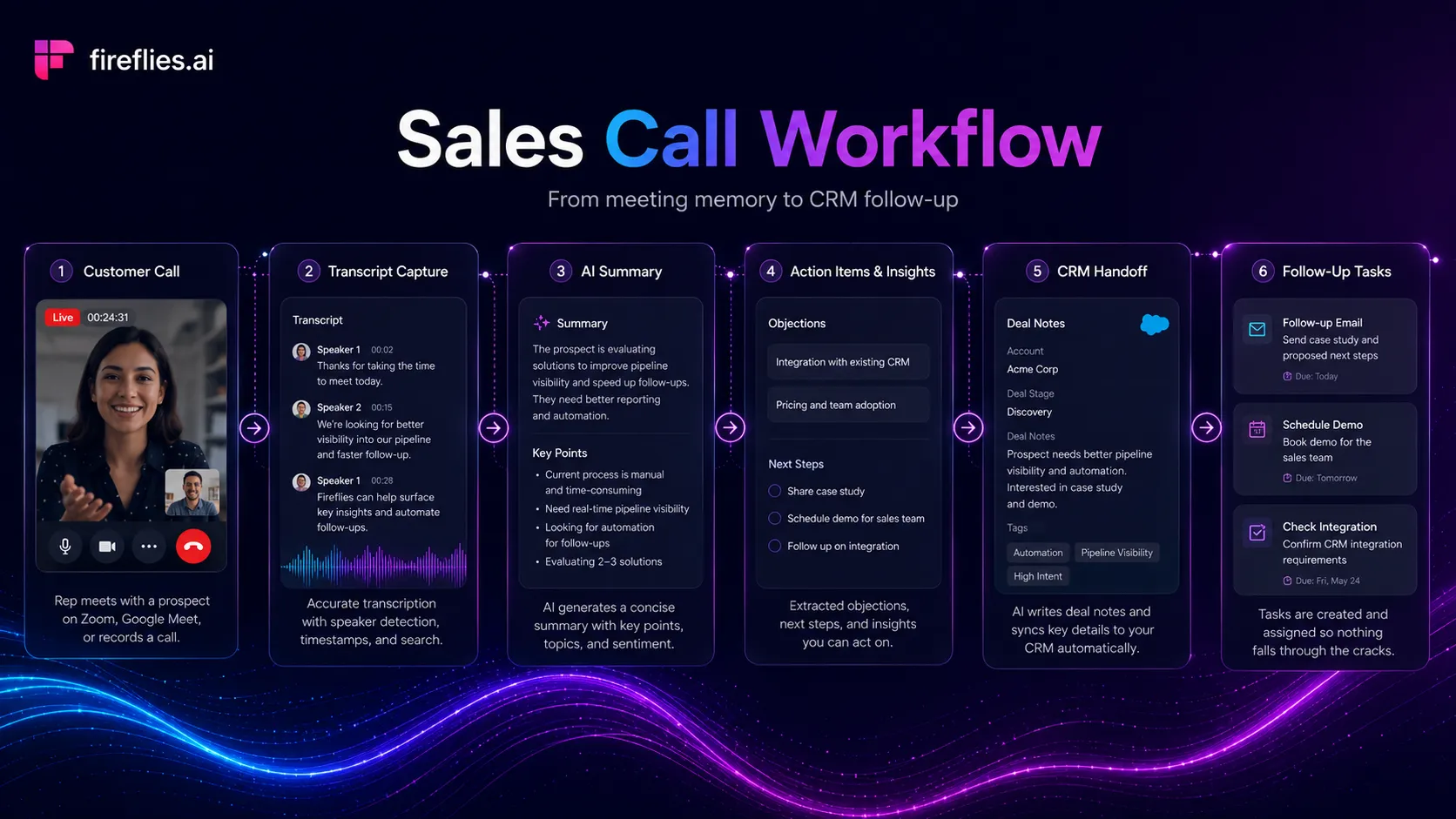
It also fits remote teams that need a shared source of truth across time zones. If one teammate misses a meeting, Fireflies can give them the transcript, summary, action items, and searchable context. That does not remove the need for human judgment, but it does reduce the number of small follow-up messages asking what happened.
Who should skip Fireflies.ai
Skip Fireflies if your team does not have a clear reason to record meetings. A transcript nobody reads is just another content pile. If the team already ignores docs, CRM notes, and task owners, adding an AI notetaker will not fix the operating problem.
You should also be careful if your meetings involve sensitive clients, healthcare information, employee issues, legal matters, or markets where recording consent is strict. Fireflies publishes privacy and security controls, but your team still needs its own policy for participant notice, sharing, deletion, and who can access the meeting record.
If you only need occasional personal transcription, Fireflies may be heavier than necessary. A simpler tool, a built-in meeting summary, or manual notes may be enough until meeting volume becomes painful.
Real workflow fit
The best Fireflies workflow starts before the call. Connect your calendar, decide which meetings should be recorded, set privacy defaults, and make sure the team knows where summaries and transcripts will go. After the call, Fireflies can create notes, action items, searchable transcripts, and handoffs into CRM or collaboration tools.
The real win is not transcription by itself. The win is that a buyer objection, hiring concern, customer feature request, or project decision becomes findable later.
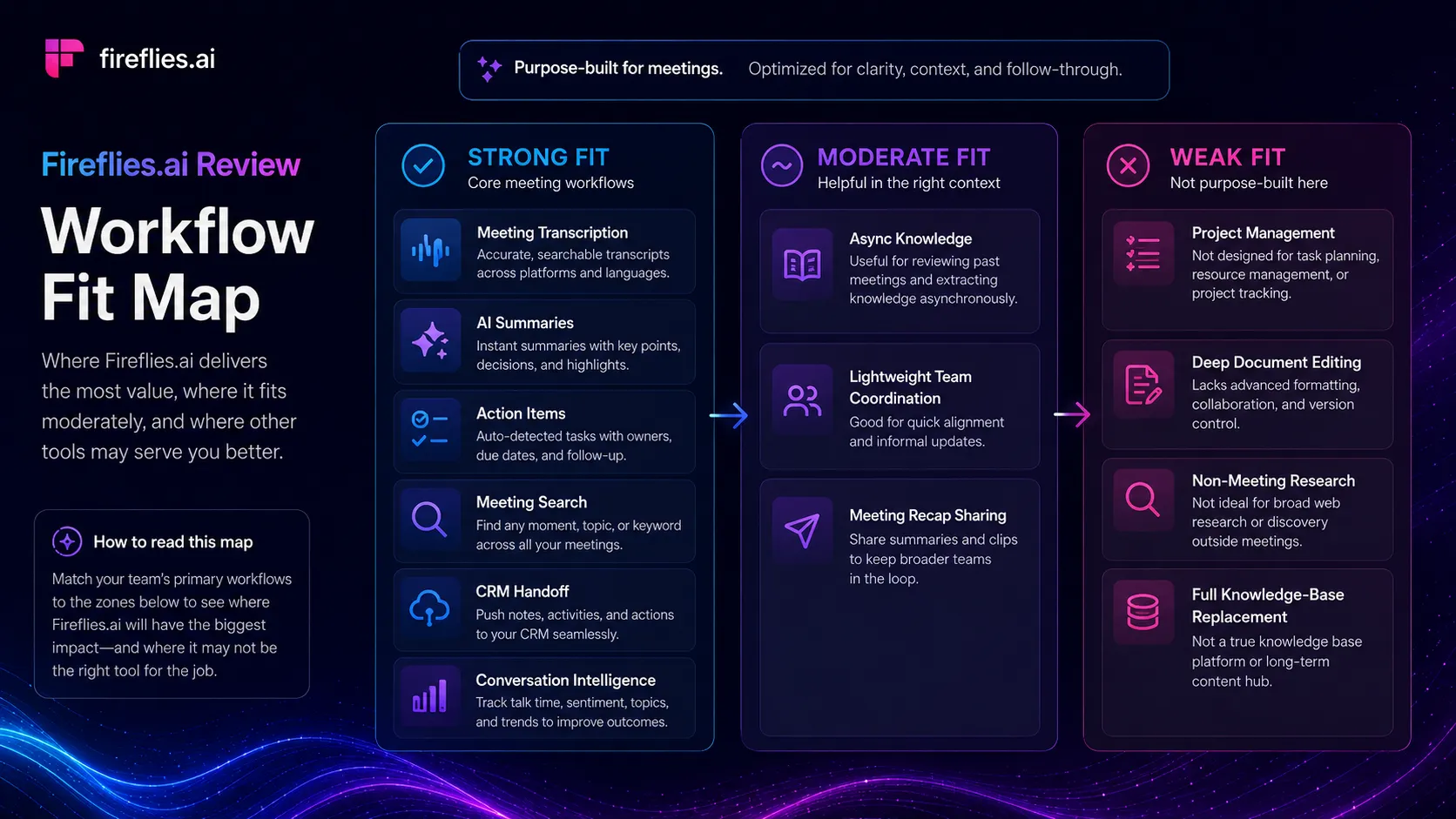
A small surprise is that Fireflies becomes more valuable after a few weeks, not on day one. One meeting summary is useful. A searchable archive of dozens of calls is where the product can change how teams remember customer problems, recurring objections, and internal decisions.
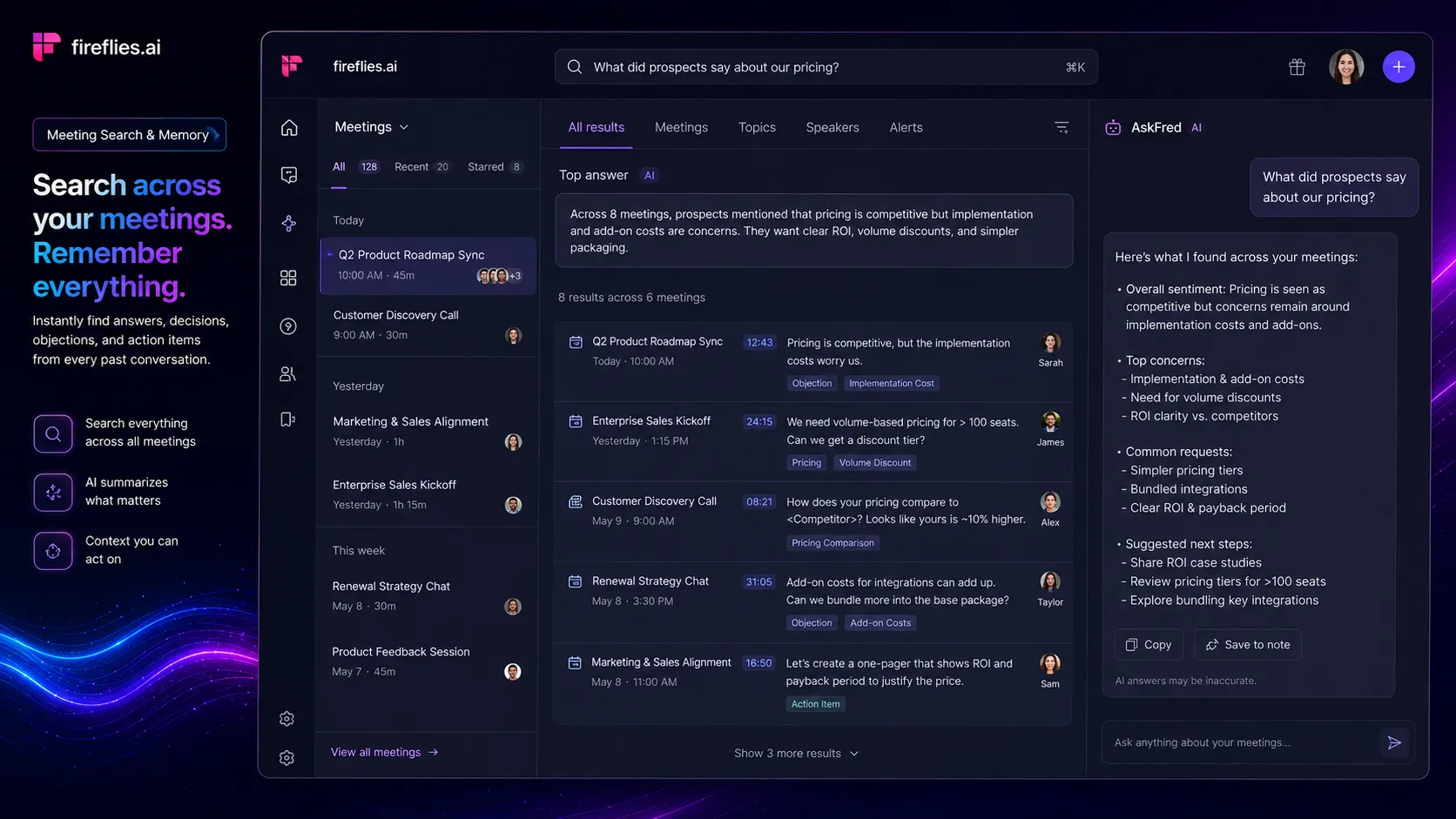
I did not embed a video in this review because I could not verify a suitable official Fireflies YouTube watch URL during this pass. That is intentional. For a review page, a missing video is better than a fake demo link.
Where Fireflies.ai fits in an AI stack
Fireflies belongs between your meetings and the systems where work happens. It can connect meeting platforms, transcripts, summaries, action items, CRM notes, Slack updates, task tools, and searchable knowledge. It does not replace the CRM, project manager, documentation owner, or person who decides what the team should do next.
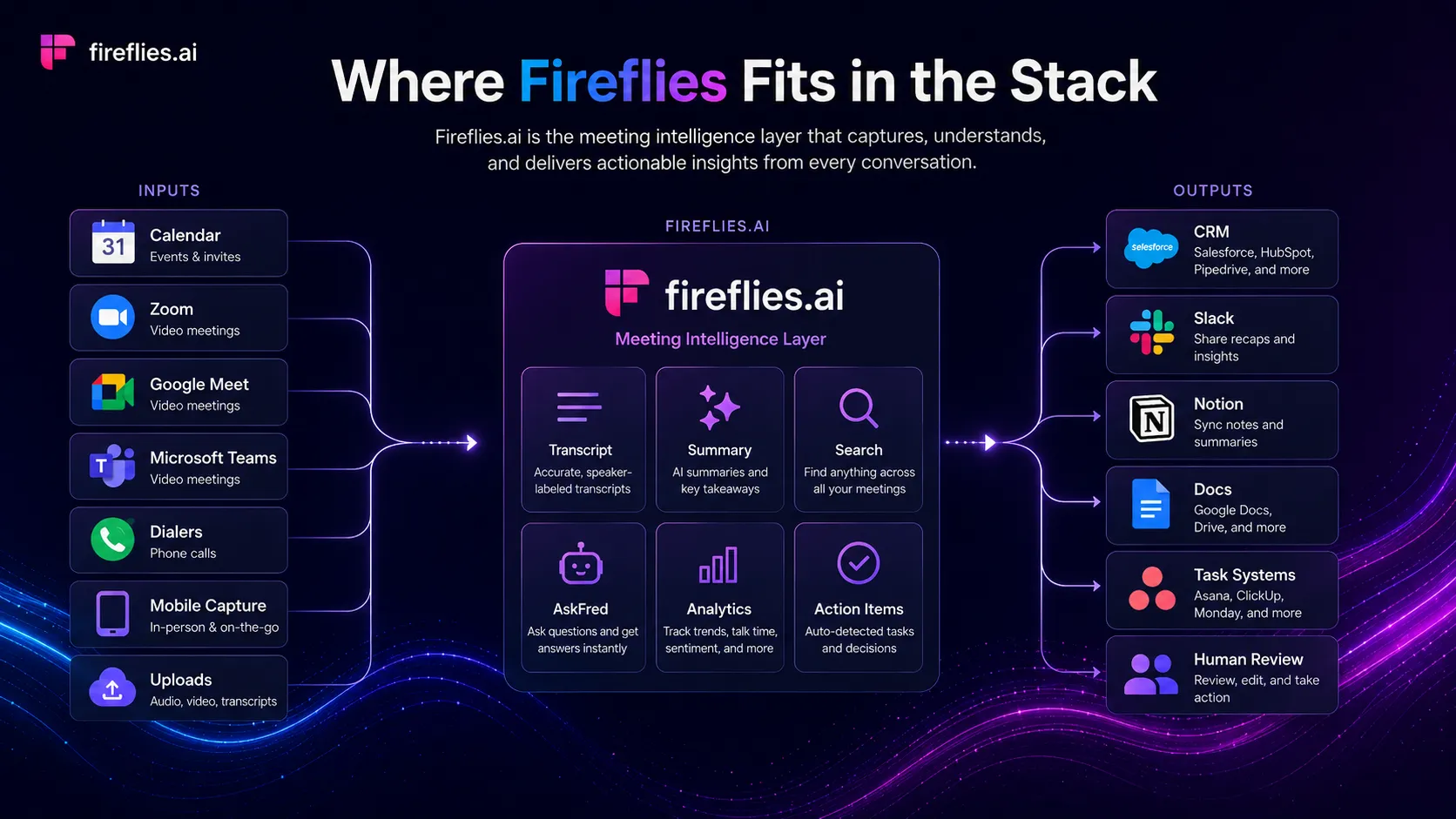
In a practical AI stack, Fireflies pairs well with ChatGPT or Claude for deeper analysis, Notion or Google Docs for documentation, Slack for team updates, Salesforce or HubSpot for sales handoff, and Zapier or Make for workflow routing. The stack only works if someone owns the next step after the summary arrives.
What Fireflies.ai does well
First, Fireflies captures meetings from more than one path. The homepage describes bot-based meeting capture, Chrome extension recording, mobile capture, audio and video uploads, dialer support, and API access. That matters because real teams do not have one neat meeting pattern.
Second, it turns meetings into more than transcripts. Summaries, action items, search, AskFred, AI apps, topic tracking, and conversation intelligence give teams different ways to use the captured conversation later.
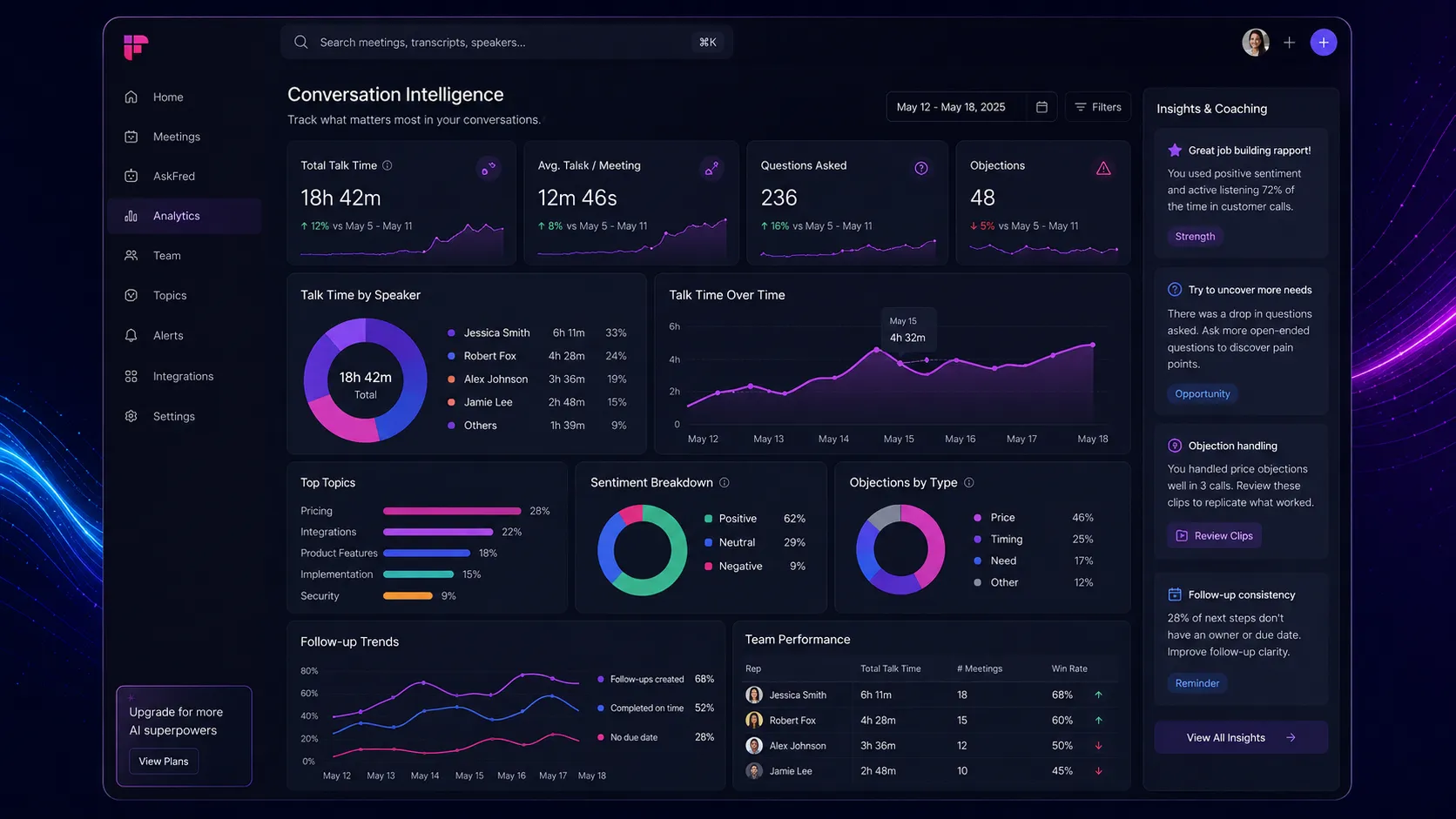
Third, Fireflies has a stronger business workflow angle than many simple transcription tools. CRM integrations, Slack, project management handoffs, AI apps, and admin controls make it more credible for teams that want meeting knowledge to move into daily work.
The friction is that stronger workflows also create more setup choices. If you connect everything too quickly, you may send noisy summaries into too many places. Start with one or two high-value meeting types before rolling it across the whole company.
Where Fireflies.ai falls short
The first weakness is consent and recording comfort. Some teams are fine with a meeting bot. Some clients are not. Some internal conversations should not be recorded by default. Fireflies gives controls, but controls do not replace policy.
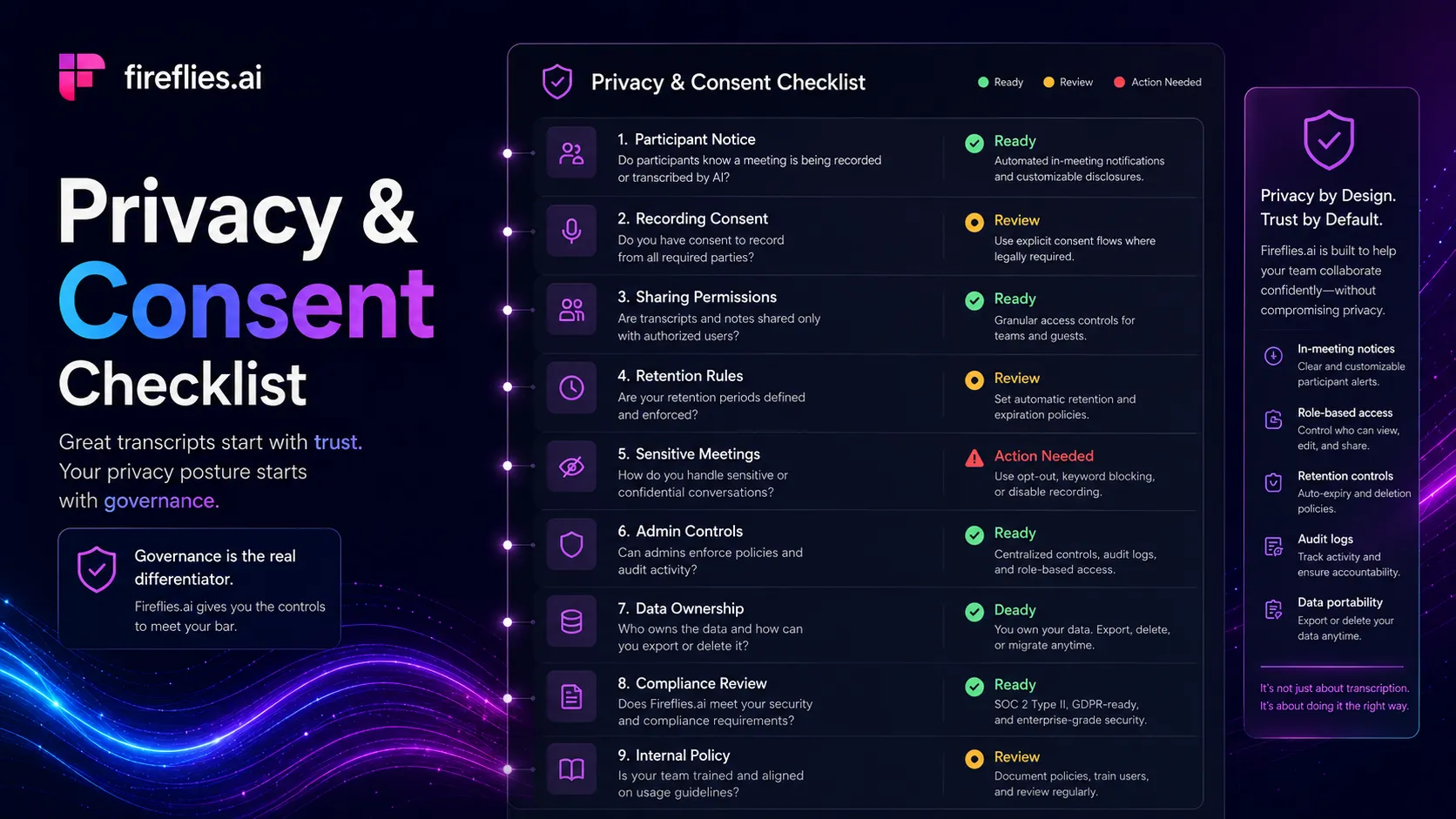
The second weakness is false confidence. A neat summary can hide nuance. Sales calls, customer complaints, and recruiting interviews often need human review because tone, hesitation, and context matter.
The third weakness is workflow sprawl. Fireflies can send outputs into CRM, Slack, tasks, and other tools. That is useful when governed well. It becomes noise when every meeting generates summaries, clips, alerts, and tasks that nobody owns.
Pricing judgment
Fireflies has a real free entry point. During this review pass, the pricing page showed Free at $0 with unlimited transcription, limited AI summaries, and 800 minutes of storage per seat. Pro was shown at $10 per seat per month billed annually, Business at $19 per seat per month billed annually, and Enterprise at $39 per seat per month billed annually.
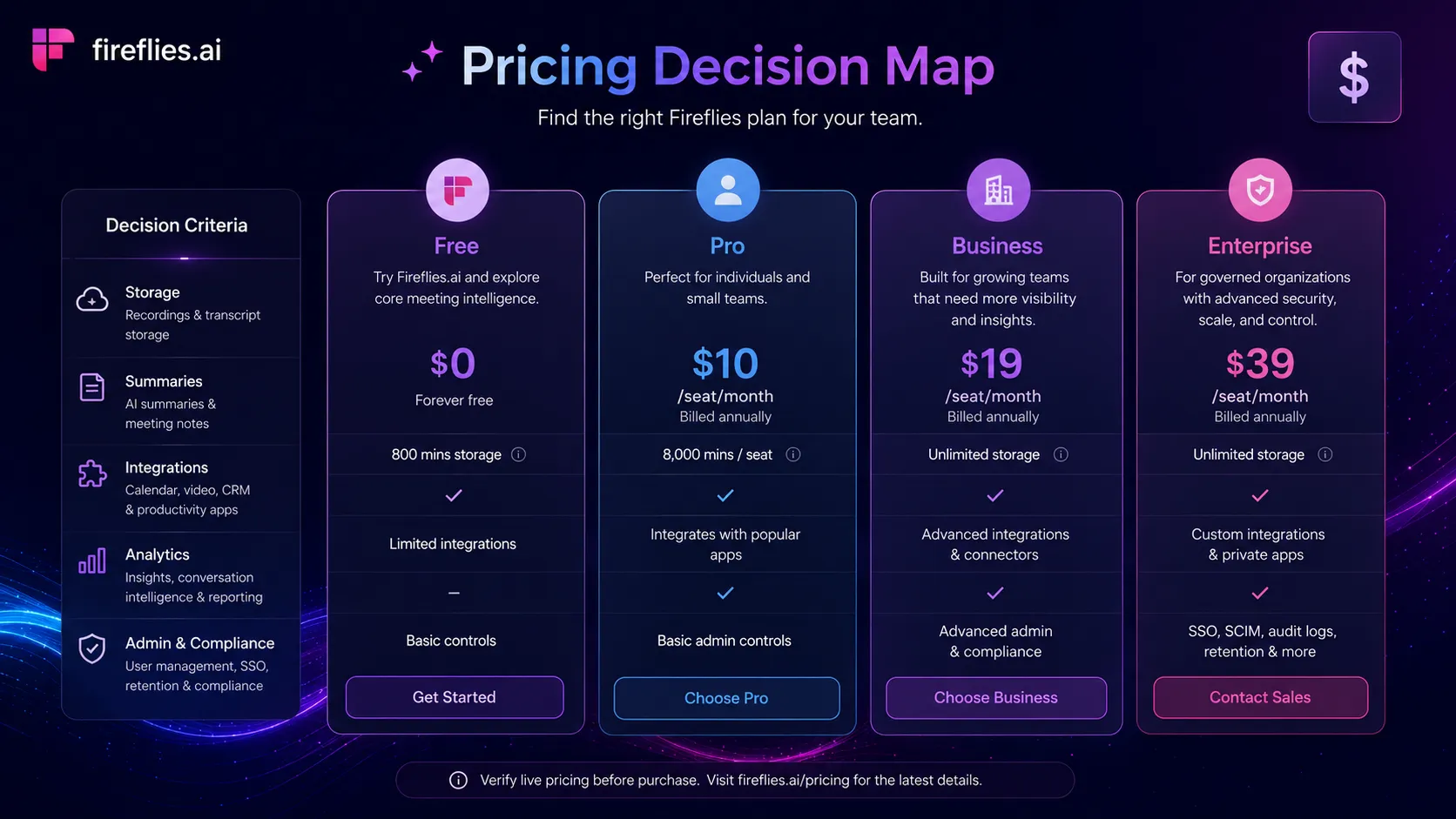
Stay free if you are validating whether AI meeting notes change behavior. Pay when the team needs unlimited summaries, downloads, more storage, integrations, AI skills, voice agents, video recording, analytics, user groups, or enterprise controls. Do not pay just because the notes look polished. Pay when the notes reliably create follow-up work, better CRM records, or searchable customer memory.
Verify current pricing on the official pricing page.
Best alternatives to compare
Compare Otter.ai first if your main need is straightforward transcription, collaborative notes, and a simpler meeting notes workflow. Otter is the most natural direct comparison because buyers often choose between note quality, meeting summaries, minutes, and collaboration rather than advanced workflow routing.
Compare Fathom if you want a lighter call summary experience and do not need Fireflies level integrations or meeting intelligence depth from day one. It may be the more comfortable option for smaller teams that want less setup.
Compare tl;dv if video-call recap, highlights, and async review are the core job. It is especially relevant for teams that want to revisit call moments rather than build a broader searchable conversation layer.
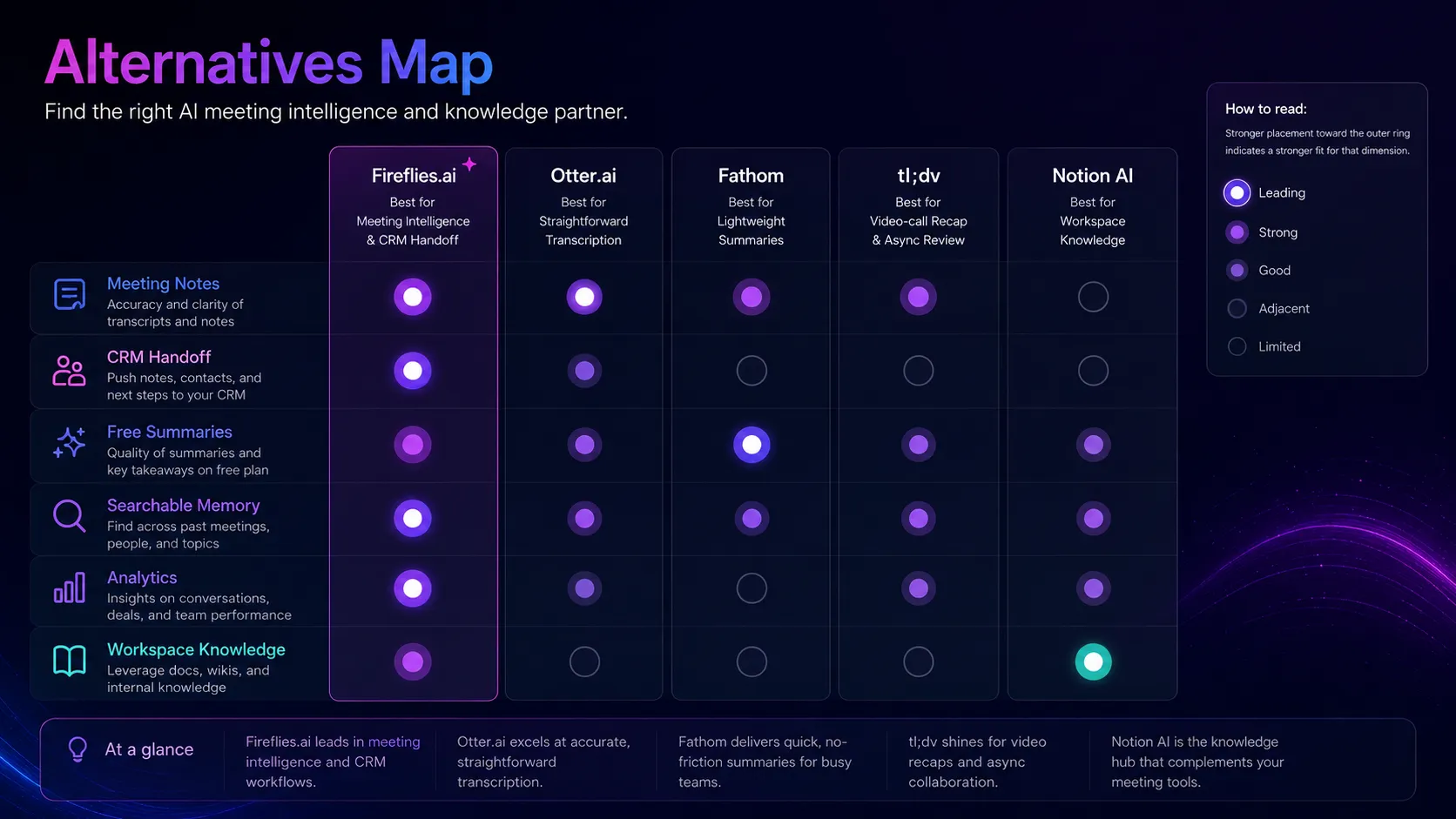
Notion AI is adjacent, not a direct replacement. It does not solve meeting capture the same way, but it may be better if your main gap is organizing knowledge after notes already exist.
Final decision
Add Fireflies.ai to your stack if meetings create business-critical follow-up, customer memory, sales context, recruiting notes, or recurring decisions that your team currently loses.
Compare Otter.ai or Fathom first if you want simpler transcription or lighter summaries without building a full meeting intelligence workflow.
Skip Fireflies.ai for now if your team has not settled recording consent, privacy rules, meeting ownership, or the habit of turning summaries into real work.
Frequently asked questions
Is Fireflies.ai good for sales teams?
Can Fireflies.ai be used for free?
Does Fireflies.ai train AI models on my meetings?
What are the best Fireflies.ai alternatives?
Should small teams pay for Fireflies.ai?
Where Fireflies.ai fits in a stack
Meeting intelligence and searchable conversation memory layer
Does not replace
- – Human consent and recording policy
- – Manager judgment
- – CRM ownership
- – Project management systems
- – Formal documentation workflows
- – Legal review for regulated conversations
Head-to-head comparisons
Top alternatives to consider
If Fireflies.ai is not the right fit, these are the most common alternatives.
Otter.ai is the closest meeting transcription and note-taking alternative, especially for teams comparing transcription minutes, meeting summaries, and collaboration workflows.
Fathom is worth comparing if you want a lighter meeting assistant with fast summaries and less workflow complexity.
tl;dv is relevant for teams that want meeting recording, highlights, and async review around video calls.
Review methodology
Editorial review based on current Fireflies.ai official product pages, pricing page, security page, privacy policy, task input context, and public market context.
This review does not claim private hands-on testing, private accuracy benchmarks, or production deployment inside a team workspace.
Not covered: Private transcription accuracy benchmark · Private CRM integration test · Admin console audit · Legal review of recording consent obligations · Enterprise contract or BAA review