 R
R Rytr
Use Rytr when you need a low-cost AI writing assistant for short-form copy, captions, emails, outlines, and quick rewrites. It is easier to justify than heavier marketing suites when budget matters more than deep content operations.
Quick answer
Use Rytr when you need a low-cost AI writing assistant for short-form copy, captions, emails, outlines, and quick rewrites. It is easier to justify than heavier marketing suites when budget matters more than deep content operations.
Rytr is not the safest choice for deep SEO articles, original research, or enterprise content governance. The free plan is useful for testing, but the character limit can disappear quickly. Buyers should verify language limits, plagiarism-check allowances, tone matching, and monthly versus annual billing before using it for regular client work.
What is Rytr?
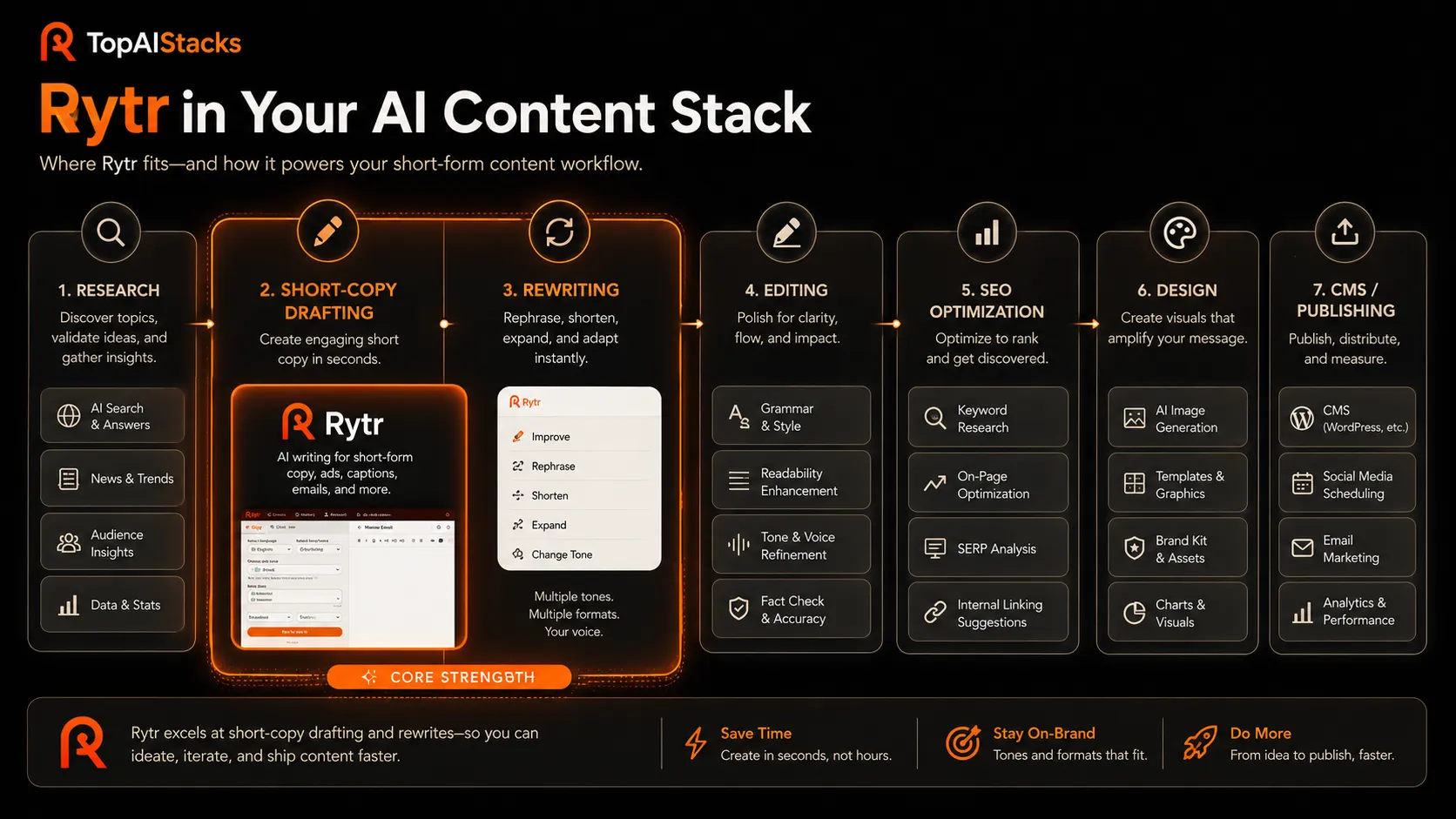
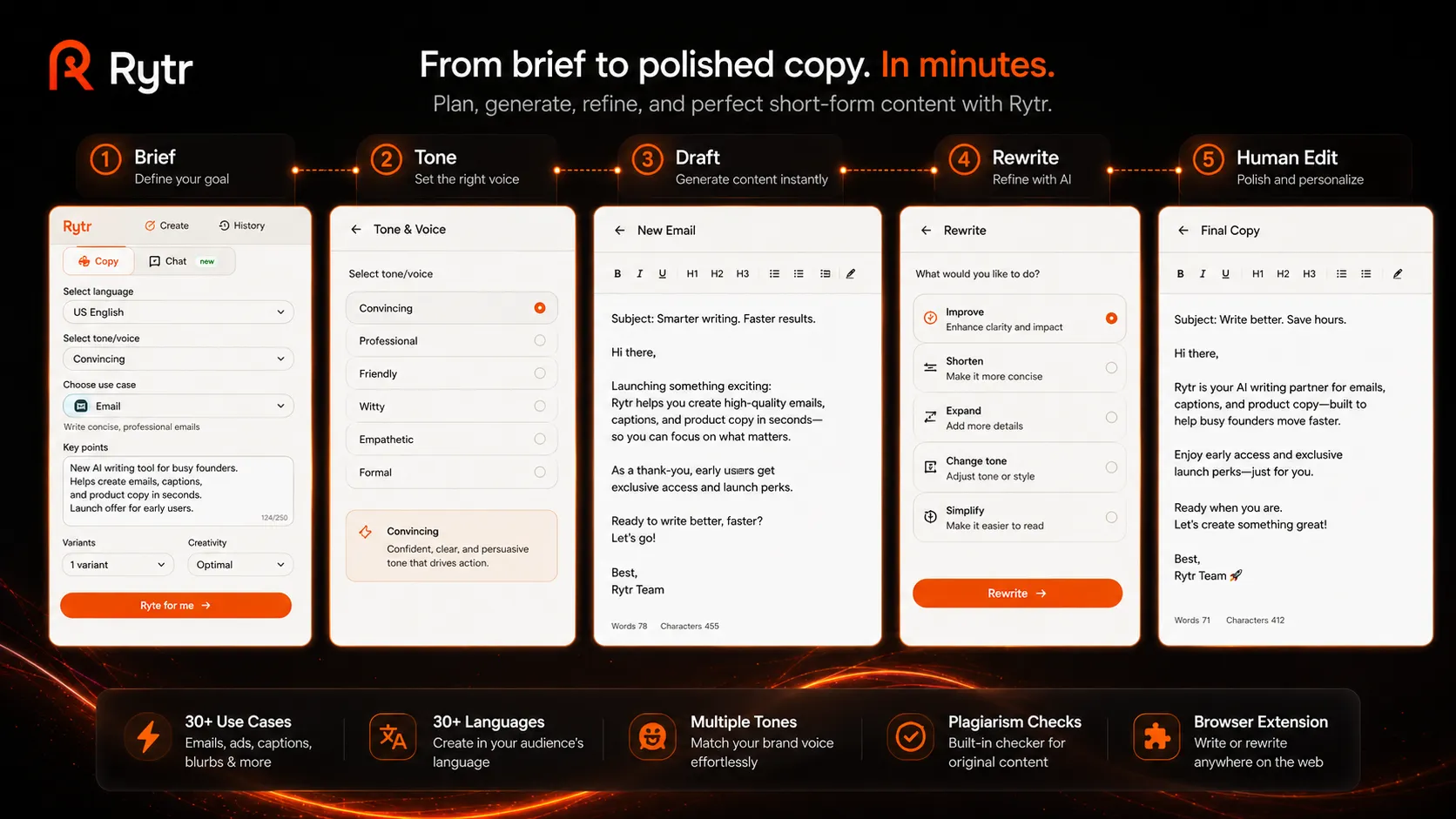
Rytr is a lightweight AI writing tool for freelancers, solopreneurs, and small teams that need fast first drafts without building a complex content system. Its public pages emphasize 40+ use cases, preset tones, tone matching on paid plans, plagiarism checks, and a Chrome extension for writing in more places. In a practical AI stack, Rytr works best near the draft and rewrite stage, then hands off to human editing, SEO tools, fact checking, and publishing tools.
Who Rytr fits best
Best for budget-conscious writers and small operators who need quick copy support without paying for a full marketing content suite.
- ✓Freelancers drafting short client copy, emails, captions, and outlines
- ✓Solopreneurs testing AI writing before paying for a larger platform
- ✓Small teams that need simple rewrites and tone variations on a tight budget
- ✓Bloggers who want first-draft help but still edit and research manually
Not ideal for
- •Teams that need advanced SEO briefs, keyword clustering, and content scoring
- •Agencies that require strict brand voice control across many clients
- •Long-form editorial workflows that depend on source-based research
- •Enterprises needing governance, approvals, and detailed content operations
Main use cases
Social captions and short posts
Rytr fits quick captions, post ideas, and short promotional copy where speed matters. The safer workflow is to edit for voice, accuracy, and platform fit before publishing.
Email and outreach drafts
Freelancers and small teams can use Rytr to produce first-pass emails, replies, and call-to-action variations. It works best when the offer, audience, and context are already clear.
Blog outlines and paragraph drafts
Rytr can help unblock outlines, intros, summaries, and short paragraph drafts. It should not be treated as a full research or SEO strategy tool.
Rewrite and tone variation
Rytr can turn rough copy into cleaner variations with different tones. Final approval still needs a human editor, especially for client, legal, or brand-sensitive copy.
Where Rytr fits in the AI stack
Rytr belongs in the early drafting and rewrite layer of an AI writing stack. It can replace some quick copy ideation, caption drafting, and simple rewrite work, but it does not replace research, editorial judgment, SEO planning, brand guidelines, or final publishing. Pair it with a stronger assistant, grammar tool, SEO workflow, and CMS when content quality matters.
Stack role
AI writing and content drafting layer
Best paired with
ChatGPT, Claude, Grammarly
Strongest layer
Idea and copy angles
| Stack layer | Fit | What to know |
|---|---|---|
| Idea and copy angles | strong | Rytr is useful for quick short-form angles, captions, and simple variations. |
| Long-form research writing | weak | It is not a research engine and should not be used alone for factual or source-heavy articles. |
| Editing and polishing | medium | Rytr can rewrite and adjust tone, but grammar, accuracy, and brand fit still need review. |
| SEO publishing workflow | weak | Rytr does not replace SERP analysis, keyword clustering, CMS publishing, or content audits. |
Best stack combinations
Freelancers writing client copy on a budget
rytr + grammarly + notion + wordpress
Use Rytr for the first draft, Grammarly for polish, Notion for briefs and approvals, and WordPress for publishing.
Affiliate bloggers building simple content workflows
chatgpt + rytr + surfer-seo + wordpress
Use ChatGPT for structure and research prompts, Rytr for short copy variations, Surfer SEO for optimization checks, and WordPress for publication.
What Rytr can replace
- · Some short-form copy brainstorming
- · Some caption and ad variation drafting
- · Some email first drafts
- · Some basic rewrites and tone changes
What it still needs
- · human-editor: Final judgment for accuracy, voice, and usefulness
- · source-research: Verified facts, examples, and product details before publishing
- · seo-workflow: Keyword intent, structure, internal links, and optimization checks
- · publishing-system: CMS formatting, metadata, images, and post-publication updates
Add it to your stack if
- · You need affordable short-form writing help more than a heavy marketing platform.
- · Your workflow already includes human editing and fact checking.
- · You write captions, emails, outlines, product blurbs, or simple blog sections often.
Skip it if
- · You need deep SEO planning, keyword clustering, or source-based long-form research inside one tool.
- · Your brand requires strict approval flows, governance, and multi-team content operations.
- · You want one AI tool to handle strategy, writing, editing, optimization, and publishing.
Choose your next step
Pricing
→Compare the Free, Unlimited, and Premium plans before choosing a budget writing path.
Alternatives
→Compare Rytr with Copy.ai, Writesonic, Jasper, and broader AI writing tools.
Compare options
→Use this comparison if you are choosing between budget copywriting and a broader GTM writing workflow.
Stack fit
→See how Rytr fits beside research, editing, SEO, and publishing tools.
Review
→Read the full editorial review before relying on Rytr for regular writing work.
Pricing summary
This is a profile-level summary. Use the pricing page for deeper plan checks.
Starting path
Free plan, then annual paid plans
Free plan
Yes
Free trial
No
Rytr's public pricing currently lists a Free plan, an Unlimited plan from $7.50 per month when billed yearly, and a Premium plan from $24.16 per month when billed yearly. The free plan includes 10K characters per month, while paid tiers expand generation, plagiarism checks, and tone features. Treat pricing as plan-fit dependent because language and tone limits differ by tier.
Best starting path: Start with the Free plan if you only want to test output quality. The Unlimited plan is the first serious buyer path for one-person short-form writing, while Premium makes more sense when multiple languages, custom use cases, or more tone matching matter.
Related stack page
AI Writing Stack
→Role: Budget short-form drafting and rewrite layer
Rytr fits an AI writing stack when the user needs fast copy drafts without the cost or setup of larger marketing suites. It works best beside a stronger research assistant, an editing layer, an SEO tool, and a CMS.
Solopreneur Stack
→Role: Low-cost content draft support
Solopreneurs can use Rytr for captions, emails, product blurbs, and lightweight content ideas. The workflow still needs manual checking before public publishing or client delivery.
Top alternatives
See all →Direct alternatives
Copy.ai is closer to go-to-market workflows and sales or marketing copy systems for teams.
Writesonic is a broader AI writing platform with stronger positioning around SEO content and real-time data features.
Jasper is a higher-cost marketing content platform with stronger brand and campaign workflow positioning.
Adjacent tools in the same stack

ChatGPT can support deeper ideation and reasoning, but it is not the same as a template-based copywriting tool.

Claude can review longer drafts and documents, but it does not replace Rytr's quick copy templates for simple use cases.

Grammarly is a polish and clarity layer that pairs well with Rytr outputs rather than replacing the drafting workflow.
Related comparisons
FAQ
What is Rytr best for?
Rytr is best for short-form copy, captions, email drafts, basic rewrites, blog outlines, and quick tone variations. It is most useful for freelancers, solopreneurs, and small teams that need affordable drafting help with human editing after generation.
Does Rytr have a free plan?
Yes. Rytr's public pricing page currently lists a Free plan with 10K characters per month, 40+ use cases, 20+ tones, and Chrome extension access. It is useful for testing, but regular writing work can hit the character limit quickly.
How much does Rytr cost?
Rytr currently shows paid yearly pricing from $7.50 per month for Unlimited and $24.16 per month for Premium. Buyers should verify the billing toggle, monthly pricing, language limits, tone matching, and plagiarism-check allowances on the official pricing page.
Is Rytr better than Jasper or Copy.ai?
Rytr is usually better for budget-conscious short-form drafting. Jasper and Copy.ai are more likely to fit teams that need brand workflows, campaign systems, or go-to-market content operations. The right choice depends on budget, team size, and workflow depth.
Can Rytr write SEO articles?
Rytr can help with outlines, intro drafts, paragraph ideas, and rewrites, but it should not replace SEO research or editorial review. For serious SEO content, pair it with keyword research, SERP analysis, internal linking, fact checking, and human editing.
How TopAIStacks evaluates Rytr
Verified Rytr's public homepage and pricing page for positioning, plan names, free plan limits, annual pricing, plagiarism-check allowances, language limits, and tone features. Third-party sources were used only for market context and caution signals, not as the source of truth for pricing.
Last checked: May 2026 · Source confidence: high