
Surfer SEO Review
Surfer SEO review for buyers comparing AI search visibility, content optimization, pricing, alternatives, and real stack fit.
Strong for SEO content teams that need optimization and AI visibility signals, but expensive for light publishing workflows.
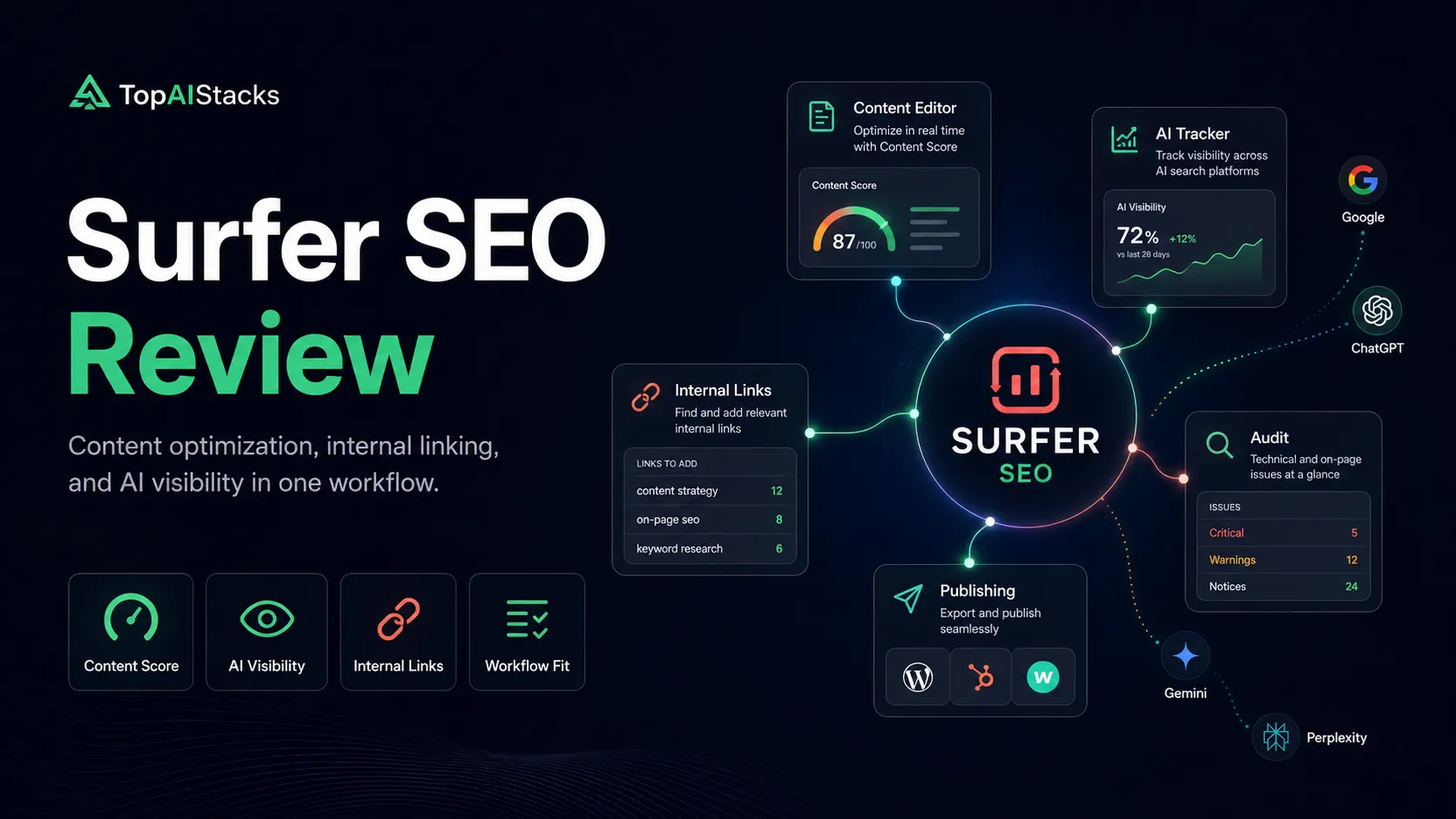
Use it if…
- ✓ You publish or refresh enough SEO content that content optimization saves real editorial time.
- ✓ You want a single workflow for briefs, content scoring, internal links, audits, and AI visibility monitoring.
- ✓ Your team is already doing keyword research and analytics elsewhere but needs a stronger page-level execution layer.
- ✓ You are actively trying to understand how your brand and content appear across Google and AI search tools.
Skip it if…
- – You are still validating a site and only publish a few articles per quarter.
- – You mainly need backlink research, technical crawling, or broad competitor intelligence.
- – Your writers will treat the score as a formula instead of a guide.
- – Your budget is tight and a cheaper brief tool or manual workflow would be enough for now.
Review scorecard
Scored by workflow fit, ease of use, value, and stack compatibility. Weights reflect importance for typical buyers.
| Criteria | Score | ||
|---|---|---|---|
| Workflow fit | 8.6 | ||
| Optimization usefulness | 8.5 | ||
| Ease of adoption | 7.8 | ||
| Pricing clarity | 7.1 | ||
| Stack value | 8.3 | ||
| Weighted overall | 8.1 / 10 | ||
On this page
Quick verdict
Surfer SEO is no longer just a content editor that tells writers which terms to add. The public positioning now leans into visibility across Google and AI search surfaces, which makes sense: content teams are not only asking, “Can this page rank?” They are also asking, “Will this brand appear when buyers ask ChatGPT, Gemini, Perplexity, or Google AI-style answers for recommendations?”
That shift makes Surfer more useful for serious content operations and less attractive for casual publishing. If you only need a few blog ideas, Surfer can feel expensive. If you manage a site where content refreshes, briefs, internal links, audits, and AI visibility tracking happen every week, it becomes a more reasonable stack layer.
The practical question is not whether Surfer is a “good SEO tool.” It is whether your content operation is mature enough to turn its recommendations into better pages instead of just higher scores.
Who should use Surfer SEO
Surfer SEO makes the most sense for teams that already have a content engine. That includes affiliate operators publishing comparison and review content, agencies managing client pages, in-house SEO teams refreshing decaying articles, and content managers trying to reduce the messy handoff between keyword research, writing, editing, and publishing.
It is especially useful when multiple people touch the same article. A writer can draft, an editor can check coverage, an SEO lead can look at content gaps, and a publisher can connect the page to the broader site with internal links. The tool gives the team a shared language for optimization.

I would not buy it just because everyone says content optimization matters. I would buy it when the team has a real publishing cadence and the cost of weak briefs, inconsistent optimization, or missed content refreshes is already visible.
Who should skip Surfer SEO
Beginners should be careful. Surfer can make SEO feel more objective than it really is. A high content score does not automatically mean the page deserves to rank, and it definitely does not mean the page has a fresh angle, better evidence, or a stronger answer than competitors.
Solo bloggers on a tight budget may also want to wait. If you publish once or twice a month, you may get more value from Search Console, a spreadsheet, a cheaper brief tool, and careful manual editing. Surfer becomes more compelling when repeated workflows make the subscription feel like operational leverage instead of another tool bill.
Teams that mainly need backlink research, competitor traffic estimates, broad keyword data, or technical crawling should compare Semrush, Ahrefs, Screaming Frog, and Search Console first. Surfer is closer to the execution layer after research, not the entire SEO intelligence system.
Real workflow fit
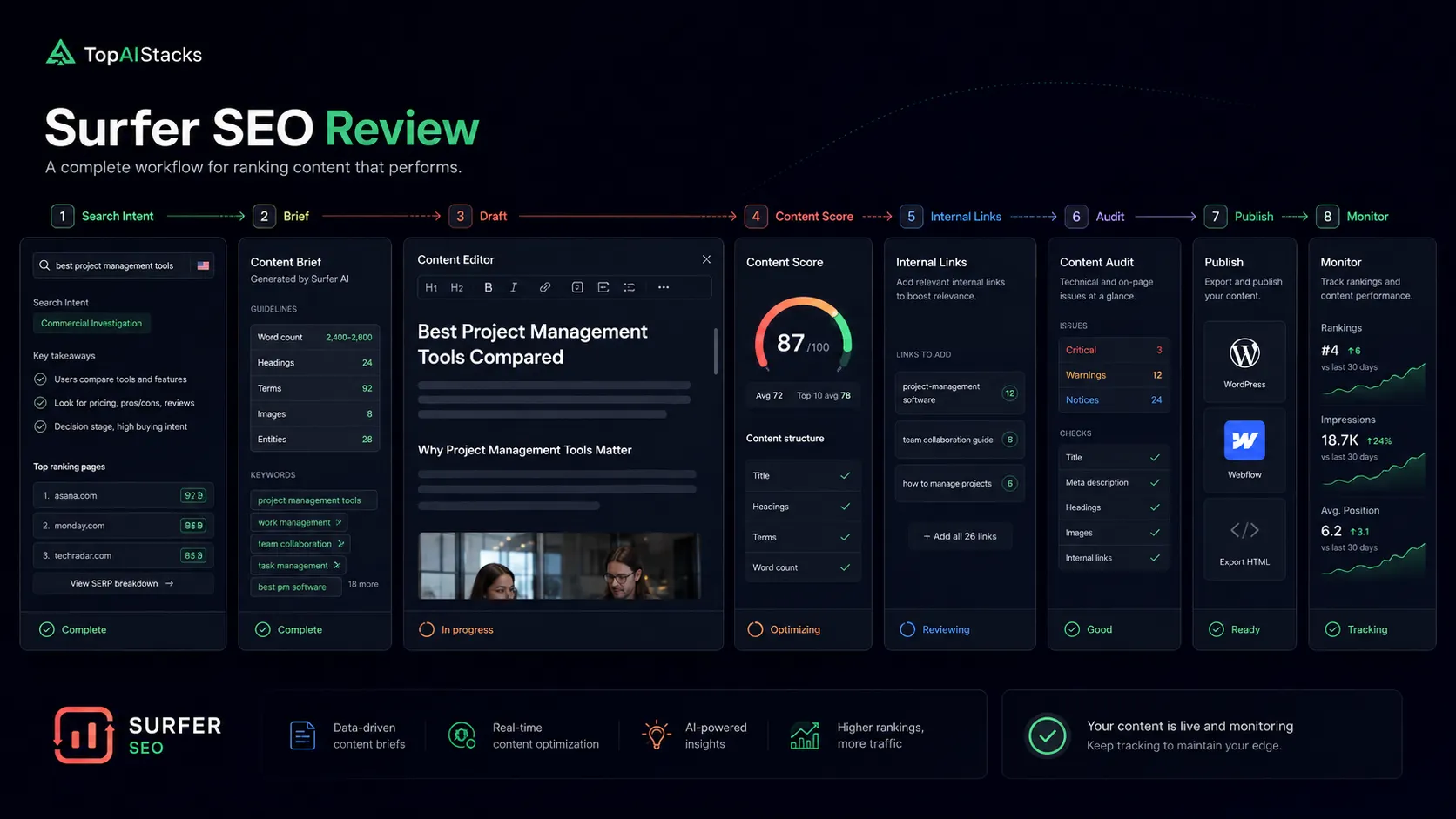
The best Surfer workflow starts before writing and continues after publishing. You research the topic, decide the angle, build a brief, draft the article, optimize coverage, add internal links, publish, monitor performance, and come back later when rankings or visibility change.
Surfer’s value is strongest in the middle of that process. It helps turn a vague instruction like “make this more SEO-friendly” into concrete editorial choices: missing subtopics, content length expectations, relevant terms, internal link opportunities, and page-level improvement work.
The tradeoff is that Surfer can only optimize around available signals. It cannot decide your positioning, verify product claims, interview experts, build topical authority from scratch, or make thin content genuinely useful. If the underlying article is weak, Surfer can make it look more optimized without making it more trustworthy.
Where Surfer SEO fits in an AI stack
In a practical AI stack, Surfer sits between research tools and publishing tools. Semrush or Ahrefs can help identify demand and competitors. ChatGPT or Claude can help with outlines, explanations, and draft support. WordPress or another CMS handles publishing. Search Console and analytics show what happened after the page went live.
Surfer’s role is different. It helps decide whether the page covers enough of the topic, whether the draft is structurally competitive, whether internal links support the page, and whether the brand is starting to appear in AI-driven search contexts.
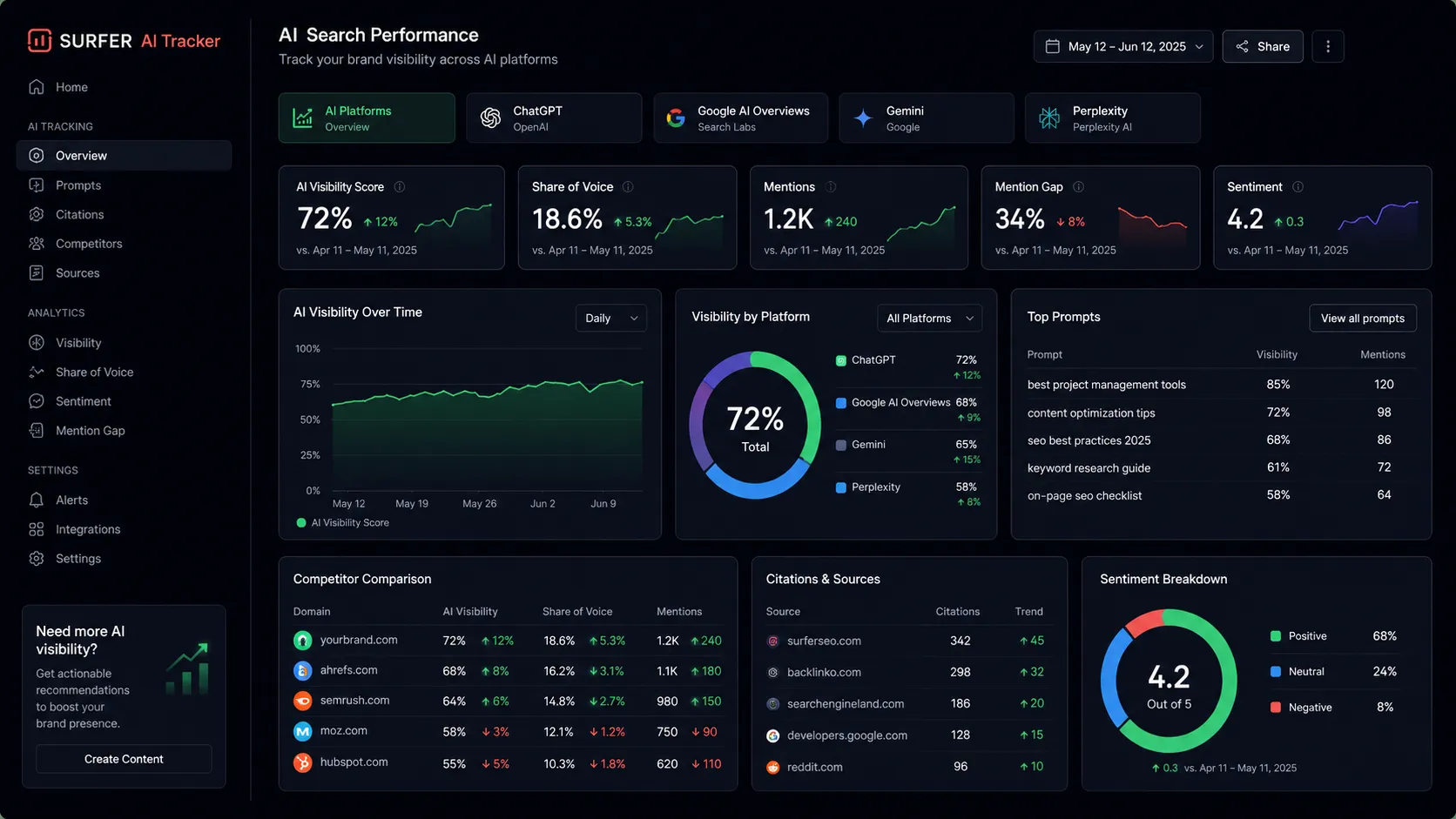
This is why I would not treat Surfer as a replacement for broader SEO tools. It is more like the optimization cockpit for content execution. The broader stack still needs keyword research, crawl diagnostics, analytics, source collection, editorial review, and real experience.
What Surfer SEO does well
Surfer is good at making SEO content work less abstract. Content Score gives teams a quick sense of how a page compares against the target topic. The content editor helps writers see missing terms, structure expectations, and coverage gaps. The audit and internal linking features make it easier to improve existing pages instead of only producing new ones.
The AI search visibility positioning is also useful, at least as a monitoring layer. If your brand disappears from AI answer surfaces while competitors are being mentioned, that is a meaningful signal. It does not tell you the whole strategy, but it gives the team a reason to investigate content coverage, authority signals, and brand context.
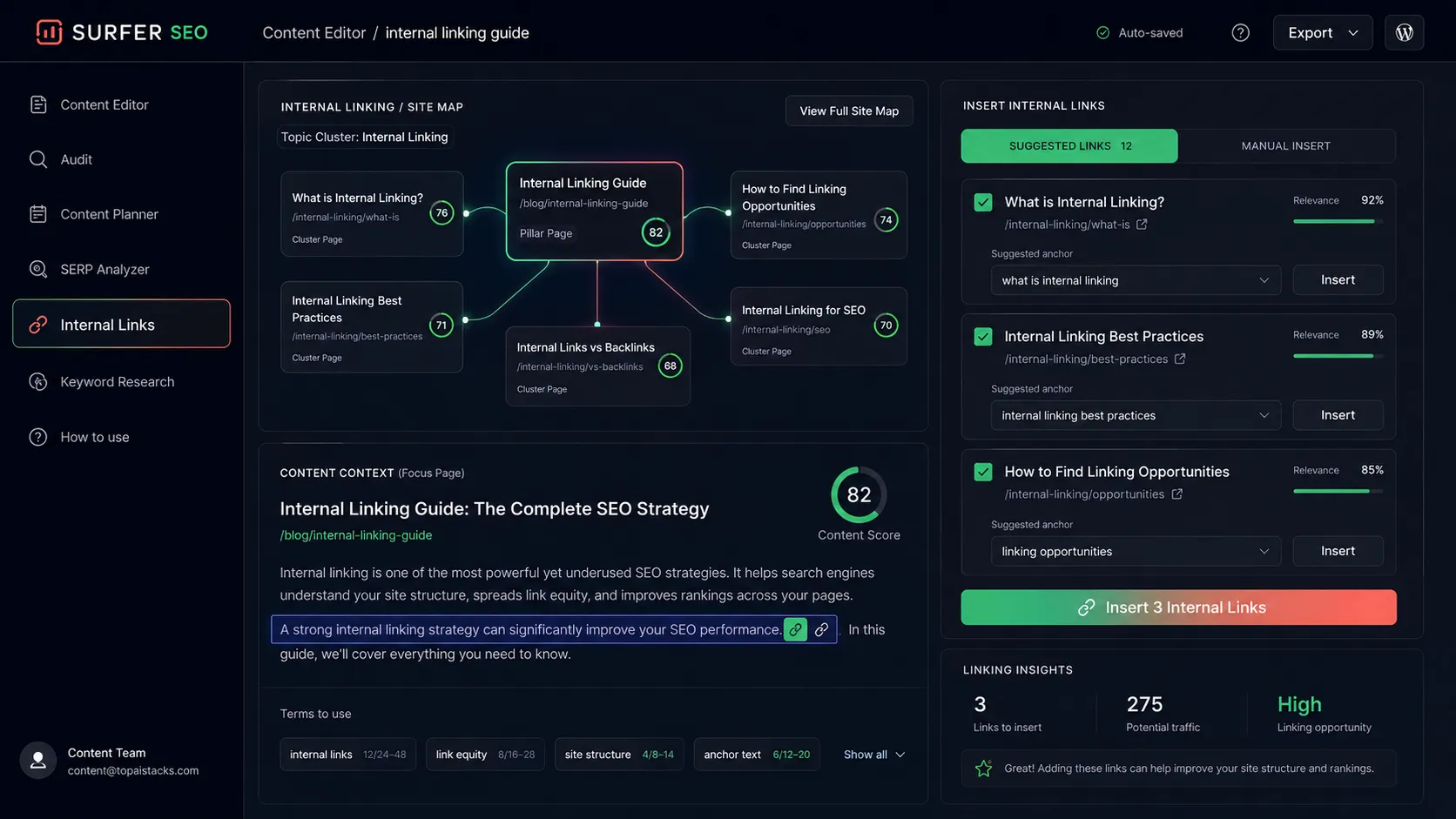
The other strong point is collaboration. SEO tools often become isolated dashboards that only one specialist uses. Surfer is easier to share with writers and editors because the recommendations appear close to the article itself.
Where Surfer SEO falls short
The biggest weakness is score-chasing. Content optimization tools can push teams toward a mechanical style: add more terms, increase word count, copy competitor structure, and keep nudging the score upward. That can help a rough draft, but it can also flatten the article if nobody protects usefulness and originality.
Surfer also does not remove the need for strategy. It can show gaps, but it cannot decide whether the keyword is worth targeting, whether the business has authority in the topic, or whether the article needs original data, product testing, expert quotes, or a stronger comparison angle.
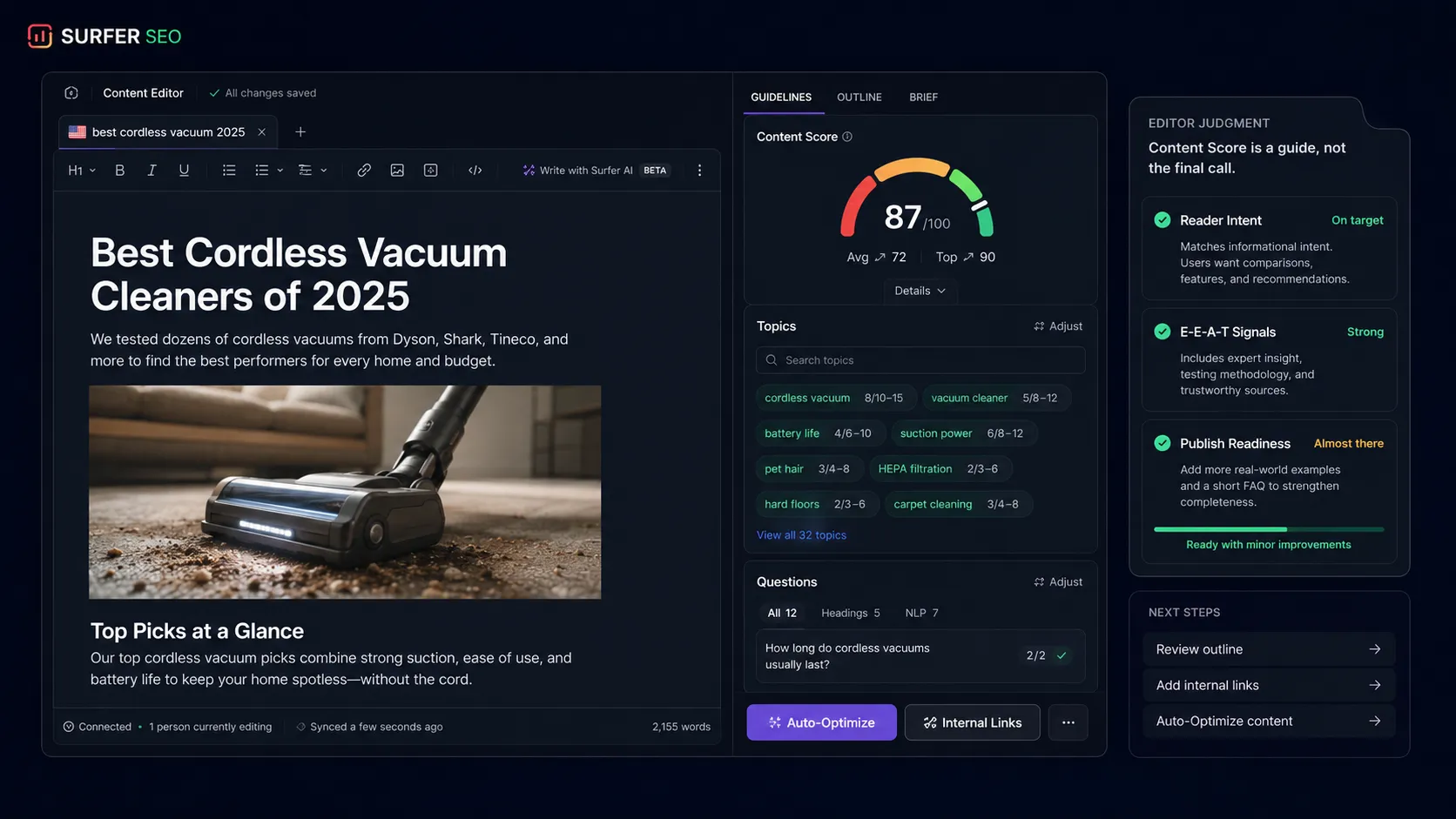
There is also the budget issue. Surfer’s lower entry point is more accessible than some enterprise SEO platforms, but it is still a recurring cost. If a site has no content calendar, no refresh process, and no one responsible for turning recommendations into published improvements, the tool will not save the strategy.
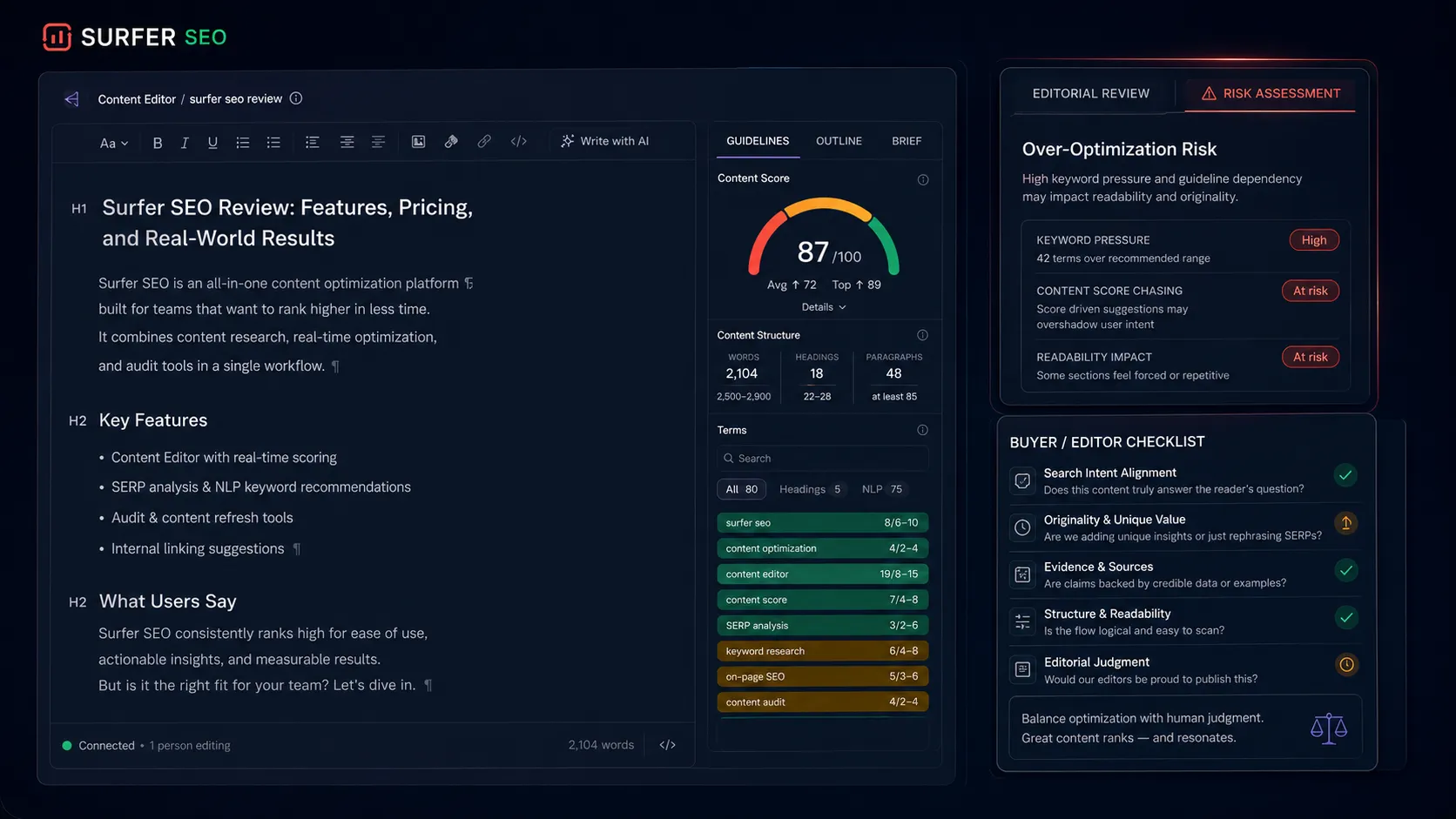
Pricing judgment
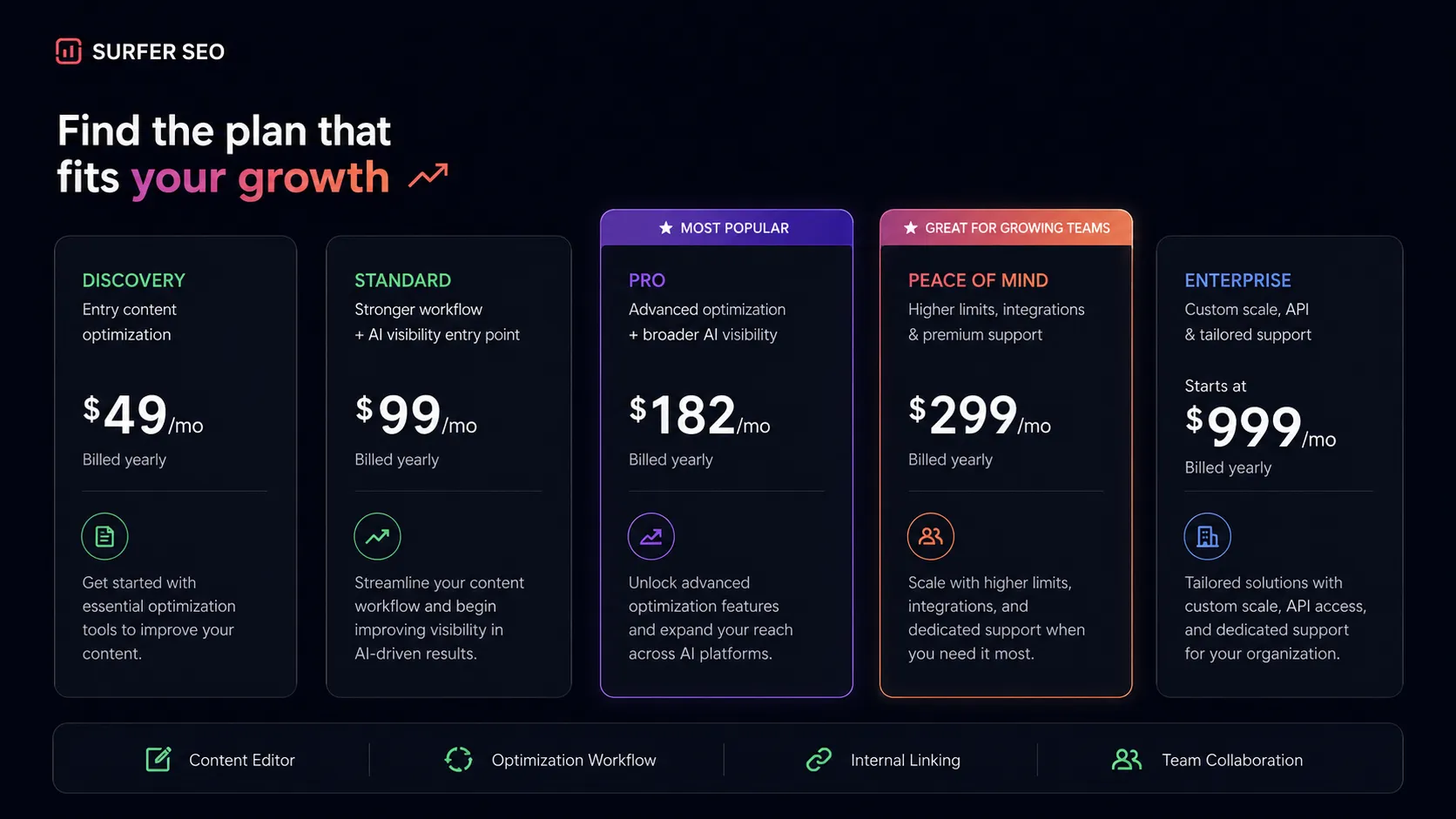
As of the latest check, Surfer’s public pricing page listed Discovery at $49 per month when billed yearly, Standard at $99 per month, Pro at $182 per month, Peace of Mind at $299 per month, and Enterprise starting at $999 per month with tailored packages. The page also showed differences around documents, AI visibility tracking, AI prompt limits, workspaces, team seats, internal linking, API access, onboarding, and support.
That means the pricing decision should not be reduced to “which plan is cheapest?” Discovery may be enough for a smaller team testing the workflow. Standard is a more realistic starting point for a team that wants AI visibility tracking and a unified workflow. Pro and Peace of Mind make more sense when multiple brands, workspaces, internal linking, daily AI prompt tracking, or higher limits matter.
I would not pay for Surfer just to optimize one article now and then. I would consider it when the workflow repeats enough that every brief, refresh, internal link, and AI visibility check saves time or improves prioritization.
Best alternatives to compare
Frase is the first comparison if you want SEO briefs and SERP research without committing to Surfer’s broader visibility workflow. Clearscope is worth comparing if the team cares most about editorial content optimization. MarketMuse is more strategic and portfolio-oriented. Semrush is the broader SEO intelligence suite if the buyer needs keyword research, competitive research, backlinks, and PPC data before the content optimization step.
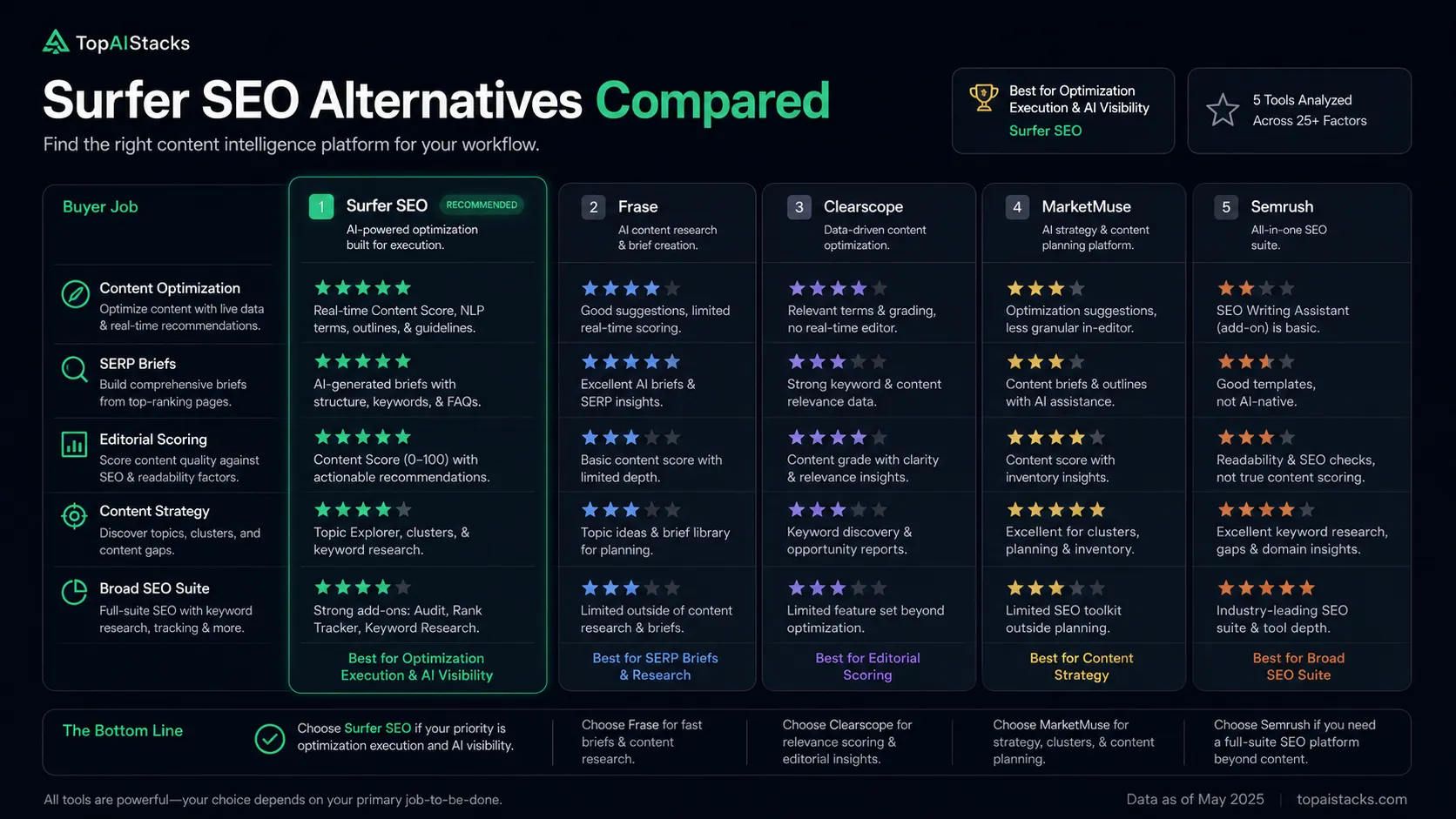
The safest comparison is Surfer SEO vs Frase if the job is content briefs and optimization. Compare Surfer vs Semrush only if the buyer is deciding between a focused content execution layer and a broader SEO research platform.
Final decision
Add Surfer SEO to your stack if you publish or update content consistently, already understand basic SEO strategy, and want a shared workflow for briefs, optimization, internal links, audits, and AI visibility signals.
Compare it first if you mainly need SERP briefs, broad keyword research, backlink data, technical crawling, or content strategy across a full portfolio. Frase, Semrush, Ahrefs, Clearscope, and MarketMuse may each be the better choice depending on the exact buyer job.
Skip it for now if you are early, budget-limited, or still figuring out whether content is a real channel for your site. Surfer is strongest after you have a repeatable publishing or refresh process. Without that process, it is too easy for the tool to become another monthly subscription instead of a true SEO workflow upgrade.
Frequently asked questions
Is Surfer SEO worth it in 2026?
Does Surfer SEO have a free plan?
What is the cheapest Surfer SEO paid plan?
Is Surfer SEO better than Frase?
Can Surfer SEO replace Semrush or Ahrefs?
Does Surfer SEO guarantee rankings or AI citations?
Where Surfer SEO fits in a stack
SEO optimization and AI visibility execution layer
Does not replace
- – Google Search Console
- – Analytics review
- – Technical SEO crawling
- – Backlink research
- – Human editorial judgment
- – Original source research and fact-checking
Head-to-head comparisons
Top alternatives to consider
If Surfer SEO is not the right fit, these are the most common alternatives.

Frase is the closest comparison for buyers who mainly want SERP-driven briefs and content optimization without necessarily buying into Surfer's broader AI visibility workflow.
Clearscope is worth comparing when the buyer wants a more editorially focused content optimization workflow and is less concerned with broader AI visibility tracking.
MarketMuse is the more strategic comparison for teams that care about content inventory, authority planning, and portfolio-level topic strategy.
Review methodology
Editorial review based on Surfer's official homepage, pricing page, public product pages, official documentation routes where available, and current public market context. No hands-on benchmark testing was conducted.
This review is based on current public product information and buyer workflow analysis, not direct hands-on testing inside a paid Surfer account.
Not covered: Hands-on content ranking benchmarks · Private account feature testing · Enterprise contract terms · Direct ROI verification for individual sites