 G
G Gemini
Gemini is Google's AI assistant best for users and teams already in the Google ecosystem who need AI assistance directly inside Gmail, Docs, Drive, and Search. It is a weaker fit for teams outside Google Workspace or those needing deep coding assistance or strict brand voice control.
Quick answer
Gemini is Google's AI assistant best for users and teams already in the Google ecosystem who need AI assistance directly inside Gmail, Docs, Drive, and Search. It is a weaker fit for teams outside Google Workspace or those needing deep coding assistance or strict brand voice control.
Gemini's value is strongest for teams already using Google Workspace; users outside that ecosystem get less integration benefit compared to ChatGPT or Claude. Pricing and plan names changed multiple times in 2025–2026, moving from "Gemini Advanced / Google One AI Premium" to standalone "Google AI Pro / Ultra" tiers. Buyers should verify current plan names, model access, usage limits, and bundled storage terms on the official page before subscribing.
What is Gemini?
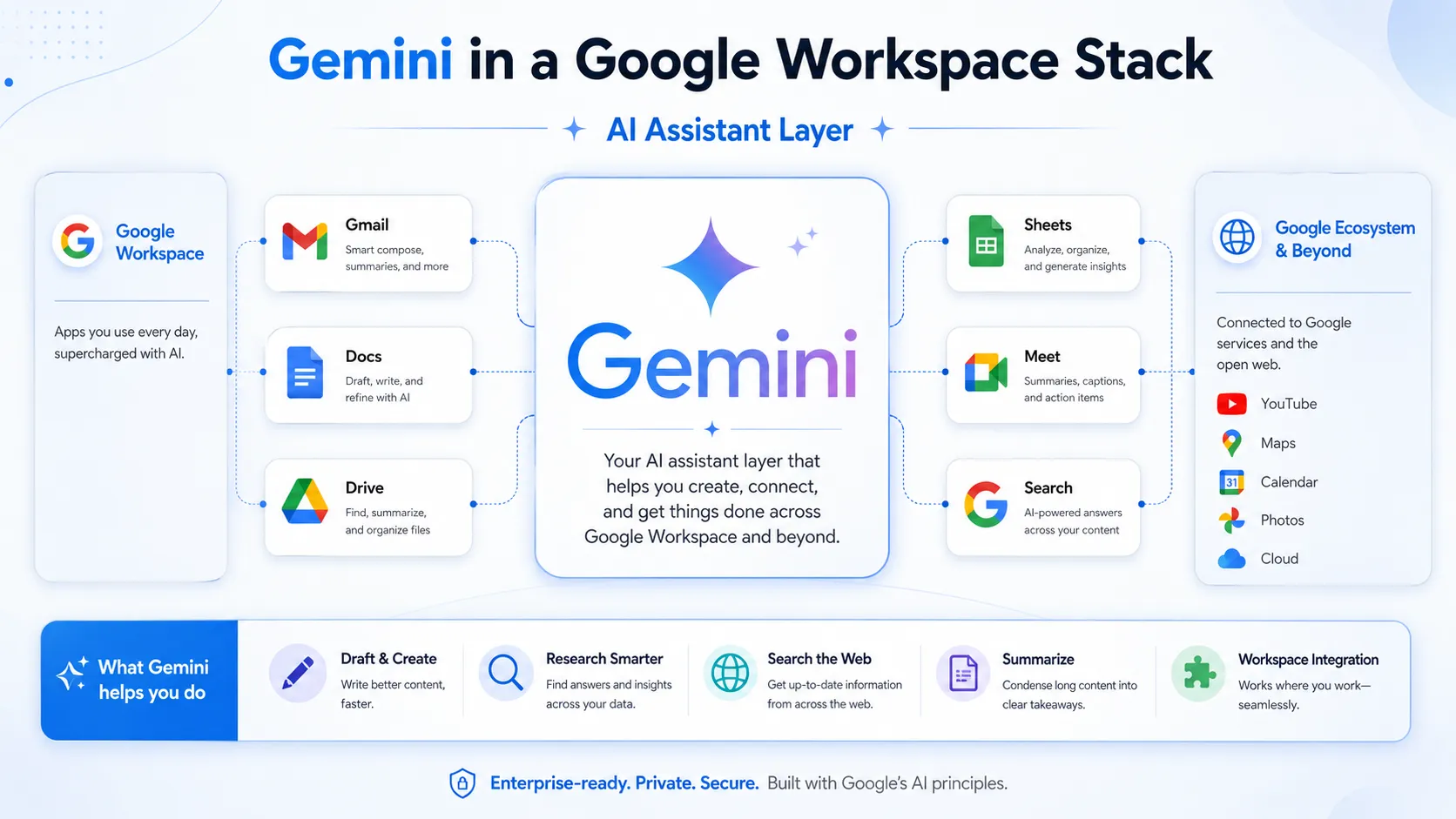
Gemini is Google's multimodal AI assistant capable of processing text, images, and code, with native integration across Google Search, Gmail, Docs, Sheets, and Drive. The free tier provides access to a capable Flash model for everyday chat and summarization. Paid plans unlock more powerful reasoning models, higher usage limits, Deep Research sessions, and tighter Workspace integration. Because Gemini is embedded directly in Google's productivity surface, it can draft emails, analyze spreadsheets, and summarize documents without switching apps.
Who Gemini fits best
Gemini fits best for Google Workspace power users, teams collaborating in Gmail and Docs, and individuals who want real-time web search built into their AI assistant, where ecosystem integration matters more than model breadth or third-party plugin support.
- ✓Google Workspace users wanting AI assistance inside Gmail, Docs, Drive, and Sheets
- ✓Users who need real-time web search integrated into AI responses by default
- ✓Individuals and teams already paying for Google One storage who want to consolidate
- ✓Multimodal tasks combining text and image understanding in a single conversation
Not ideal for
- •Teams primarily outside the Google ecosystem — ChatGPT or Claude may offer better value
- •Developers needing deep in-editor coding assistance — Cursor or GitHub Copilot fit better
- •Teams requiring strict brand voice control or complex workflow automations
- •Buyers who need a stable, predictable plan structure — Gemini pricing has changed frequently
Main use cases
AI Assistance Inside Google Workspace
For teams already using Gmail, Google Docs, and Sheets, Gemini's deepest value is embedded assistance — drafting email replies, summarizing long documents, generating content inside Docs, and analyzing data in Sheets. This integration is Gemini's strongest differentiator versus ChatGPT or Claude for Google-native workflows.
Real-Time Web Search and Research
Gemini integrates Google Search natively, meaning responses can include current web information without a separate browsing step. This is useful for quick research tasks, news summaries, and fact-checking in a conversational interface. Users who rely on current information frequently may find this more seamless than toggling web search on in other tools.
Multimodal Tasks with Images and Documents
Gemini can process images, PDFs, and other files alongside text prompts, supporting tasks like summarizing uploaded documents, explaining charts, or analyzing visual content. Multimodal capability is available on the free tier with limitations; verify which model tier and file types are supported at your plan level before relying on this for production workflows.
General Writing, Brainstorming, and Summarization
Like other general-purpose AI assistants, Gemini handles everyday writing tasks — drafting, editing, summarizing, brainstorming, and explaining concepts. For users outside Google Workspace, this use case competes directly with ChatGPT and Claude; tool choice here often comes down to ecosystem fit and model preference.
Where Gemini fits in the AI stack
Gemini functions as the AI reasoning and assistant layer inside a Google-centric productivity stack. It handles writing, summarization, research synthesis, and multimodal tasks, and connects natively to Google Workspace tools. It is not a replacement for dedicated coding tools, SEO platforms, image generation tools, or workflow automation systems; it is one reasoning layer that other specialized tools plug around.
Stack role
AI reasoning and general assistant layer
Best paired with
Cursor, Perplexity, Notion
Strongest layer
General writing and drafting + Google Workspace integration + Real-time web research
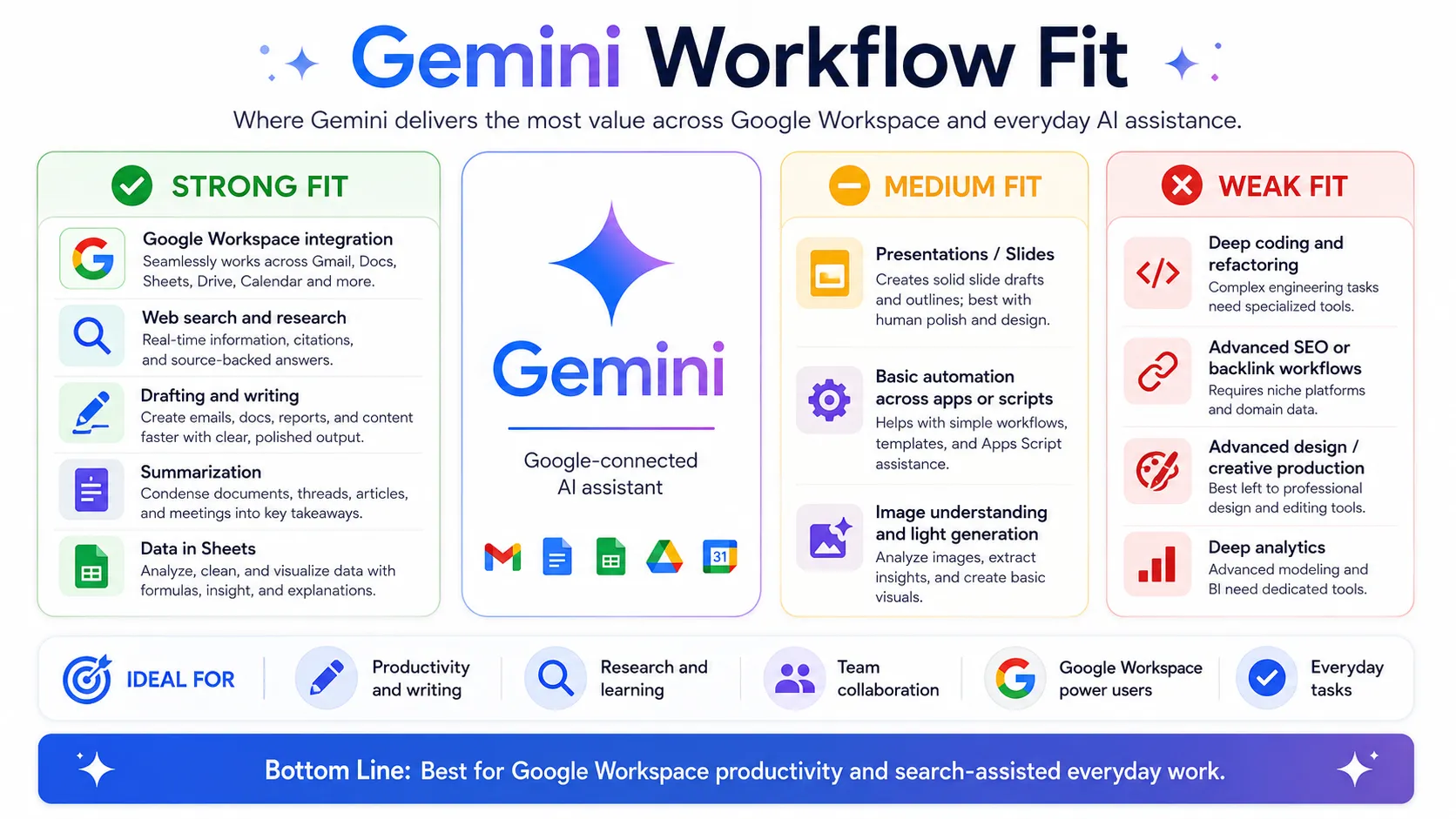
| Stack layer | Fit | What to know |
|---|---|---|
| General writing and drafting | strong | Strong for everyday drafting, editing, and summarization inside or outside Google Docs. |
| Google Workspace integration | strong | Native integration with Gmail, Docs, Sheets, and Drive is Gemini's primary differentiator. |
| Real-time web research | strong | Google Search integration provides current web context natively. Depth of citation varies. |
| Multimodal image and document tasks | medium | Supports image and document input; capability varies by model tier and plan. Verify limits. |
| Code generation and debugging | medium | Handles code explanation and lightweight coding help; not a replacement for Cursor or Copilot for in-editor workflows. |
| Specialized SEO, design, or automation tasks | weak | Not a dedicated SEO, design, or automation tool. Pair with category-specific tools for those workflows. |
Best stack combinations
Google Workspace team
Gemini + Google Workspace + Zapier
Gemini handles AI assistance inside Gmail, Docs, and Sheets. Zapier connects Gemini outputs and Google Workspace events to other apps in the broader stack.
Researcher or analyst
Gemini + Perplexity + Notion
Perplexity handles source-cited web research and discovery. Gemini synthesizes, drafts, and reasons over findings. Notion stores and organizes outputs for long-term reference.
Solo professional comparing AI assistants
Gemini + ChatGPT
Users evaluating AI assistants often run Gemini and ChatGPT in parallel. Gemini is stronger for Google Workspace users; ChatGPT offers a broader plugin ecosystem. Tool choice depends on ecosystem fit.
What Gemini can replace
- · Some general brainstorming, drafting, and summarization done manually
- · Basic web research without a dedicated research tool
- · Switching between Google apps and a separate AI chat window for everyday tasks
What it still needs
- · Ahrefs or Semrush: Keyword research and SEO analysis — Gemini does not provide search data
- · Cursor or GitHub Copilot: In-editor coding workflow for software development
- · Canva or Adobe Firefly: Visual design and image generation — Gemini is not a dedicated image tool
- · Zapier or Make: Multi-step workflow automation beyond one-off conversational tasks
Add it to your stack if
- · You use Google Workspace (Gmail, Docs, Sheets, Drive) as your primary productivity environment
- · You want real-time web search integrated into AI responses by default
- · You are already paying for Google One storage and want to consolidate into one subscription
Skip it if
- · Your team primarily uses Microsoft 365 or non-Google tools — Microsoft Copilot may be a better fit
- · You need deep in-editor coding assistance — use Cursor or GitHub Copilot instead
- · You need stable, predictable pricing — Gemini plan names and pricing have changed frequently
Choose your next step
Pricing
→Compare Gemini free, Pro, and Ultra plans including current model access and limits.
Alternatives
→See how Gemini compares to ChatGPT, Claude, and Microsoft Copilot.
Compare options
→Side-by-side comparison of ChatGPT and Gemini for everyday AI tasks.
Stack fit
→See how Gemini fits inside a broader developer and productivity workflow.
Review
→See whether Gemini is worth it for your workflow.
Pricing summary
This is a profile-level summary. Use the pricing page for deeper plan checks.
Starting path
Free plan available; paid from ~$19.99/mo
Free plan
Yes
Free trial
No
Gemini offers a free tier for everyday chat and basic tasks. Paid individual plans are reported at approximately $19.99/month (Google AI Pro) and higher tiers above that. Plan names and bundled features have changed multiple times in 2025–2026. Buyers should verify current plan names, model access, usage limits, and storage bundling on the official Gemini pricing page before subscribing. API access is billed separately through Google AI Studio or Vertex AI.
Best starting path: Google Workspace users who want AI inside Gmail and Docs should evaluate Google AI Pro. Casual users should start with the free tier to assess fit before upgrading. Verify current plan names and model access before subscribing as the structure has changed recently.
Related stack page
Top alternatives
See all →Direct alternatives

Most direct alternative for general-purpose AI assistance. Broader plugin ecosystem; Gemini has stronger Google Workspace integration.

Strong alternative for long-form writing, document analysis, and nuanced reasoning. No native Google Workspace integration.
Adjacent tools in the same stack

Source-cited web research tool that complements Gemini's general reasoning. Not a full replacement for everyday assistant tasks.

AI coding tool for in-editor development workflows. Adjacent in a developer stack but not a general assistant replacement.

Knowledge base and project management tool often used alongside AI assistants for storage and organization.
Related comparisons
FAQ
What is Gemini best for?
Gemini is best for users and teams in the Google ecosystem who want AI assistance directly inside Gmail, Google Docs, Sheets, and Drive, with real-time web search built in. It is a strong everyday AI assistant for Google Workspace workflows.
Is Gemini enough as a complete AI productivity stack?
No. Gemini handles general writing, research, and Workspace integration well, but does not replace dedicated coding tools, SEO platforms, image generation tools, or workflow automation systems. Most productive stacks pair Gemini with category-specific tools for those jobs.
What tools should I use alongside Gemini?
Pair Gemini with Cursor or GitHub Copilot for in-editor coding workflows, Perplexity for source-cited research, Zapier for automation, and Canva or Adobe Firefly for visual production. Notion works well for knowledge management outside Google Workspace.
Does Gemini have a free plan?
Yes. The free tier provides access to a capable Flash-tier model for everyday chat, image understanding, and summarization. Usage is rate-limited and some features like Deep Research are capped. Paid plans start at approximately $19.99/month for higher limits and full Workspace integration. Verify current free tier limits and plan pricing on the official Gemini page.
How does Gemini compare to ChatGPT?
Gemini's main advantage is native Google Workspace and Search integration. ChatGPT offers a broader third-party plugin ecosystem and the GPT store. For Google Workspace users, Gemini often delivers more integrated day-to-day value. For teams outside Google, ChatGPT or Claude may be a better starting point.
Who should skip Gemini?
Teams primarily using Microsoft 365 should evaluate Microsoft Copilot instead. Developers needing deep in-editor coding assistance should use Cursor or GitHub Copilot. Buyers who need stable predictable pricing should note that Gemini plan names and pricing have changed multiple times in 2025–2026; verify before committing.
How TopAIStacks evaluates Gemini
Tool Profile built from official Gemini homepage and pricing page references supplemented by multiple third-party pricing guides verified in May 2026. Pricing fields reflect the current reported structure (Free, Google AI Pro, Google AI Ultra) with cautious language applied throughout because plan names, model access, and bundled storage terms changed multiple times in 2025–2026. Stack role, workflow fit, and alternative classifications are based on product scope and buyer job analysis. Hands-on testing was not conducted by TopAIStacks; buyers should verify current plan names, model access, and pricing on the official Gemini page before subscribing.
Last checked: May 2026 · Source confidence: medium