 I
I InVideo AI
Text-to-video AI for fast YouTube and social content
Quick answer
InVideo AI is strongest when you need to move from an idea, prompt, article, product note, or campaign angle to a publishable video draft faster than a manual editing workflow. It is a better fit for social videos, faceless YouTube drafts, ads, explainers, and repurposing than for cinematic video production or avatar-led enterprise training.
Buyers should check the current pricing page and credit rules before upgrading. InVideo uses a credit-based model where different video, image, audio, and agent workflows can consume credits differently. Credits reset each billing cycle, unused plan credits do not roll over, and model or agent prices can change, so heavy creators should estimate usage before relying on a plan.
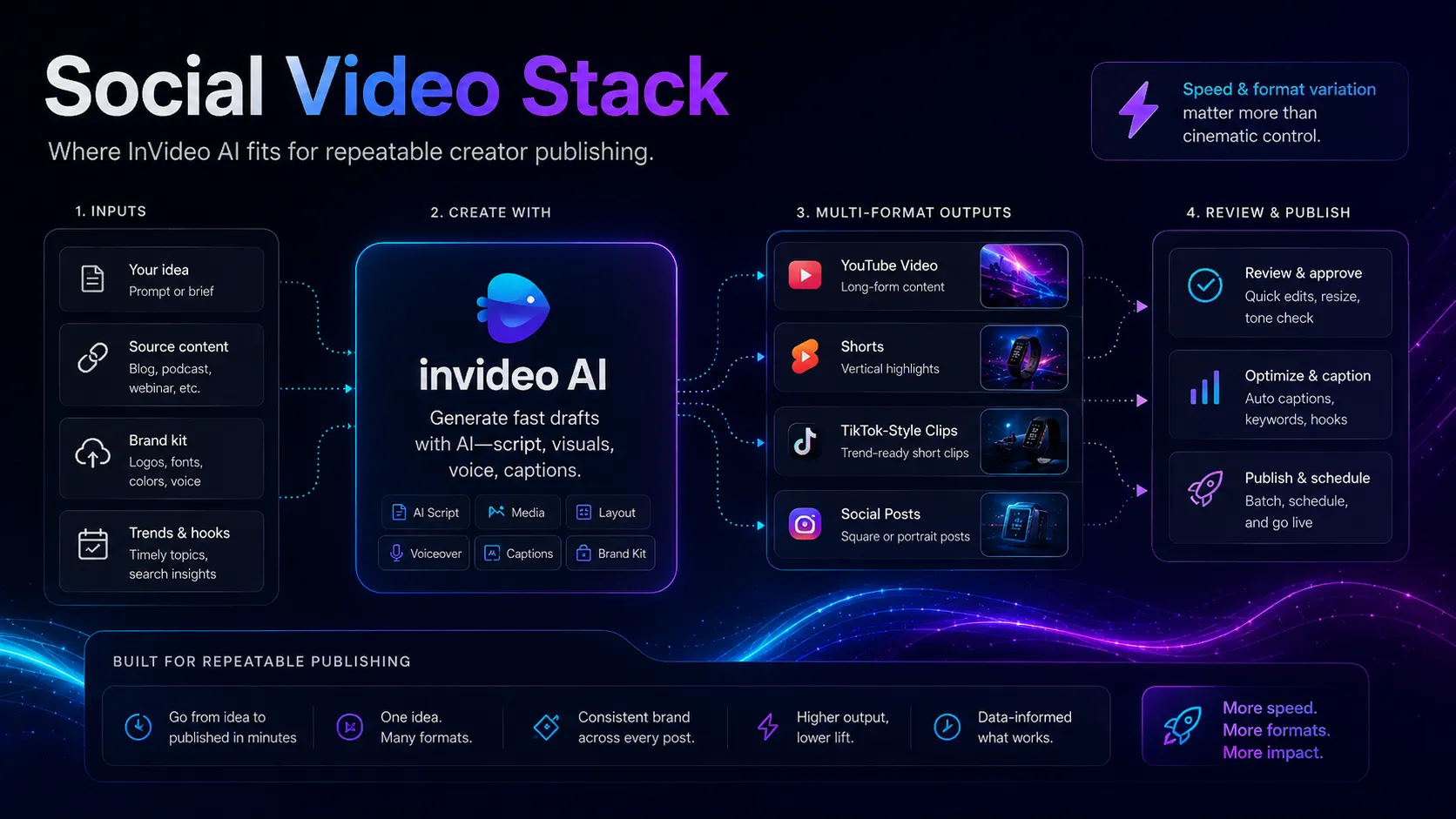
What is InVideo AI?
InVideo AI is an AI video creation platform that combines prompt-to-video generation, stock media, voice, music, avatars, model-based generation, and an older timeline-style Studio editor. In a practical creator stack, it sits between script planning and publishing: it can assemble video output quickly, but it still needs human direction, factual review, visual judgment, and channel-specific editing before publication.
Who InVideo AI fits best
Best for creators and marketing teams that want fast prompt-to-video production, social video drafts, and faceless content workflows without building every edit manually.
- ✓A YouTube creator wants to turn outlines, scripts, list posts, or affiliate content into first-pass video drafts quickly.
- ✓A social media manager needs frequent short videos for TikTok, Instagram, Facebook, YouTube Shorts, or campaign repurposing.
- ✓An affiliate marketer wants to convert product comparisons, how-to posts, or promotional angles into video assets.
- ✓A small business wants a faster way to create explainer videos, ads, product clips, or educational content without hiring a full video team.
Not ideal for
- •A filmmaker needs precise shot design, cinematic control, advanced VFX, color work, and deep post-production.
- •A training team mainly needs corporate avatar videos with LMS, SCORM, or enterprise training governance.
- •A team needs predictable high-volume production but has not mapped expected credit usage or model costs.
- •A creator expects every prompt to produce a final publish-ready video without fact-checking, script edits, and visual review.
Main use cases
Prompt-to-video drafts
Turn ideas, scripts, product notes, or blog outlines into first-pass videos that can be reviewed and refined before publishing.
Faceless YouTube content
Create script-driven videos using stock media, voice, music, and AI generation when the creator does not want to appear on camera.
Social video repurposing
Convert campaign ideas, educational snippets, product tips, or affiliate angles into shorter video formats for social platforms.
Ad and explainer concepts
Generate draft ad creatives, UGC-style concepts, and explainer clips that can be used for ideation or refined into production assets.
Where InVideo AI fits in the AI stack
InVideo AI fits in the video creation layer of a creator or marketing stack. It helps convert scripts, briefs, and content ideas into video drafts, while separate tools may still handle script quality, thumbnails, transcript editing, voice polish, analytics, and publishing. Its value is speed and breadth, not full production control.
Stack role
Prompt-to-video and social video creation layer
Best paired with
ChatGPT, Canva AI, Descript
Strongest layer
Prompt to video + Social and YouTube repurposing + Stock-based video assembly
| Stack layer | Fit | What to know |
|---|---|---|
| Prompt to video | strong | InVideo AI is strongest when the input is a clear idea, script, or brief and the desired output is a fast video draft. |
| Social and YouTube repurposing | strong | Good fit for creators turning articles, product ideas, or campaign notes into short videos and faceless drafts. |
| Stock-based video assembly | strong | Useful when the workflow can lean on stock media, voice, music, and AI assembly rather than original footage. |
| Avatar-first training video | medium | InVideo includes avatar-related features, but HeyGen or Synthesia may be stronger when avatar presentation is the main buying reason. |
| Cinematic video generation | weak | For scene generation, visual effects, and creative video control, Runway-style tools are usually a closer fit. |
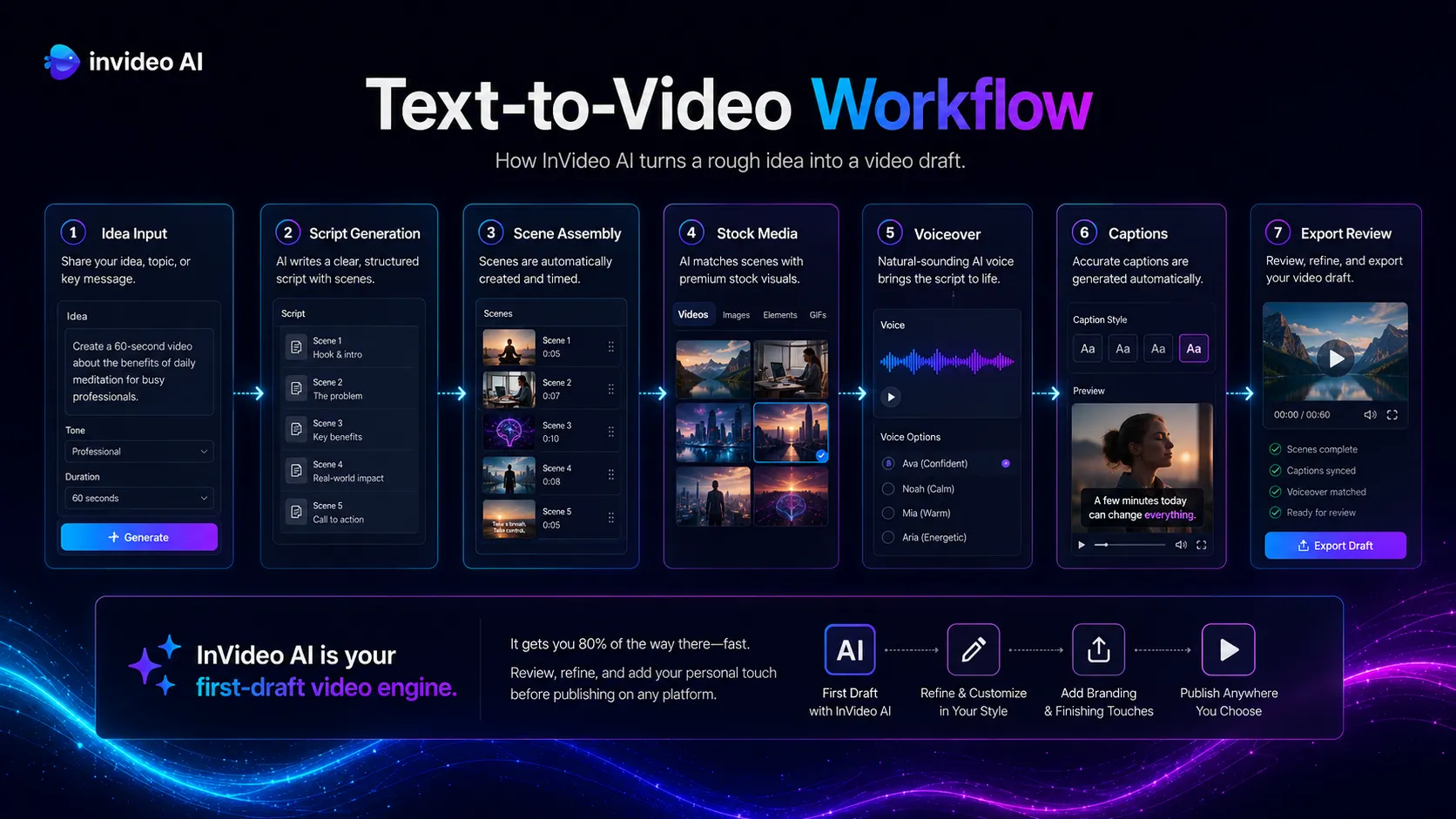
What InVideo AI can replace
- · Some manual video assembly work
- · Basic stock-video editing for social content
- · Some first-pass ad and explainer drafts
- · Some repurposing from written content to video
What it still needs
- · Script workflow: Shapes the angle, claims, structure, and call to action before video generation starts
- · Human review: Checks facts, visuals, copyright risk, tone, captions, and platform fit before publishing
- · Design tool: Creates thumbnails, covers, brand graphics, and supporting campaign assets
- · Publishing workflow: Distributes finished videos on YouTube, TikTok, Instagram, websites, or ad platforms
Add it to your stack if
- · You need fast video drafts from prompts, scripts, articles, or campaign ideas.
- · Your content workflow depends on frequent YouTube, social, explainer, or ad-style videos.
- · You are comfortable reviewing AI-generated output before publication and managing credit usage.
Skip it if
- · You need detailed cinematic control, pro timeline editing, or original footage post-production.
- · Your main need is avatar-led enterprise training rather than prompt-to-video creation.
- · You cannot predict monthly credit usage or need fixed production costs for client work.
Choose your next step
Pricing
→Review the current free path, paid credit tiers, monthly allowances, top-up rules, and checkout price before upgrading.
Alternatives
→Compare InVideo AI with avatar video, creative generative video, and video editing tools.
Compare options
→Compare InVideo AI with HeyGen if you are choosing between stock-style prompt videos and avatar-led presenter videos.
Stack fit
→See where InVideo AI fits beside scripting, thumbnail design, voice, editing, and publishing tools.
Review
→Read the full editorial review when you need a deeper buyer verdict.
Pricing summary
This is a profile-level summary. Use the pricing page for deeper plan checks.
Starting path
Free path, paid credit plans
Free plan
Yes
Free trial
No
InVideo currently presents its product as a credit-based AI video platform. The public pricing page confirms paid plans include access to many image, video, audio, music, and agent models, stock providers, and InVideo v4 agent workflows, while the help docs list plan credit allowances across Free, Plus, Max, Generative, Elite, Team, and Enterprise tiers. Exact checkout pricing should be verified on the live pricing page because model and agent prices are subject to change.
Best starting path: Start with the Free path to test prompt quality, editing flow, watermark or export constraints, and whether the generated output fits your channel. Upgrade only after estimating how many credits your preferred video models, resolution, length, audio, avatars, and agent workflows will consume each month.
Related stack page
YouTube Creator Stack
→Role: Prompt-to-video and faceless content layer
InVideo AI can help creators turn scripts, outlines, list posts, product explainers, and affiliate angles into first-pass YouTube or Shorts videos faster than manual stock assembly.
AI Video Creator Stack
→Role: Social video, ad concept, and quick video draft layer
InVideo AI belongs beside scripting, design, voice, editing, and publishing tools. It is useful for fast drafts and repurposing, while other video tools may handle avatars, cinematic generation, or deeper editing.
Top alternatives
See all →Direct alternatives

HeyGen overlaps in AI video but is more focused on avatar-led presenter videos, localization, and business video workflows.

Runway overlaps in AI video but is closer to creative generation, visual experimentation, and advanced AI video editing.
Synthesia overlaps on AI video but is more focused on enterprise avatar, training, HR, and learning content.
Adjacent tools in the same stack
Descript is stronger for editing audio and video by transcript after content exists.

ElevenLabs focuses on voice generation and dubbing rather than full video assembly.

Canva AI supports the visuals around video, including thumbnails, covers, slides, and social graphics.
Related comparisons
HeyGen vs InVideo AI
Best for buyers choosing between avatar-led video and prompt-to-video social content creation.
Runway vs InVideo AI
Best for creators deciding between creative generative video control and fast social video assembly.
Synthesia vs InVideo AI
Best for teams comparing enterprise avatar training content with broader creator-style prompt video workflows.
FAQ
What is InVideo AI best used for?
InVideo AI is best used for turning prompts, scripts, articles, ads, explainers, and campaign ideas into video drafts for YouTube, social media, and quick marketing workflows.
Does InVideo AI have a free plan?
Yes. InVideo lists a Free path, and its help docs describe Free as limited. Buyers should check the live pricing page for current watermark, export, credit, and model limits before publishing.
How does InVideo AI pricing work?
InVideo uses credits for video creation, generative models, and some premium workflows. Its help docs list different monthly credit allowances by plan, and unused plan credits do not roll over. Exact checkout prices and model costs should be verified before upgrading.
Is InVideo AI better than HeyGen?
It depends on the video type. InVideo AI is usually closer for prompt-to-video, stock-style social videos, and faceless YouTube drafts. HeyGen is usually stronger for avatar-led presenter videos and localization workflows.
Is InVideo AI good for faceless YouTube channels?
Yes, it can be useful for faceless YouTube workflows because it can turn prompts and scripts into video drafts with media, voice, and music. Human review is still needed for accuracy, pacing, visuals, and monetization safety.
What should I pair with InVideo AI?
Pair InVideo AI with a script workflow, Canva AI for thumbnails and campaign visuals, Descript for transcript-based editing, and a publishing workflow for YouTube or social channels.
How TopAIStacks evaluates InVideo AI
Reviewed the official InVideo homepage, pricing page, billing and credit help docs, and G2 review page. Pricing copy is intentionally cautious because the official pricing page confirms a credit-based paid model and subject-to-change model costs, while exact plan prices may need live checkout verification. Rating and review count use G2 as a public third-party signal.
Last checked: May 2026 · Source confidence: medium