 H
H HeyGen
AI avatar video creation for marketing and training content
Quick answer
HeyGen is strongest when you need presenter-style video, avatar narration, product explainers, training clips, or localized marketing content without setting up cameras, actors, and a full production team. It is less suitable when your goal is cinematic AI video generation or detailed professional editing.
Buyers should treat HeyGen as a synthetic media tool, not just a simple design app. Before publishing avatar or voice content, confirm consent rules, brand policy, disclosure needs, plan limits, credits, export resolution, translation accuracy, and whether the chosen plan supports the level of collaboration or security your team needs.
What is HeyGen?
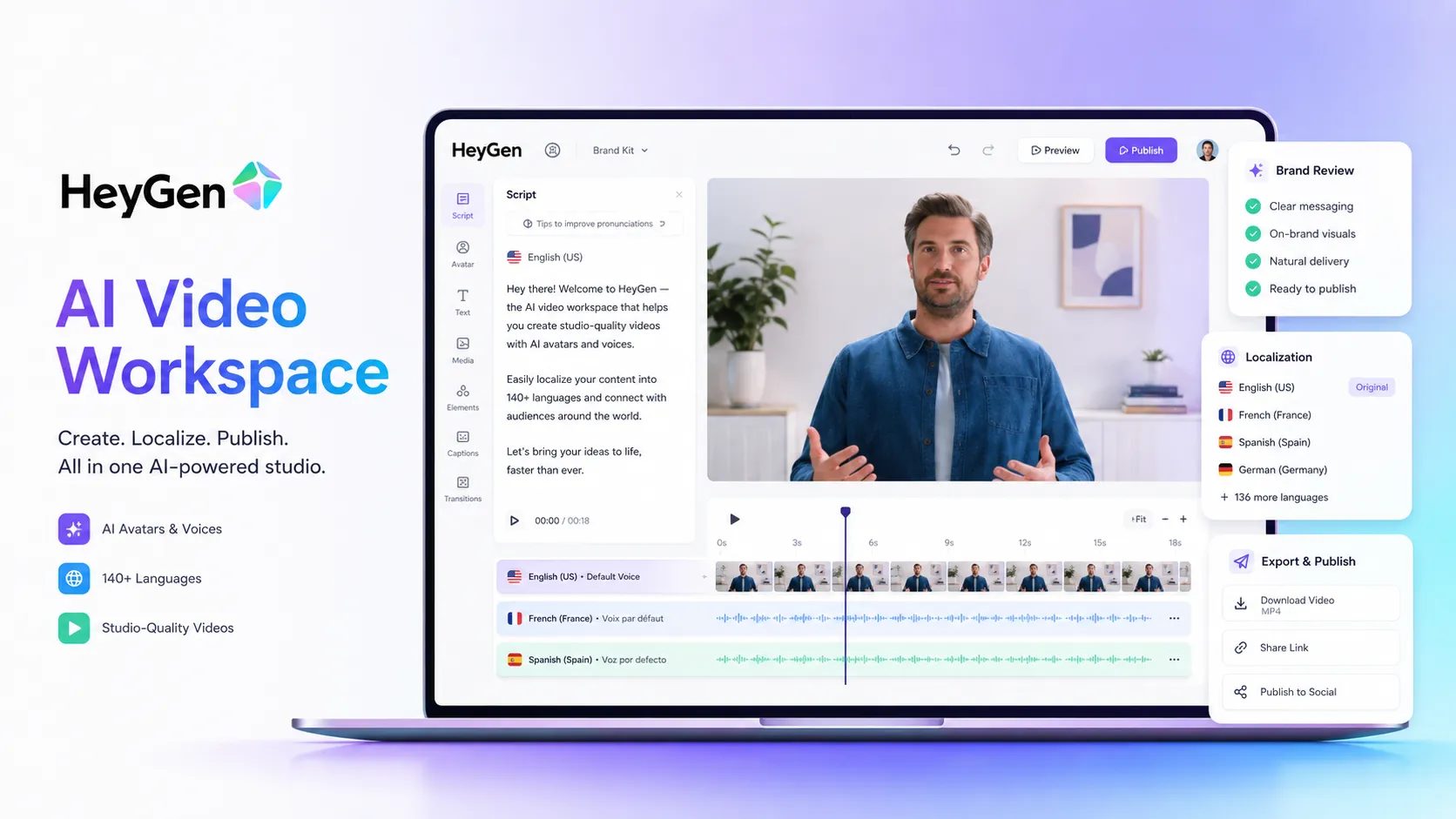
HeyGen is an AI video generation platform focused on avatar videos, digital twins, voice cloning, video translation, and prompt-to-video workflows. In a modern AI stack, it sits in the video creation layer: the script, message, and brand direction still need to come from the team, but HeyGen can turn that material into polished presenter-style videos faster than a traditional shoot.
Who HeyGen fits best
Best for marketers, trainers, sales teams, and creators who need scalable talking-head or localized video without recording every version manually.
- ✓A marketing team wants short product explainers, campaign clips, or landing page videos without booking presenters and filming sessions.
- ✓A training or HR team needs repeatable onboarding, enablement, or learning videos that can be updated when scripts change.
- ✓A sales or customer success team wants personalized or localized video messages for prospects, customers, or partner education.
- ✓A creator wants a faster way to turn scripts, PDFs, or ideas into presenter-style video drafts before polishing distribution assets.
Not ideal for
- •A filmmaker needs cinematic generative video, advanced camera movement, visual effects, or creative scene generation.
- •A video editor needs detailed timeline editing, color grading, complex audio mixing, and manual production control.
- •A team cannot publish synthetic avatar or voice content without legal, compliance, or consent review.
- •A buyer only needs simple social clips and does not need avatars, translation, or presenter-style output.
Main use cases
AI avatar marketing videos
Turn scripts into presenter-style videos for landing pages, campaigns, explainer content, and social distribution without scheduling a traditional shoot.
Training and onboarding content
Create repeatable internal videos for HR, enablement, product training, tutorials, and learning content that can be updated when the script changes.
Video localization
Adapt existing video messages for global audiences with translation, voice, and avatar workflows while keeping human review in the loop.
Sales and customer communication
Use avatar or personalized video workflows for outreach, customer education, product walkthroughs, and repeatable message formats.
Where HeyGen fits in the AI stack
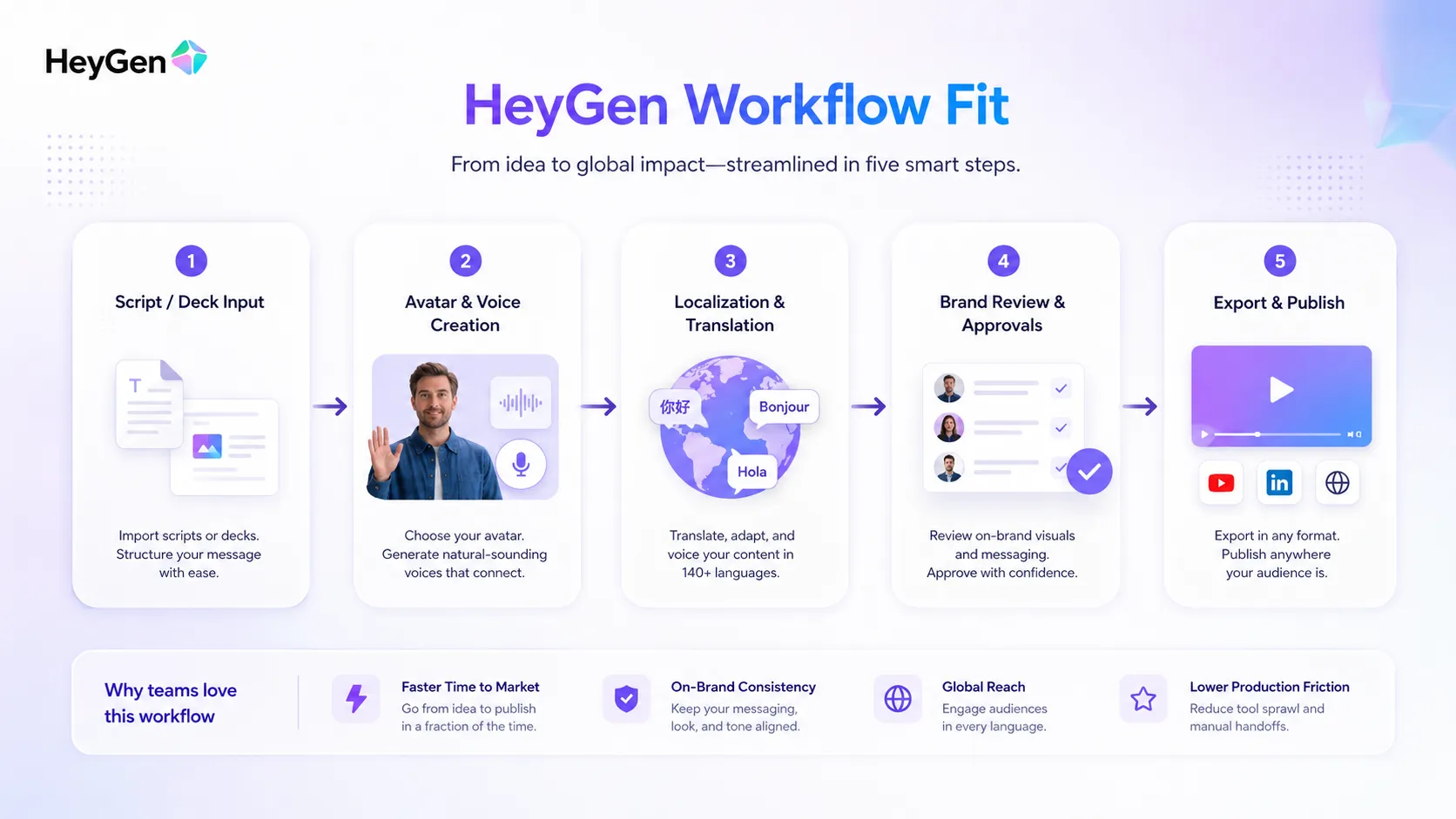
HeyGen fits in the video creation layer of an AI stack. It can turn scripts, prompts, PDFs, and product messages into presenter-style videos with avatars, voices, and localization support. It still needs clear messaging, brand review, consent controls, publishing channels, and sometimes a separate editor for final polish.
Stack role
AI avatar and localized video creation layer
Best paired with
ChatGPT, Canva AI, Descript
Strongest layer
Script to avatar video + Video localization + Training and sales enablement
| Stack layer | Fit | What to know |
|---|---|---|
| Script to avatar video | strong | HeyGen is strongest when the content is scripted and presenter-style output is acceptable. |
| Video localization | strong | Useful for translating and adapting messages across languages, with review needed for accuracy and cultural fit. |
| Training and sales enablement | strong | Good fit for repeatable, updateable videos where a consistent presenter format is useful. |
| Cinematic video generation | weak | For stylized scenes, film-like generation, and visual effects, Runway-style tools are usually a closer fit. |
What HeyGen can replace
- · Some talking-head video shoots
- · Basic presenter video production
- · Some localization and dubbing steps
- · Manual recording for repeated explainer videos
What it still needs
- · Script workflow: Defines the message, structure, and call to action before video creation starts
- · Brand review: Checks voice, avatar fit, visuals, policy, and audience expectations before publishing
- · Video editor: Handles heavier timeline edits, audio polish, and final post-production when needed
- · Publishing channel: Distributes the final video on websites, social platforms, LMS tools, or sales workflows
Add it to your stack if
- · You need recurring presenter-style videos and do not want to film every version manually.
- · You create training, sales, product, or marketing videos that benefit from avatars or localization.
- · Your team has a review process for synthetic media, consent, scripts, and brand fit.
Skip it if
- · You need cinematic scene generation rather than avatar-led video.
- · You only need lightweight social editing without avatars or localization.
- · Your legal, brand, or audience context makes synthetic avatars risky without more governance.
Choose your next step
Pricing
→Compare Free, Creator, Pro, Business, and Enterprise paths before committing credits to a video workflow.
Alternatives
→Compare HeyGen with avatar video, prompt-to-video, and creative AI video tools.
Compare options
→Compare HeyGen with Synthesia if you are choosing between avatar video platforms.
Stack fit
→See where HeyGen fits beside scripting, voice, design, editing, and publishing tools.
Review
→Read the full editorial review when you need a deeper buyer verdict.
Pricing summary
This is a profile-level summary. Use the pricing page for deeper plan checks.
Starting path
Free plan, Creator from $29/mo
Free plan
Yes
Free trial
No
Based on the current public pricing page, HeyGen offers a Free plan at $0 per month with up to 3 videos per month and short video limits. The Creator plan is currently listed at $29 per month, or $24 per month when paid annually. Pro starts at $49 per month, Business starts at $149 per month plus additional seat pricing, and Enterprise is handled through sales.
Best starting path: Start with Free to test avatar quality, translation flow, and whether the workflow fits your content. Creator is the first serious self-serve path for solo creators. Pro is better for heavier usage and 4K export. Business and Enterprise make more sense when collaboration, security, SSO, SCORM, integrations, or team controls matter.
Related stack page
YouTube Creator Stack
→Role: AI avatar and presenter video layer
HeyGen can help creators and teams produce presenter-style explainers, product walkthroughs, and repeatable educational videos when filming is too slow or impractical.
AI Video Creator Stack
→Role: Avatar, translation, and scripted video production layer
HeyGen belongs beside tools for scripting, design, editing, voice, and publishing. It is not the only video tool in the stack, but it covers the avatar and localization layer well.
Top alternatives
See all →Direct alternatives
Synthesia overlaps strongly on AI avatar video and training-style business content.
InVideo AI overlaps on prompt-to-video workflows, but focuses more on stock-style social and YouTube content.

Runway overlaps in AI video, but is more oriented toward generative video, creative visuals, and editing workflows.
Adjacent tools in the same stack
Descript is stronger for editing recorded audio and video by transcript after content exists.

ElevenLabs is focused on voice generation and dubbing rather than full avatar video creation.

Canva AI helps with visuals, presentations, and design assets around the video.
Related comparisons
HeyGen vs Synthesia
Best for buyers comparing avatar video platforms for marketing, training, and localization.
HeyGen vs Runway
Best for buyers deciding between avatar-led business video and creative generative video.
HeyGen vs InVideo AI
Best for creators choosing between presenter-style avatar videos and faster stock-based social videos.
FAQ
What is HeyGen best used for?
HeyGen is best used for AI avatar videos, presenter-style marketing clips, product explainers, training videos, voice cloning, and video localization workflows where a scripted message can be turned into video quickly.
Does HeyGen have a free plan?
Yes. HeyGen currently lists a Free plan at $0 per month with up to 3 videos per month and videos up to 1 minute. Check the official pricing page for current limits before publishing.
How much does HeyGen Creator cost?
HeyGen currently lists Creator at $29 per month, or $24 per month when paid annually. Buyers should confirm final billing terms, credits, taxes, and renewal details at checkout.
Is HeyGen better than Runway?
It depends on the job. HeyGen is usually better for avatar-led business videos and localization, while Runway is usually closer for creative generative video, visual experimentation, and scene-based video work.
Is HeyGen good for training content?
Yes, HeyGen can be a strong fit for training and onboarding videos, especially when scripts need to be updated or localized. Teams should still review accuracy, compliance, and whether the avatar format fits the audience.
What should I pair with HeyGen?
Pair HeyGen with a script writing workflow, brand assets, a design tool for thumbnails and supporting visuals, a video editor for final polish, and a publishing or learning platform for distribution.
How TopAIStacks evaluates HeyGen
Reviewed the official HeyGen homepage, pricing page, pricing FAQ, and G2 review page. Pricing is based on the current public pricing table and FAQ. Rating and review count use G2 as a public third-party signal. Credit usage, annual billing, consent requirements, and plan-specific limits should be verified again before checkout or publication updates.
Last checked: May 2026 · Source confidence: high