 R
R Runway
Use Runway when your AI stack needs cinematic video generation, image-to-video clips, or AI-assisted editing rather than avatar-only explainers. It fits creators who can budget for prompt testing, credit usage, and human review.
Quick answer
Use Runway when your AI stack needs cinematic video generation, image-to-video clips, or AI-assisted editing rather than avatar-only explainers. It fits creators who can budget for prompt testing, credit usage, and human review.
Runway can become expensive if a team treats each prompt as a finished production asset. Credits are consumed during testing, paid plans differ by model access, and free-plan outputs carry restrictions such as watermarking. Buyers should verify the current credit rules, commercial needs, and export limits before using it for client or campaign work.
What is Runway?
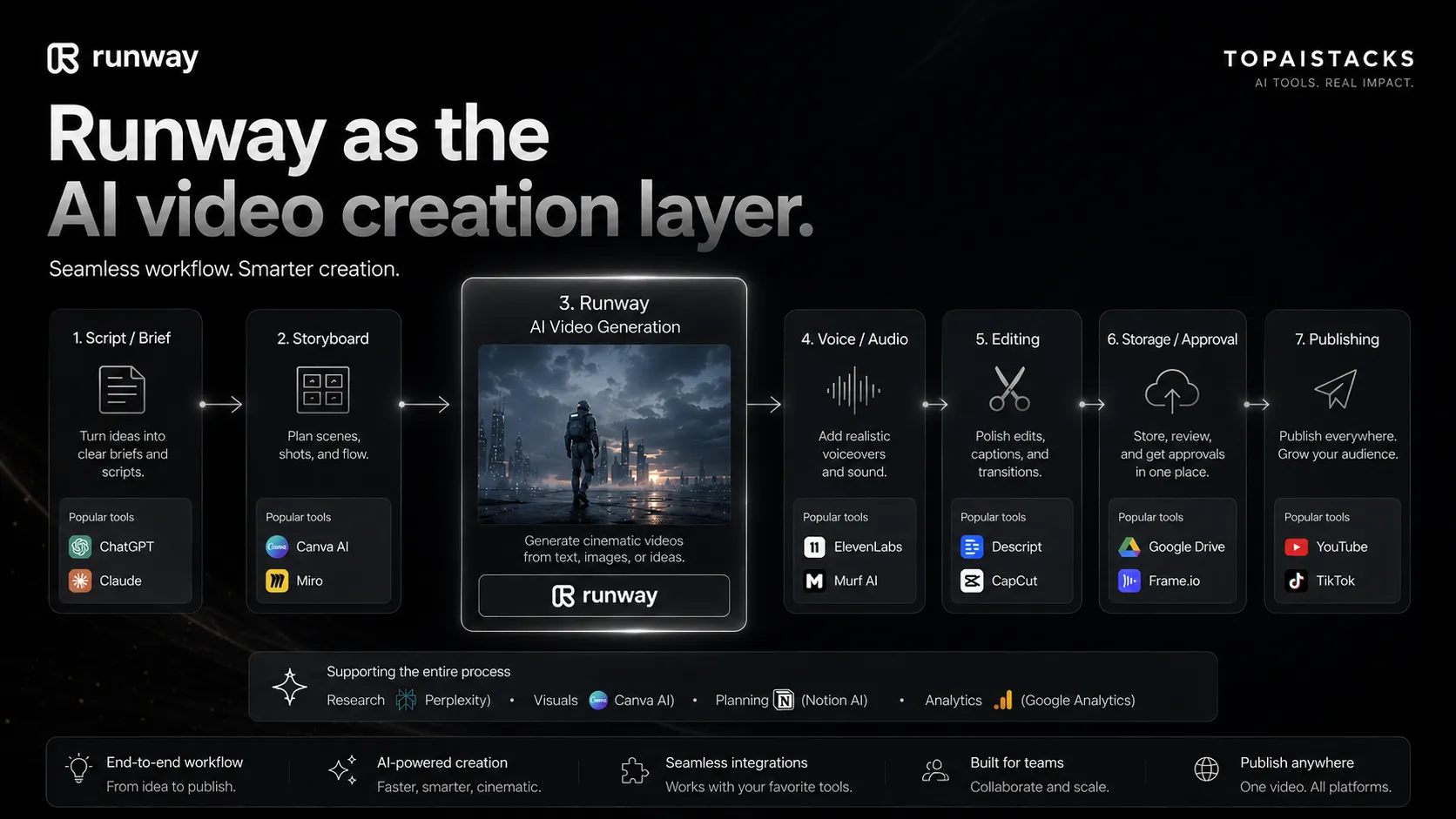
Creative teams usually choose Runway for AI video generation, image-to-video workflows, video editing, and visual experimentation that would be slow inside a normal editor. Its public product pages now emphasize Gen-4.5 video generation, Runway Characters, Aleph, Act-Two, and broader world-model research. In a practical stack, Runway sits after scripting and before final editing, so it works best with a writing tool, asset library, audio workflow, and publishing channel.
Who Runway fits best
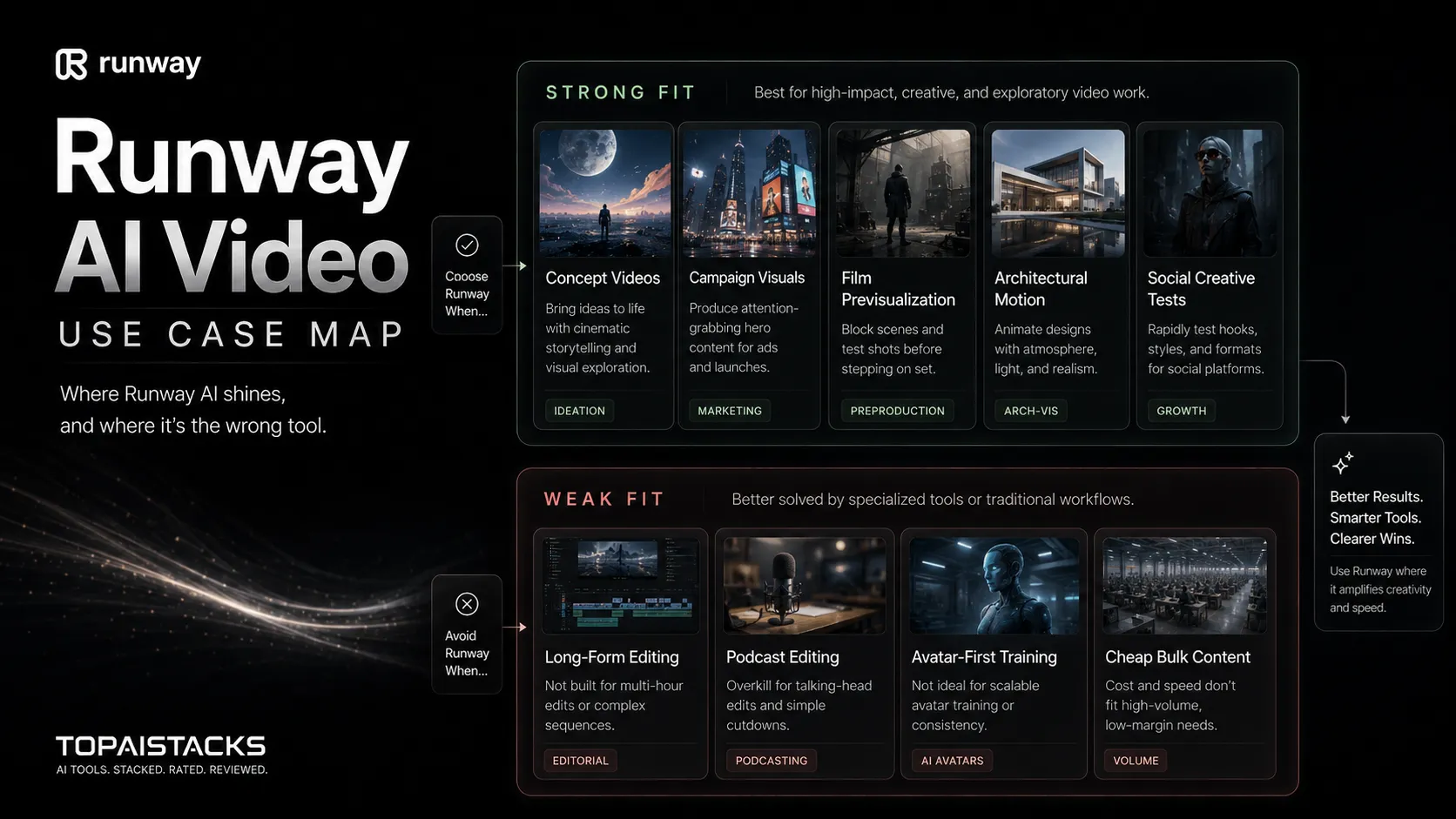
Best for creators, marketers, and production teams that need short AI-generated video assets and are willing to iterate before final editing.
- ✓Short cinematic b-roll for YouTube, social, and campaign concepts
- ✓Creative teams testing image-to-video or text-to-video ideas before production
- ✓Marketers who need visual concepts, scene variations, or motion drafts
- ✓Film, media, and design teams exploring AI-assisted previsualization
Not ideal for
- •Teams expecting long-form video editing to be fully handled inside one AI tool
- •Budget users who cannot absorb repeated credit usage during prompt testing
- •Training teams that mainly need avatar presenters and slide-style narration
- •Workflows that require predictable output volume every week without creative review
Main use cases
AI b-roll and concept clips
Runway is useful when a creator needs short visual sequences for intros, ads, or supporting shots. The output still needs review and editing before it becomes final public content.
Image-to-video experiments
Teams can turn reference images into motion tests before spending on manual animation or production. This is strongest when the source image, brand direction, and motion goal are clear.
Creative video editing
Runway can support editing tasks such as AI video changes, motion effects, and generative visual revisions. It should sit beside a standard editor when timing, audio, and final polish matter.
Previsualization for campaigns
Marketers and creative teams can test scene directions before approving a shoot or full campaign. This helps reduce vague briefs, but it does not replace brand approval or legal review.
Where Runway fits in the AI stack
Runway belongs in the creative production layer of an AI stack. It can replace some early visual concepting, short b-roll generation, and experimental motion work, but it does not replace scripting, asset planning, audio production, final editing, or publishing. Pair it with writing, design, voice, and editing tools for a complete workflow.
Stack role
AI video creation layer
Best paired with
ChatGPT, Canva AI, Descript
Strongest layer
Video generation
| Stack layer | Fit | What to know |
|---|---|---|
| Script and creative brief | medium | Runway needs clear prompts and source assets, but it is not the best place to develop the full story or offer. |
| Video generation | strong | This is Runway's main role, especially for short AI-generated clips, image-to-video tests, and cinematic visual exploration. |
| Final editing | medium | Runway can support edits, but most teams will still need a standard editor for pacing, audio, captions, and final delivery. |
| Publishing and analytics | weak | Runway does not replace YouTube, social scheduling, analytics, or campaign tracking tools. |
Best stack combinations
YouTube creators and short-form video teams
chatgpt + runway + elevenlabs + capcut
Draft the script in ChatGPT, generate visual clips in Runway, create narration in ElevenLabs, and finish timing, captions, and exports in CapCut.
Marketing teams testing campaign visuals
canva-ai + runway + descript + google-drive
Use Canva AI for campaign assets, Runway for motion concepts, Descript for edits or transcript work, and Google Drive for review handoff.
What Runway can replace
- · Some early b-roll sourcing
- · Some concept animation tests
- · Some manual visual effects exploration
- · Some first-pass motion drafts
What it still needs
- · script-planning: Clear story, prompt direction, and shot intent before generation
- · human-editor: Review for continuity, brand fit, pacing, and factual safety
- · audio-workflow: Voice, music, sound design, captions, and mix decisions
- · publishing-platform: Final upload, metadata, thumbnails, and audience testing
Add it to your stack if
- · You need AI-generated video clips, motion tests, or visual experiments rather than static images only.
- · Your team can afford iteration and understands that credits may be consumed before a usable output appears.
- · You already have a script, brand direction, and final editing workflow outside the generator.
Skip it if
- · You mainly need avatar training videos or corporate slide narration.
- · You need predictable weekly ad output with minimal creative trial and error.
- · You do not have time for human review, editing, usage-rights checks, and final polish.
Choose your next step
Pricing
→Compare Free, Standard, Pro, and higher-volume paths before buying credits.
Alternatives
→Compare Runway with avatar, text-to-video, and creator video tools.
Compare options
→Use this comparison if you are choosing between creative video generation and avatar video training content.
Stack fit
→See where Runway fits beside scripting, voice, editing, and publishing tools.
Review
→Read the full editorial review before using Runway as a paid creative production layer.
Pricing summary
This is a profile-level summary. Use the pricing page for deeper plan checks.
Starting path
Free plan, then credit-based paid plans
Free plan
Yes
Free trial
No
Runway's public pricing currently includes a Free plan with 125 one-time credits and paid plans that begin with Standard at $12 per user per month when billed annually. The pricing page also lists yearly billing as 20% off. Treat the free plan as a trial-style test path, because credits do not refresh and free outputs may include watermarks.
Best starting path: Start with the Free plan only to test workflow fit. The Standard plan is the first paid path to evaluate, but teams doing repeated video work should compare credit needs against Pro or Unlimited before committing.
Related stack page
YouTube Creator Stack
→Role: AI video generation and creative motion layer
Runway fits a creator stack when the channel needs short generated clips, cinematic b-roll, or visual experiments before editing. It should connect to scripting, voice, editing, storage, and publishing tools rather than sit alone.
Agency Stack
→Role: Campaign concept and visual testing layer
Agencies can use Runway to prototype visual directions for ads, client concepts, and creative briefs. The safer workflow is to treat outputs as draft assets until brand, legal, and final production review are complete.
Top alternatives
See all →Direct alternatives

HeyGen is a better fit when the video job is avatar-led marketing, product explainers, or multilingual presenter content.
Synthesia focuses more on structured avatar video for training, onboarding, and business communication.

InVideo AI is closer to prompt-to-social-video production with stock footage, voiceover, and simpler content assembly.
Adjacent tools in the same stack

ChatGPT can help with scripts, scene prompts, and ideation, but it does not replace a video generation platform.

Canva AI supports graphics and campaign assets that can feed a video workflow, but it is not a direct replacement for Runway's video generation layer.
Descript is useful after or beside Runway when editing audio, transcripts, clips, and recorded video content.
Related comparisons
FAQ
What is Runway best for?
Runway is best for short AI-generated video clips, image-to-video experiments, creative b-roll, visual concepting, and AI-assisted video edits. It fits teams that can review outputs, iterate on prompts, and finish the final asset in a broader video workflow.
Does Runway have a free plan?
Yes. Runway's public pricing page currently lists a Free plan with 125 one-time credits. The help center explains that these credits do not renew after they are spent, so the free path is better for testing than ongoing production.
How much does Runway cost?
Runway's pricing page currently shows Standard from $12 per user per month when billed annually, with higher paid plans available for more credits and features. Buyers should verify monthly billing, credits, and model access on the official pricing page before checkout.
Is Runway better than HeyGen or Synthesia?
Runway is usually stronger for creative video generation, motion experiments, and cinematic visual assets. HeyGen and Synthesia are often better when the main job is avatar presenter content, training videos, localization, or structured business communication.
What should I check before paying for Runway?
Check which models your workflow needs, how credits are consumed, whether outputs need watermark removal, and how much editing is required outside Runway. Also verify usage rights, team seats, storage, billing, and client-review requirements before production use.
How TopAIStacks evaluates Runway
Verified the public homepage, pricing page, Runway help articles for Free and Standard plans, and the Gen-4.5 research page. Third-party sources were used only for market context and buyer caution, not for final pricing or plan claims.
Last checked: May 2026 · Source confidence: high