 M
M Microsoft Copilot
Microsoft Copilot is an AI assistant best for individuals and teams already inside the Microsoft 365 ecosystem who need writing, summarization, and productivity help across Word, Outlook, Teams, and Excel. Users outside Microsoft 365 will get limited value from the paid tiers.
Quick answer
Microsoft Copilot is an AI assistant best for individuals and teams already inside the Microsoft 365 ecosystem who need writing, summarization, and productivity help across Word, Outlook, Teams, and Excel. Users outside Microsoft 365 will get limited value from the paid tiers.
Copilot's value scales directly with your existing Microsoft 365 investment. The free tier is a capable general assistant but cannot access your files, emails, or meetings. Paid tiers require a qualifying Microsoft 365 base subscription — Copilot cannot be purchased as a standalone product. Teams outside the Microsoft ecosystem should evaluate ChatGPT or Claude first.
What is Microsoft Copilot?
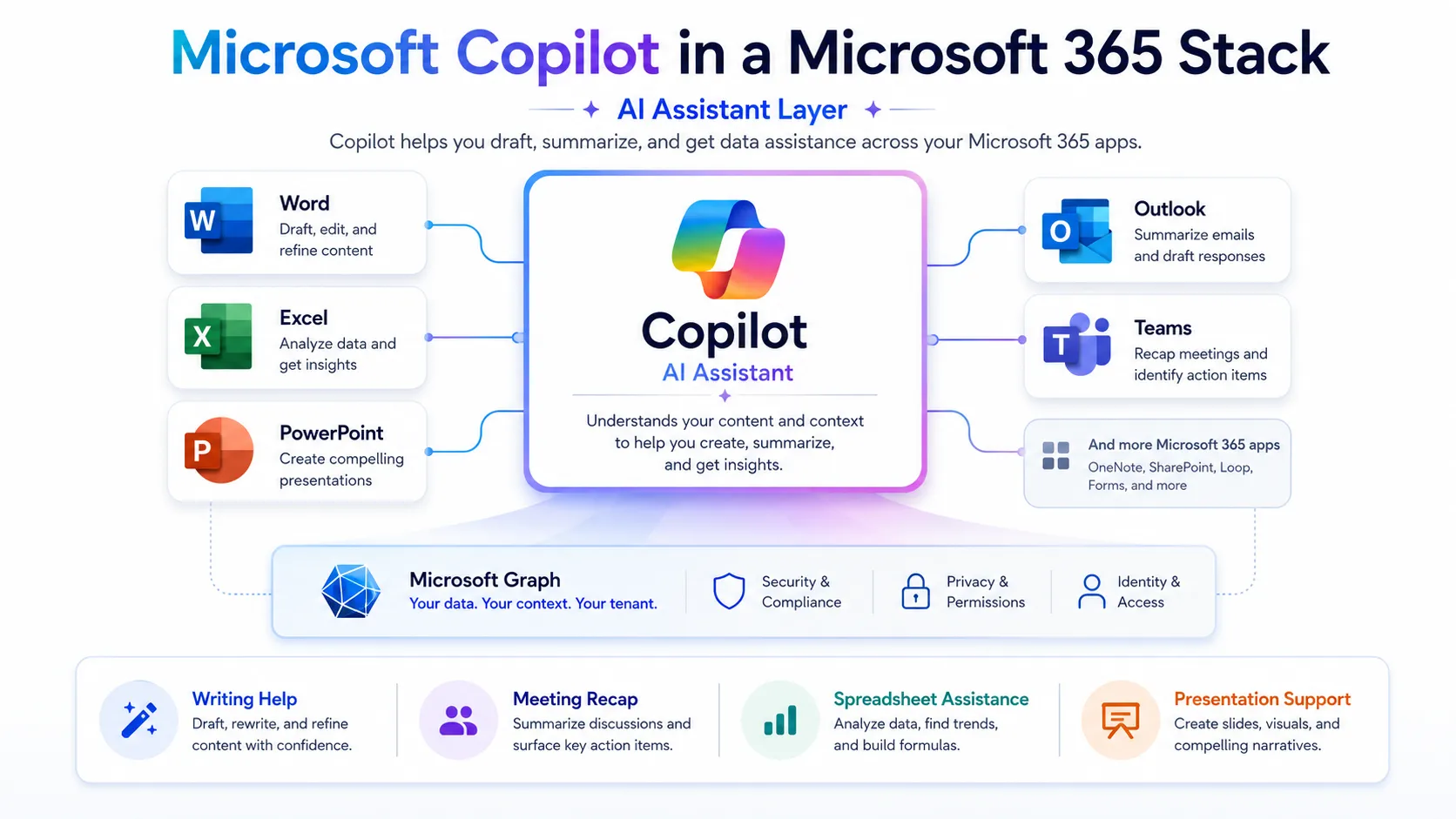
Microsoft Copilot is Microsoft's generative AI assistant, available as a free web tool at copilot.microsoft.com and as a deeper integration inside Microsoft 365 apps. The free tier handles general chat, writing, image generation, and web-grounded answers. Paid tiers unlock app-level integration — drafting in Word, summarizing meetings in Teams, analyzing data in Excel, and managing email in Outlook. The business and enterprise plans add organizational data grounding, IT controls, and agent capabilities through Microsoft Copilot Studio.
Who Microsoft Copilot fits best
Microsoft Copilot fits best for Microsoft 365 power users, enterprise IT teams standardizing on one AI vendor, and knowledge workers who spend most of their day in Word, Outlook, Teams, or Excel where in-app AI assistance matters more than model flexibility.
- ✓Microsoft 365 subscribers wanting AI inside Word, Outlook, Teams, and Excel
- ✓Enterprise teams that need IT controls, data protection, and admin oversight
- ✓Knowledge workers who summarize meetings, draft documents, and analyze data daily
- ✓Organizations already standardized on the Microsoft stack
Not ideal for
- •Teams not using Microsoft 365 — paid tiers require a qualifying M365 base license
- •Creative content production at scale where dedicated AI image or video tools fit better
- •Budget-conscious solopreneurs who need a standalone AI assistant without an M365 subscription
- •Developers needing deep coding assistance — GitHub Copilot is the more targeted option
Main use cases
Document drafting in Word and Outlook
Writers and knowledge workers use Copilot inside Word to generate first drafts, rewrite sections, and adjust tone without switching tools. In Outlook, Copilot drafts replies and summarizes long email threads. Requires a paid M365 plan with Copilot integration; the free web tier does not connect to your documents.
Meeting summarization in Teams
Teams meetings generate transcripts and AI-written summaries, action items, and follow-up suggestions directly inside the Teams interface. This is one of the most practical use cases for distributed teams. Paid M365 Copilot plan required; verify that your organization's Teams configuration supports this feature before rollout.
Data analysis and formula help in Excel
Copilot in Excel helps users analyze data, generate formulas, create charts, and surface insights through natural language prompts. Useful for non-technical team members who need to work with spreadsheets without deep Excel expertise. Feature availability varies by plan and subscription tier.
General AI chat and web research (free tier)
The free version of Copilot at copilot.microsoft.com handles general questions, summarization, writing, and image generation with web-grounded answers and source citations. Useful as a daily AI companion for individuals who do not need M365 app integration.
Where Microsoft Copilot fits in the AI stack
Microsoft Copilot operates as the AI reasoning and writing layer inside the Microsoft 365 stack. It handles drafting, summarization, data analysis, and general question answering across the apps where most enterprise knowledge workers already spend their time. Outside the Microsoft ecosystem, it functions as a capable general AI assistant with web grounding, but competes more directly with ChatGPT and Claude as a standalone tool.
Stack role
AI reasoning and general assistant layer
Best paired with
GitHub Copilot, Notion, Perplexity
Strongest layer
Writing and drafting + Meeting summarization
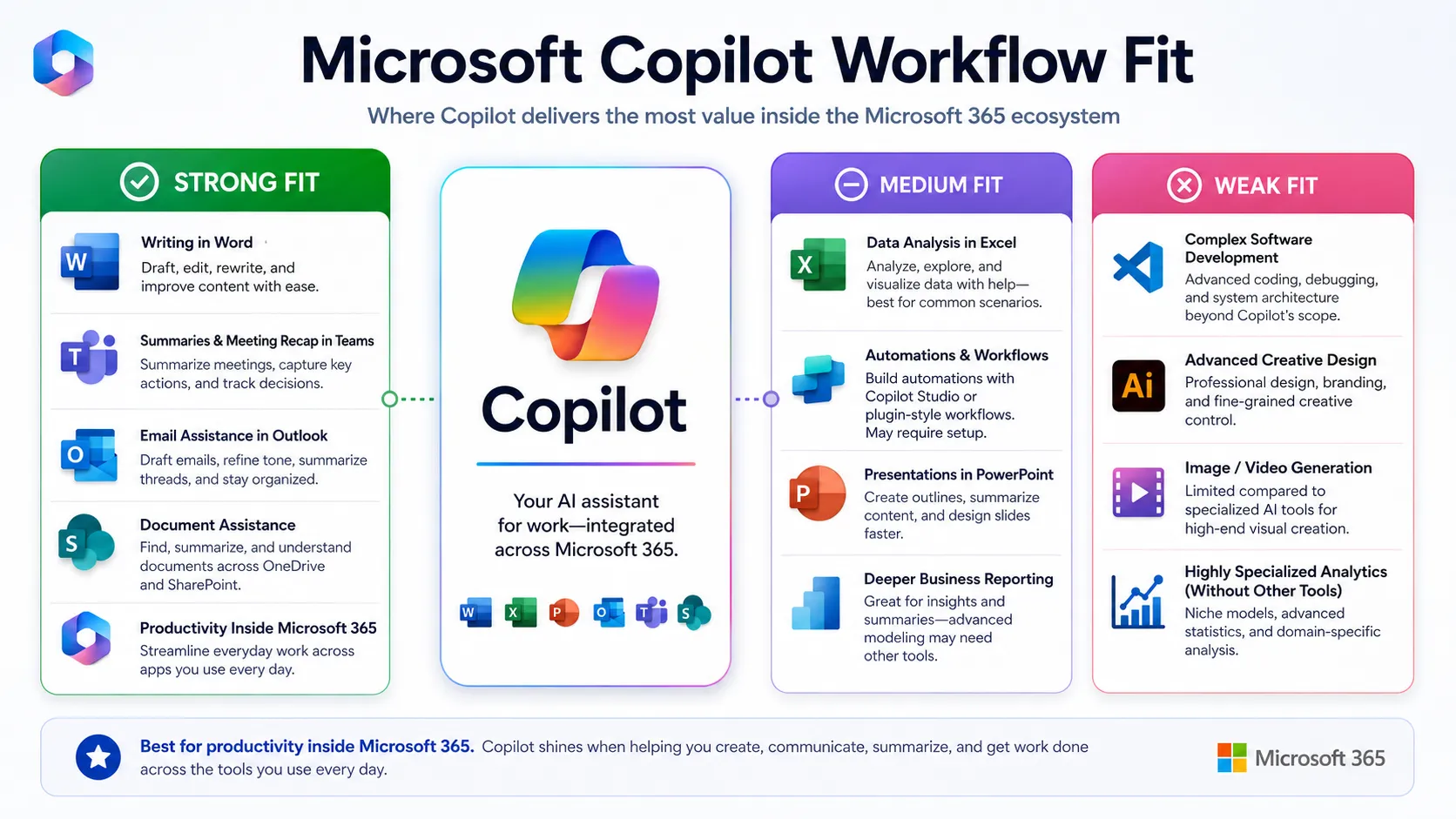
| Stack layer | Fit | What to know |
|---|---|---|
| Writing and drafting | strong | Native integration in Word and Outlook makes this one of Copilot's clearest strengths for M365 users. |
| Meeting summarization | strong | Teams-native meeting summaries and action items work well for organizations standardized on Teams. |
| Data analysis | medium | Excel integration is useful for non-technical users; advanced analysis still benefits from dedicated BI tools. |
| Code generation | weak | General coding help is available in chat; GitHub Copilot is the correct tool for in-editor coding workflows. |
| Image and creative production | weak | Image generation via Designer is available but not suited for professional creative output at scale. |
| Workflow automation | medium | Copilot Studio enables agent building, but general no-code automation across third-party apps still needs Zapier or Make. |
Best stack combinations
Enterprise knowledge workers
Microsoft Copilot + GitHub Copilot + Zapier
Copilot handles writing and meetings; GitHub Copilot covers coding; Zapier connects M365 outputs to external tools and triggers.
Content and marketing teams on M365
Microsoft Copilot + Grammarly + Canva AI
Copilot drafts in Word and Outlook; Grammarly refines tone and grammar; Canva AI handles visual design outside the M365 suite.
Research and analysis teams
Microsoft Copilot + Perplexity + Notion
Copilot summarizes and drafts inside M365; Perplexity handles source discovery; Notion stores and organizes research outputs.
What Microsoft Copilot can replace
- · Some manual drafting, rewriting, and proofreading tasks in Word and Outlook
- · Meeting note-taking and manual action-item extraction in Teams
- · Basic formula writing and data summary tasks in Excel
- · General-purpose web research for quick factual answers
What it still needs
- · Human reviewer: Brand, legal, and accuracy review before publishing or sending AI-generated content
- · GitHub Copilot: Deeper in-editor coding workflow for software development teams
- · Perplexity or Google Search: Primary source discovery and citation when source quality matters
- · Zapier or Make: Cross-app workflow automation beyond what M365 native connectors cover
Add it to your stack if
- · Your team is already paying for Microsoft 365 and wants AI built into existing apps
- · You need meeting summaries, email drafting, and document assistance without switching tools
- · Your organization requires IT controls, data protection, and centralized admin for AI usage
Skip it if
- · Your team does not use Microsoft 365 — the paid tiers require a qualifying M365 base license
- · You need a standalone AI assistant without an existing M365 subscription
- · Your primary use case is coding — GitHub Copilot or Cursor is the more focused option
Choose your next step
Pricing
→Compare Copilot free, individual, business, and enterprise plans with current pricing and M365 license requirements.
Alternatives
→Compare Microsoft Copilot with ChatGPT, Claude, Gemini, and other AI assistants for teams outside or inside the Microsoft ecosystem.
Compare options
→See how the leading general AI assistants compare on pricing, features, and stack fit.
Stack fit
→See how Copilot fits into a broader productivity and AI workflow stack.
Review
→See whether Microsoft Copilot is worth it for your workflow and M365 setup.
Pricing summary
This is a profile-level summary. Use the pricing page for deeper plan checks.
Starting path
Free + paid add-on
Free plan
Yes
Free trial
No
Microsoft Copilot has a free tier at copilot.microsoft.com covering general chat, image generation, and web answers. For individuals, Microsoft 365 Personal and Family plans include Copilot at their existing subscription price. For businesses, Microsoft 365 Copilot Business is available as a paid add-on requiring a qualifying M365 Business plan; the enterprise tier requires a qualifying M365 Enterprise plan. Verify current plan names, prices, and eligibility on the official pricing page before purchasing, as promotional pricing and plan structures change frequently.
Best starting path: If you are an individual Microsoft 365 subscriber, check whether Copilot is already included in your plan. For business teams, evaluate Microsoft 365 Copilot Business if you have fewer than 300 users; confirm eligibility and current pricing on the official page before purchasing.
Related stack page
Top alternatives
See all →Direct alternatives

Strongest direct alternative as a general AI assistant; wider model flexibility and plugin ecosystem without requiring M365.

Strong alternative for writing, summarization, and reasoning tasks for teams not locked into the Microsoft ecosystem.

Google's AI assistant with deep Google Workspace integration — the natural alternative for teams on Google Workspace.
Adjacent tools in the same stack

Handles in-editor coding within the Microsoft ecosystem; complements rather than replaces Copilot for developer teams.

Source-first research tool that pairs with Copilot when verified citations and deeper web sourcing are needed.

Knowledge base and document collaboration layer for teams that need persistent storage and cross-tool organization beyond M365.
Related comparisons
FAQ
What is Microsoft Copilot best for?
Copilot is best for Microsoft 365 users who want AI assistance embedded directly in Word, Outlook, Teams, and Excel. It handles drafting, meeting summarization, email replies, and basic data analysis without leaving the apps your team already uses. The free web version covers general chat and writing for individuals.
Is Microsoft Copilot enough as a full AI productivity stack?
For M365-heavy teams it covers the writing and meeting layers well, but it still needs supporting tools. Developers need GitHub Copilot for in-editor coding. Teams needing cross-app automation need Zapier or Make. Research-heavy workflows benefit from pairing Copilot with Perplexity for source-first web research.
What tools should I use with Microsoft Copilot?
For most teams: GitHub Copilot for coding, Grammarly for writing polish, Perplexity for source-first research, and Zapier or Make for cross-app workflow automation. Creative teams should add Canva AI for visual design work that goes beyond what Microsoft Designer covers.
What is the best alternative to Microsoft Copilot?
ChatGPT is the most comparable general AI assistant with wider model and plugin flexibility, no M365 dependency, and a strong free tier. Claude is a strong alternative for writing and reasoning. Gemini is the natural choice for teams standardized on Google Workspace.
Who should not use Microsoft Copilot?
Teams that do not use Microsoft 365 will find limited value in the paid tiers, which require a qualifying M365 base license. Budget-conscious users who need a standalone AI tool without an existing M365 subscription should start with ChatGPT or Claude instead.
Does Microsoft Copilot have a free plan?
Yes. The free version is available at copilot.microsoft.com with no account required. It covers general chat, writing help, image generation, and web-grounded answers. The free tier does not connect to your Microsoft 365 files, email, or meeting data — that requires a paid plan with an eligible M365 subscription.
How TopAIStacks evaluates Microsoft Copilot
Pricing and plan structure verified from official Microsoft pricing pages and Microsoft Support documentation. Plan names, M365 base license requirements, and feature scope drawn from official sources only. Business and enterprise pricing confirmed via official page; promotional rate end dates noted with buyer caution. Stack role, workflow fit, and alternative classification based on product category analysis. No hands-on testing claimed. Pricing fields use cautious wording given Microsoft's history of frequent plan restructuring.
Last checked: May 2026 · Source confidence: medium