Copy.ai Review
A practical Copy.ai review for GTM, sales, and marketing teams. See pricing fit, workflow strengths, limits, and alternatives.
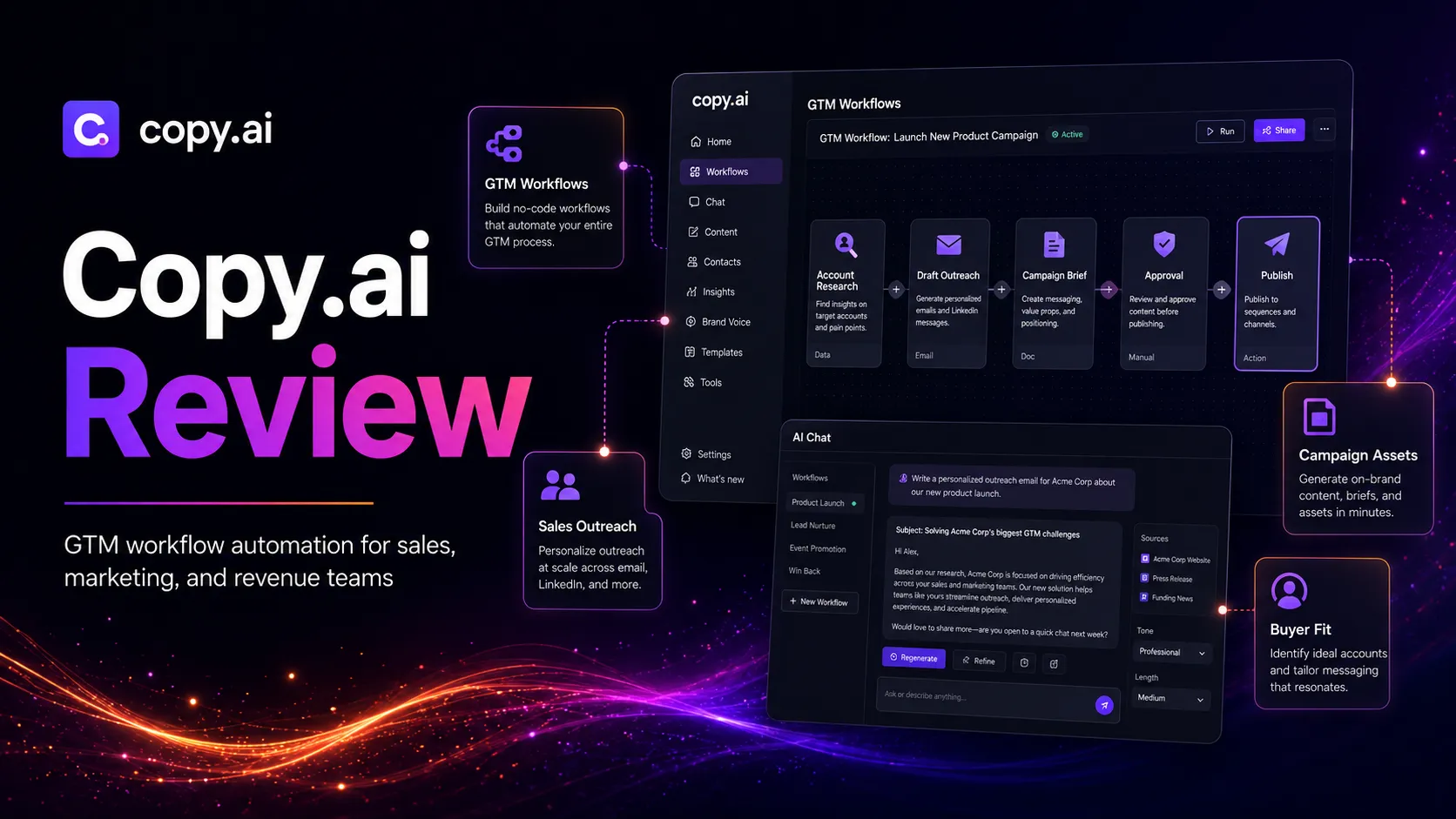
Copy.ai is strong for GTM teams that need repeatable writing workflows, but it is no longer the simple cheap copywriter many buyers remember.
Use it if…
- ✓ Your sales or marketing team repeats the same writing and research tasks every week.
- ✓ You want a GTM-focused workflow layer rather than a general chatbot alone.
- ✓ You can connect Copy.ai output to account research, CRM context, campaign briefs, approvals, and publishing.
- ✓ You are comparing the Chat plan with a clear path toward workflow automation if the use case proves itself.
Skip it if…
- – You only need occasional blog ideas, social captions, or personal writing help.
- – You have no clear process yet and would be automating messy work.
- – You need a dedicated SEO optimizer, grammar checker, or design production tool first.
- – The larger workflow tiers feel impossible to justify against a measurable revenue or operations case.
Review scorecard
Scored by workflow fit, ease of use, value, and stack compatibility. Weights reflect importance for typical buyers.
| Criteria | Score | ||
|---|---|---|---|
| GTM workflow fit | 8.7 | ||
| Writing and campaign utility | 8.1 | ||
| Automation depth | 8.4 | ||
| Pricing accessibility | 6.9 | ||
| Stack compatibility | 8.0 | ||
| Buyer clarity | 7.6 | ||
| Weighted overall | 8.0 / 10 | ||
On this page
Quick verdict
Copy.ai is no longer best understood as a simple copywriting tool that spits out ads, captions, and blog intros. That version of the category still exists in people’s memory, but the product’s public direction is now much more GTM-focused. It is trying to sit closer to sales, marketing, and revenue operations workflows.
My practical verdict: Copy.ai is worth considering if your team repeats the same sales and marketing writing jobs every week. Outreach, campaign copy, account-based content, follow-up assets, thought leadership support, and GTM process automation are the places where it can make sense. It is less compelling if you are a solo blogger looking for the cheapest long-form article writer.
The friction point is pricing shape. The Chat plan is easy enough to understand, but the moment you need workflow automation at team scale, the conversation moves into much larger annual plans. That is not automatically bad. It just means Copy.ai should be evaluated like a GTM operations tool, not like a casual AI writer.
This review is based on public product information, official Copy.ai pricing and terms pages, the existing TopAIStacks Copy.ai profile, official videos, and editorial stack-fit analysis. No private workflow deployment or paid account test was conducted. Verify current plan limits and pricing before buying.
Who should use Copy.ai
Imagine a marketing team preparing a campaign. The same message has to become sales emails, social posts, landing page snippets, follow-up copy, internal briefs, and maybe account-specific variations. A general chatbot can help, but the work quickly becomes scattered across prompts, docs, spreadsheets, and approvals.
That is where Copy.ai is most relevant. It fits teams that want AI writing inside a repeatable GTM process. If your team already has positioning, audience data, campaign structure, CRM context, and approval rules, Copy.ai can help standardize routine writing work.
Use it if you are a GTM team, sales team, marketing team, or revenue operations group trying to turn repeatable writing into a workflow. It belongs in the stack when the same work happens often enough that process matters more than one clever prompt.
Who should skip Copy.ai
If your current writing process is simple, Copy.ai may feel heavier than expected.
A solo creator who only needs blog ideas, product descriptions, or a few social captions can often start with ChatGPT, Claude, Rytr, Writesonic, or a lighter SEO writing workflow. The practical question is not whether Copy.ai can draft copy. It can. The question is whether its GTM workflow direction solves a problem you hit every week.
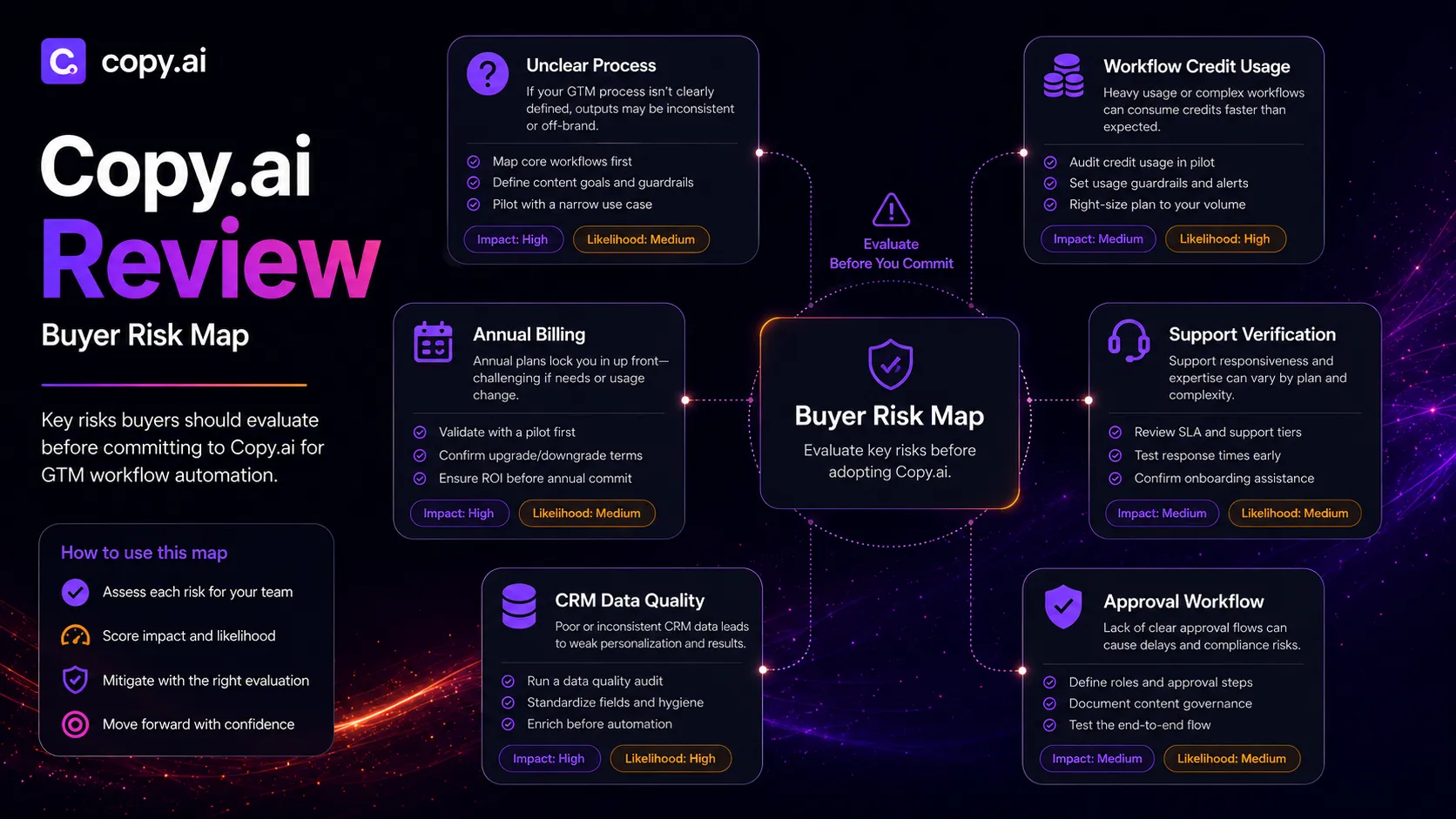
Skip it if your team has no clear sales or marketing process yet. AI automation does not fix unclear ownership, weak messaging, messy CRM data, or missing approval rules. In those cases, Copy.ai can make the process look more organized than it really is.
It is also not the right first tool if you need design, SEO scoring, citation research, grammar correction, or analytics as the main job. Those belong to other stack layers.
Copy.ai pros and cons
Pros
- Strong fit for repeatable GTM writing and sales workflows.
- More structured than a basic chatbot for team content operations.
- Useful for campaign copy, outreach, follow-up, and collateral support.
- Pairs well with CRM, SEO, editing, design, and automation tools.
- Official pricing clearly separates Chat from larger workflow plans.
Cons
- Pricing jumps sharply when teams need workflow automation depth.
- Not ideal as a cheap solo blogger writing subscription.
- Workflow value depends on clean inputs and process ownership.
- Buyers must verify free limits, credits, seats, and renewal terms.
- It still needs human review for claims, tone, accuracy, and approvals.
Real workflow fit
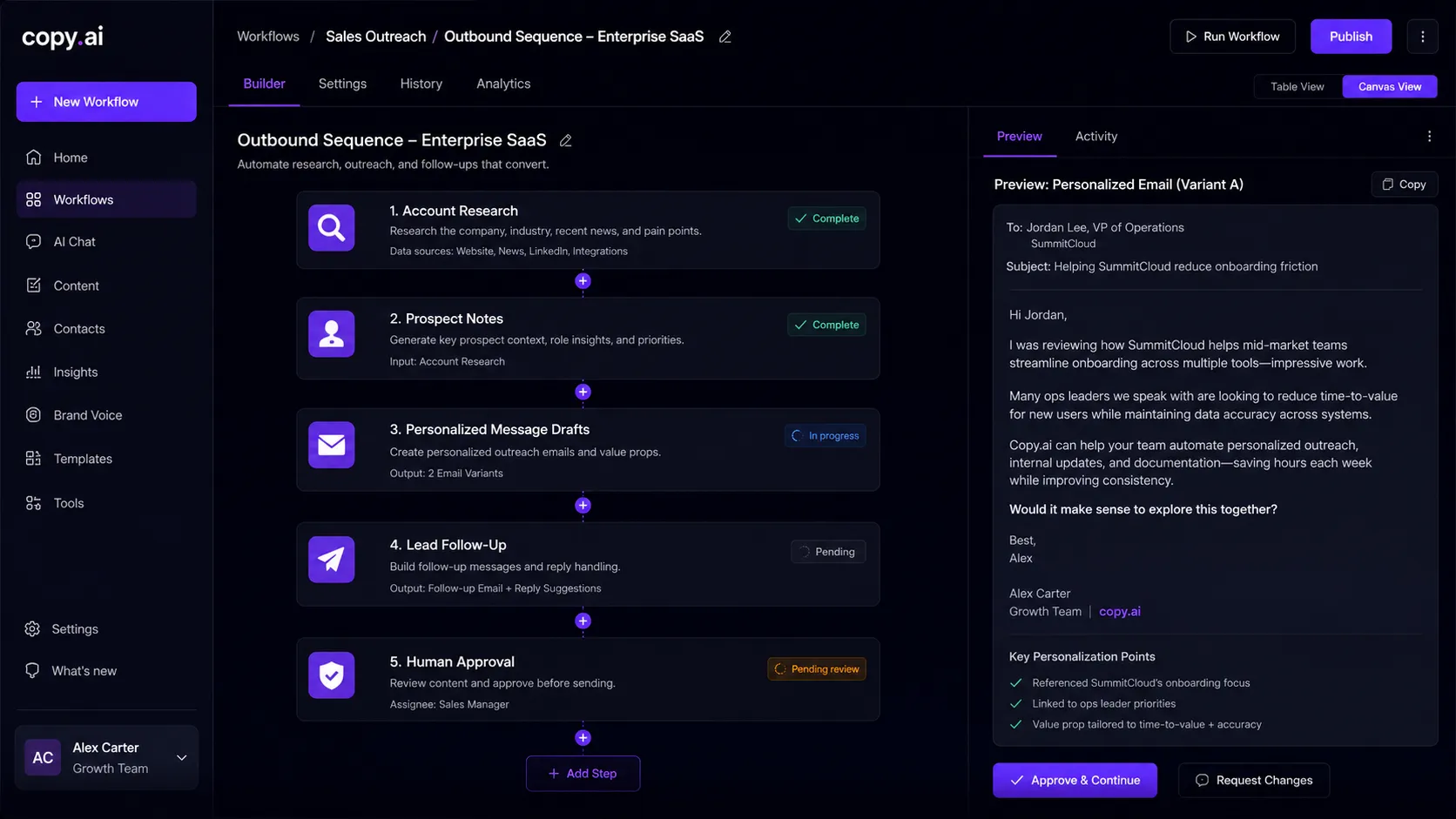
The best Copy.ai workflow starts before the tool writes anything. You need a real input source: customer data, account notes, campaign goals, product positioning, previous examples, and a decision about who approves final copy.
From there, Copy.ai can help turn the work into repeatable steps. It can support sales outreach, campaign content, localization, lead follow-up, content operations, and GTM tasks that would otherwise live across docs and spreadsheets.
The weaker fit is unstructured long-form SEO publishing. Copy.ai can support drafts and briefs, but it does not replace keyword research, SERP analysis, source verification, editorial judgment, or CMS publishing.
Where Copy.ai fits in an AI stack
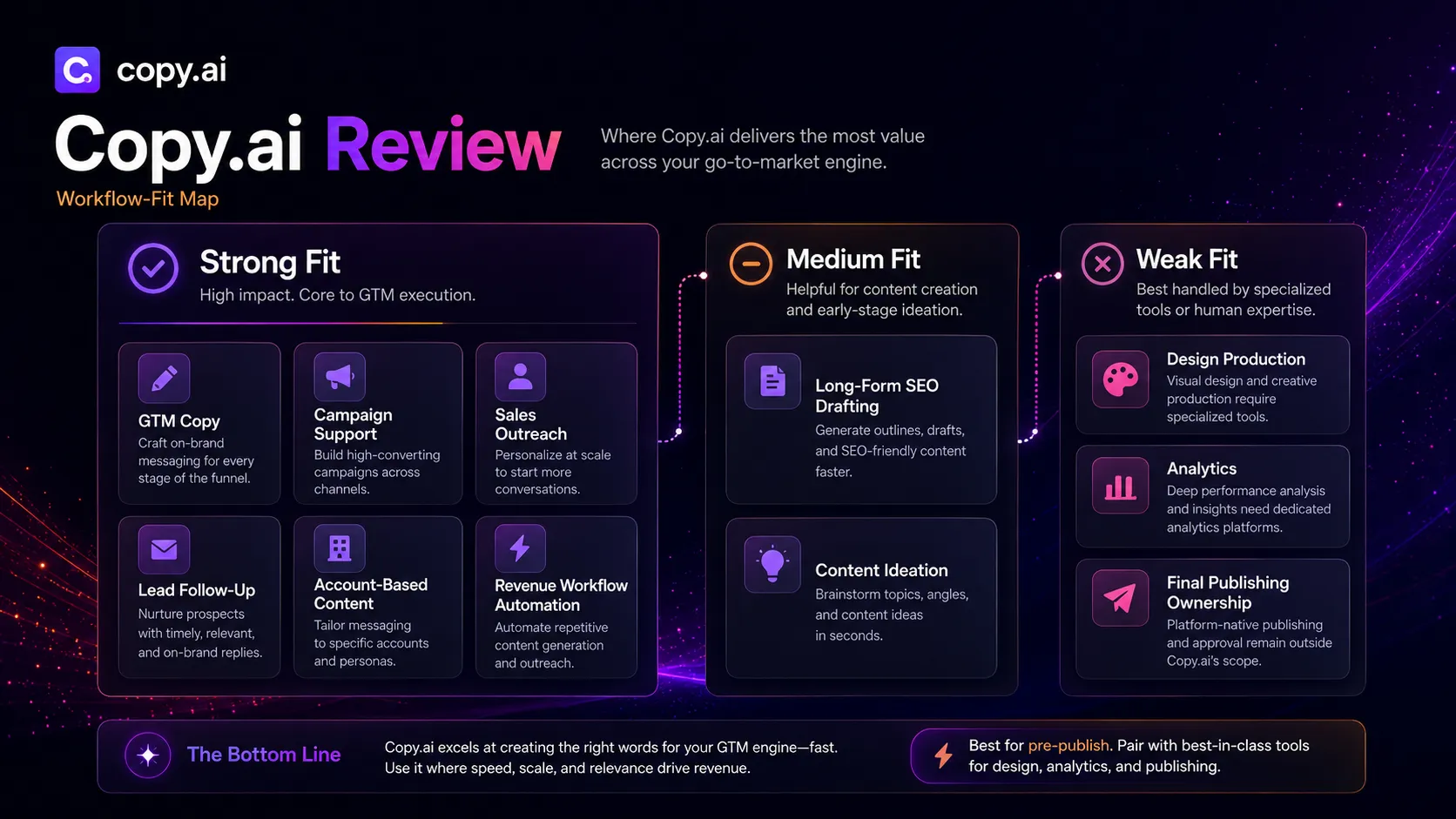
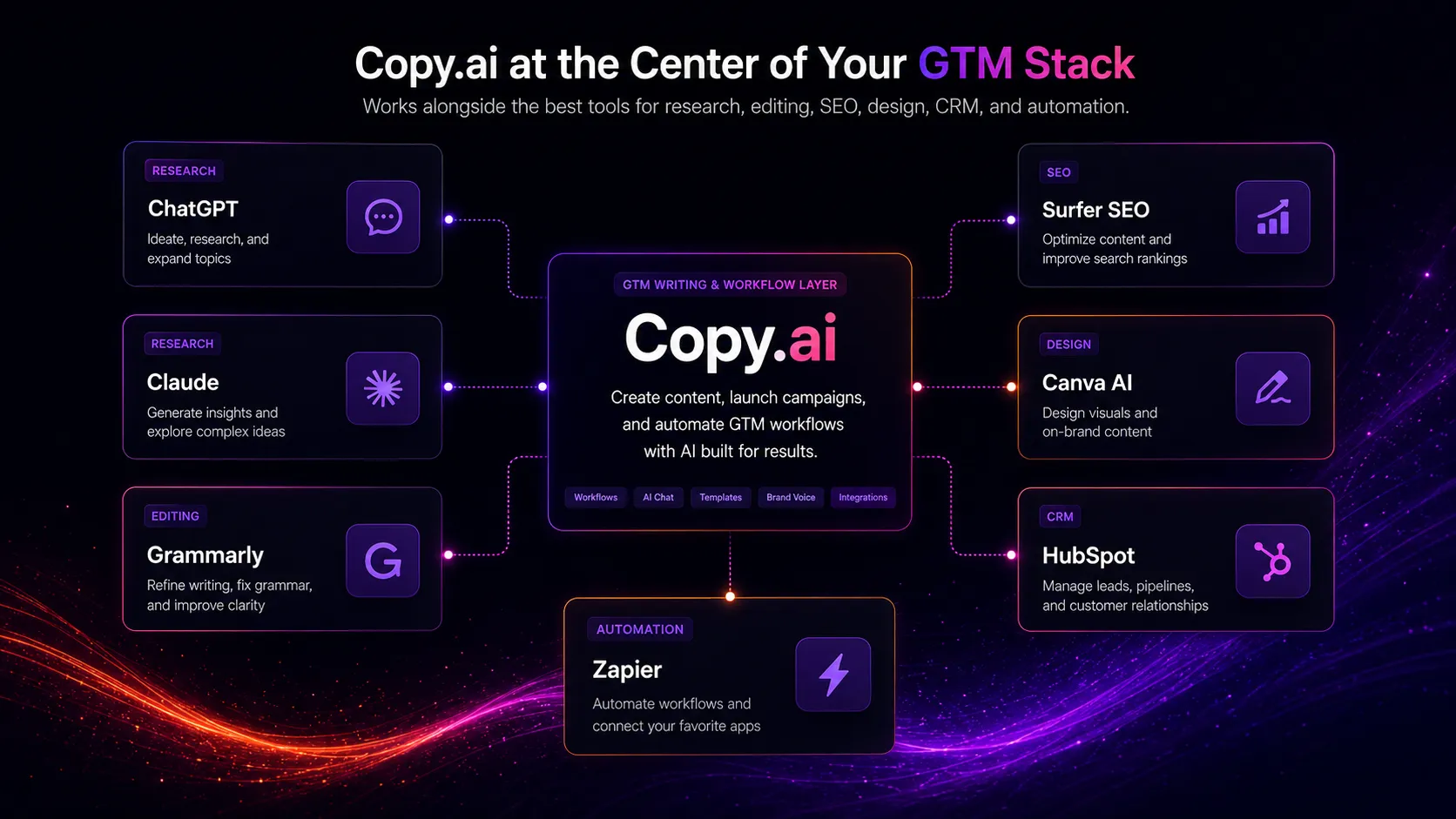
The right way to think about Copy.ai is as the GTM writing and workflow layer, not as the whole content stack.
In a practical stack, ChatGPT or Claude can still handle open-ended thinking. Grammarly can polish final language. Surfer SEO or Frase can support search intent and on-page optimization. Canva AI can handle visual assets. HubSpot or another CRM holds customer context. Zapier or Make can move data between tools when a dedicated workflow is not needed.
Copy.ai sits in the middle when the job is repeatable GTM writing. It can replace scattered prompt documents and basic copy templates. It does not replace customer data, strategy, design, analytics, or human approval.
What Copy.ai does well
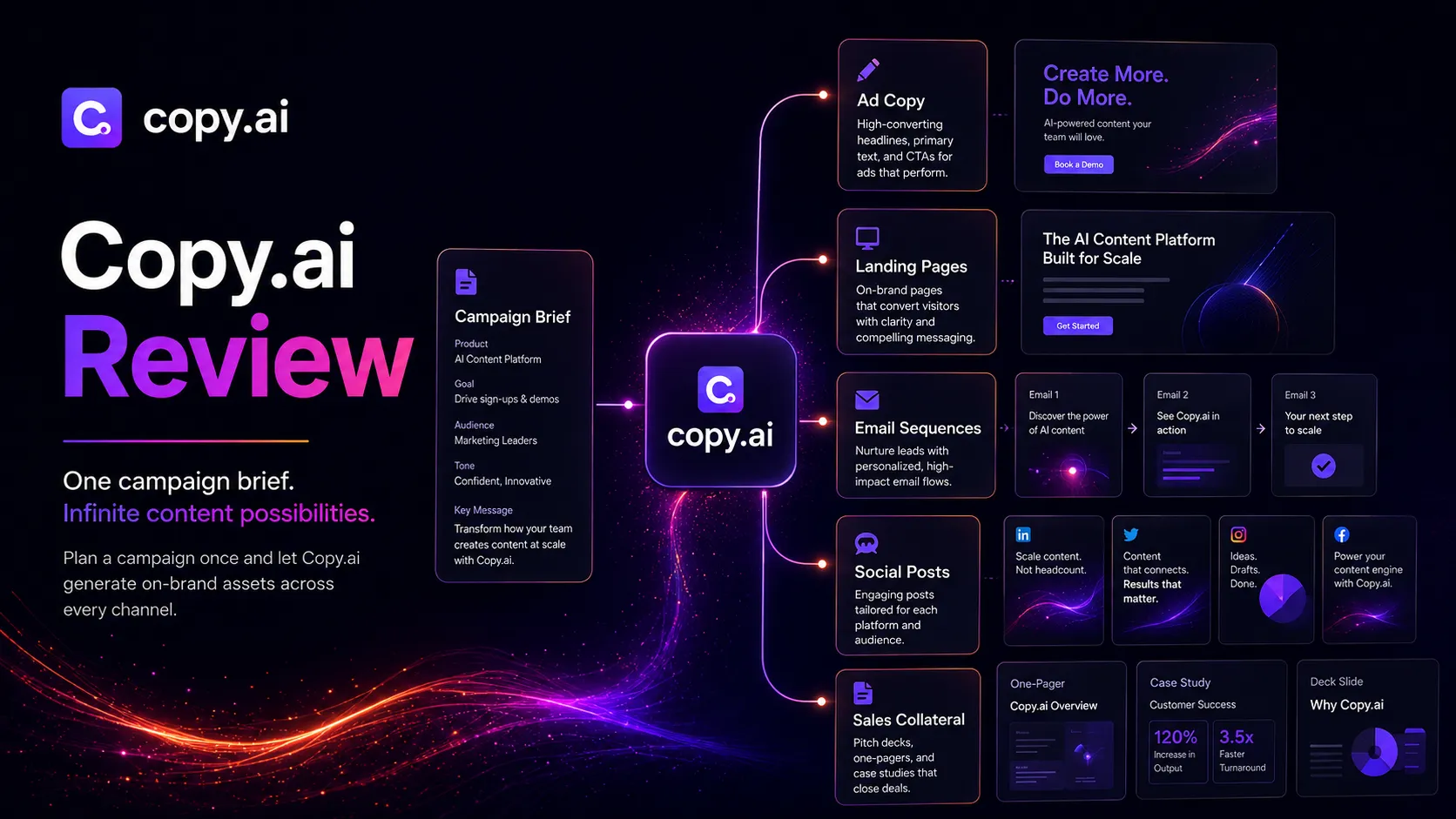
Copy.ai is strongest when a team needs many related copy assets around the same GTM motion. A campaign rarely needs one isolated paragraph. It needs emails, ad angles, landing page snippets, social posts, sales talking points, follow-up copy, and internal context.
That is the practical use case. Copy.ai can help teams reuse positioning, keep writing closer to brand voice, and make repeatable work less dependent on whoever happens to write the first draft.
The other strong point is focus. The platform is not trying to be a design suite or an SEO crawler. Its best role is GTM writing, chat, workflows, tables, actions, brand voice, and process support.
Where Copy.ai falls short
The biggest weakness is not that Copy.ai lacks value. The weakness is that the value is uneven by buyer type.
For GTM teams, the product direction makes sense. For a solo writer, it can feel like a platform designed for a different room. A cheap AI writer is judged by output quality and monthly cost. A GTM workflow platform is judged by process savings, seat rollout, workflow credits, implementation friction, and whether the team actually uses it.
That difference matters. If you buy Copy.ai expecting a simple writing assistant, the pricing and platform language may feel like overkill. If you buy it to codify recurring GTM work, the same structure becomes the point.
Pricing judgment
Copy.ai’s current pricing needs to be read carefully.
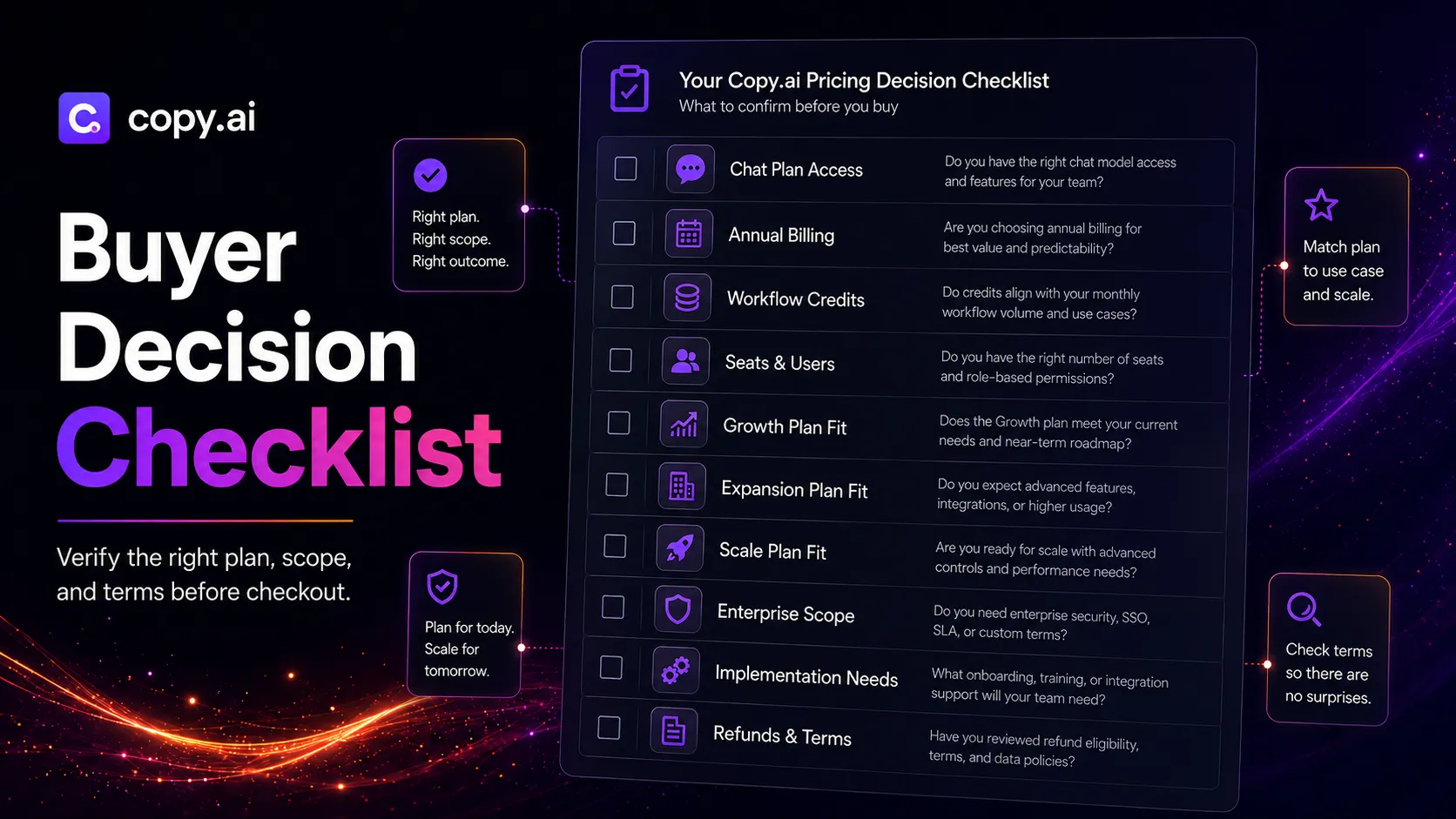
The public pricing page lists a Chat plan at $29 per month, or $24 per month when billed annually. That is the easier self-serve entry point. The larger plan ladder changes the conversation: Growth, Expansion, and Scale are built around more seats and workflow credits, with annual billing shown publicly.
That jump is the decision point. If you only need chat-style drafting, compare Copy.ai with Jasper, Writesonic, Rytr, ChatGPT, and Claude. If you need GTM workflow automation, calculate the cost against real time saved, revenue process impact, and the number of people who will actually use it.
Also verify the refund window, renewal terms, free access, workflow credits, and seat limits before checkout. The official terms reference a five-day refund window for initial subscription purchase cancellation, which is not much time for a team to evaluate a complex workflow tool.
Best alternatives to compare
The better comparison depends on what you were hoping Copy.ai would do.
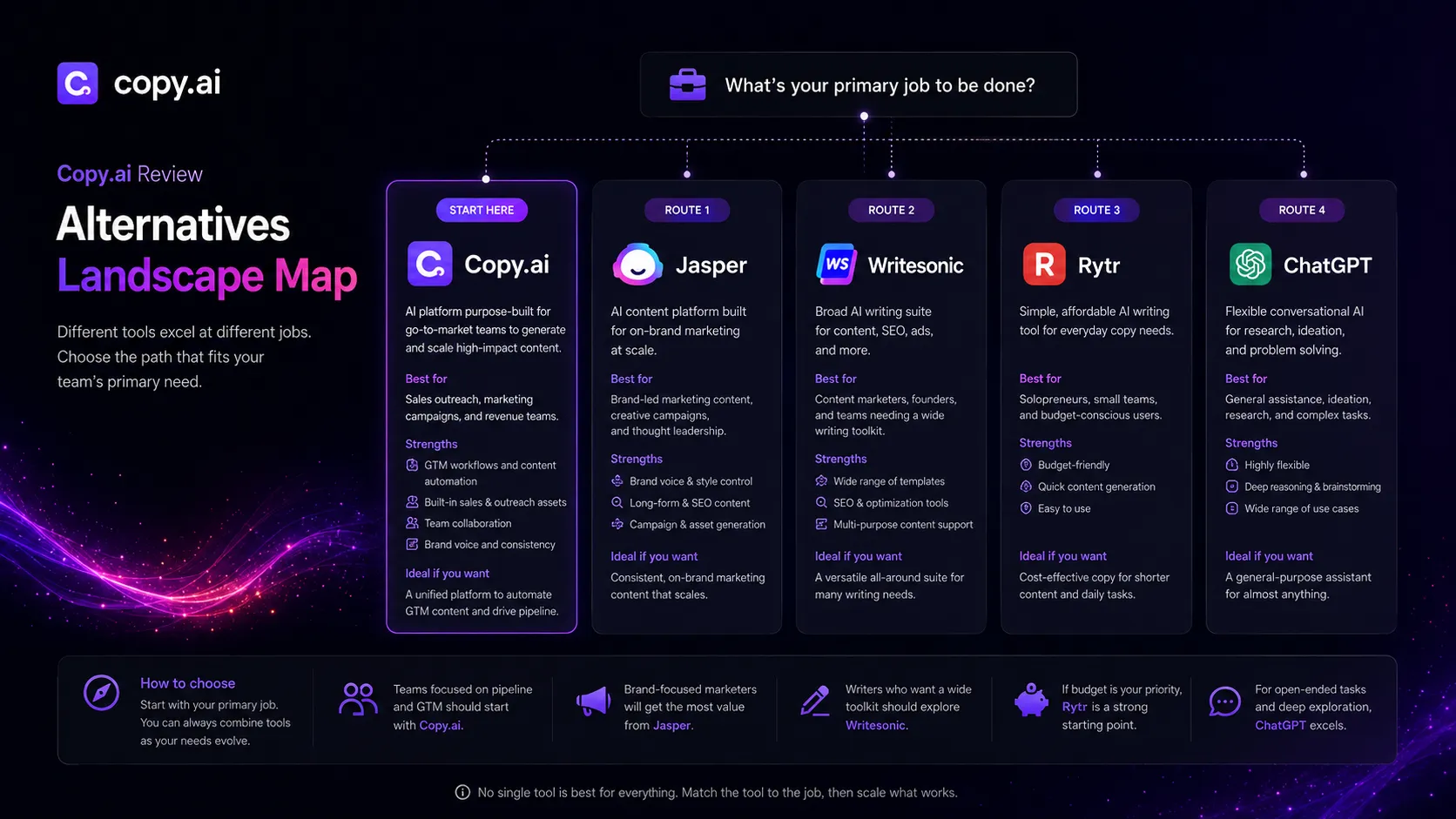
Choose Jasper as the first comparison if your team cares most about brand-led marketing content, campaign workflows, and team content control. Compare Writesonic if you want a broader AI writing suite. Compare Rytr if price matters more than GTM workflow depth. Compare ChatGPT or Claude if you mostly need flexible drafting and reasoning.
This is where some buyers make the wrong move. They compare tools by output sample alone. For Copy.ai, the better question is whether you need a GTM workflow layer or just another writing assistant.
Final decision
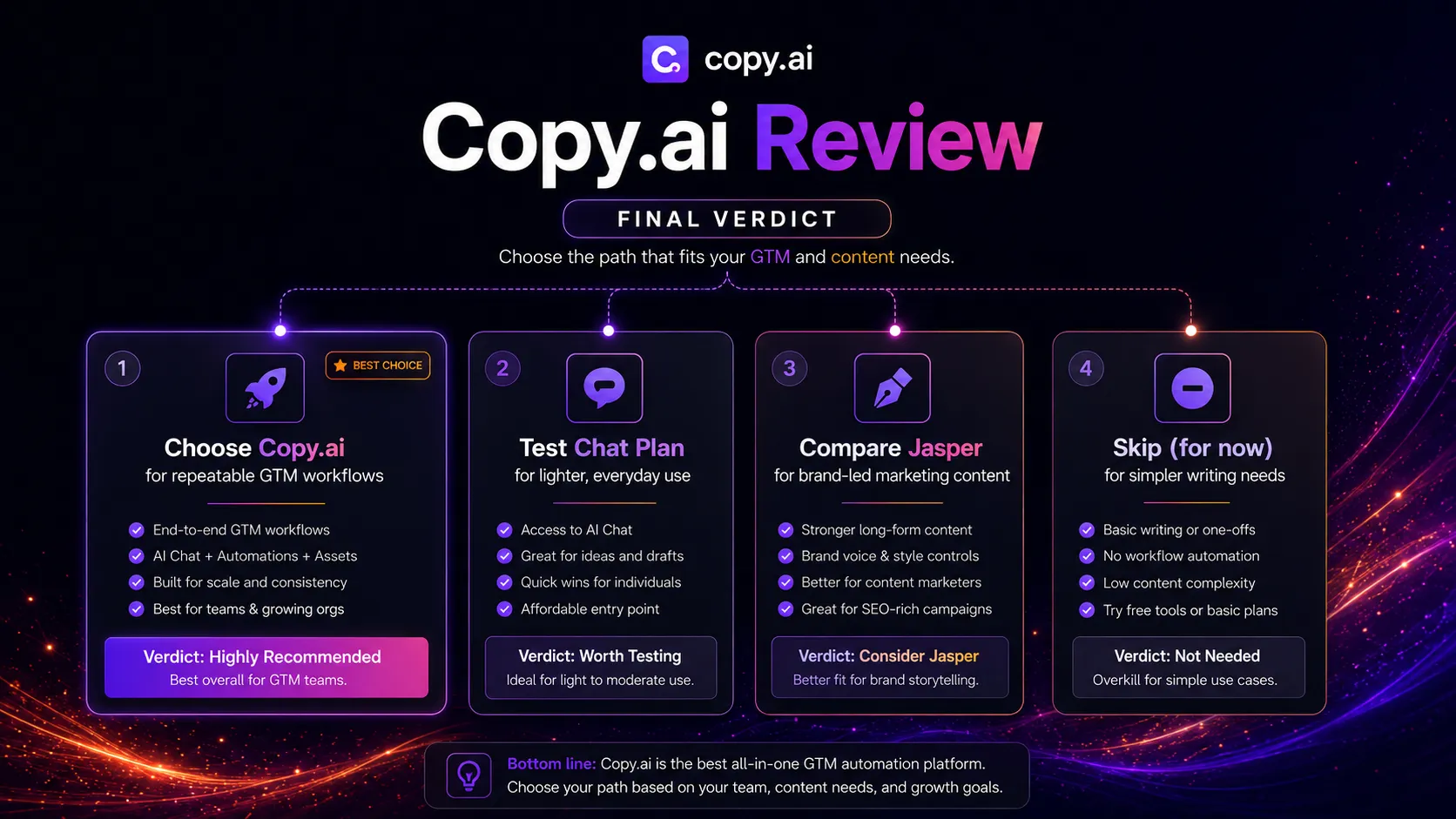
Copy.ai deserves a place in the stack when your team has repeatable GTM writing work that is painful enough to structure. Sales outreach, campaign content, lead follow-up, account-based content, and marketing operations are the right lens.
I would not treat it as the default recommendation for every writer. The platform direction, pricing shape, and workflow emphasis make it a better fit for teams than for casual solo use.
The safer move is simple. Start with the lowest-risk path you can verify, test it on a real recurring GTM task, and judge the result by time saved and process quality. If the workflow is real, Copy.ai can be useful. If the workflow is vague, another chatbot will probably feel cheaper and easier.
Frequently asked questions
Is Copy.ai worth it in 2026?
Does Copy.ai have a free plan?
How much does Copy.ai cost?
Is Copy.ai good for solo bloggers?
What is the best Copy.ai alternative?
Does Copy.ai replace ChatGPT or Claude?
Where Copy.ai fits in a stack
GTM writing and workflow layer
Does not replace
- – CRM or customer data source
- – SEO research and search optimization tools
- – Human editor or brand owner
- – Design and creative production tools
- – Analytics, attribution, and revenue reporting systems
Head-to-head comparisons
Top alternatives to consider
If Copy.ai is not the right fit, these are the most common alternatives.
Jasper is the closest comparison when the buyer cares about brand voice, campaign content, team workflows, and marketing asset control rather than GTM automation depth.
Writesonic is a better comparison when the buyer wants a broader AI writing suite with content, marketing copy, and lighter search-oriented workflows.
Rytr is a cleaner choice for freelancers and budget-first users who mainly need lightweight short-form copy instead of GTM workflow automation.
Review methodology
This review is based on current public Copy.ai product pages, official pricing, terms, the existing TopAIStacks Copy.ai YAML profile, official Copy.ai video references, third-party buyer context, and editorial stack-fit analysis.
No private paid account test, live workflow implementation, or internal sales-team deployment was conducted for this review. Recommendations reflect public product information and buyer-fit analysis.
Not covered: Hands-on output benchmark testing · Private CRM or GTM workflow deployment · Enterprise contract negotiation · Internal revenue impact measurement