
ChatGPT Review
A practical ChatGPT review for writers, teams, coders, and researchers. See where it fits, when Plus or Pro makes sense, and what to compare.
ChatGPT is the strongest default AI assistant for broad daily work, but it still needs source checks, workflow boundaries, and careful plan selection.
Use it if…
- ✓ You want one reliable starting point for daily drafting, explanation, analysis, and planning work.
- ✓ You regularly move between writing, coding, spreadsheets, images, files, and web research.
- ✓ You can verify important claims and treat ChatGPT as a thinking partner rather than a final authority.
- ✓ Your team needs a shared AI workspace and is willing to review the Business or Enterprise privacy model.
Skip it if…
- – You mainly need a dedicated SEO, design, coding, or automation product with deeper native workflow controls.
- – You cannot tolerate source-checking, occasional confident mistakes, or plan limits on advanced features.
- – You only ask casual questions and the free plan already covers your needs.
- – Your organization has not approved how data, files, connectors, and retention are handled.
Review scorecard
Scored by workflow fit, ease of use, value, and stack compatibility. Weights reflect importance for typical buyers.
| Criteria | Score | ||
|---|---|---|---|
| General reasoning and drafting | 9.2 | ||
| Workflow breadth | 9.0 | ||
| Source reliability and verification | 7.8 | ||
| Stack integration | 8.7 | ||
| Pricing fit | 8.3 | ||
| Privacy and team controls | 8.5 | ||
| Weighted overall | 8.7 / 10 | ||
On this page
Quick verdict
ChatGPT is easy to underrate because almost everyone has tried it. The real question is not whether it can respond to a request. The better question is whether it should become the default reasoning layer in your stack.
My practical take is yes for many users, with boundaries. ChatGPT earns an 8.8 out of 10 because it is strong across writing, research prep, coding help, data analysis, file work, images, and general problem solving. The caution is familiar but still important: it can sound more certain than the evidence deserves.
This review is based on public product information, official documentation, pricing pages, and workflow-fit analysis. No private benchmark or team deployment test was conducted. Verify current features and pricing before purchasing.
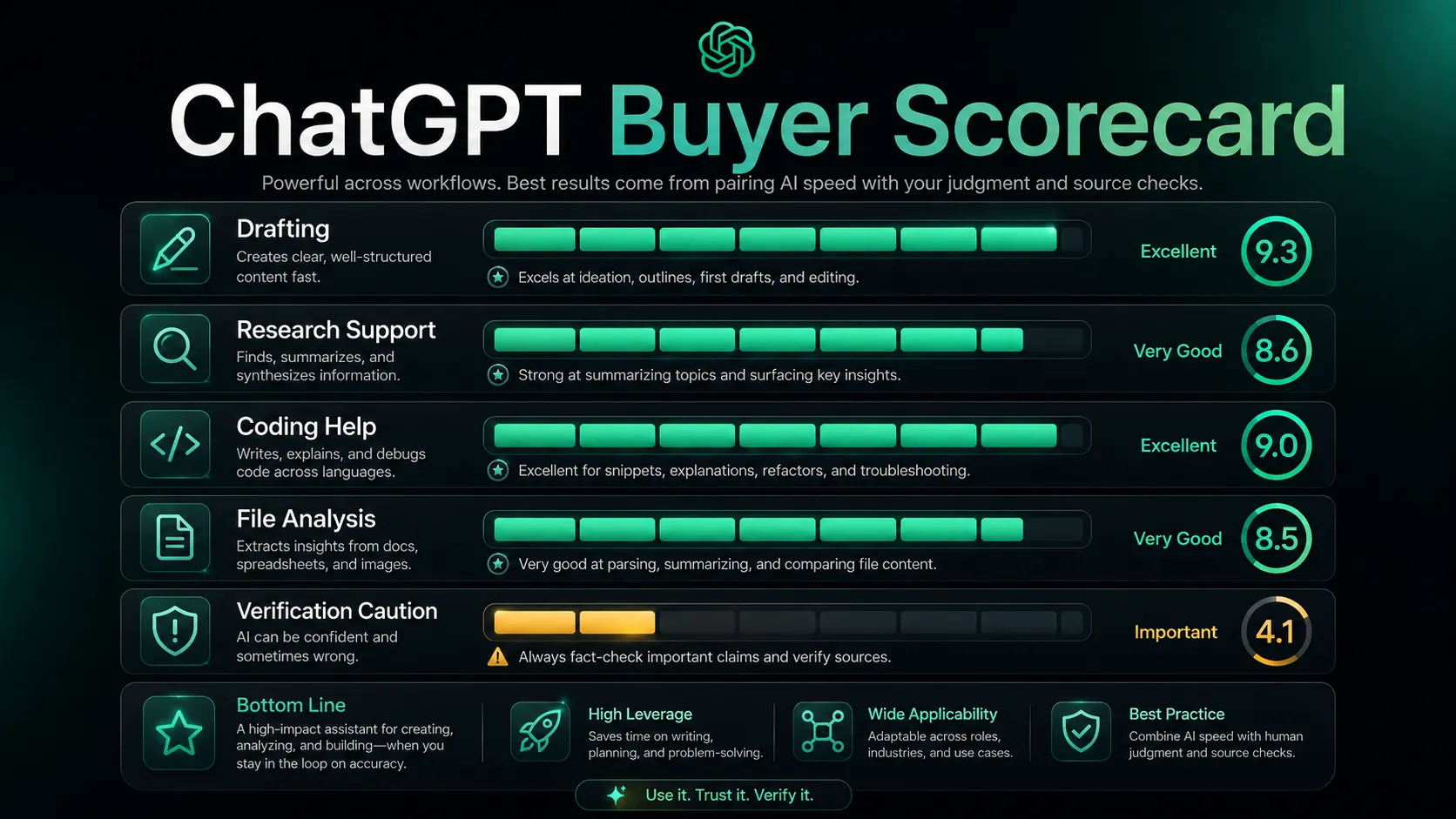
The strongest case for ChatGPT is breadth. You can start with a messy idea, upload a file, ask for a rewrite, build a table, analyze a spreadsheet, inspect an image, draft code, and turn the result into a plan. That does not make it perfect. It does make it a practical first stop.
The friction starts when users expect one assistant to be the whole stack. ChatGPT can help you think, draft, inspect, and structure. It should not be your only source of truth, your only research tool, your only coding review layer, or your only publishing workflow.
Who should use ChatGPT
You are switching between a blank document, a spreadsheet, a browser tab, and a note app. The value of ChatGPT appears when those tasks blur together and you need a thinking partner that can move with you.
ChatGPT fits people who need one assistant for many knowledge tasks. That includes writers who need outlines and rewrites, students who need explanations, analysts who need summaries, creators who need content angles, and developers who need code help before moving into a deeper IDE workflow.
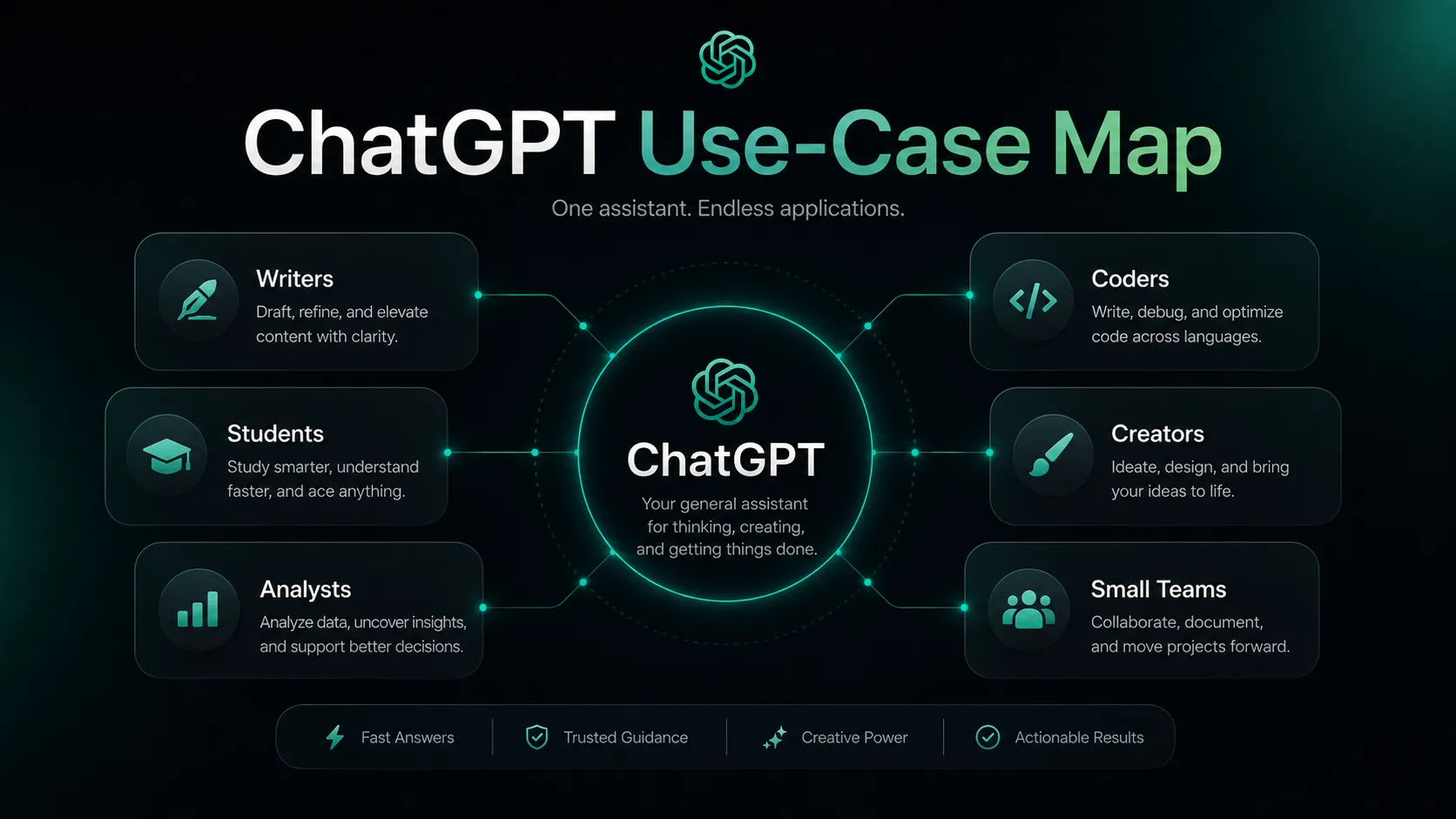
It also fits small teams that need a shared AI workspace. The Business path becomes more relevant when people need connected apps, shared projects, admin controls, and clearer data handling than a personal account can provide.
The best personal use case is recurring work. If you ask ChatGPT one casual question a week, the free plan may be enough. If you use it every day for files, data, search, drafts, images, tasks, and coding support, a paid plan becomes easier to justify.
Who should skip ChatGPT
Skip ChatGPT if your main problem is narrow and specialist. A content team that needs SERP scoring still needs a tool like Surfer SEO or Frase. A designer still needs Canva, Figma, Photoshop, or another production tool. A developer working inside a large repository may still prefer Cursor or GitHub Copilot for editor-native context.
Skip it if you cannot build a verification habit. The output may be polished before it is correct. That is the part that still catches users. A clean answer can hide a weak source, an outdated number, or a misunderstood instruction.
It is also less compelling if your team has strict privacy rules and has not reviewed workspace controls. Personal accounts, Business workspaces, and Enterprise setups do not carry the same assumptions. Before uploading sensitive files, your team should confirm training, retention, connector, and admin settings.
ChatGPT pros and cons
Pros
- Broad assistant coverage across writing, coding, files, images, and research prep
- Strong first-draft partner for messy ideas and unclear working notes
- Useful free plan for light daily questions and basic exploration
- Paid plans add more serious workflow depth for regular users
- Business workspace path gives teams stronger admin and data controls
Cons
- Confident answers still need source checks for important decisions
- Advanced features and limits change often across plans
- Not a replacement for specialist SEO, design, coding, or legal tools
- Pro pricing only makes sense for heavy, recurring advanced work
- Personal-account data controls require buyer attention before sensitive use
Real workflow fit
A realistic ChatGPT workflow does not start with a perfect instruction. It starts with a half-formed task: a transcript, a product note, a messy outline, a spreadsheet, a screenshot, or a question you are not sure how to ask.
ChatGPT is strongest in the middle of that workflow. It can organize the mess, ask for missing context, produce a first pass, and give you a structure to react to. The final step should still be human review, especially when the output contains claims, calculations, strategy, or customer-facing advice.
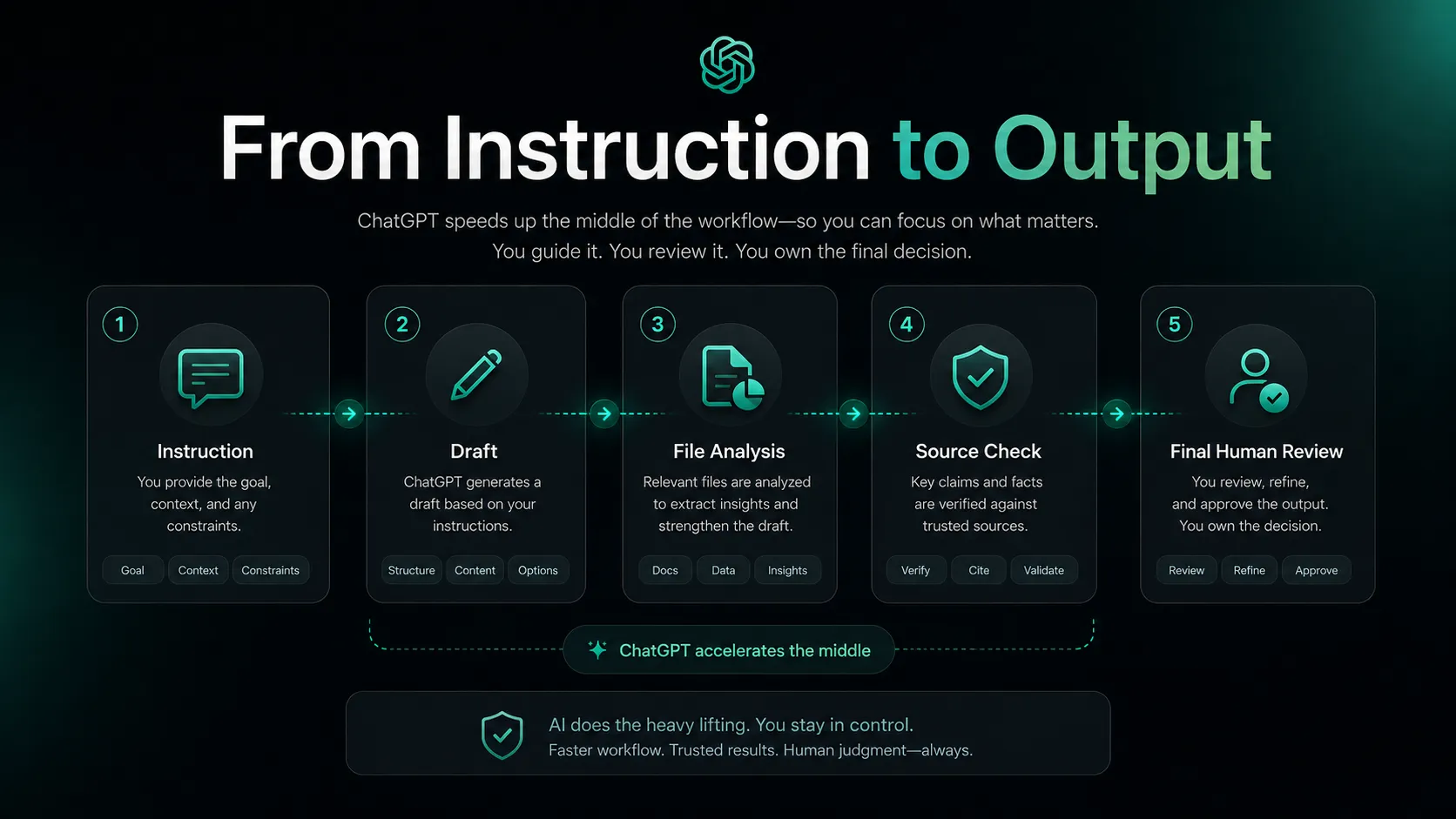
For writing, it helps most with outlines, rewrites, structure, tone options, and second-pass editing. For coding, it is useful for explanation, debugging direction, small scripts, and learning unfamiliar APIs. For research, it can help scope a question and summarize sources, but you should still inspect the cited material.
Agent-style work is the most interesting newer layer. I would be careful here. It can save time when the task has clear steps and review points, but it also increases the need to inspect what happened before you trust the result.
Where ChatGPT fits in an AI stack
The right way to think about ChatGPT is as the reasoning layer, not the whole operating system. It sits between the user’s intent and the specialist tools that produce, verify, publish, or automate the work.
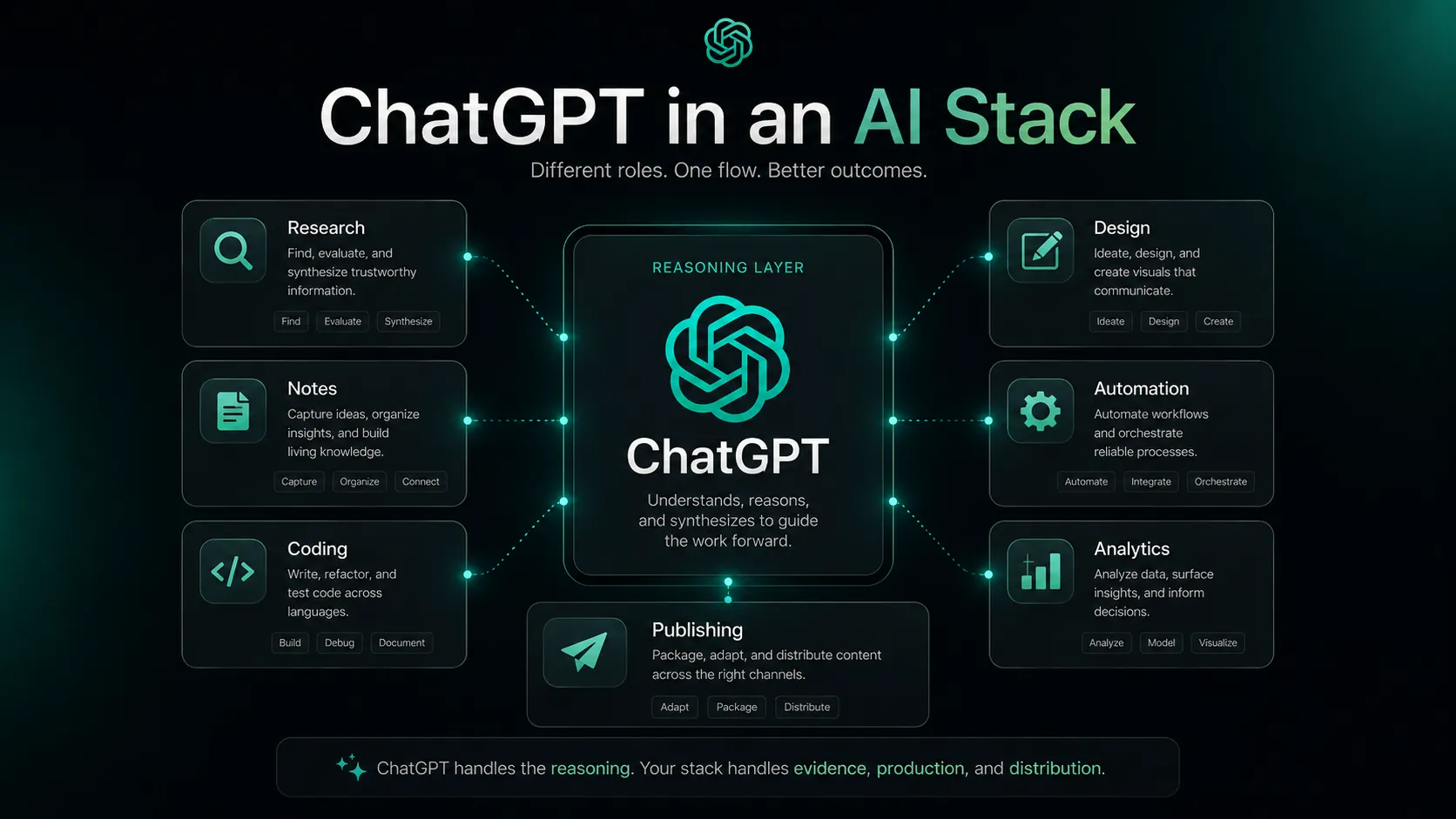
It can replace some first-draft writing, rough brainstorming, basic summaries, simple code explanation, and lightweight analysis. It does not replace your source library, CMS, analytics, brand system, code review process, or team permissions model.
Your stack should answer one practical question: where does ChatGPT reduce friction without becoming a single point of failure? For many users, the best setup is ChatGPT plus a source-checking habit, a note system, a publishing tool, and one or two specialist apps for the work they do most often.
What ChatGPT does well
The strongest thing ChatGPT does is turn fuzzy intent into workable structure. You can give it a loose goal and get back a plan, table, draft, checklist, code sketch, or explanation. That alone is valuable because many people lose time before the work even starts.
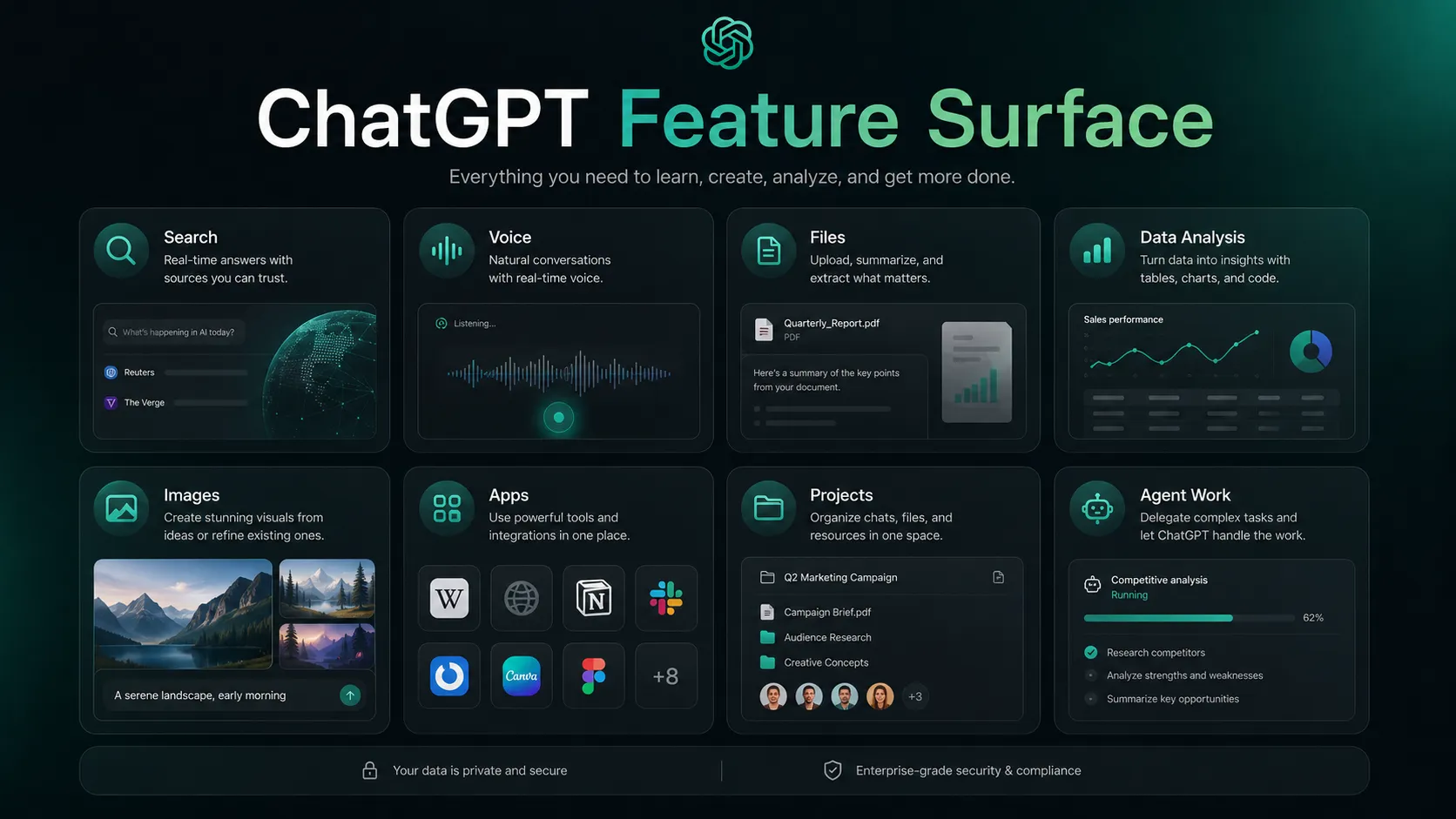
It also works well as a translation layer between tasks. A spreadsheet can become a summary. A meeting note can become an email. A screenshot can become a question. A long explanation can become a checklist. That range is why it often beats narrower tools as the first AI subscription people consider.
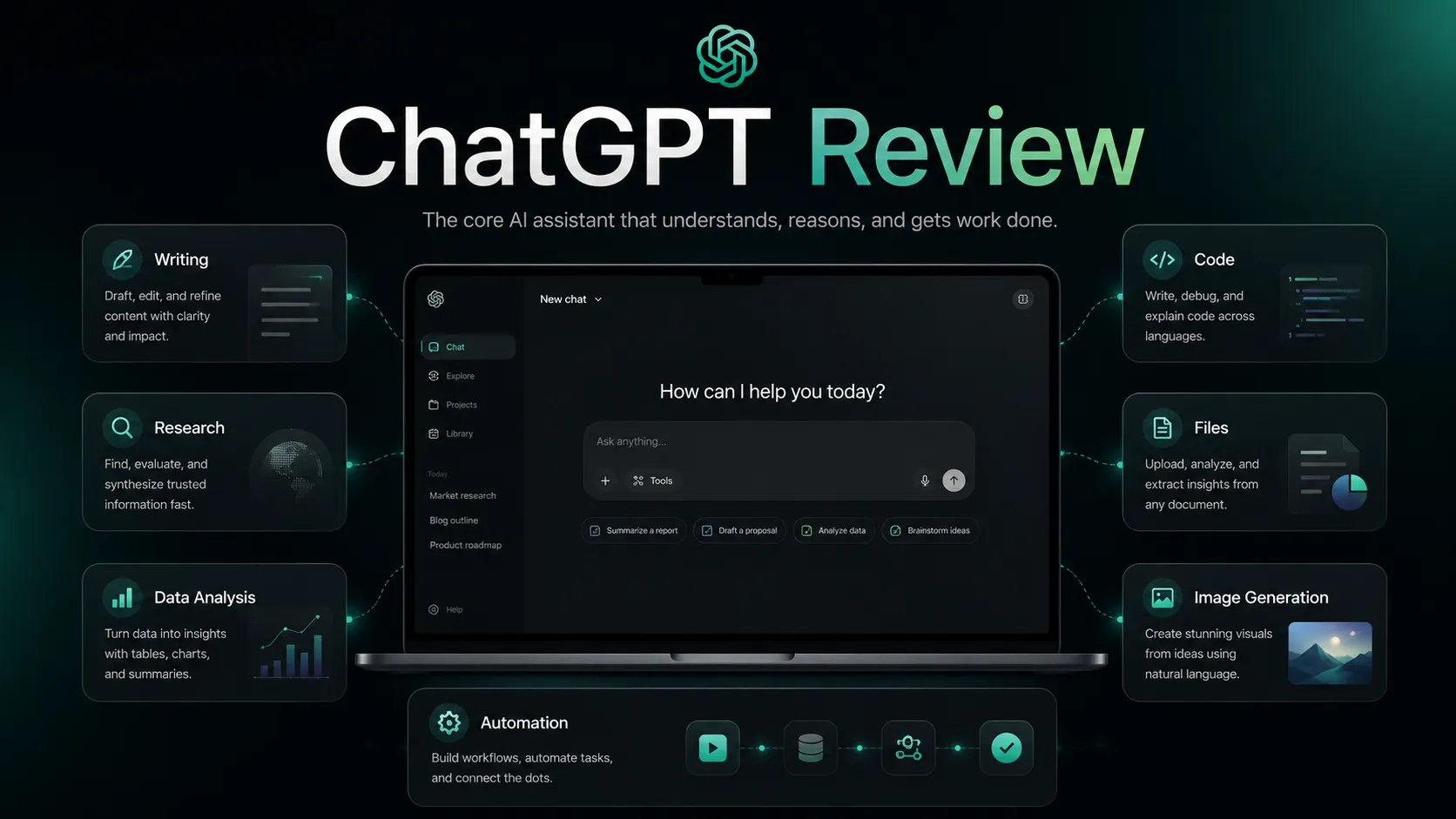
What is actually interesting here is that the product is no longer just a chat box. It is becoming a workspace with projects, files, apps, voice, data analysis, images, coding support, and agent workflows. That makes the plan decision more complex, but also more meaningful if you use it every day.
Where ChatGPT falls short
The biggest weakness is trust calibration. ChatGPT can be wrong in a polished way. It can miss context, rely on a weak source, flatten nuance, or answer too quickly when it should ask one more question.
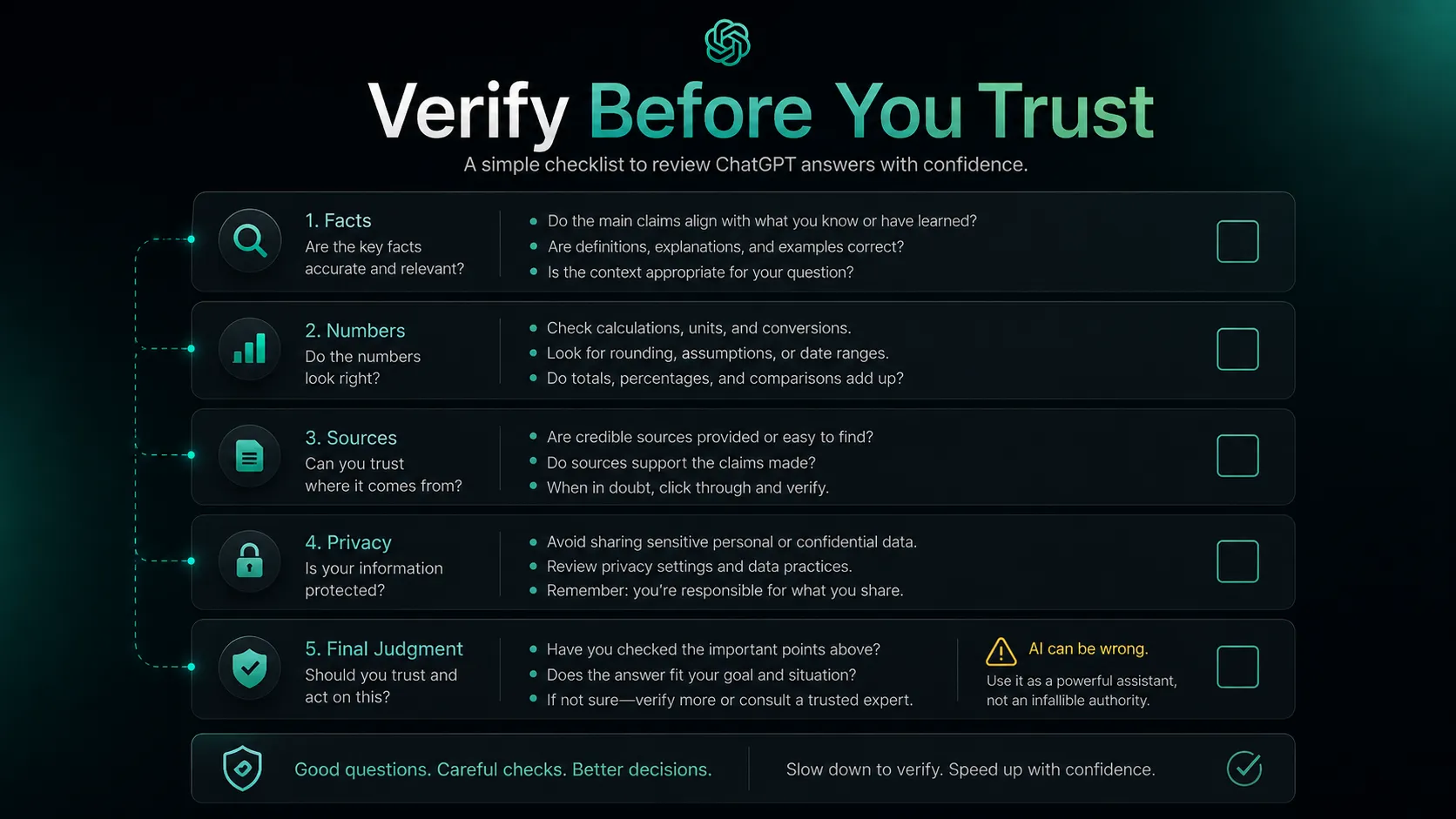
This is where I would be careful. If the work affects money, health, law, compliance, reputation, or customer commitments, do not treat a confident answer as final. Ask for sources, inspect them, and keep a human decision point.
There is also product sprawl. Search, voice, files, image generation, apps, tasks, projects, memory, Codex, and agent work are useful, but they can make plan value harder to understand. Many users upgrade because the product feels powerful, then discover they only use two or three features regularly.
Pricing judgment
For most users, the safer move is to start free and upgrade only when the friction becomes repetitive. The free plan is good enough for learning the product, casual help, and occasional drafting. Plus at $20 per month is the most natural paid step when ChatGPT becomes part of daily work.
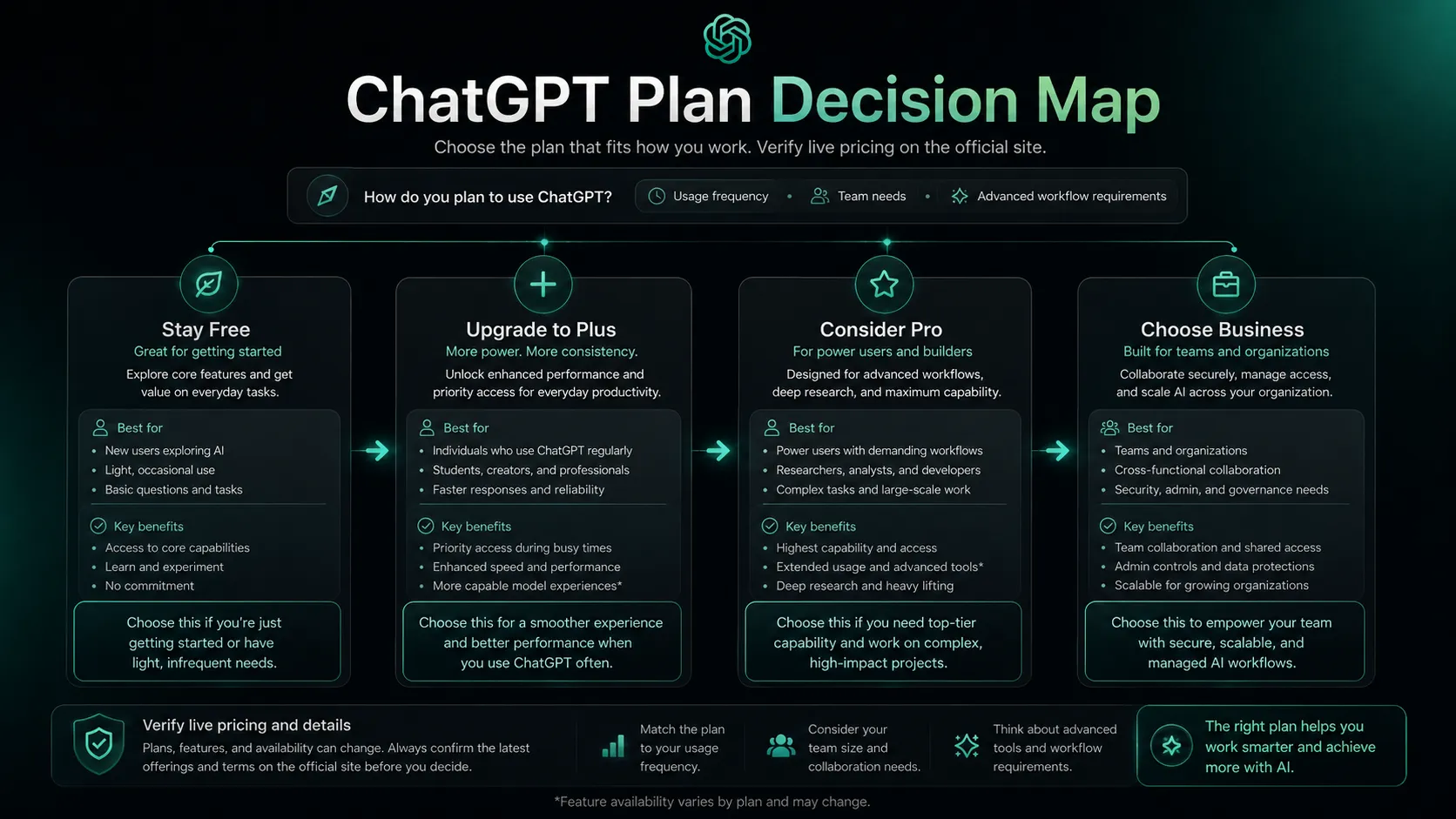
Pro is different. I would not pay for Pro just because the demo looks impressive. It makes more sense when you are hitting limits, running heavy research, using Codex often, working with larger files, relying on advanced models, or treating ChatGPT as a serious daily production environment.
Business becomes relevant when the buyer is not one person. If a team needs shared workspace controls, apps, admin management, and stronger default data handling, the decision should move away from personal productivity and into workspace governance.
The practical question is simple: are you paying to remove a real bottleneck, or paying because the feature list looks exciting? If the bottleneck is real and weekly, upgrade. If not, stay free and compare.
Best alternatives to compare
If ChatGPT feels too broad, the alternative should match the job you actually care about. Do not compare every AI assistant as if they solve the same problem.
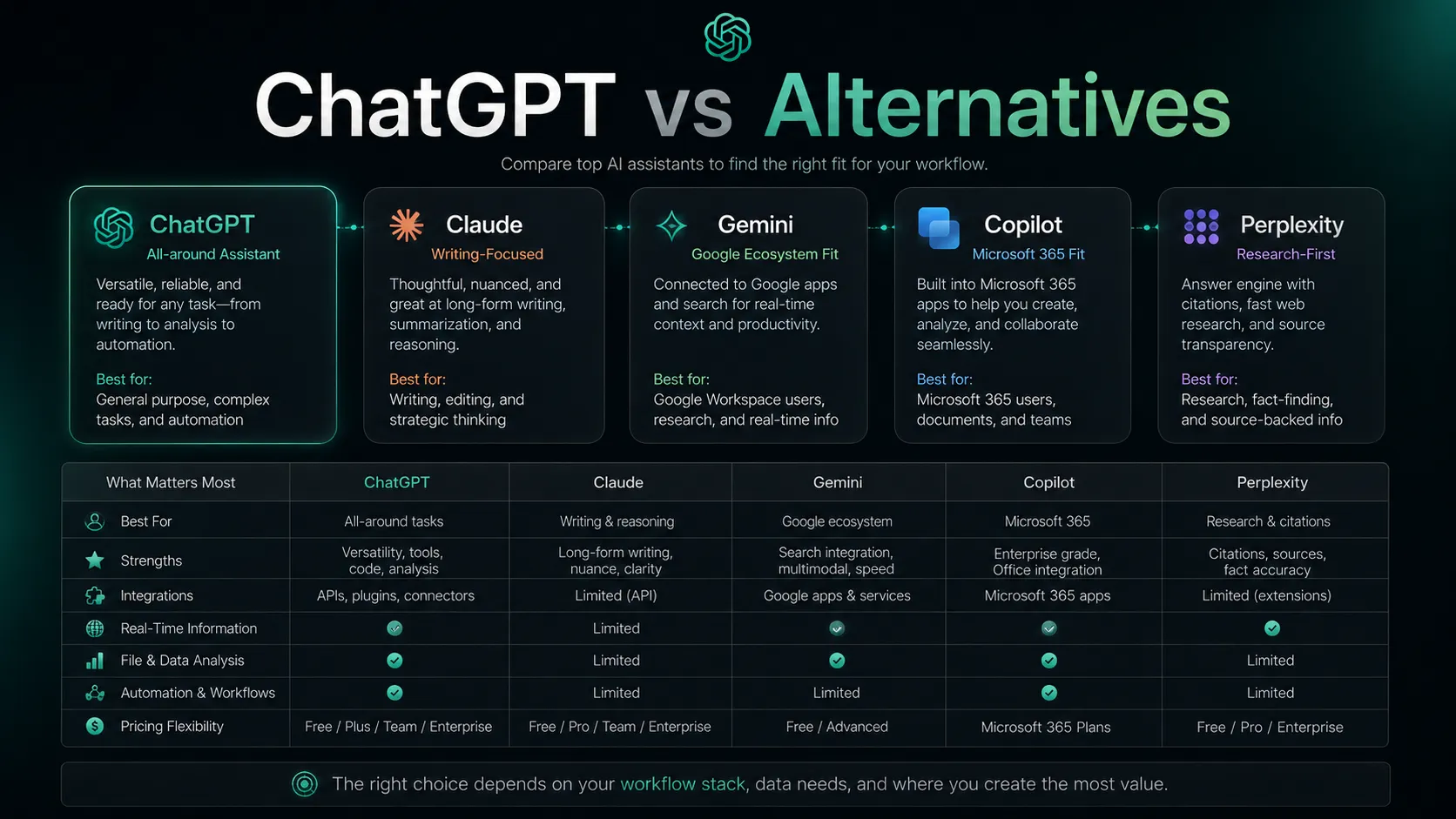
Claude is the best first comparison for writing-heavy users who care about tone, long documents, and careful reasoning. Gemini is the more natural comparison for Google-native users. Microsoft Copilot is the serious route for Microsoft 365 teams that want AI inside Word, Excel, PowerPoint, Outlook, and Teams.
Perplexity is different. It is not a full ChatGPT replacement for broad drafting, file work, projects, images, and agent workflows. It is better as a research-first companion when the job starts with finding and checking sources.
Final decision
Add it to your stack if ChatGPT can become your default thinking partner for drafting, planning, code help, file analysis, research preparation, and everyday problem solving. The product is strong enough to sit near the center of a modern AI workflow, as long as you keep a verification step.
Compare it first if your work is dominated by one ecosystem. Choose Claude for writing judgment, Gemini for Google workflows, Copilot for Microsoft 365, and Perplexity for research-first answers. A narrow daily job should not always be solved with the broadest assistant.
Skip it for now if the free plan already covers your questions, if you need guaranteed source accuracy without review, or if your organization has not approved the data and workspace model. ChatGPT is powerful, but the best buyers use it with boundaries.
Frequently asked questions
Is ChatGPT worth paying for?
Who should use ChatGPT instead of Claude or Gemini?
Can ChatGPT replace Google Search or Perplexity?
Is ChatGPT safe for business data?
What is the biggest weakness of ChatGPT?
Where ChatGPT fits in a stack
AI reasoning and general assistant layer
Does not replace
- – Primary source verification
- – Dedicated SEO research tools
- – Professional design software
- – IDE-native coding assistants for repository-heavy work
- – Human review for legal, medical, financial, or brand-critical decisions
Pairs well with
Head-to-head comparisons
Top alternatives to consider
If ChatGPT is not the right fit, these are the most common alternatives.

Claude is the closest direct alternative for long-form writing, careful reasoning, and document-heavy work. Compare it first if tone, long context, or cautious prose matters more than ChatGPT's wider feature surface.

Gemini is the natural comparison for users already living inside Google Search, Gmail, Docs, and Android. It is a direct alternative when Google ecosystem fit matters more than ChatGPT's broader assistant workflow.

Microsoft Copilot is a serious alternative for organizations built around Word, Excel, PowerPoint, Outlook, Teams, and Microsoft 365 admin controls. It is less compelling as a general consumer assistant outside that ecosystem.
Review methodology
This review is based on current public product information, official OpenAI pricing and help pages, feature documentation, data-control documentation, and editorial workflow analysis.
No private benchmark, paid account stress test, or team deployment test was conducted for this review. Recommendations reflect public product information and stack-fit judgment.
Not covered: Private model benchmark testing · Enterprise procurement review · Legal, medical, financial, or compliance validation · Hands-on comparison against every competing assistant