
Claude Review
Claude review for buyers: workflow fit, pricing, strengths, limits, alternatives, and where Claude belongs in an AI stack.
A strong reasoning and writing assistant for users who work with long context, nuanced drafts, and code review.

Use it if…
- ✓ Your recurring work involves long documents, careful writing, code review, or complex reasoning.
- ✓ You want an AI assistant that feels more like a thinking partner than a quick autocomplete tool.
- ✓ You are willing to verify factual claims, pricing, citations, and technical output before publishing or shipping.
- ✓ You can benefit from projects, file analysis, web search, extended thinking, Claude Code, or connected context.
Skip it if…
- – Your main AI need is image generation, design production, or social media asset creation.
- – You need every answer to come with search citations and current-source retrieval as the central workflow.
- – You are buying for a Microsoft 365 or Google Workspace team where native suite integration matters more than model style.
- – You will be frustrated by usage limits during long, file-heavy, or model-intensive sessions.
Review scorecard
Scored by workflow fit, ease of use, value, and stack compatibility. Weights reflect importance for typical buyers.
| Criteria | Score | ||
|---|---|---|---|
| Reasoning and writing quality | 9.3 | ||
| Document and context handling | 9.1 | ||
| Coding and technical support | 8.8 | ||
| Pricing and usage fit | 8.1 | ||
| Stack compatibility | 8.7 | ||
| Weighted overall | 8.8 / 10 | ||
On this page
Quick verdict
Claude deserves a serious look if your AI work is less about quick snippets and more about thinking through dense material. The practical question is not whether Claude can answer requests. It can. The better question is whether your stack has recurring work where a patient reasoning assistant saves you from rereading, reorganizing, and rewriting the same context again.
My practical take is simple: add Claude if long documents, nuanced writing, code review, or structured analysis are routine in your week. Compare ChatGPT first if you want the broadest general assistant with more everyday consumer familiarity. Compare Gemini or Microsoft Copilot first if your work lives inside Google Workspace or Microsoft 365.
Who should use Claude
You have a messy brief, a transcript, three PDFs, and a draft that almost works but still feels scattered. That is the kind of situation where Claude makes more sense than another lightweight chatbot. It is strongest when you need to hold a lot of context, ask follow-up questions, and turn raw material into something more coherent.
Claude is a good fit for writers, operators, analysts, students, developers, and small teams who use AI for thinking work rather than only quick output. It fits people who care about the shape of an answer, not just the speed of an answer. If your current AI workflow is copying notes into a chat, asking for a rough summary, then spending another hour fixing structure, Claude is worth comparing seriously.

The other strong buyer group is technical users. Claude should not be treated as a replacement for tests, pull requests, or real engineering review, but it is useful for explaining code, reasoning through edge cases, and helping with the first pass of debugging notes. If you already use Cursor or GitHub Copilot, Claude can still sit beside those tools as the deeper reasoning layer.
Who should skip Claude
Skip Claude if your main AI need is visual production. Canva AI, Adobe Firefly, Midjourney, and other design tools belong in that part of the stack. Claude can help plan visuals or draft image briefs, but it is not the tool I would choose for image generation, creative asset systems, or brand design production.
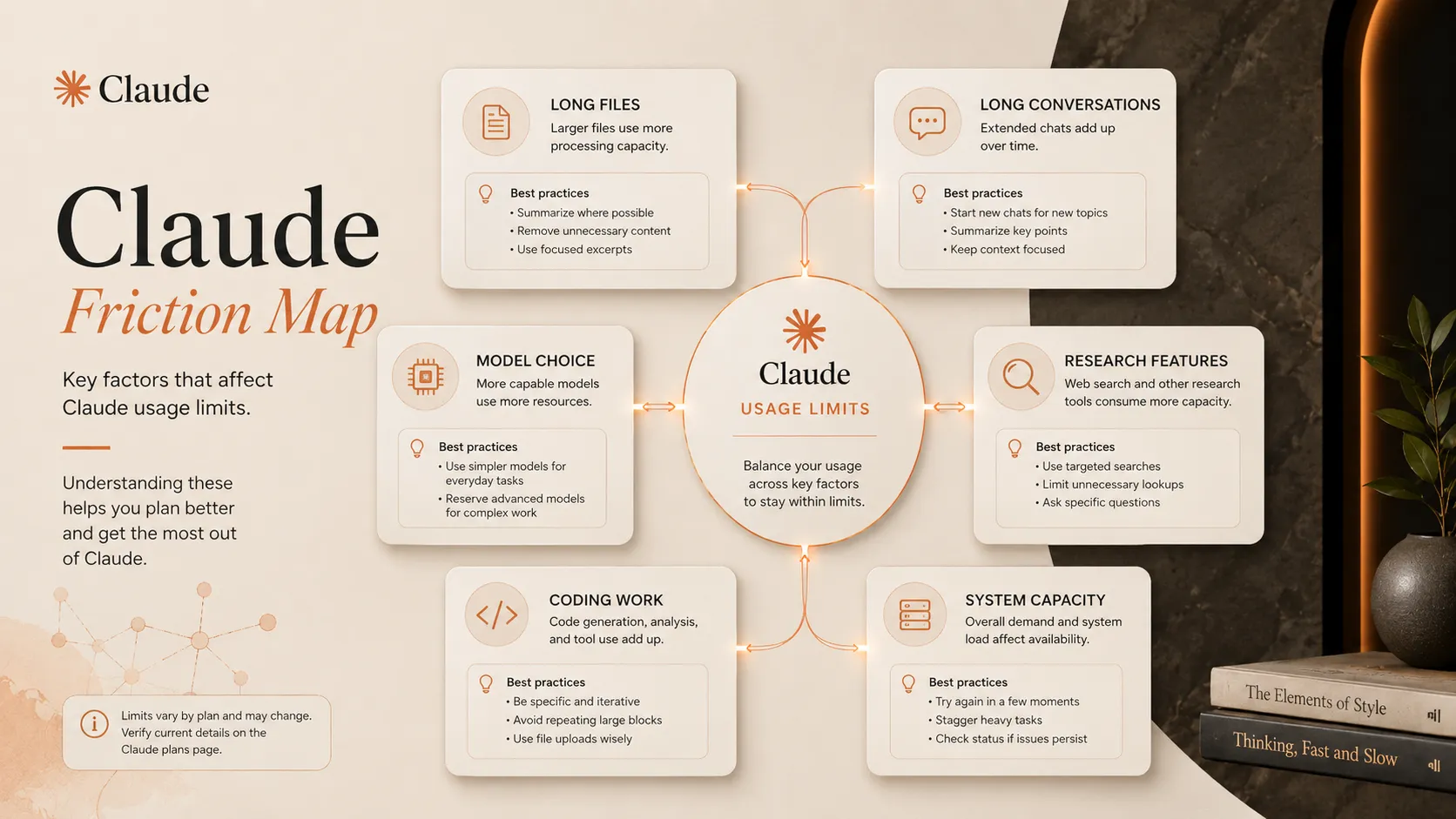
Also skip it, or at least delay paying, if you expect predictable unlimited usage. Anthropic’s own help content says Pro usage depends on factors such as message length, attached files, conversation length, model or feature choice, and capacity. That is not a flaw unique to Claude, but it is a real buying consideration. The feature looks attractive until the exact work that made you pay, long files and long conversations, starts using limits faster.
Real workflow fit
Claude fits best as the second brain layer of a stack. You bring it source material, ask it to reason, revise, compare, explain, or structure, then move the output into your actual system of record. That might be Notion, Google Docs, GitHub, a CMS, a project-management system, or a client deliverable.
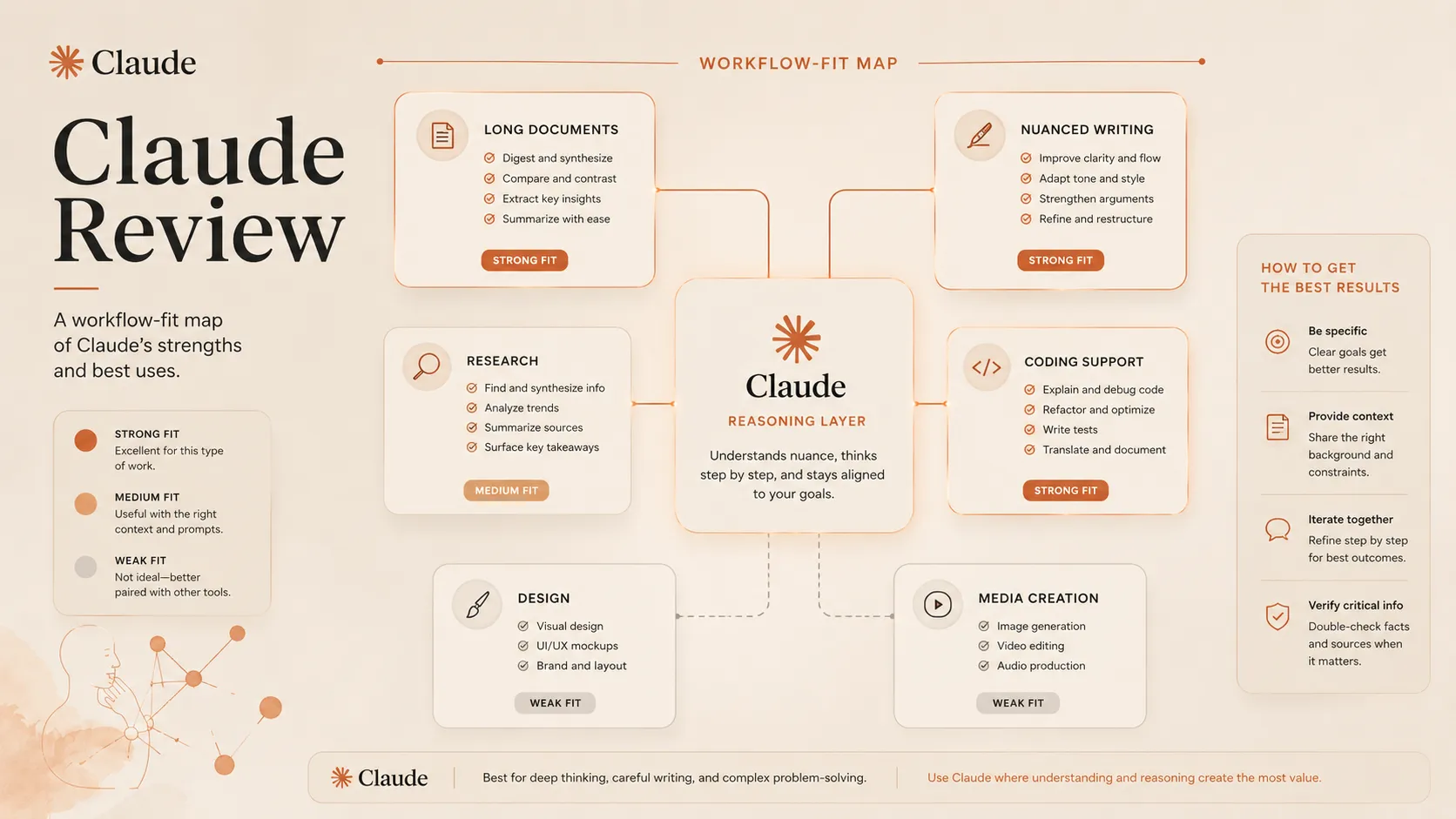
The buyer mistake is expecting Claude to become every layer at once. It can draft, summarize, code, analyze, and search the web, but the final workflow still needs a source of truth. If you are writing a review, your source ledger still matters. If you are editing code, your tests still matter. If you are making a business decision, your data and human review still matter.
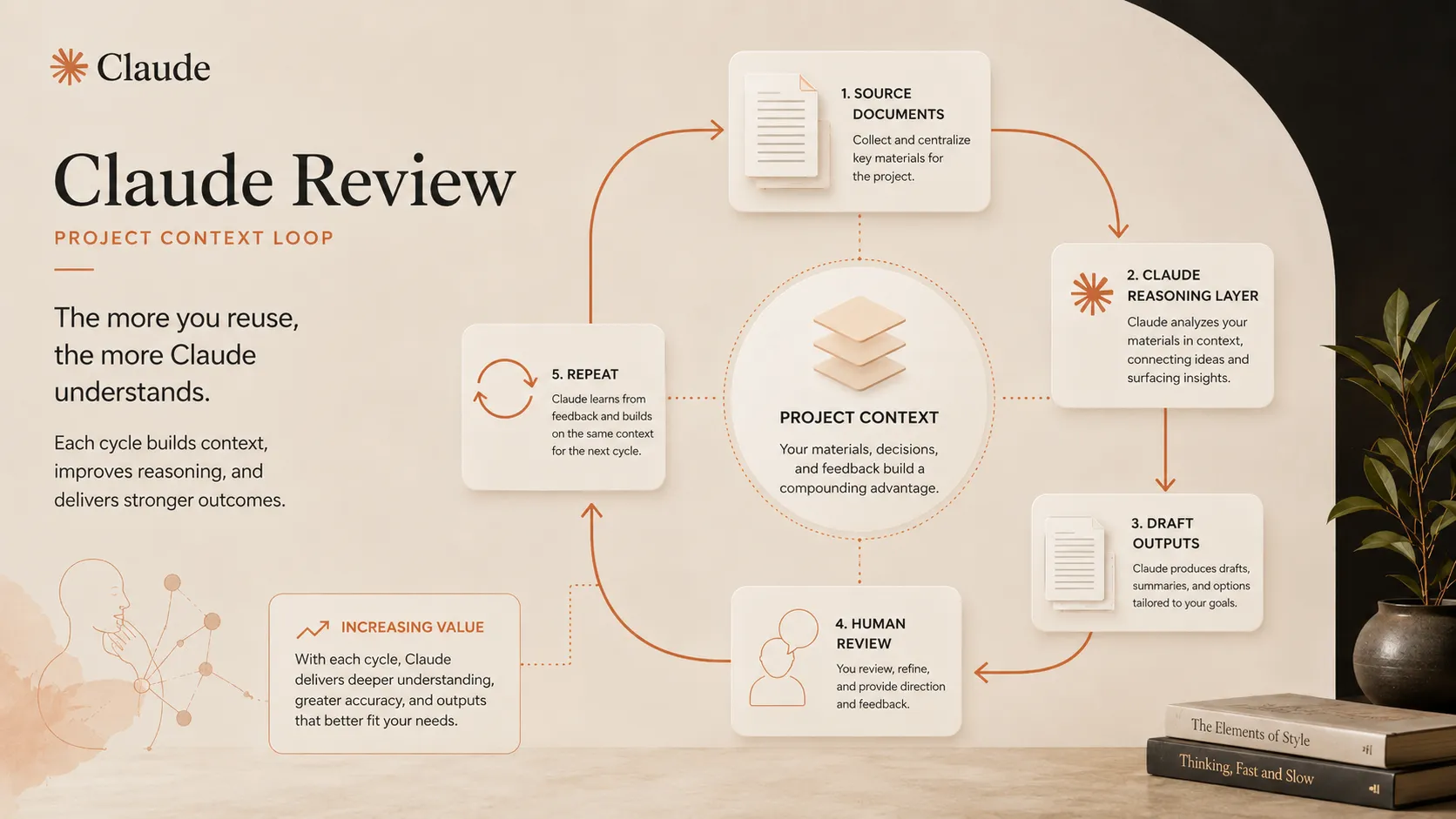
For real work, I would treat Claude as a thinking layer between your raw context and your final tool. It is strongest when the task is too nuanced for a simple automation, but still repetitive enough that you do not want to do every pass manually.
Where Claude fits in an AI stack
The right way to think about Claude is as the reasoning and writing layer, not as a replacement for your full productivity stack. It can replace some summarization, first-pass outlining, rewrite passes, explanation work, and code reasoning. It does not replace Perplexity for search-first research, Canva for visuals, GitHub for version control, or a human reviewer for high-stakes judgment.
Claude pairs naturally with tools that hold your work: Notion for notes, Google Workspace for docs, Cursor or GitHub Copilot for coding, Perplexity for research, and Zapier or Make for handoffs. It belongs in the stack when you regularly need to think across context, not when you just want a novelty chatbot.
What Claude does well
Your draft is too long, your notes are too uneven, and the obvious AI rewrite makes everything sound flat. This is where Claude is often more useful than the average assistant. It is good at taking a rough argument and reshaping it without completely washing out the nuance.

The second strength is document reasoning. Claude is well matched to briefs, transcripts, strategy notes, policies, specs, and research packets. The useful part is more than summarizing a file. It is asking follow-up questions against that context, comparing sections, and turning the material into a more usable decision draft.
For developers, Claude is compelling as a code reasoning partner. It can help explain unfamiliar code, reason through implementation options, and support debugging. The safer framing is that Claude helps you think through the work. It does not prove the work is correct.

What is genuinely useful here is restraint. Claude is usually easiest to justify when you have a serious task, not a flashy demo. That makes it less exciting in screenshots, but more valuable in actual decision work.
Where Claude falls short
The first friction point is usage predictability. Claude can feel excellent during a focused session, then frustrating when the same work pattern runs into limits. The official help guidance makes clear that limits are affected by conversation length, attached files, model or feature choice, and current capacity. For document-heavy users, that caveat matters.
The second limit is ecosystem fit. If your organization already pays for Microsoft 365 and wants AI inside Word, Excel, PowerPoint, Outlook, and Teams, Microsoft Copilot may be easier to justify. If your work is centered on Gmail, Docs, Sheets, and Drive, Gemini may feel more native.
The third limit is research workflow. Claude can search the web on supported plans and contexts, but if your main job is source-first discovery with citations, Perplexity may still be the cleaner tool. Claude is better as the thinking and drafting layer after you know what sources matter.
Pricing judgment
Claude’s public plan page currently lists a Free plan, Pro, Max, Team, and Enterprise. The public page shows Pro at $17 per month with annual billing or $20 monthly, and Max starting from $100 per month. That makes Pro the practical paid entry point for most individuals, while Max is more clearly aimed at heavy users who hit limits and use Claude Code or deep work sessions often.
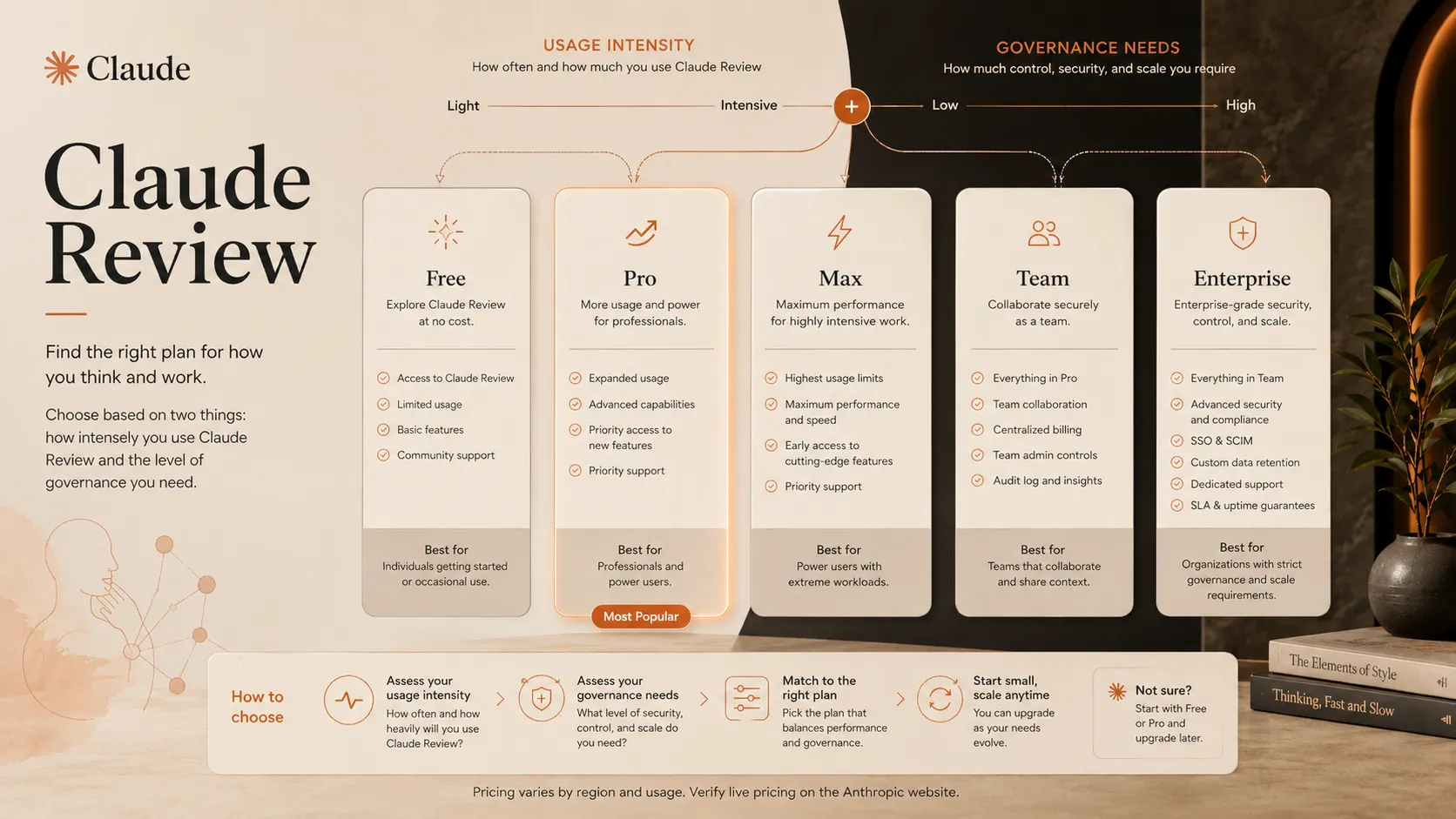
Stay free if you are still testing whether Claude fits your work. Pay for Pro when it becomes a weekly or daily reasoning layer. Consider Max only when usage limits interrupt valuable work often enough that the higher subscription makes business sense. Team and Enterprise decisions should include admin, security, privacy, and procurement review. Verify current pricing on the official pricing page.
Best alternatives to compare
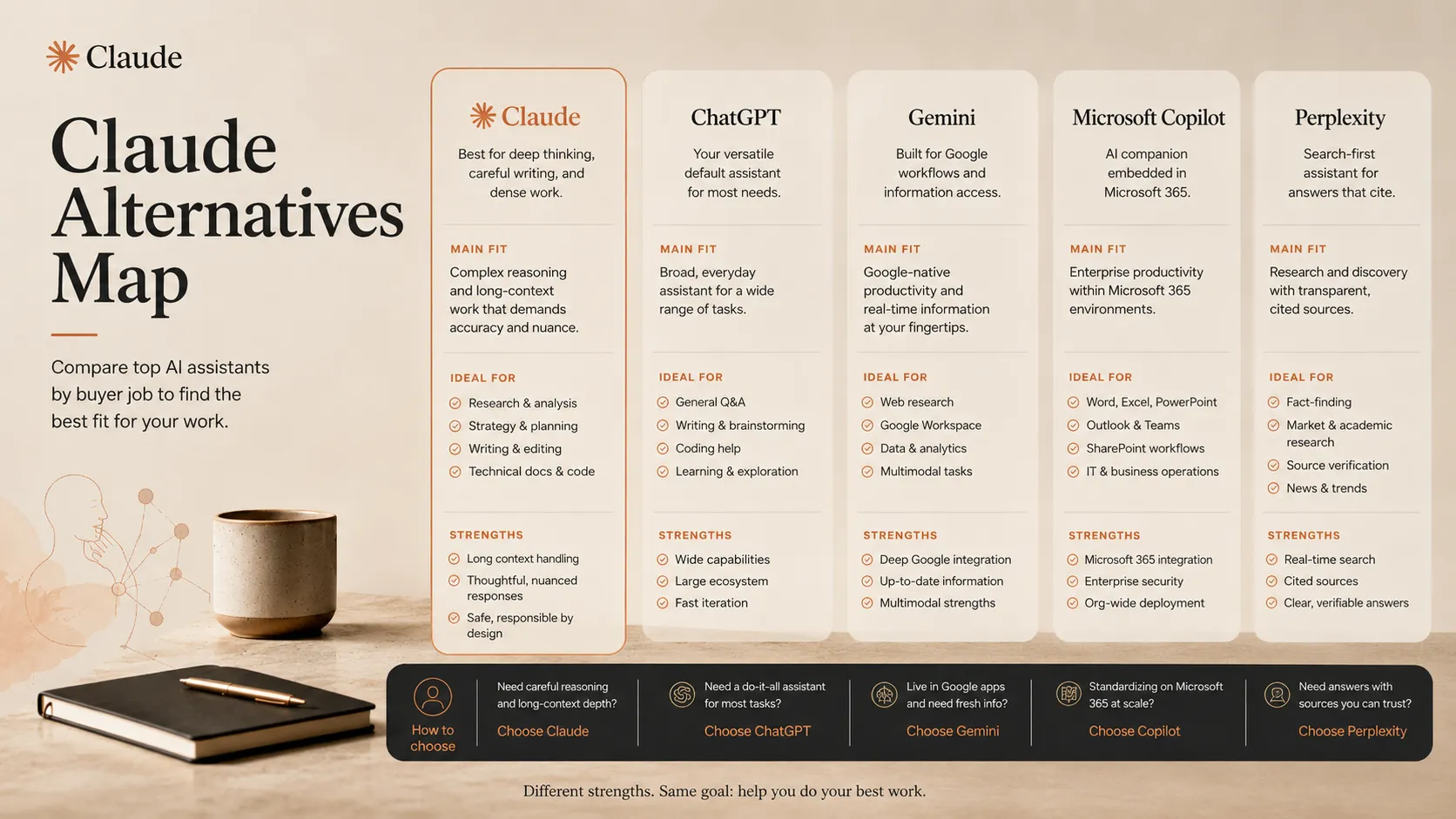
ChatGPT is the first direct comparison. It is broader as a default assistant, especially if you want a single AI tool for general writing, images, file work, voice, GPT workflows, and broad ecosystem adoption. Claude is the better comparison point when your main pain is careful thinking over long context.
Gemini is the better comparison if your work starts in Google Workspace. The decision is less about which model sounds smarter and more about where your documents, emails, spreadsheets, and team habits already live.
Microsoft Copilot is the stronger comparison for companies that want AI inside Microsoft 365. It may not feel like the same standalone assistant experience, but procurement and workflow fit can matter more than chat style for a team.
Perplexity is the adjacent comparison for research-first buyers. If your first need is finding and checking sources, use a search-first tool. If your first need is reasoning over the material you already have, Claude becomes more compelling.
Final decision
Add Claude to your stack if your recurring work involves long documents, careful writing, code review, complex reasoning, or project context that benefits from a more patient assistant.
Compare ChatGPT first if you want the broadest general assistant layer with stronger everyday ecosystem coverage, image features, and more familiar default workflows.
Skip Claude for now if you mainly need design production, search-first research with citation discipline, Microsoft 365 native deployment, or a plan with usage behavior that feels more predictable for your workload.
Frequently asked questions
Is Claude worth paying for?
Is Claude better than ChatGPT?
Does Claude have a free plan?
What are Claude's main limits?
Is Claude safe for sensitive work?
Where Claude fits in a stack
AI reasoning and general assistant layer
Does not replace
- – Primary source verification
- – Legal, medical, financial, or compliance review
- – A search-first research engine with citation discipline
- – Design, image, and video production tools
- – Version control, tests, QA, and human code review
Pairs well with
Head-to-head comparisons
Top alternatives to consider
If Claude is not the right fit, these are the most common alternatives.

ChatGPT is the default comparison if you want the broadest general assistant layer with strong everyday adoption, image features, custom GPT workflows, and broad ecosystem support.

Gemini is the cleaner comparison if your work already lives inside Google Search, Gmail, Docs, Sheets, Drive, and broader Google Workspace context.

Microsoft Copilot is the stronger comparison for teams that care more about Word, Excel, PowerPoint, Outlook, Teams, and enterprise Microsoft controls than standalone assistant style.
Review methodology
Editorial review based on official Claude product information, official pricing pages, Anthropic help documentation, privacy policy, public third-party context, and TopAIStacks stack-fit analysis.
This review does not claim private hands-on benchmarking. It evaluates Claude from a buyer workflow, pricing, stack-fit, and public evidence perspective.
Not covered: Private benchmark testing · Enterprise contract review · API cost modeling · Security questionnaire validation · Unverified coupon, refund, or unlimited-usage claims