
Loom Review
Loom review for async video, AI summaries, Jira bug reports, pricing fit, team communication, and alternatives like Descript and tl;dv.
Strong for async team communication and visual handoffs, but not a replacement for advanced video editing or meeting intelligence tools.
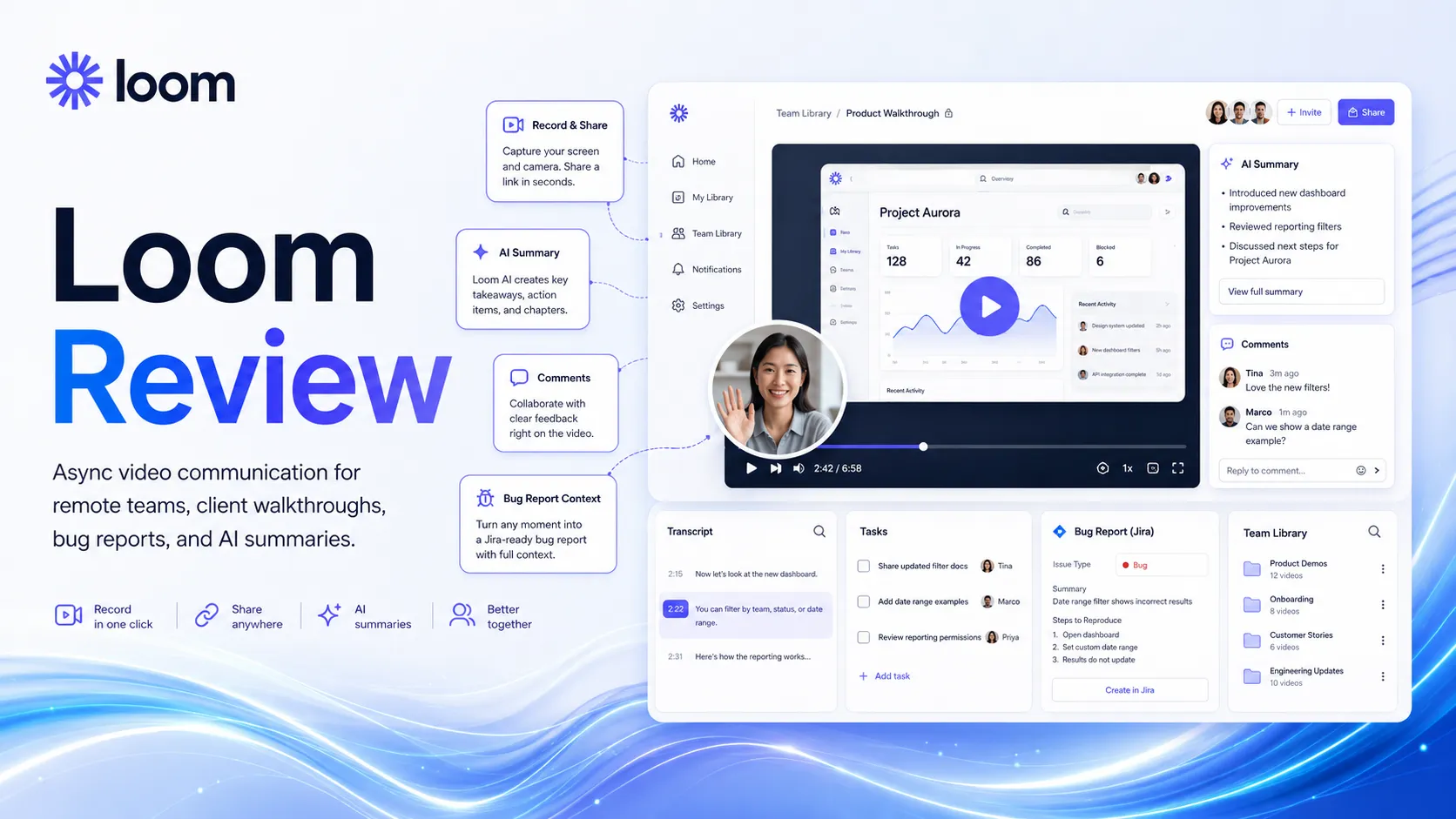
Use it if…
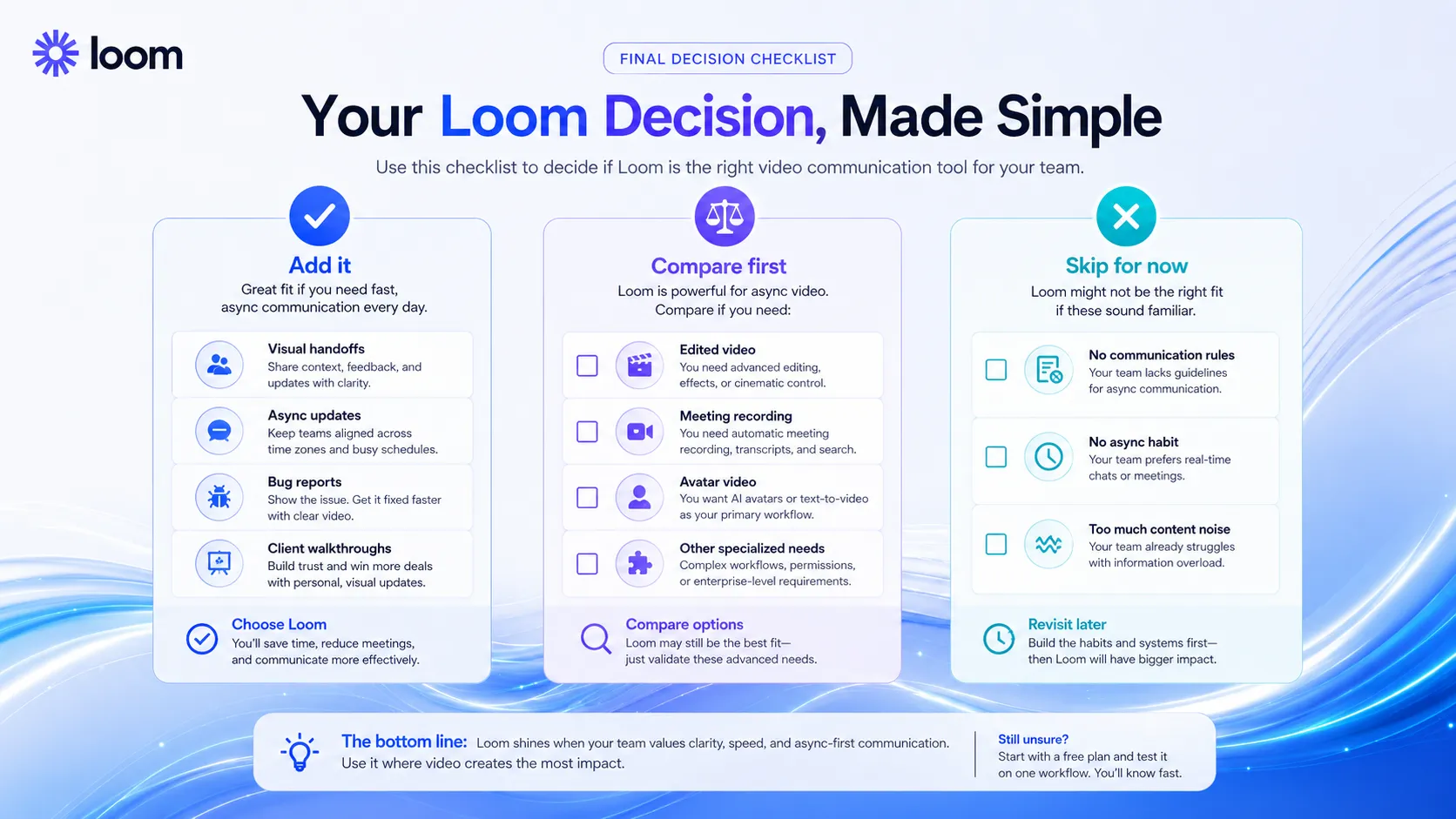
- ✓ Your team repeatedly explains work visually and wants fewer live meetings, fewer long messages, and clearer handoffs.
- ✓ You need screen recordings with transcripts, comments, privacy controls, basic editing, and integrations with tools like Slack, Jira, GitHub, Gmail, Notion, and Confluence.
- ✓ You are willing to pay for Business + AI when summaries, tasks, chapters, filler word removal, and video-to-text workflows save real team time.
Skip it if…
- – You need an AI video generator, avatar video tool, podcast editor, or social video production platform.
- – Your main problem is recording every meeting automatically, not sending intentional async video messages.
- – Your team has no communication rules and will turn Loom into another noisy inbox instead of a decision tool.
Review scorecard
Scored by workflow fit, ease of use, value, and stack compatibility. Weights reflect importance for typical buyers.
| Criteria | Score | ||
|---|---|---|---|
| Workflow fit | 8.5 | ||
| AI usefulness | 8.0 | ||
| Ease of use | 9.0 | ||
| Pricing clarity | 7.5 | ||
| Stack value | 8.0 | ||
| Weighted overall | 8.2 / 10 | ||
On this page
Quick verdict
Loom is one of those tools that only makes sense after you have lived through the annoyance it solves. A developer tries to describe a bug in text. A client says the design feels off but cannot explain where. A manager asks for a quick update, then the team loses 30 minutes in a meeting that could have been a three-minute walkthrough.
That is where Loom works. It is not trying to be a full AI video studio. It is a screen recorder, async video messenger, lightweight editor, and team communication layer that now has enough AI features to turn recordings into summaries, chapters, tasks, and written follow-ups.
The practical verdict is simple. Add Loom if your team already loses time explaining visual work. Compare it first if your real need is editing, meeting recording, or polished video production. Skip it if nobody on the team will record short, focused updates.
Who should use Loom
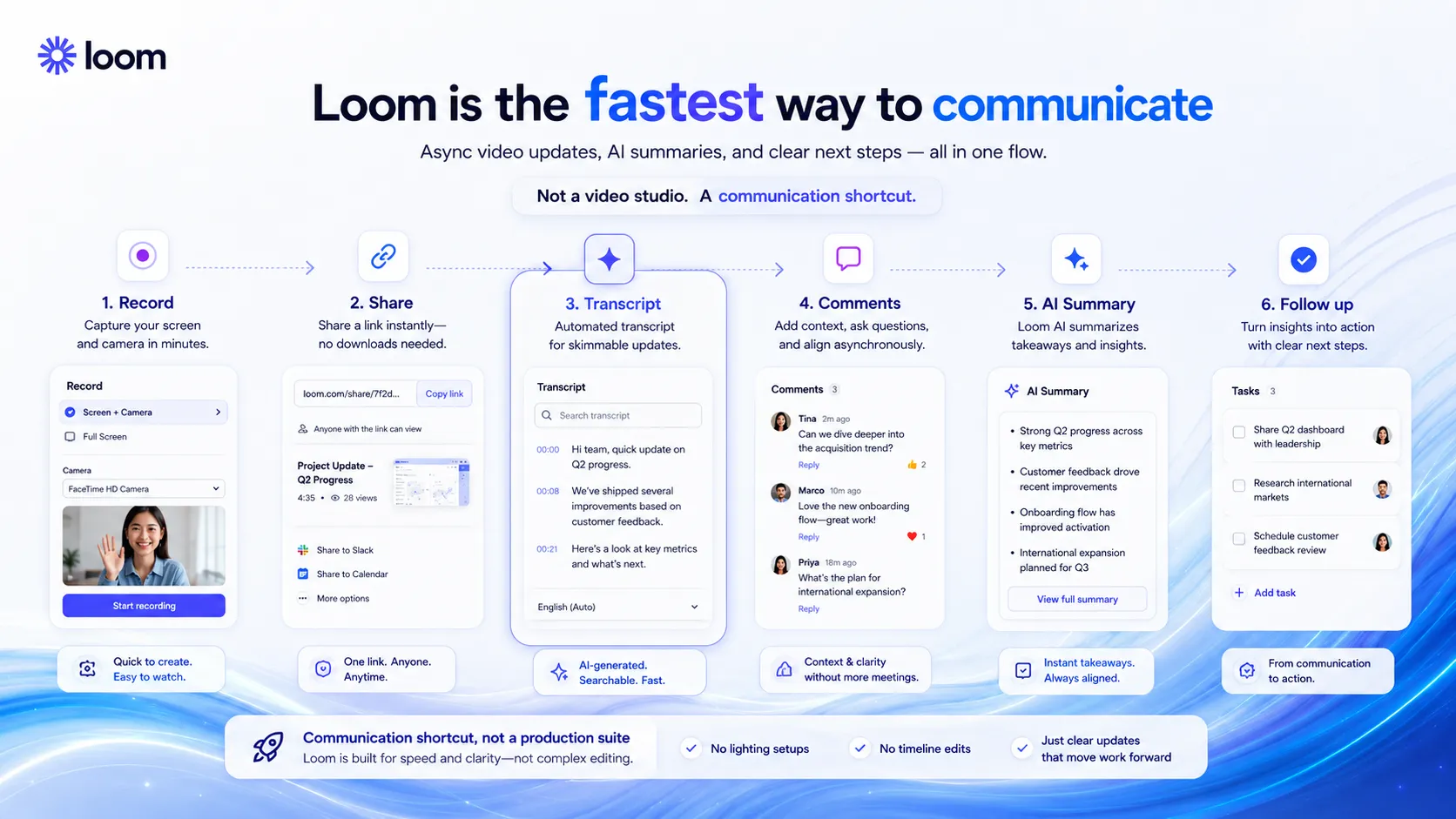
Loom fits remote and hybrid teams that explain work visually. That sounds broad, but the best use cases are very specific.
Use it for client walkthroughs, design feedback, QA notes, bug reports, sales handoffs, product updates, onboarding guides, internal SOPs, and async status updates. It is especially useful when text alone creates too much back-and-forth, but a live meeting feels excessive.
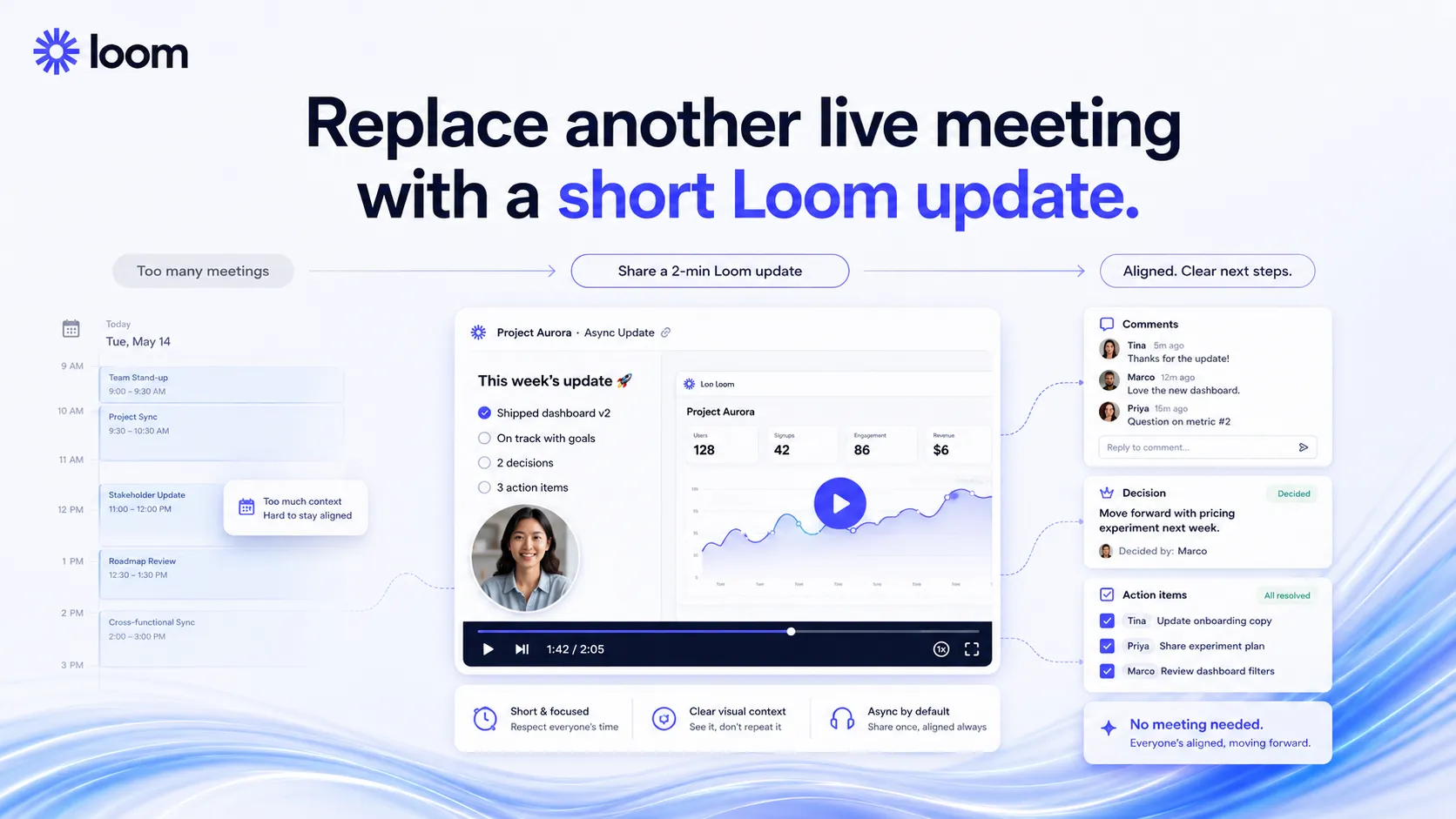
Agencies can use Loom to explain deliverables without booking another call. Developers can record a bug and attach the context to Jira or GitHub. Support teams can show a customer what changed. Managers can replace a recurring update meeting with a focused recording and a few comments.
The strongest buyer is not the person who wants to make videos. It is the person who wants fewer explanations to get lost.
Who should skip Loom
Skip Loom if you want a serious video editor. Loom can trim, stitch, add backgrounds, add simple overlays, and clean up recordings, but it is not Descript, Premiere Pro, CapCut, or a social video production suite.
Also skip it if your main problem is meeting capture. Tools like tl;dv, Fireflies.ai, and Otter.ai are built around joining meetings, recording calls, creating notes, and building searchable meeting histories. Loom is more intentional. You press record because you have something to explain.
The other poor-fit case is a team with no communication rules. Loom is powerful when a team agrees on when to record, where to store videos, who needs to watch, and what happens next. Without that, it can become another pile of links inside Slack.
Real workflow fit
A good Loom workflow usually has four parts: record the context, share it where work already happens, capture responses, then convert the important parts into a task or decision.
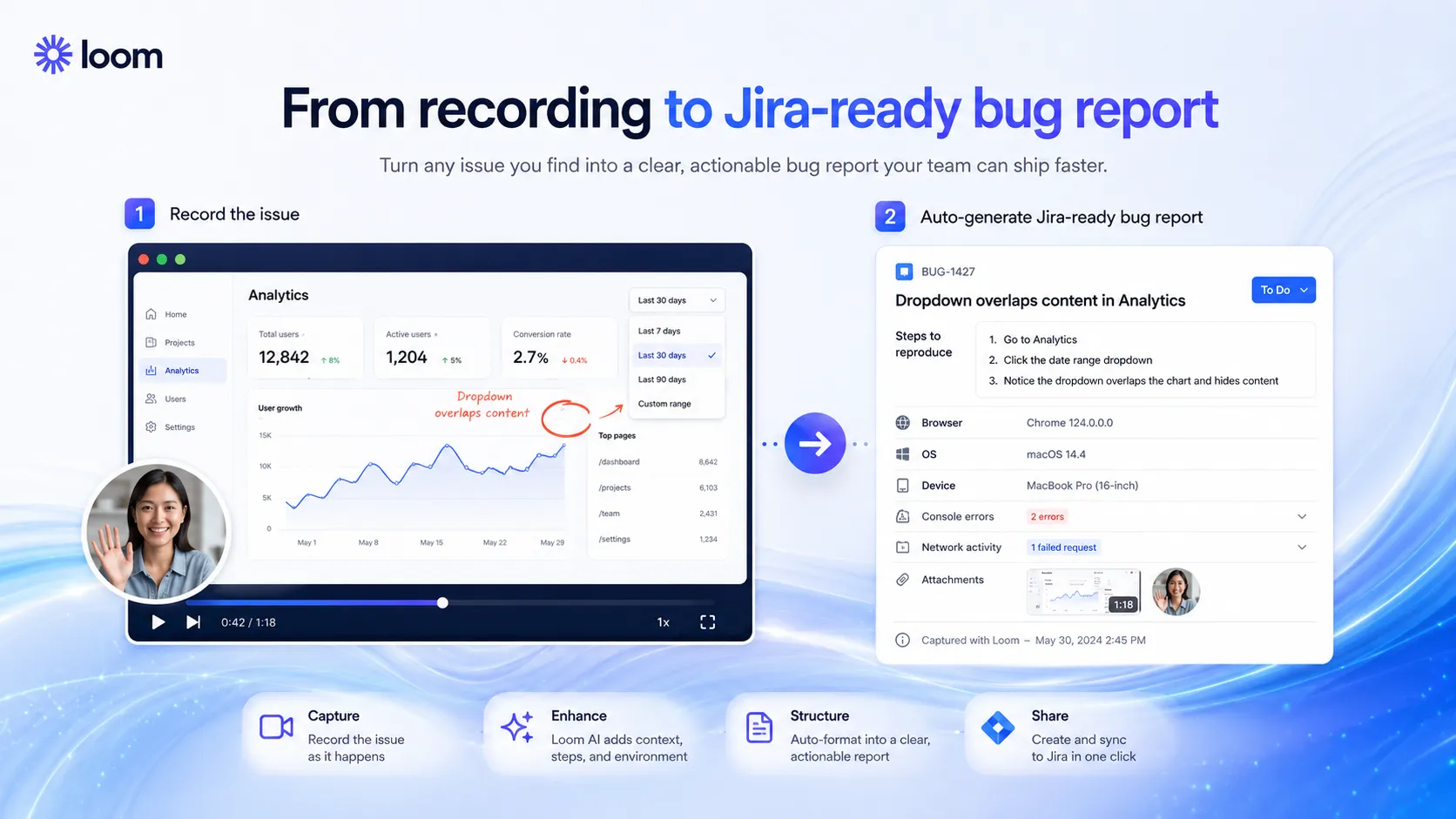
For product and engineering teams, the new bug-report angle is one of the most useful directions. Loom says its AI bug report flow can turn a quick walkthrough into a Jira work item and capture technical details like device, browser, OS, console errors, and network activity. That matters because developers do not just need a video. They need enough context to reproduce the issue.
For non-technical teams, the same idea applies. A client feedback video is only useful if someone knows what changed. A sales handoff is only useful if the next person knows what to do. A support walkthrough is only useful if it reduces the next question.
Where Loom fits in an AI stack
In an AI stack, Loom sits between communication and documentation. ChatGPT or Claude can help write the script. Loom captures the screen, face, voice, and context. Notion, Confluence, Jira, Slack, GitHub, Gmail, or a support tool becomes the place where the recording turns into work.
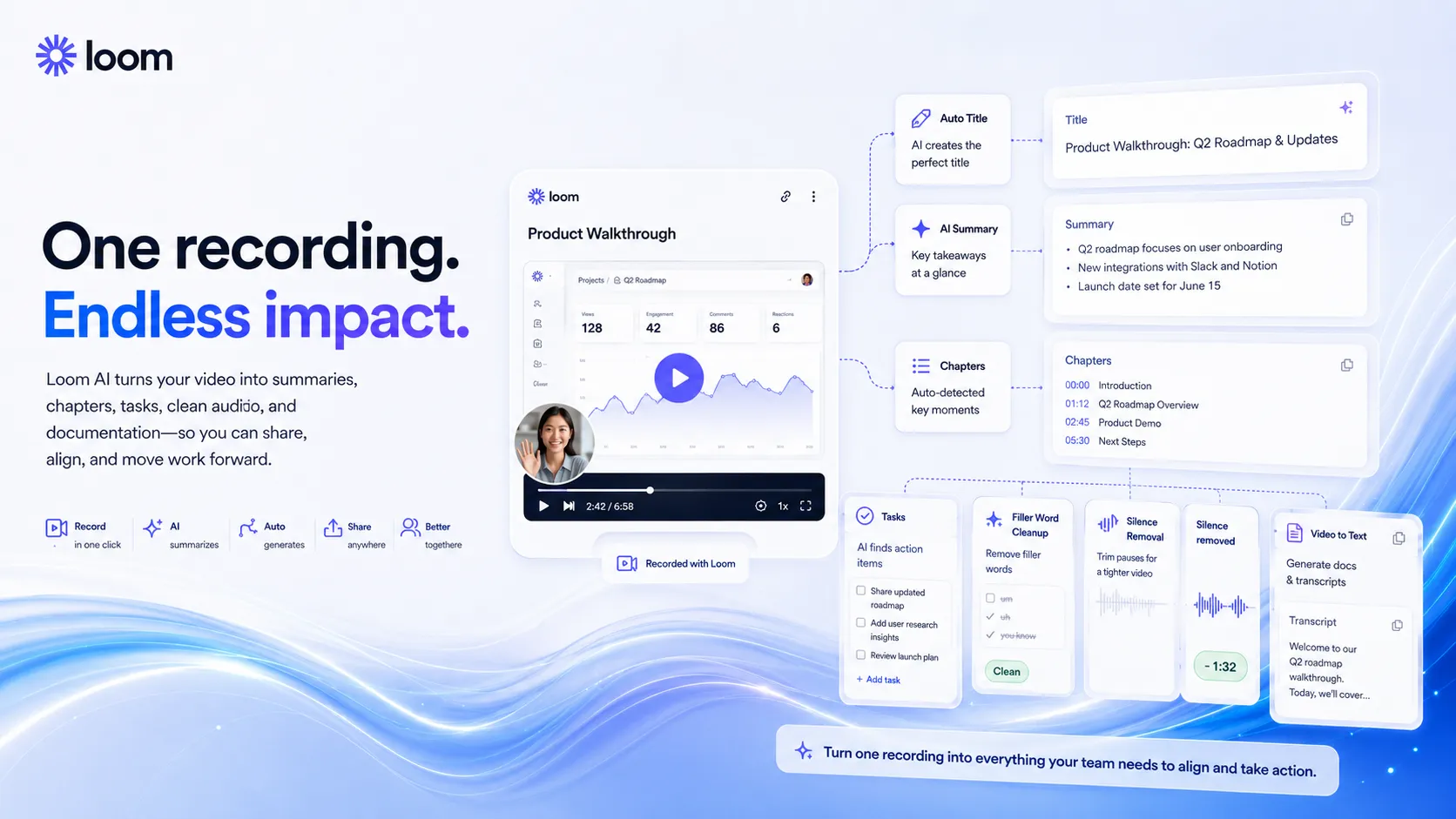
The AI layer is practical rather than flashy. Auto titles help people find videos later. Auto summaries reduce the need to watch everything. Auto chapters help viewers jump to the right section. Auto tasks turn a recording into follow-up work. Filler word and silence removal make videos easier to watch. Video-to-text automation helps convert spoken explanation into written documentation.
That is the buyer logic. Loom is not the AI that thinks for your team. It is the layer that captures messy human context and makes it easier to reuse.
What Loom does well
The first strength is speed. Loom makes recording feel casual enough that people actually do it. That matters more than a feature checklist. If a tool is too heavy, the team goes back to typing messy messages.
The second strength is workplace fit. Loom plugs into the places teams already communicate: Slack, Jira, Confluence, GitHub, Gmail, Notion embeds, support tools, and other collaboration surfaces. The video is not meant to live as a finished media asset. It is meant to live next to work.
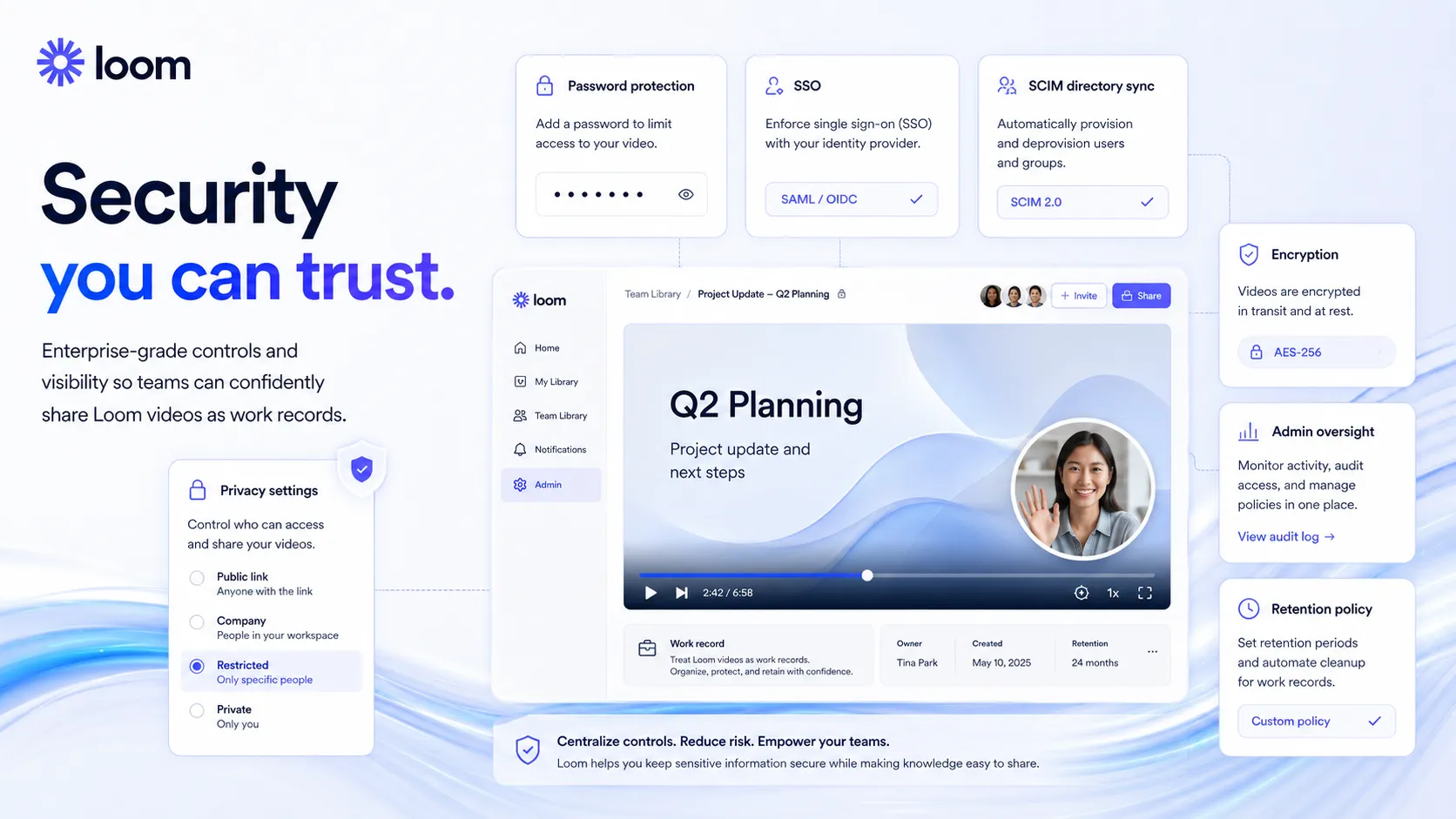
The third strength is the viewer experience. Transcriptions, closed captions, comments, emoji reactions, privacy controls, and viewer insights make a video easier to consume than a raw screen recording file.
The fourth strength is the Atlassian direction. Loom now has a clearer path into Jira and Confluence-style workflows. That does not mean every buyer should pay more. It does mean Loom is increasingly positioned as a work-context tool rather than a generic recorder.
Where Loom falls short
Loom’s biggest weakness is category confusion. Some buyers compare it with AI video generators, some compare it with meeting bots, and some compare it with video editors. That creates bad expectations.
If you need a polished training course, Descript or a dedicated video editor is a better fit. If you need avatar-led training or marketing videos, compare HeyGen or Synthesia. If you need automatic meeting notes, compare tl;dv, Fireflies.ai, or Otter.ai.
The second weakness is governance. A short Loom is helpful. A hundred unorganized Looms are not. Teams need naming rules, folders, privacy defaults, retention choices, and a decision about which videos become docs or tickets.
The third weakness is the AI paywall. The free plan is good for testing the habit, but the AI workflow value lives on Business + AI. That is fair, but buyers should not assume every useful AI feature is available on Starter.
Pricing judgment
Loom’s public pricing is easy to understand at a high level, but the buyer decision depends on the workflow.
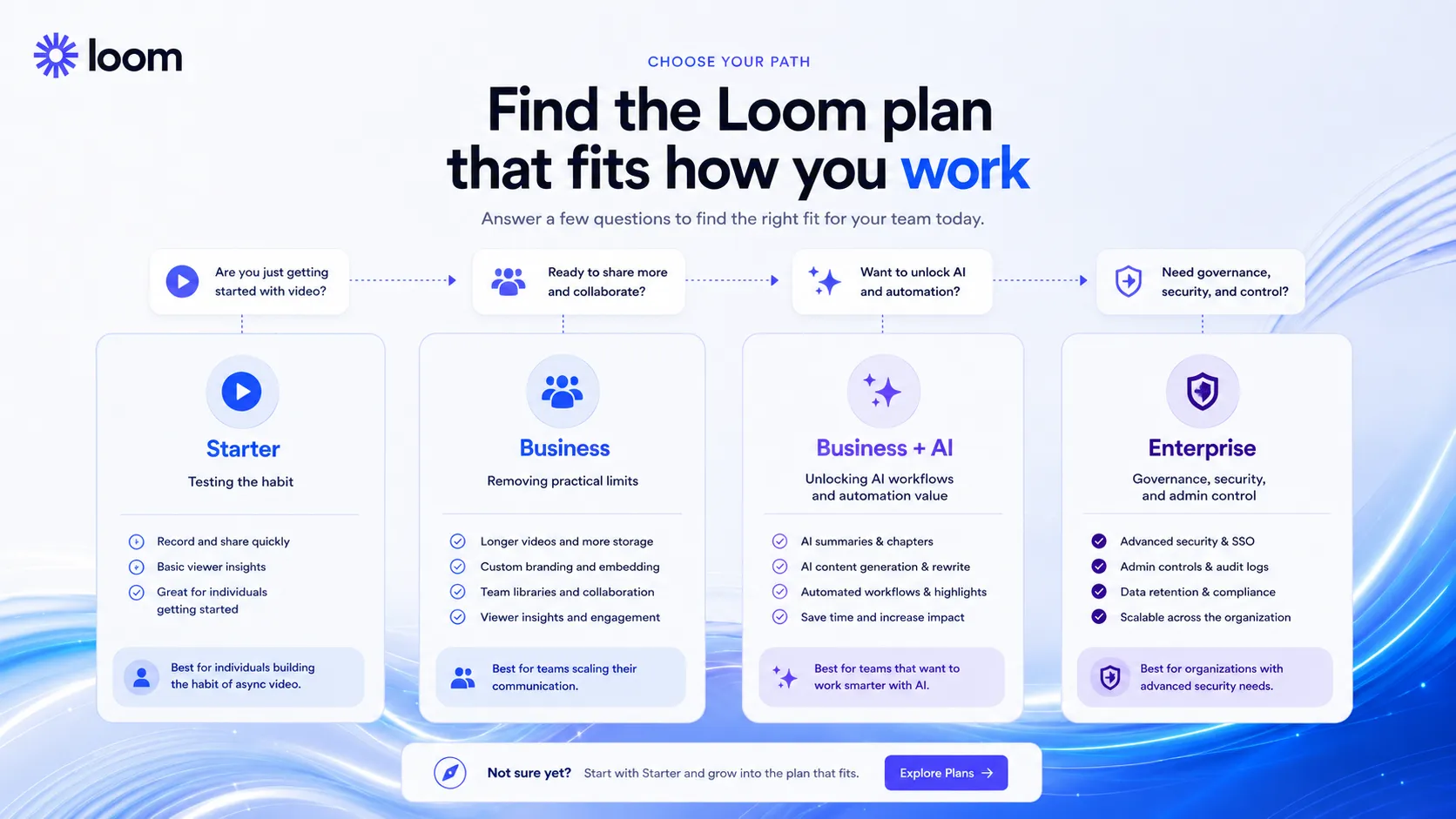
Starter is listed at $0 and is useful for trying Loom. It includes 25 videos per person, 5 minute screen recordings, transcriptions in 50+ languages, comments, emoji reactions, privacy controls, and useful integrations. That is enough to test whether your team will record short updates.
Business is listed at $18 per user per month. The reason to consider it is removing practical limits: unlimited videos, unlimited recording time, higher video quality, upload and download, branding controls, trim and stitch, password protected videos, priority support, and more team workspace features.
Business + AI is listed at $24 per user per month. This is the plan to evaluate when AI workflows are the point. It adds AI Workflows, Auto CTA, Auto Titles, Auto Summaries, Auto Chapters, Auto Tasks, Filler Word Removal, Silence Removal, edit by transcript, video-to-text automation, and meeting recap or notes features shown on the pricing page.
Enterprise is for larger organizations that need sales review, advanced security such as SSO and SCIM, admin controls, SLA terms, Salesforce integration, and deeper governance.
My pricing take is this: do not pay for Loom just because recording is convenient. Pay when recording replaces real meeting time, reduces support friction, improves bug reporting, or turns repeated explanations into reusable team knowledge.
Best alternatives to compare
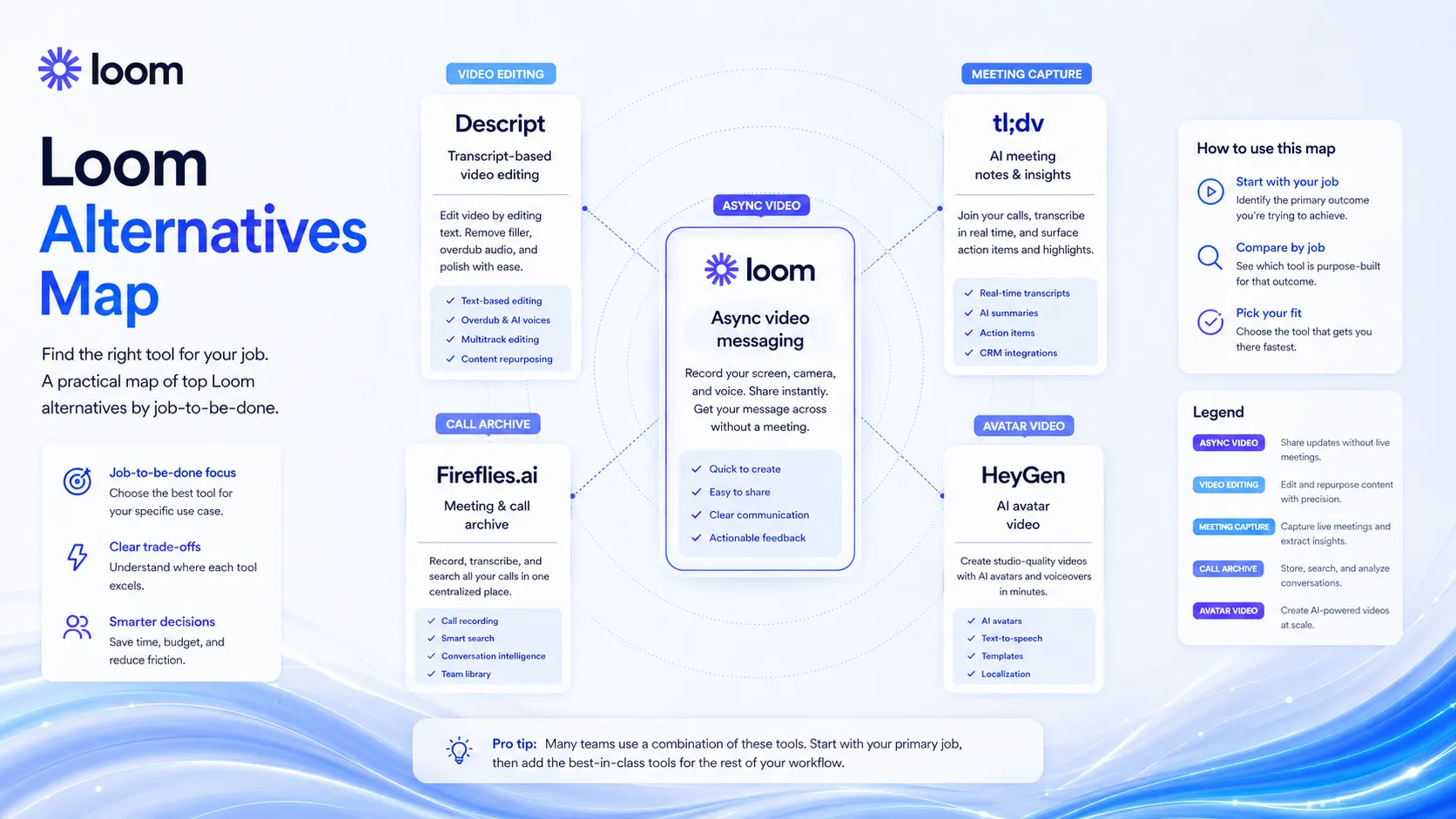
Compare Loom against alternatives by job, not by popularity.
Choose Descript if the job is editing audio or video after recording. Descript is stronger when the recording becomes a polished podcast, tutorial, social clip, or edited training video.
Choose tl;dv, Fireflies.ai, or Otter.ai if the job is joining live meetings, recording calls, creating notes, and building a searchable meeting archive. Loom is better when the message is intentional and visual.
Choose HeyGen or Synthesia if the job is avatar-led video. That is a different use case. You are creating presentation-style media, not sending a quick work explanation.
Choose plain Slack, Notion, Confluence, or Google Docs when the context can be written clearly. Loom should not replace writing when writing is faster, easier to search, and less noisy.
Final decision
Add it to your stack if your team keeps explaining visual work in the worst possible way: long messages, unclear tickets, meetings that could have been recorded, or client feedback calls with no durable context.
Compare it first if your real need is edited video, automatic meeting notes, avatar training content, or CRM call intelligence. Loom can touch some of those areas, but it is not the specialist for each one.
Skip it for now if your team will not define when to use video, how to organize recordings, and how to turn a Loom into a decision, task, doc, or ticket. The tool is easy. The workflow still needs discipline.
For the right team, Loom is not just a recorder. It is a way to preserve visual context before it disappears inside another meeting or message thread.
Frequently asked questions
Is Loom worth it for remote teams?
Does Loom have a free plan?
What is Loom Business + AI?
Is Loom an AI video generator?
Where Loom fits in a stack
Async video communication and visual context layer
Does not replace
- – Advanced video editing, brand video production, avatar generation, or social video creative tools.
- – Meeting bots that automatically attend and summarize calls.
- – Clear communication rules, decision logs, knowledge bases, issue tracking, and human ownership.
Pairs well with
Head-to-head comparisons
Top alternatives to consider
If Loom is not the right fit, these are the most common alternatives.
Descript is the better comparison when the buyer wants transcript-based video or podcast editing rather than fast async communication.
tl;dv is a stronger comparison when the buyer wants AI meeting recording, summaries, and call intelligence instead of intentional video messages.
Fireflies.ai is worth comparing for searchable meeting archives, CRM workflows, and sales call notes rather than screen-recorded explanations.
Review methodology
Editorial review based on current public product information, official pricing details, official product pages, official security documentation, and current market positioning. No hands-on testing was conducted unless explicitly stated.
This review is based on public product information and current research, not direct hands-on testing.
Not covered: Hands-on recording quality benchmark testing · Private enterprise contract review · Internal workspace security audit · Large-team adoption analytics